Loopy Pro: Create music, your way.

What is Loopy Pro?Loopy Pro is a powerful, flexible, and intuitive live looper, sampler, clip launcher and DAW for iPhone and iPad. At its core, it allows you to record and layer sounds in real-time to create complex musical arrangements. But it doesn’t stop there—Loopy Pro offers advanced tools to customize your workflow, build dynamic performance setups, and create a seamless connection between instruments, effects, and external gear.

Use it for live looping, sequencing, arranging, mixing, and much more. Whether you're a live performer, a producer, or just experimenting with sound, Loopy Pro helps you take control of your creative process.

Download on the App Store

Loopy Pro is your all-in-one musical toolkit. Try it for free today.

Mela 7.5 – 7.9: MIDI Echo, XY Modulator. Cut/Copy/Paste. Remotes, Root Module UI.

hey all, here's what's new in Mela

TL;DR: Mela 7.5 introduces the MIDI Echo module and brings significant enhancements to many existing modules. Get 40% off Collections until April 11.

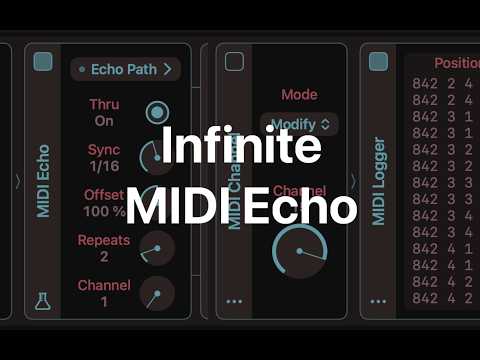
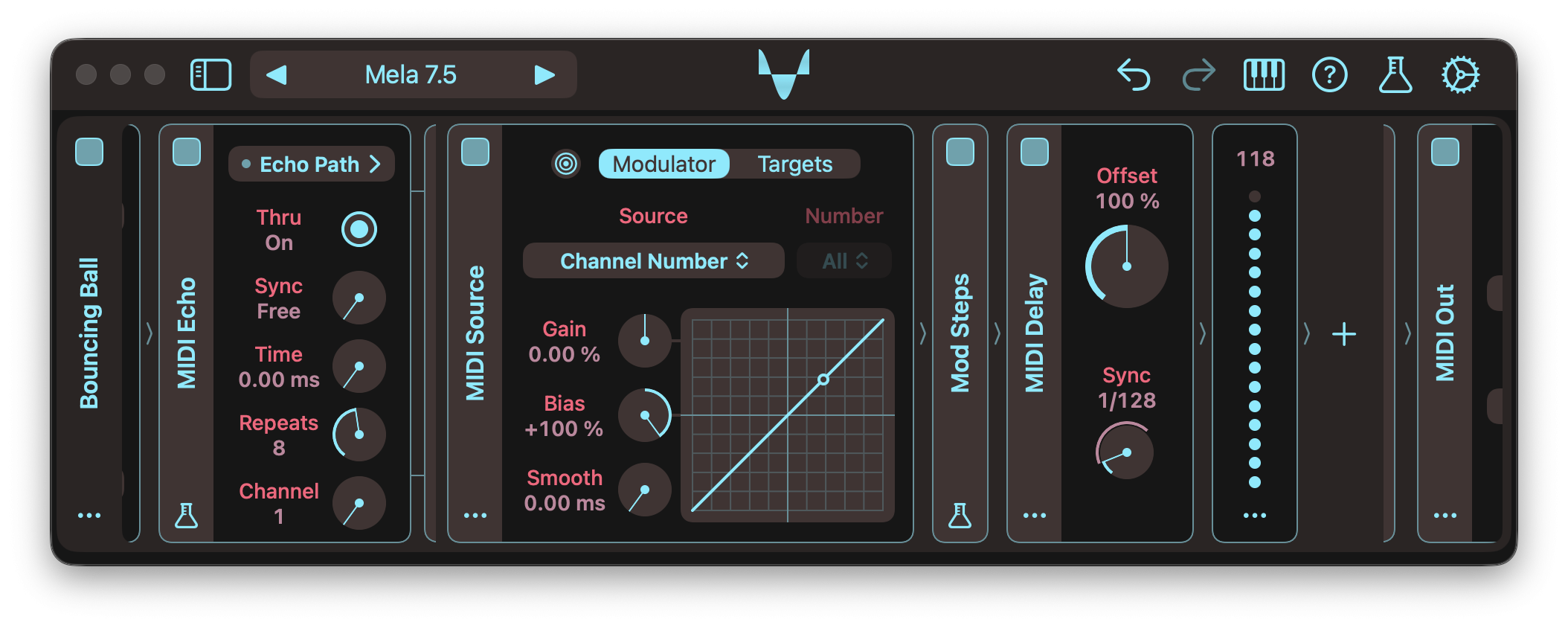
Mela 7.5 introduces MIDI Echo, a new MIDI processor with a customisable feedback path. Each repeated MIDI event is sent through the Echo Path sublane, where it can be processed by submodules before being fed back into the next repeat. Repeats are tracked by MIDI channel, support up to 16 echoes, and can be timed in seconds or with tempo-synced values.

MIDI Delay, MIDI Channel, and MIDI Source were also improved to work well with MIDI Echo and make sophisticated MIDI delay effects easier to build. For example, inserting MIDI Channel in Modify mode within the Echo Path can produce infinite repeats, while MIDI Source can now convert MIDI channels 1 to 16 into a Mod signal, allowing each repeat to have different parameter settings.
For the full details, check out the Changelog.

Video Tutorials


MIDI Echo

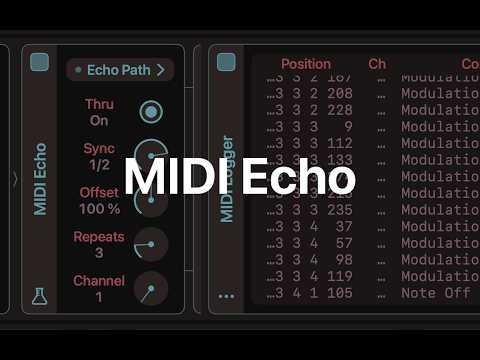
  • The MIDI Echo module repeats incoming MIDI events using a customisable feedback path.
  • The Echo Path sublane receives each repeated MIDI event for processing.
  • Repeats are tracked using MIDI channel numbers.
  • It supports up to 16 repeats.
  • The interval between repeats can be set in seconds or using tempo-synced values.
  • While the module is optimised to avoid stuck notes or infinite repeats during normal use, it can still be pushed creatively.
  • For example, inserting a MIDI Channel module in Modify mode within the sublane can produce infinite repeats.
  • In such cases, the Panic action is available in the module actions menu.
  • The module also includes an indicator for when the echo buffer is full.
  • MIDI Echo is a Mela Lab module and part of Collection 5.

Other Changes

  • Mod Steps: The Retrig parameter has been renamed to Trigger, adding a new behaviour where, in Step mode, the sequencer advances to the next step on note-on.
  • MIDI Delay: Redesigned the module UI.
  • MIDI Delay: Renamed the Mode parameter to Sync and added tempo-synced options 1/64 and 1/128.
  • MIDI Delay: Fixed an issue where modulating delay time could cause some MIDI events to be delayed by an incorrect amount.
  • MIDI Delay: Fixed an issue where changing the On parameter state while processing notes could cause stuck notes or orphaned note-offs.
  • MIDI Channel: Fixed an issue where changing parameters while processing notes could cause stuck notes or orphaned note-offs.
  • MIDI Channel: The Channel parameter is now controlled with a dial instead of a pop-up list.
  • MIDI Source: The new Channel Number source option maps MIDI channels 1 to 16 to a stepped [0%, 93.75%] Mod signal.
  • Digital Delay: Added an indicator to show when the built-in clipper is active.
  • Signal Indicators: Updated Feedback's clip and Note Pulse's pulse indicators to match the style of Digital Delay's clip indicator.
  • Parameters: In the parameter actions menu, the presets section is now labelled. Parameter presets appear under Presets, while list and toggle parameters use Values.
  • Factory Presets: Added the "Euclid Sequencer" preset to the Parts group. It uses Euclid to generate rhythm and Mod Steps to provide the notes.
  • Presets: Fixed a crash caused by a malformed preset, with a Root Stack submodule that's not a Group type.

Grab Mela from the App Store.

As always, let me know if you have follow-up questions 🙏

Comments

  • edited April 20

    hey all, here's what's new in Mela 7.6

    Mela 7.6 introduces Cut, Copy, and Paste actions, making workflows between modules and presets smoother.
    Get 40% off Collections until April 22.

    Mela 7.6 refreshes lane and module action menus with simplified terminology and improved grouping. It also introduces Cut, Copy, and Paste functionality as an alternative to module drag-and-drop and preset import/export workflows.

    Modules and presets can now move more freely between contexts. Copied modules can be pasted into another instance of Mela, as files in Finder or Files, or as text in a text editor. Presets from Finder or Files can be pasted directly into Mela as modules. Advanced users can edit preset text, such as adjusting parameter values, and paste it back into Mela.

    For the full details, check out the Changelog.

    Video Tutorial

    Release Notes

    Action Menus

    • Lane and module action menus have been reworked, with simplified terminology and improved grouping of related items.
    • As an alternative to drag-and-drop, action menus now provide Cut, Copy, and Paste actions.
    • A module can be inserted, appended, or used to replace another via the Paste action.
    • A copied module can be pasted into another instance of Mela, as a file in Finder or Files, or as text in a text editor.
    • A preset copied from Finder or Files can be pasted as a module into an instance of Mela.
    • Presets can be edited in a text editor, for example by changing parameter values, then pasted back as modules (as long as the format remains intact).
    • The Duplicate action now behaves like Copy and Paste, also duplicating external modulations and remotes.

    Other Changes

    • Velocity Module: Now uses a more compact layout.
    • Remotes: If more than 2 controls are assigned, smaller controls are used in the remotes view to keep the module compact.
    • Remotes: Renaming a remote control to an empty string now resets it to the parameter name.
    • Preset Format: JSON keys are now ordered alphabetically, making them easier to edit in text editors.
    • Updated the "Bouncing Ball" MIDI FX factory preset by simplifying its design using new modules.

    Grab Mela from the App Store.

    As always, let me know if you have follow-up questions 🙏

  • @Nikolozi What a wonderful support of a awesome app!

  • @Pierre118 said:
    @Nikolozi What a wonderful support of a awesome app!

    Thank you 🧡

  • hey all, here's what's new in Mela 7.7

    Mela 7.7 introduces the XY module for two-dimensional modulation, plus enhancements to Remotes. Get 40% off Collections until May 2.

    Mela 7.7 introduces XY, a manual two-axis modulator that generates two independent Mod signals from X and Y. It supports up to 8 targets, each configurable to use either axis as its source, making it easy to control multiple parameters from a single module.

    Adding and removing remotes on an ancestor Group or Stack module is now simpler. From the parameter actions menu, destinations can be selected or deselected directly. The remote actions menu also includes a Remove action for quickly clearing a remote.

    For the full details, check out the Changelog.

    Video Tutorial

    Release Notes

    XY Modulator

    • The XY module is a manual two-axis modulator that generates two independent Mod signals from the X and Y parameters in the [0%, 100%] range.
    • Similar to CC Modulator, each target can be configured to use either the X or Y value as the source.
    • XY is part of Collection 5 and is listed under the Modulator category.

    Modulators

    • XY Control: Added a modulation indicator.
    • Edit Modulation: Modulator sources can now be set directly for CC Modulator and XY modules.
    • CC Modulator: Simplified how source parameter values are stored in presets.
    • Macro Button: Fixed an issue where modulation applied only to a single voice.
    • Updated the symbol for the Modulator category.

    Remotes

    • Added a quick way to assign or remove parameters as remotes on ancestor Group or Stack modules via the parameter actions menu.
    • Added a Remove action to the remote control actions menu.
    • Internal parameters can now be assigned to remotes.
    • Global parameters for polyphony and latency can now be assigned to remotes in the Global remote view.

    Other Changes

    • Stereo Delay: The module is now slightly more compact.
    • MIDI Logger: Improved the UI.
    • Internal: Refactored parameter and value handling.

    Grab Mela from the App Store.

    As always, let me know if you have follow-up questions 🙏

  • Mela 7.8 adds smarter modulation intensity entry and more flexible remote layouts, including sliders and XY controls.
    Get 40% off Collections until May 14.

    Mela 7.8 improves modulation and remote control workflows. Modulation intensity parameters can now accept target values directly, making it possible to enter the desired result instead of calculating modulation amounts manually. For example, entering =500ms automatically derives the modulation intensity needed for the target parameter to reach 500ms when the Mod signal is at 100%.

    Remote views have also been redesigned to be more compact and adaptive. Layouts now adjust automatically based on the number of remote assignments, with support for sliders and XY layouts when using 1 or 2 assignments. The update also includes improvements to Euclid, undo and redo behaviour for module UI state, preset handling, voice alignment, and various interface refinements and fixes.

    For the full details, check out the Changelog.

    Video Tutorial

    Release Notes

    Entering Modulation Intensity

    • Modulator intensity parameters now accept target values.
    • Values prefixed with = are converted to the modulation intensity needed to move the current target value to that value.
    • For example, if a target ranges from -24 to 24 semitones and is currently set to 0, =12 sets the intensity to 25%.
    • By default, the target value is matched when the Mod signal reaches 100%.
    • The @ symbol provides a different Mod signal reference value.
    • The reference is a percentage, and the % suffix is optional.
    • Examples: =500ms reaches 500ms at a 100% Mod signal. =400Hz@50% reaches 400Hz at a 50% Mod signal, while =G2@-50 reaches G2 at a -50% Mod signal.

    Remotes

    • Remote views are now more compact.
    • When there are 1 or 2 assignments, standard dials are used. With 3 or more, smaller dials are used.
    • Dials are stacked vertically, and if there are more than 6, they are placed in a scroll view.
    • When there are 1 or 2 remote assignments, a Slider or XY layout can be selected from the Remotes submenu.

    Other Changes

    • Euclid: Added the Retrig parameter, which determines whether the pattern restarts on the first note-on event or follows the host grid.
    • Preset Format: Simplified how module information is stored in presets.
    • Modules: Module UI state now participates in undo and redo, including collapse and expand state and active tab selection, such as the modulator targets view.
    • Lanes: The actions menu is simplified by removing the Collapse All and Expand All actions. Tap/Click on Global instead.
    • Edit Modulation: Updated the border contour to better match the popover corner radii used in iOS 26 and macOS 26.
    • Voice Alignment: Fixed an issue where the MIDI In module's Panic action did not reset voice allocations, preventing voices across lanes from being resynchronised.
    • Module Actions: Fixed an issue where Replace > Paste did not undo as a single action.
    • Lane Preset: Fixed a crash when inserting a Group module during new lane creation.

    Grab Mela from the App Store.

    As always, let me know if you have follow-up questions 🙏

  • You know I support you the best I can (meaning: I buy what you release) and I do appreciate how you keep adding BUT I still go elsewhere for midi modules when it's time to start build a new project. I can't tell you why (I dunno). I try to change (promise 😊)

    There's nothing wrong with your tutorials but what I would really like to see is if Jakob Haq could do a sweep of MELA with his humoristic approach but very educating at the same time.
    I think you could get a load of new (and old) users to start using the app.
    He have a bit more than half the subscribers of Doug* but, look at views on each video and there's a huge difference where JH has 10k views Doug has 8-900 and Leo far less. Just a thought and maybe his not even interested.

    *JH was also a thesoundtestroom dude if you check far back, I don't know if they started together or what that story is.
  • @Pxlhg said:
    You know I support you the best I can (meaning: I buy what you release) and I do appreciate how you keep adding BUT I still go elsewhere for midi modules when it's time to start build a new project. I can't tell you why (I dunno). I try to change (promise 😊)

    What do you mainly do with MIDI modules when you start building a new project?

    There's nothing wrong with your tutorials but what I would really like to see is if Jakob Haq could do a sweep of MELA with his humoristic approach but very educating at the same time.

    Jakob makes great videos. Good idea, I'll get in touch with him to see if he is interested in making a video on Mela.

  • @Nikolozi said:

    @Pxlhg said:
    You know I support you the best I can (meaning: I buy what you release) and I do appreciate how you keep adding BUT I still go elsewhere for midi modules when it's time to start build a new project. I can't tell you why (I dunno). I try to change (promise 😊)

    What do you mainly do with MIDI modules when you start building a new project?

    It differs of course but usually I do some chord progression and use that on e.g 4 synths then I use various tools to interrupt the sameness, like strum, arp, transpose and stuff like that. It's always good (I think) the fewer sources of origin you have thus letting modulations make it sound like it's four different sources/players. I hope that makes sense.

    I know Mela can do most, if not all, of this but I don't know, I think it scares me .. the things I have to learn (again).
    I'm starting to understand that old saying: "you can't teach an old dog new tricks" it's not because he doesn't want to but because the brain just isn't there (or overloaded). I'm speaking of my brain not anyone elses, to be clear.

    Jakob makes great videos. Good idea, I'll get in touch with him to see if he is interested in making a video on Mela.

    Fingers crossed :smile:

  • @Pxlhg said:

    @Nikolozi said:

    @Pxlhg said:
    You know I support you the best I can (meaning: I buy what you release) and I do appreciate how you keep adding BUT I still go elsewhere for midi modules when it's time to start build a new project. I can't tell you why (I dunno). I try to change (promise 😊)

    What do you mainly do with MIDI modules when you start building a new project?

    It differs of course but usually I do some chord progression and use that on e.g 4 synths then I use various tools to interrupt the sameness, like strum, arp, transpose and stuff like that. It's always good (I think) the fewer sources of origin you have thus letting modulations make it sound like it's four different sources/players. I hope that makes sense.

    I know Mela can do most, if not all, of this but I don't know, I think it scares me .. the things I have to learn (again).

    So, you mean you knew how to do all those things in Mela, and you feel like you probably forgot and need to relearn them?

  • edited May 12

    @Nikolozi said:

    @Pxlhg said:

    @Nikolozi said:

    @Pxlhg said:
    You know I support you the best I can (meaning: I buy what you release) and I do appreciate how you keep adding BUT I still go elsewhere for midi modules when it's time to start build a new project. I can't tell you why (I dunno). I try to change (promise 😊)

    What do you mainly do with MIDI modules when you start building a new project?

    It differs of course but usually I do some chord progression and use that on e.g 4 synths then I use various tools to interrupt the sameness, like strum, arp, transpose and stuff like that. It's always good (I think) the fewer sources of origin you have thus letting modulations make it sound like it's four different sources/players. I hope that makes sense.

    I know Mela can do most, if not all, of this but I don't know, I think it scares me .. the things I have to learn (again).

    So, you mean you knew how to do all those things in Mela, and you feel like you probably forgot and need to relearn them?

    No, I never learnt them in Mela, that's my whole point, if I knew how I would use them without any doubt. When I say again I just mean in general, all this learning all the time that got introduced with using digital tools which I done now for 30 plus years.

  • @Pxlhg said:

    @Nikolozi said:

    @Pxlhg said:

    @Nikolozi said:

    @Pxlhg said:
    You know I support you the best I can (meaning: I buy what you release) and I do appreciate how you keep adding BUT I still go elsewhere for midi modules when it's time to start build a new project. I can't tell you why (I dunno). I try to change (promise 😊)

    What do you mainly do with MIDI modules when you start building a new project?

    It differs of course but usually I do some chord progression and use that on e.g 4 synths then I use various tools to interrupt the sameness, like strum, arp, transpose and stuff like that. It's always good (I think) the fewer sources of origin you have thus letting modulations make it sound like it's four different sources/players. I hope that makes sense.

    I know Mela can do most, if not all, of this but I don't know, I think it scares me .. the things I have to learn (again).

    So, you mean you knew how to do all those things in Mela, and you feel like you probably forgot and need to relearn them?

    No, I never learnt them in Mela, that's my whole point, if I knew how I would use them without any doubt. When I say again I just mean in general, all this learning all the time that got introduced with using digital tools which I done now for 30 plus years.

    I can 100% relate to that.

    With Mela, I’m always trying to simplify things, make them more uniform, and reduce the number of concepts in the app for two reasons. First, simplifying things often makes them more powerful and flexible (e.g. everything is a module). Second, it makes the learning curve less steep and more approachable.

    It still requires a bit of initial time investment, but I’m certain it pays off in spades. These days, when I’m playing around with music and want to try a new idea, I no longer think about which plug-in I need to load. I just insert Mela and build what I want inside it.

    One of the reasons I haven’t done a full beginner tutorial in a while is that Mela is still evolving quite rapidly. If I make a big beginner series, parts of it can become outdated fairly quickly because newer versions often make things easier or improve the interface. So lately the tutorials have been more geared towards users already keeping up with the changes.

    That said, when beginners email me with questions, I often record quick custom tutorials for them.

    Is there a specific type of tutorial you’d find useful? It sounds like you’re especially interested in MIDI modules. Maybe a beginner tutorial focused just on MIDI workflows could be useful. Obviously, I can’t promise haQ attaQ-grade entertainment 😄 but I can definitely try to cover topics you’re interested in. Usually, if one person wants a tutorial on something, others do too.

  • @Nikolozi said:

    @Pxlhg said:

    @Nikolozi said:

    @Pxlhg said:

    @Nikolozi said:

    @Pxlhg said:
    You know I support you the best I can (meaning: I buy what you release) and I do appreciate how you keep adding BUT I still go elsewhere for midi modules when it's time to start build a new project. I can't tell you why (I dunno). I try to change (promise 😊)

    What do you mainly do with MIDI modules when you start building a new project?

    It differs of course but usually I do some chord progression and use that on e.g 4 synths then I use various tools to interrupt the sameness, like strum, arp, transpose and stuff like that. It's always good (I think) the fewer sources of origin you have thus letting modulations make it sound like it's four different sources/players. I hope that makes sense.

    I know Mela can do most, if not all, of this but I don't know, I think it scares me .. the things I have to learn (again).

    So, you mean you knew how to do all those things in Mela, and you feel like you probably forgot and need to relearn them?

    No, I never learnt them in Mela, that's my whole point, if I knew how I would use them without any doubt. When I say again I just mean in general, all this learning all the time that got introduced with using digital tools which I done now for 30 plus years.

    I can 100% relate to that.

    With Mela, I’m always trying to simplify things, make them more uniform, and reduce the number of concepts in the app for two reasons. First, simplifying things often makes them more powerful and flexible (e.g. everything is a module). Second, it makes the learning curve less steep and more approachable.

    It still requires a bit of initial time investment, but I’m certain it pays off in spades. These days, when I’m playing around with music and want to try a new idea, I no longer think about which plug-in I need to load. I just insert Mela and build what I want inside it.

    One of the reasons I haven’t done a full beginner tutorial in a while is that Mela is still evolving quite rapidly. If I make a big beginner series, parts of it can become outdated fairly quickly because newer versions often make things easier or improve the interface. So lately the tutorials have been more geared towards users already keeping up with the changes.

    That said, when beginners email me with questions, I often record quick custom tutorials for them.

    Is there a specific type of tutorial you’d find useful? It sounds like you’re especially interested in MIDI modules. Maybe a beginner tutorial focused just on MIDI workflows could be useful. Obviously, I can’t promise haQ attaQ-grade entertainment 😄 but I can definitely try to cover topics you’re interested in. Usually, if one person wants a tutorial on something, others do too.

    Well there's another issue with that, I wouldn't call myself exactly a beginner but when I've tried it's been on different occasions, too far apart. I have even built a supersaw preset (Leo's tut.) and I've even tried some stuff after checking your video. So, a complete beginners tutorial would probably make me annoyed (so hard to please, I'm sorry🙂‍↕️).
    I don't know, right know I'm not ready to learn anything anyway as I'm in a bad creative slump (I hate it!) and I'm also doing (trying) a lot in Reason Studio (no AU unfortunately) so...don't do anything solely on my behalf, at least not right now.
    I do appreciate the conversation Nik, really!

  • @Pxlhg said:

    @Nikolozi said:

    @Pxlhg said:

    @Nikolozi said:

    @Pxlhg said:

    @Nikolozi said:

    @Pxlhg said:
    You know I support you the best I can (meaning: I buy what you release) and I do appreciate how you keep adding BUT I still go elsewhere for midi modules when it's time to start build a new project. I can't tell you why (I dunno). I try to change (promise 😊)

    What do you mainly do with MIDI modules when you start building a new project?

    It differs of course but usually I do some chord progression and use that on e.g 4 synths then I use various tools to interrupt the sameness, like strum, arp, transpose and stuff like that. It's always good (I think) the fewer sources of origin you have thus letting modulations make it sound like it's four different sources/players. I hope that makes sense.

    I know Mela can do most, if not all, of this but I don't know, I think it scares me .. the things I have to learn (again).

    So, you mean you knew how to do all those things in Mela, and you feel like you probably forgot and need to relearn them?

    No, I never learnt them in Mela, that's my whole point, if I knew how I would use them without any doubt. When I say again I just mean in general, all this learning all the time that got introduced with using digital tools which I done now for 30 plus years.

    I can 100% relate to that.

    With Mela, I’m always trying to simplify things, make them more uniform, and reduce the number of concepts in the app for two reasons. First, simplifying things often makes them more powerful and flexible (e.g. everything is a module). Second, it makes the learning curve less steep and more approachable.

    It still requires a bit of initial time investment, but I’m certain it pays off in spades. These days, when I’m playing around with music and want to try a new idea, I no longer think about which plug-in I need to load. I just insert Mela and build what I want inside it.

    One of the reasons I haven’t done a full beginner tutorial in a while is that Mela is still evolving quite rapidly. If I make a big beginner series, parts of it can become outdated fairly quickly because newer versions often make things easier or improve the interface. So lately the tutorials have been more geared towards users already keeping up with the changes.

    That said, when beginners email me with questions, I often record quick custom tutorials for them.

    Is there a specific type of tutorial you’d find useful? It sounds like you’re especially interested in MIDI modules. Maybe a beginner tutorial focused just on MIDI workflows could be useful. Obviously, I can’t promise haQ attaQ-grade entertainment 😄 but I can definitely try to cover topics you’re interested in. Usually, if one person wants a tutorial on something, others do too.

    Well there's another issue with that, I wouldn't call myself exactly a beginner but when I've tried it's been on different occasions, too far apart. I have even built a supersaw preset (Leo's tut.) and I've even tried some stuff after checking your video. So, a complete beginners tutorial would probably make me annoyed (so hard to please, I'm sorry🙂‍↕️).
    I don't know, right know I'm not ready to learn anything anyway as I'm in a bad creative slump (I hate it!) and I'm also doing (trying) a lot in Reason Studio (no AU unfortunately) so...don't do anything solely on my behalf, at least not right now.
    I do appreciate the conversation Nik, really!

    Cool, no worries : )

  • edited May 13

    @Nikolozi :Jakob is an entertaining guy for sure but there’s nothing wrong with your videos at all or Leo’s..Not everyone is a comedian, you don’t have to be..Jakob started WAY before either of you guys, he already had a wide fan base when you and Leo began..Still wouldn’t hurt to see if Jakob would do one though..

  • @Telstar5 said:
    @Nikolozi :Jakob is an entertaining guy for sure but there’s nothing wrong with your videos at all or Leo’s..Not everyone is a comedian, you don’t have to be..Jakob started WAY before either of you guys, he already had a wide fan base when you and Leo began..Still wouldn’t hurt to see if Jakob would do one though..

    Cheers!

    My main goal with YT videos is to provide tutorials for Mela covering the latest features, and as a distant second, to promote the app. The main reason is that the YouTubers who make AUv3 demos and tutorials would need to dedicate serious time to Mela to showcase its ever-expanding feature set. So I figured it's better if I also create tutorials. And now, if one wants to master Mela, there's a video tutorial on pretty much every major feature.

    As my tutorials mostly focus on new features and changes in the app, there's a huge space for others to do tutorials on how to create spcific sound or a MIDI/audio effect in Mela.

  • @Telstar5 said:
    Jakob is an entertaining guy for sure but there’s nothing wrong with your videos at all or Leo’s..Not everyone is a comedian, you don’t have to be..Jakob started WAY before either of you guys, he already had a wide fan base when you and Leo began..Still wouldn’t hurt to see if Jakob would do one though..

    I said that his tuts are alright so I don't get what you're on about? Jakob Haq's reach (and pedagogy) to a much wider public was the main reason. Mela keeps flying under the radar and JK could do miracles with that. I think.

  • edited June 9

    Mela 7.9 update reinforces Mela's "everything is a module" idea by unifying the root module, toolbar, and preset selector. Get 40% off Collections until June 11.

    Mela 7.9 focuses on simplifying patch management and reinforcing Mela’s “everything is a module” philosophy. As Mela has evolved, Presets, Preset Groups, and the Preset Browser have become better described as Patches, Folders, and the Library. The toolbar, preset selector, and Global view have also been unified into a single design, making it clearer that a patch is simply the root module and everything contained within it.

    The root module is now presented as a header that combines the On parameter, naming, save state, patch actions, and remotes view. The patch can be renamed directly, dragged out to export, and managed using Init, Copy, Paste, Revert, and Delete actions. The Library has also been refreshed around the new terminology. New plug-in instances now start with a blank patch, while the previous default patches are found in the Keys, Audio FX, and MIDI FX folders.

    For the full details, check out the Changelog and the What's New video.

    Root Module

    • The root module sidebar is now presented as a header.
    • The header combines the functionality previously spread across the toolbar, preset selector, and Global view.
    • Root module remotes now collapse into the header when the patch is scrolled.
    • Tapping the patch name, which is also the root module name, now turns it into an editable text field for renaming.
    • The patch name can now be dragged and dropped to another instance, the Library, or Files/Finder to export the active patch.
    • The root module, or active patch, now offers Init, Copy, Paste, Revert, and Delete actions.
    • Init removes all lanes and initialises the patch name to "Untitled".
    • Copy copies the root module as a patch to the clipboard.
    • Paste replaces the root module with a patch from the clipboard.
    • Revert discards changes made to the active patch by restoring its original state.
    • Delete removes the patch from the Library.
    • The Save Patch button now provides single-action save behaviour.
    • Long pressing the Save Patch button presents additional actions such as "Save to" and "Export".
    • The filled save icon indicates that there are no unsaved changes.
    • The folder containing the active patch is now displayed below the patch name.
    • If the active patch is not linked to a file in the Library, "Detached" is displayed below the patch name.
    • Renaming the active patch unlinks it from the Library, allowing it to be saved under a new name.
    • Mela now automatically relinks restored host states to their corresponding Library patches and indicates whether unsaved changes exist.
    • Toolbar buttons move into an overflow menu when there is insufficient width.
    • The file menu has been updated to match the root module actions.
    • Replaced the preset selector help text with a new "Patches" section in the Getting Started guide.

    Library and Patches

    • The Library UI has been refreshed to complement the new root module design.
    • Its toolbar includes buttons for selecting the previous and next patch.
    • Mela plug-in no longer loads the Default patch when instantiated.
    • New instances now start with a blank patch, and the Library scrolled to the relevant folder.
    • The previous Default patch can be found in the Keys, Audio FX, and MIDI FX folders.
    • Deleting an empty folder no longer requires confirmation.
    • Renamed the Parts folder to Subpatches.

    Other Changes

    • Library and toolbar buttons once again scale with the zoom setting.
    • Improved the layout of actions in module menus.
    • Patch and module names can no longer contain filename-unsafe characters.

    Exploring New Presets for Mela: New Era by SOi

    Sound of Izrael, aka SOi, released a new preset pack for Mela called New Era, utilising the latest modules. It includes 63 great-sounding presets and is available for just $4.99. Grab it from Payhip.

  • @Nikolozi said:
    Mela 7.9 update reinforces Mela's "everything is a module" idea by unifying the root module, toolbar, and preset selector. Get 40% off Collections until June 11.

    Mela 7.9 focuses on simplifying patch management and reinforcing Mela’s “everything is a module” philosophy. As Mela has evolved, Presets, Preset Groups, and the Preset Browser have become better described as Patches, Folders, and the Library. The toolbar, preset selector, and Global view have also been unified into a single design, making it clearer that a patch is simply the root module and everything contained within it.

    The root module is now presented as a header that combines the On parameter, naming, save state, patch actions, and remotes view. The patch can be renamed directly, dragged out to export, and managed using Init, Copy, Paste, Revert, and Delete actions. The Library has also been refreshed around the new terminology. New plug-in instances now start with a blank patch, while the previous default patches are found in the Keys, Audio FX, and MIDI FX folders.

    A good quality of life update, thank you

Sign In or Register to comment.