Loopy Pro: Create music, your way.
What is Loopy Pro? — Loopy Pro is a powerful, flexible, and intuitive live looper, sampler, clip launcher and DAW for iPhone and iPad. At its core, it allows you to record and layer sounds in real-time to create complex musical arrangements. But it doesn’t stop there—Loopy Pro offers advanced tools to customize your workflow, build dynamic performance setups, and create a seamless connection between instruments, effects, and external gear.
Use it for live looping, sequencing, arranging, mixing, and much more. Whether you're a live performer, a producer, or just experimenting with sound, Loopy Pro helps you take control of your creative process.
Download on the App StoreLoopy Pro is your all-in-one musical toolkit. Try it for free today.
Perc8 by Joe Topjian (Released)

https://apps.apple.com/app/id6759513561
Perc8 is a professional drum synthesizer and step sequencer designed for techno, acid, industrial, and experimental electronic music. Create everything from tight four-bar loops to complete arrangements using eight independent synthesizer voices. Each voice is a fully-featured drum instrument with its own engine, filters, effects sends, and modulation.
SOUND DESIGN
Design unique percussion sounds with multiple engine families including kicks, snares, claps, cymbals, hats, and noise percussion. Each engine offers eight expressive macros for intuitive, musical control. Shape tone with 7 filter types and multiple distortion algorithms. Process the entire drum kit with professional effects: delay, reverb, and chorus/flanger.
SEQUENCING & ARRANGING
Build sophisticated patterns with a step sequencer featuring probability-based triggers, conditional fills, per-step parameter locks (p-locks), and variable-length retriggering. Chain patterns into full songs with timeline-based automation. Modulate any parameter across your arrangement with the Chain editor.
STANDALONE & AUV3
Use Perc8 as a standalone app or as an Audio Unit plugin in your DAW. Route individual voices to separate outputs. Export patterns and kits. Create and organize presets: voice presets, full kits,
and complete projects.
KEY FEATURES
• 8 independent voices: each with full synth controls
• Multiple percussion engines: kicks, snares, claps, cymbals, hats, synth, noise
• Advanced filters: 7 filter multi-mode, resonant types
• Distortion & drive: 7 saturation types
• Dual LFOs: per-voice modulation with sync and phase control
• Step sequencer: probability, conditions, parameter locks, retriggering
• Pattern chaining: build full arrangements with slot-based structure
• Timeline automation: per-parameter long-form shape with interpolation
• Fill variations: dynamic pattern switching without manual editing
• Effects: delay, reverb, chorus, flanger with parallel sends
• Master mixing: gain, pan, mute/solo, EQ, master drive, stereo width
• MIDI support: multi-channel routing, pattern triggering, full learn
• Audio Unit plugin: integrate into AUv3 hosts like AUM
• Standalone app: work independently or on the go
MANUAL & TUTORIALS
• See the "Help" page in the app for the full manual and tutorials
• Alternatively, visit https://terrarum.net/perc8.html to read them online
Details:
Universal: Yes
Minimum OS version: 17.6
Comments
Sounds like my cup o' tea.
A sound demo would be nice.
from the description, this seems fully featured and right up my alley....just need to hear what the drums sound like
edit: found a demo
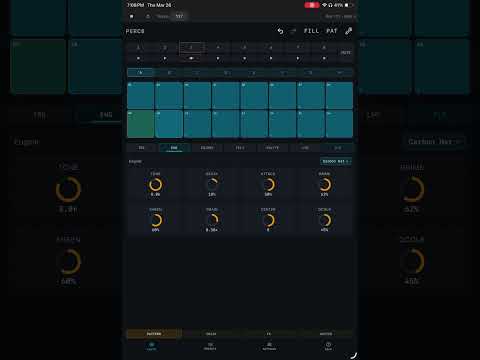
drums here sound good but maybe not great (for my purposes)....I'll reserve judgment until I hear an official demo of the released version
[deleted post]
From the demo, the synthesis engine seems pretty deep. The filter types and modulation options should open up a wide range of possibilities.
@Pixel is pattern length variable per track?
Sorry, I’m not the developer of the app, but I found the manual here:
https://terrarum.net/perc8-manual.html
Anybody knows if this app supports landscape mode? Everything I see looks like portrait mode.
Just got it and made a simple drum sequencer with it by going through the app
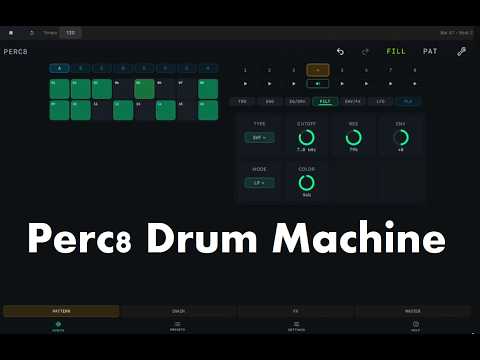
It does indeed support landscape mode.
Nice as always! 👍
What does the Chain button/view do?
[Edit: Oh, it’s a pattern sequencer from the manua]
Considering the affordable price and the free effects this dev has recently given us, I decided to buy this and I am very glad I did.
I play around with it here to give you an idea of what it does. Parameter locking is handled well by Perc8.
My first thoughts:
Extremely impressive features overall. With p.locking, euclidean sequencer, retrigger, slide it has all the perks of the premium Elektron boxes. But then my Analog Rytm lacks features this has such as EQ, two LFOs, chorus etc
With the 4 output busses and midi control I can picture this being the rhythmic heart of a live setup.
while the overall features are great, i find the sound engines lacking something. Maybe that will change as I spend time with them. As someone mentioned above, the generous filter and distortion types can coax a lot of sounds out of any source material. Hopefully some other sound engines types get added in future
I thought it would have MIDI out but, no! Shouldn't it?
Look to lattice which in many ways is this app minus the drum synths
I just got the app and have to say the UI layout in landscape mode is not great. Lots of wasted screen estate with the sequencer squeezed into the top left corner.
It should not be too difficult to fix this as I can see that the different UI blocks are in principle draggable. The problem is the auto arrangement that pulls them always back into a sub optimal arrangement. This could be a superb app for live playing if the UI elements could be arranged manually with them auto scaling to use the maximum width available.
wish i was in the beta. i dig @drewinnit beat
That's a common issue with this developer's apps unfortunately, poor use of space and a ui that is designed mainly to be usable on phone, but which is then non optimal on an iPad.
Sound and functionality seem overall good tho. There are some ui bugs currently which the dev is fixing
I emailed the dev and mentioned the inefficient layout in landscape mode and a few other observations from my time spent with it yesterday.
I am still very impressed by how comprehensive the feature set is with this. IMO at this price, it's a bargain.
I intend to grab Lattice soon too
thanks! mostly just an exercise to quickly test it all out. my next session will delve more into the distortion and filter modes. that demo was a bit "vanilla," sound-wise
Decided I wanna refund this but for some reason, the invoice link isn't present.
Sometimes it takes some time but then the site announces that, this one is just blank. Weird!
edit:
MTim is a p-lock only feature (of course), that's why it was ghosted facepalm
Polymeter is achieved by customising the Pattern Length in the wrench settings
the deeper I dig, the more features are sitting there ready to be used. it's just a lot to take in at once.
not sure if anyone else here is on the TestFlight for this but there's been changes to the UI (the empty space now has an overview of all sequencer lanes, very helpful to see) and there's also a new set of sound engines (original engine set was Carbon, new set is Copper - the Copper kick, snare and hat tones are more useful for my tastes)
I've had a lot of fun with this since it was released and it's good to know that on top of the many features it launched with, more is being added.