Loopy Pro: Create music, your way.
What is Loopy Pro? — Loopy Pro is a powerful, flexible, and intuitive live looper, sampler, clip launcher and DAW for iPhone and iPad. At its core, it allows you to record and layer sounds in real-time to create complex musical arrangements. But it doesn’t stop there—Loopy Pro offers advanced tools to customize your workflow, build dynamic performance setups, and create a seamless connection between instruments, effects, and external gear.
Use it for live looping, sequencing, arranging, mixing, and much more. Whether you're a live performer, a producer, or just experimenting with sound, Loopy Pro helps you take control of your creative process.
Download on the App StoreLoopy Pro is your all-in-one musical toolkit. Try it for free today.
Extract Auv3 parameters into a text file

Hi,
I want to extract the list of exposed Auv3 parameters inside AUM or any other host.
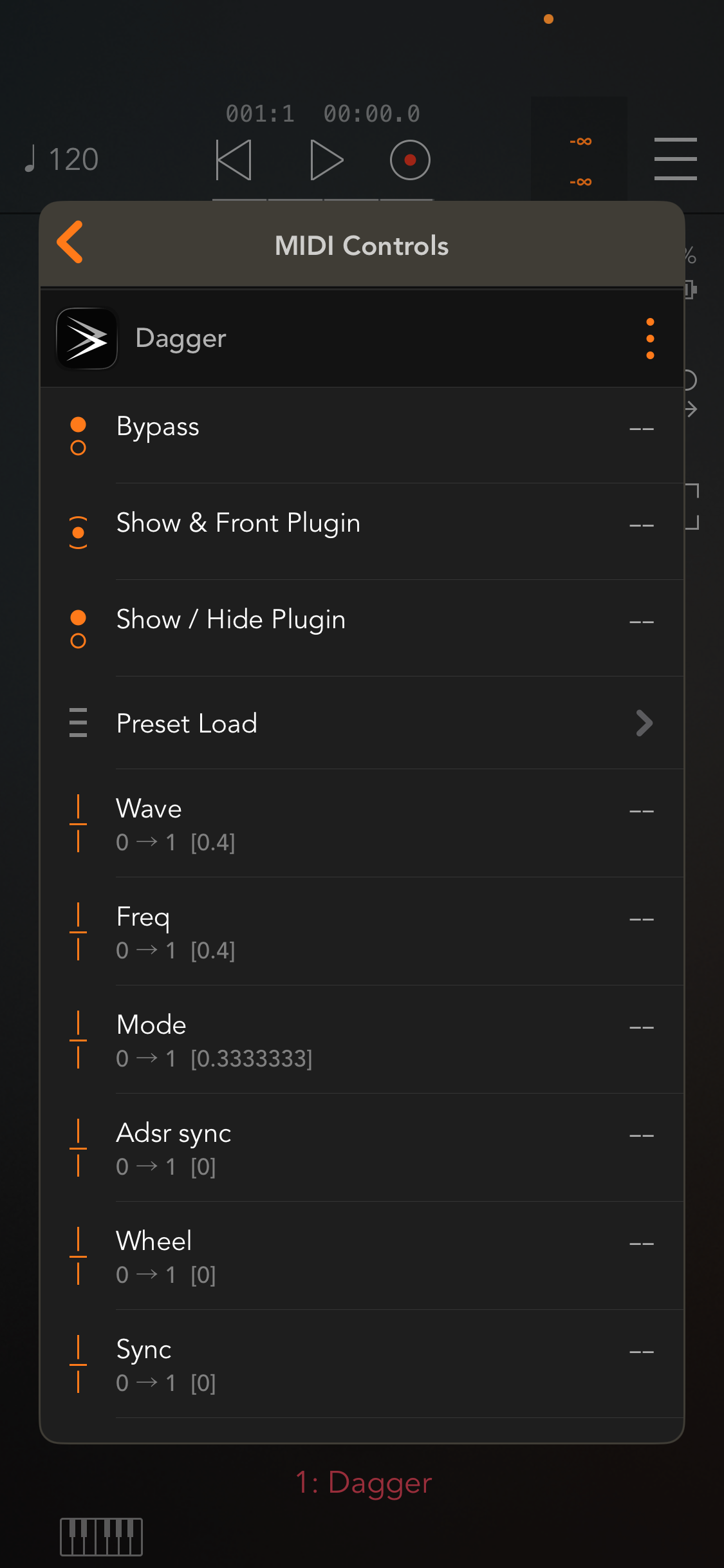
I want to be able to think about mappings and modulatable parameters in advance, when away from my iPad.
I’ve looked at Mozaic on Patchstorage but didn’t find anything.
Do you know how I could achieve that?
Comments
That would require writing a full-fledged iOS app. Mozaic can't do it.
Sounds like it could be an interesting vibe coding project if you're set up with the necessary tools for iOS development (a Mac and at least a minimal free Apple Developer account to run the app in TestFlight). I have a hunch it could be 100% vibe coded.
Wasn’t somebody working on an app that could do that? Or something similiar.
A bit off topic, but you don’t even really need a dev account. You can make an Xcode app and load it directly on your device with a USB cable. I think you’d have to load it on there again every few weeks as it would pretty much be a test build. But saves the trouble of going through Test Flight.
Are you simply looking for a text file of midi mappable parameters just for reference? I tapped on your jpg to open it and then long-pressed and selected the text and pasted it into Notes. I had to do a little cleaning up, but here’s the result:
DAGGER
Bypass
—
Show & Front Plugin
—
Show / Hide Plugin
—
Preset Load
—
Wave
0 → 1 [0.4]
—
Freq
0 → 1 [0.4]
—
Mode
0 → 1 [0.3333333]
—
Adsr sync
0 → 1[0]
—
Wheel
0 → 1 [0]
—
Sync
0 → 1 [0]
@daddyfalldown that’s only a few of Dagger’s parameters, and some apps have way more.
You still need a developer account for code signing. Also you don't have to connect with a USB cable. Wifi will work as well.
At least that's what I remember from my (failed) foray into iOS development.
If the synth you’re using has an owner’s manual with an appendix you could copy and paste the modulation parameters from it. Often times the appendix contains those parameters listed out. It might make it even easier to use a spreadsheet to assign rows to match the total amount of points in the mod matrix then use data lists to make drop down menus of the parameters so you can select them in each cell. This feels like a mod matrix in its most fundamental form.
Thanks @wim, I don’t have a Mac so I can’t dip into this endeavor.
@Stuntman_mike , some apps don’t even have a manual and some of the parameters are not always exposed.
I think I’ll go with the screenshot to text method of @daddyfalldown but what a time-consuming thing …
I wonder if this is something AUBE 2 could be extended to incorporate. Or if @FredAntonCorvest might get interested in making such a thing.
Since most apps expose a parameter for every aspect of the ui, you could maybe just try feeding either the manual or an image of the ui to an llm and asking it to generate a list of the expected parameters. Might not be accurate but it'd be fast and probably accurate in most cases.
@Gavinski good idea, I'll try that.
@wim , I have Aube2, which is really useful. I concur that it would be an amazing upgrade!
It would also be cool if a host like AUM would let you just "export as text" or something like that. Having the little ... options menu on the parameters where you'd save the settings and putting an export option there could be useful
Most hosts probably don't check those things until the plugin is loaded, and most don't maintain any persistent database of the parameters. So, each plugin would need to be loaded and exported one by one by the user, which would still be helpful, but also still a lot of work.
Zenbeats and NanoStudio 2 have global preset management systems, and those scan for new plugins. It's that process that would need to be built into a utility or a DAW to accomplish this.
I forgot NS2 indexed presets across plugins. I need to look into that host more. AUBE 2 having the capability would be a great implementation. I’m very fond of that one.
Great! If there is enough interest and support, I may consider adding this to AUBE 2. I'm already prototyping and exploring the idea of previewing AUv3 plugins within AUBE 2, so this may fit very well. @5alien please drop me a mail to the support.
Cool! I just sent you an email @FredAntonCorvest
Thank you for your tests @5alien!
This new feature is now part of AUBE 2! Tap the "preview" button on any plugin, then tap "info" and "export".
The parameters are exported to a JSON file.
Yes, very useful, thanks @FredAntonCorvest !
Fantastic!
Very cool, Fred. You are such a thoughtful and responsive developer 👍