Loopy Pro: Create music, your way.
What is Loopy Pro? — Loopy Pro is a powerful, flexible, and intuitive live looper, sampler, clip launcher and DAW for iPhone and iPad. At its core, it allows you to record and layer sounds in real-time to create complex musical arrangements. But it doesn’t stop there—Loopy Pro offers advanced tools to customize your workflow, build dynamic performance setups, and create a seamless connection between instruments, effects, and external gear.
Use it for live looping, sequencing, arranging, mixing, and much more. Whether you're a live performer, a producer, or just experimenting with sound, Loopy Pro helps you take control of your creative process.
Download on the App StoreLoopy Pro is your all-in-one musical toolkit. Try it for free today.
Minimal Loopy Pro Setup Without a Dedicated Interface

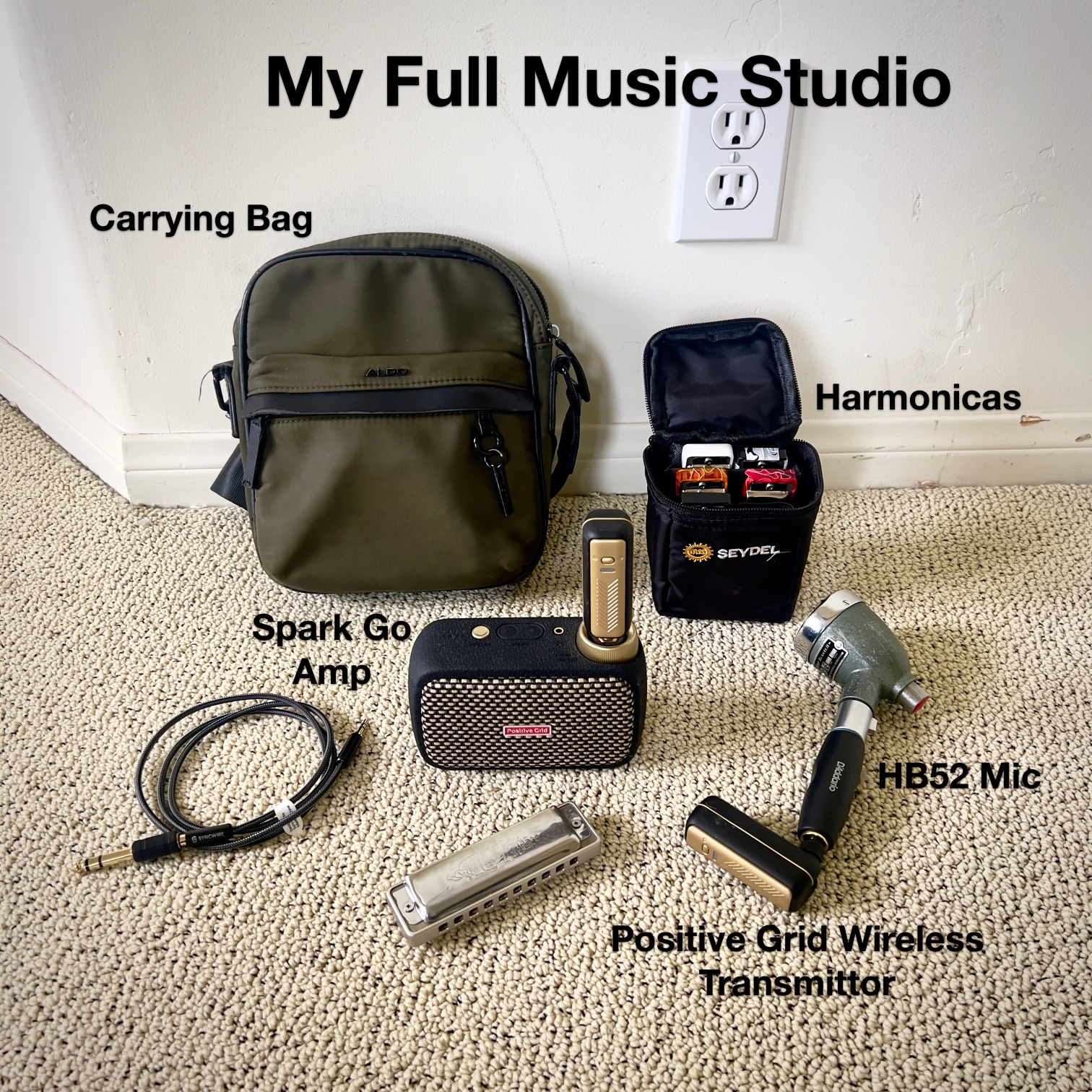
I play harmonica and vocals using the following minimal setup which works really well for me:
But I’ve got a question…
I want to migrate to a more sophisticated setup that incorporates Loopy Pro, without losing the simplicity I value. With that in mind, instead of having a separate audio interface, I found an Amp, similar to mine, that includes a built in USBC Audio interface - minimizing adding complexity to my setup. However, I’m not sure if this will actually work.
Here’s what I’m exploring as a new setup:
- HB52 high-impedance harmonic microphone which functions like a guitar pickup and is designed to plug directly into a guitar amp. Used for Harmonica and Vocals
- Wireless Guitar transmitter and receiver that lets me connect the harmonica mic to the amp wirelessly
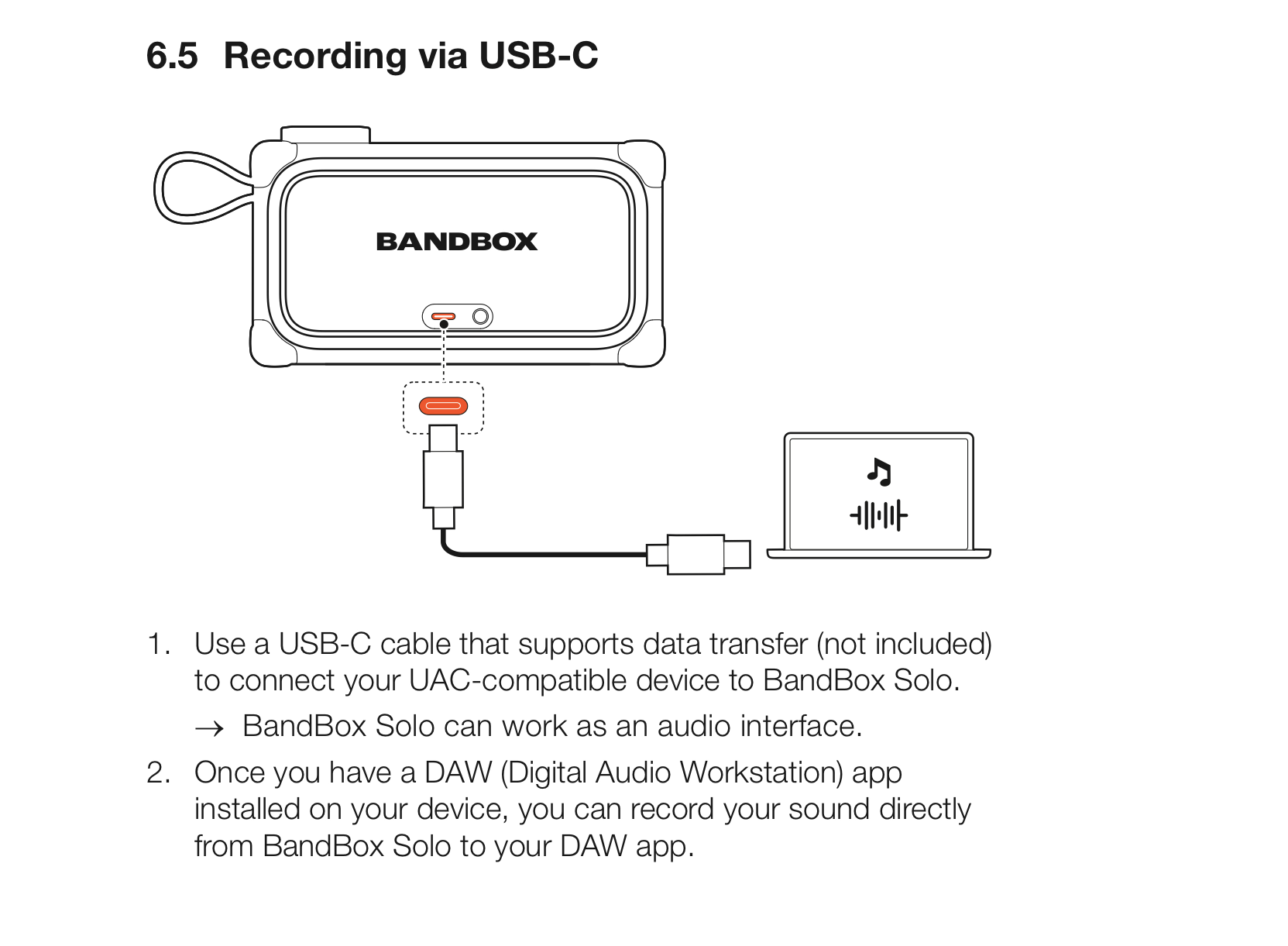
- JBL BandLab Solo which is central to this discussion. It’a a new compact guitar amp with a built-in USB-C Audio Interface (UAC format, 48kHz, 24-bit, 2 channels)
- Six harmonicas and my vocals
- iPhone running Loopy Pro
- Audio Cable which is used when I want to plug my amp into a bigger sound system or PA
My intended signal flow is:
Harmonica mic → wireless transmitter → JBL Solo amp (via Receiver)
iPhone → USB-C cable → JBL Solo amp
That’s the entire setup.
With this configuration, will I be able to route the harmonica signal into Loopy Pro through the amp’s built-in audio interface and then send the signal back out through the JBL amp for playback and live looping? Will the latency be low enough to be workable?
So the full setup would be an iPhone running Loopy Pro, a small battery-powered USB-C amp with a built-in interface, a harmonica mic, and a wireless transmitter/receiver.
I know it sounds silly, but I really value simplicity and having less stuff to do what I want to do. Having an extra Audio Interface or accessories is an added burden for my needs.
I’m trying to confirm whether this will work reliably or if there are any issues I should expect. Here’s is what the User Manual says about the JBL Bandbox Solo Audio Interface:
Thanks for any input on my future setup idea!
Comments
@rishio : unless someone has direct experience with that device it is uncertain what the latency would be and whether the amp passes the input pre or post amp effects and how it handles the output from the host.
We might need to hear from someone that has one.
How does the jBL differ from the Spark?
@espiegel123 Thanks for the response. From what I’ve found, the Spark GO doesn’t function as an audio interface with iOS devices, whereas the JBL BandBox Solo (or JBL Bandbox Trio) appears to support this based on its documentation. I’ve tested the Spark GO with Loopy Pro, and it doesn’t work in that role.
My understanding is that class-compliant (UAC) audio interfaces should offer relatively low latency, with the interface portion typically around 2–5 ms round trip under good conditions. I’m trying to confirm how this plays out in real-world setups.
I’m also curious whether anyone here has successfully used Loopy Pro with an amp that has a built-in interface, since every user I’ve found online rely on a separate dedicated audio interface.
Rishi Ó
@espiegel123 I just discovered that the new Blackstar Beam Mini reportedly includes a built-in audio interface (though I haven’t heard of anyone using it as one). That would make it the second all-in-one mini amp I’m aware of that could potentially work with Loopy Pro for live looping without needing a separate interface. I’d be interested to hear if anyone has tried or have knowledge on using one of these Amps for live looping.
Rishi Ó
For future reference in case anyone is interested, I contacted technical support at Blackstar regarding the new Blackstar BEAM Mini . According to their response, it should work well with Loopy Pro without needing a separate audio interface, which makes it a really interesting option for an ultra-minimal looping setup.
Here’s what Blackstar support wrote to me:
Rishi Ó
I use a Yamaha THR10ii amp which works very well with Loopy Pro and other iOS apps. No problem with latency. It’s an electric guitar amp, but the two inputs in Loopy are either through the amp or clean.
There’s also the THR30A which is an acoustic guitar amp with an additional XLR mic input. Fairly pricey, but they are very stylish battery powered amps. Mine has turned out to be one of the best kit investments I’ve ever made. I have an iPad mini running Loopy Pro more or less permanently mounted on top.
@rishio interesting to see the alternatives, they also look good. I personally wouldn’t imagine latency would be a problem with those and Loopy Pro either. That would really depend on which and how many other apps you are trying to run alongside your live audio.
@steve99
That’s super cool! You’re the first person I’ve seen using an amp directly with Loopy Pro without a separate audio interface. I’m pretty new to the DAW world and just starting to experiment with Loopy Pro, so I wanted to find out whether this kind of setup was actually possible before investing in both the amp and Loopy Pro.
Seeing that you’ve gotten it working with the Yamaha — especially since that model is a few years old — definitely gives me more confidence that the amp I’m considering (Blackmagic beam mini) will work too. The Beam Mini has four outputs to the iPad (Amp Input L, Amp Input R, Clean, and Vocals) and two inputs from the iPad (Output L, Output R).
From your picture, it also looks like you’re using a wireless transmitter/receiver setup. I’m hoping something similar will work for me without adding too much latency, since I’m trying to keep cables to a minimum aside from USB-C and maybe a power cable for the iPhone.
I’d imagine Loopy Pro needs pretty low latency to feel responsive for live looping, but I’m still new to all of this and figuring things out. My setup would be pretty simple and probably wouldn’t use any effects on the iOS side. I mainly want to run some pre-made loops and one-shots, then combine that with live vocals and harmonica looping with the sound processed from the Amp itself.
Let me know if you have a youtube page or something showcasing your setup!
Rishi Ó
@rishio In the Facebook group, there are quite a few people using amps that act as the interface…mostly Sparks.
@espiegel123
Ah - I didn’t know that. I tried it with my Spark Go, but unfortunately it doesn’t support being an audio interface on iOS.
Interestingly, there are some people who have managed to make that work but don’t know the trick.
Yes, I use it wireless and wired, generally depending on if the the wireless transmitter is charged or not, I don't notice any difference in playability because of any latency.
Ha... just as soon as I've finished perfecting my Loopy Pro template
What I'd really like would be a small amp/interface with both a mic and guitar input. At the moment I have to use an audio interface into the Yamaha THR10's aux if I want both (then losing the amps in built sounds and relying on an iOS amp sim). That bigger Yamaha THR30A is close, but a bit big and too fancy I think for what we are both seeking.
I looked at the Blackstar BEAM mini - I see the mic input for that is for a headset mic - I'd be very wary of that. First does it cut the speaker output if you plug headphones with a mic in (which may or may not be good in different scenarios)? Secondly, I have a Blackstar Polar Go audio interface which boasts a headset mic input, but I've found it to be beyond unusable in terms of sound. It may be user error, but the documentation for using the app is also really poor.
I was intrigued by this, I have a Spark Go (that didn't previously work as an interface), so gave it a go... Updated Spark Go firmware from v1.14 to v1_15_0_209. Now it does show up for me in iOS, but flakey as hell. Really broken/glitchy sound on lightning iPad and iPhone. Not too bad on USB-C iPad, but guitar latency pretty hopeless. Mildly good result was it seems ok to use on my Macbook, which is something, but overall probably more trouble than it's worth for iOS. Shame because it's a great sounding little speaker, so near so far.
Make sure to try different sample rates. Some of these devices work well at only one sample rate.
I did a bit of that… you’re tempting me to go back and do it more thoroughly… but I think maybe I’ve lost enough of my life to Positive Grid already… maybe if I ever need to actually use it as an interface I will.
@steve99 Wow, I’m surprised you even got it working with Loopy Pro. Mine didn’t work at all, and I’m pretty sure it’s already updated to the latest firmware — but I’ll double-check. I have no way to really properly learn explore LoopyPro wothout an interface of some sort.
Anyway, I ended up ordering the Blackstar Beam Mini, which on paper seems like the ultimate all-purpose amp for my needs. I used the Spark Go for quite a while and loved it, but I pretty much always had it maxed out and kept wishing for just a little more volume during travel and jams — without making the setup much bigger. I even used it for performances on stage by using it like a pedal that colored my sound and outputting it to a big speaker by plugging it into a PA system. It usually worked well that way. Loopy Pro with the Beam Mini would be a game changer for me if it all works as I imagine in my head.
The Beam has been getting rave reviews so far, although most of them seem sponsored, so we’ll see how it actually holds up. It’s hard to find genuinely unbiased reviews these days. Still, on paper it looks pretty incredible. According to the documentation, it supports 4-channel USB audio, so theoretically you can run vocals and guitar into Loopy Pro at the same time without issues.
The only thing I’m unsure about is vocals, since the vocal sound seems like it’ll still get colored by the amp before hitting Loopy Pro. In my case, though, I’ll just use my harmonica mic through the 1/4” input for everything — harmonica, vocal textures, and beatboxing.
I’ll post a video on my blog showing the whole minimal setup if anyone here is interested (blog.oneberri.com), but that video may be about a month away as I get my new amp on the 14th.
Rishi Ó
@rishio good luck, I hope it works well for you. Post your video here too, I for one would be interested.
A few days ago, I ordered the Blackstar BEAM Mini and have to wait approximately 6 to 8 weeks for delivery. The amp's headphone output also serves as a microphone input. Ideally, a splitter cable should be plugged into this port—featuring a TRRS connector on the amp side and separate TRS jacks for the headphones and microphone. If a wireless headset microphone is used, the microphone signal is taken from the transmitter via a TRS cable—along with an appropriate 6.3 mm to 3.5 mm adapter—and plugged into the headphone jack of the splitter cable. However, if a headset requiring phantom power is used, a DI box—along with the necessary adapters and cables—must be placed between the microphone power supply and the splitter cable. In this scenario, it is best to utilize only the input and output jacks on the DI box; if an XLR connection were used, the amp would fail to pass the signal through to the amp or would not recognize the connected microphone. i tested all that with an older ipad pro‘s headphone input and think that it is similar to the amps input. The TRRS splitter cable must comply with the CTIA standard.
Hey guys, just wanted to share that I finally got my Blackstar Beam Mini and Loopy Pro works great with it without needing a separate audio interface.
My current setup is:
This setup lets me play and record live loops with no noticeable latency.
I’ll be posting more videos on it soon, but here’s my first blog post if you want to check it out:
https://blog.oneberri.com/posts/blackstar-beam-mini-for-harmonica
Rishi Ó
Thank you very much for all your findings, @rishio!
I'm thinking about replacing the iPad + Zoom AMS-22 + MiniRig 4 setup I'm currently using with the BEAM Mini.
Please let me ask you two things:
Direct monitoring:
I need the clean, unprocessed signal from my connected guitar to go through the BEAM to my iPad, where I’ll apply effects (cmp, ampsim, rev, dly, ...), and then send it back to the BEAM speakers. Basically, I want the BEAM to function like a standard audio interface. The response from Blackstar mentions "The BEAM Mini also supports direct/near-zero-latency monitoring of the live input while simultaneously handling USB return audio from the iPad.."
That's exactly what I want to get rid of. Can you please confirm that direct monitoring can be turned off and how to do so? I’d need this feature to be permanently off so I don’t have to set it every time I turn on the BEAM (like I have to do on the NuX Mighty Pro).
Speaker position:
How does the BEAM sound when you turn the speakers upward? The Minirig has 360° sound and sounds great in this position because that’s how it was designed. But Blackstar certainly didn’t intend for the BEAM to work that way, and even though it says “immersive spatial sound,” I have my doubts that it will work well with the speakers facing upward.
The BEAM Mini won’t be in stock in my country for another two months, so for now I'm looking for information wherever I can
Hey @filo01
Per #1, This is directly from the user manual:
I assume direct monitoring can be turned off in Loopy Pro, but I’ll double-check that. In the audio settings, I do see an option to disable monitoring when headphones are plugged in, though that doesn’t seem like the most elegant solution.
Per #2, the speaker sounds amazing — very immersive. That said, my frame of reference is somewhat limited since I’m coming from a Spark Go. I’d describe it as more “room-filling” and 360-like, but it’s still dependent on having walls and surfaces for the sound to bounce off of. I’ll point it upward tomorrow, test it more, and let you know if I notice anything particularly notable.
Thanks for screens of audio settings, @rishio. This only made me even more suspicious about the direct monitoring. Looks very similar to NuX Mighty Plug control app. Btw, Direct monitoring cannot be controlled from the DAW (Loopy Pro). You need to do this in the audio interface control app or directly in the audio interface itself. I sent a query to Blackstar technical support.
Per #2 - I'm looking forward to it
@rishio : direct monitoring happens at the interface level. So the switch will either be on the device or in the device’s configuration hardware. It won’t be in Loopy Pro as Loopy has no access to hardware-specific settings.
Sorry I'm coming a bit late to the discussion, I just wanted to share another possibility instead of having an amp that does audio interface, it's just to have a regular audio interface and a good portable speaker like the minirig 4 (can go up to 50W) : https://minirigs.co.uk/speakers/bluetooth-minirig-4.
That's my setup, and if you combine it with short cables it stays pretty light and compact :
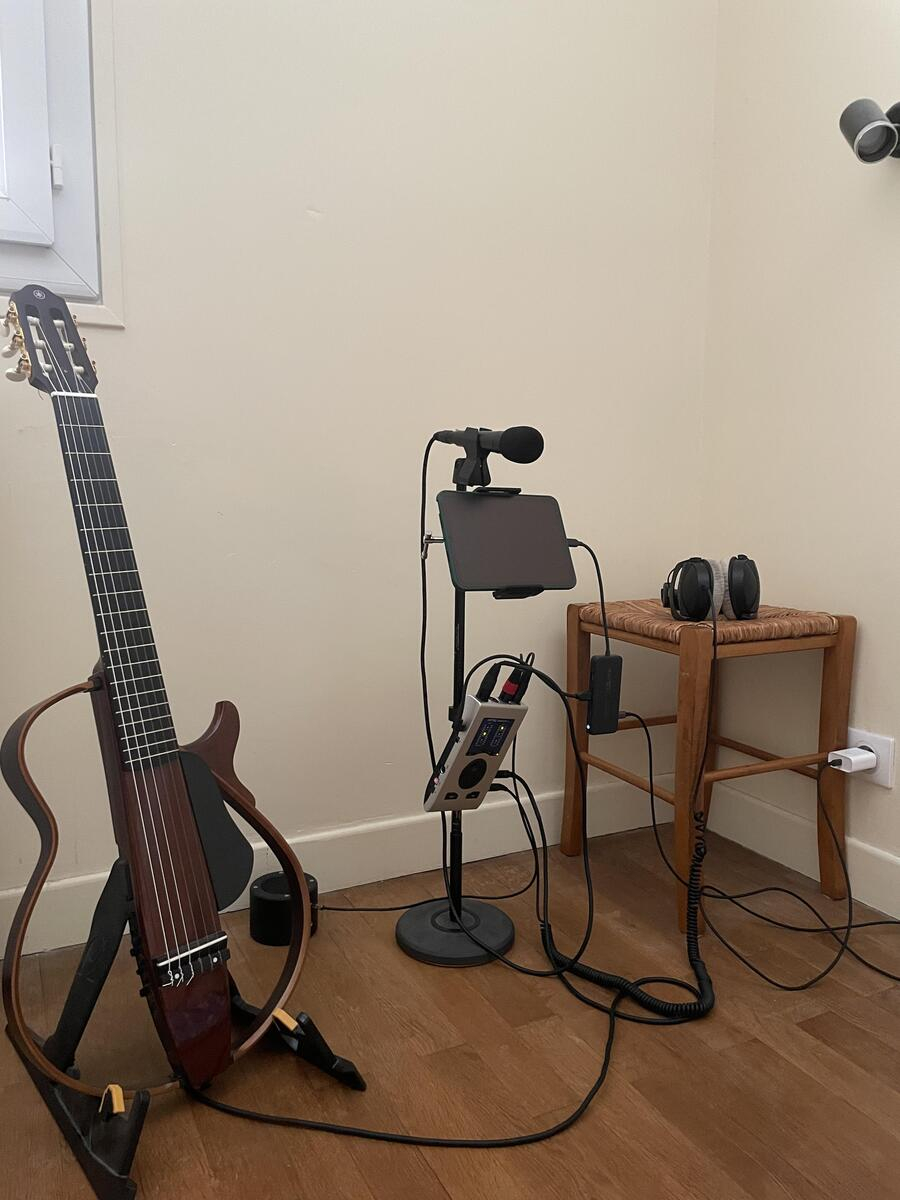
This is with guitar and microphone, everything including the mic stand can be put into a small bag with just the guitar alongside, and you can choose an even more compact audio interface if you don't need many inputs.
Personally I prefer to keep the choice of audio interface, as it can determine a lot on the sound quality, level and latency, rather than use a device that acts as an audio interface as an auxiliary function, but that's just my take on it.
That said the blackstar seems to be a nice piece of gear.
I appreciate your setup. Mine, with the blackstar amp, was much more minimal and fits my workflow better. Unfortunately, I seem to have gotten a lemon — the new amp died on me, so I’ll have to return it and buy another one. At this point, it looks like I won’t be back up and running until mid-June. It’s a shame, because I was really loving it and was just about to finish my first song with Loopy Pro. The amp solved all my problems and now I know it’s the one I want, but I guess they have some production issues on the current batch.
I have got a reply from Blackstar tech. rep. about Direct Monitoring:
Yeah, it doesn’t seem advanced enough for your purpose. I’m really disappointed that, as good as their tech and speaker design are, I’ve heard rumblings online about other people getting lemons too.
I decided to use this time to experiment with other minimal setups while they work out the production bugs.
One extremely minimal Loopy Pro setup I’ve been testing is the Blackstar Beam Solo, which uses headphones instead of a speaker amp. Check out the pics below — the headphone setup is so portable that my whole studio could fit in my pockets. The problem is that I don’t really like using headphones…