Loopy Pro: Create music, your way.
What is Loopy Pro? — Loopy Pro is a powerful, flexible, and intuitive live looper, sampler, clip launcher and DAW for iPhone and iPad. At its core, it allows you to record and layer sounds in real-time to create complex musical arrangements. But it doesn’t stop there—Loopy Pro offers advanced tools to customize your workflow, build dynamic performance setups, and create a seamless connection between instruments, effects, and external gear.
Use it for live looping, sequencing, arranging, mixing, and much more. Whether you're a live performer, a producer, or just experimenting with sound, Loopy Pro helps you take control of your creative process.
Download on the App StoreLoopy Pro is your all-in-one musical toolkit. Try it for free today.
Comments
Oh hey there. Good to see you on the forum for feedback.
Any thoughts on the erosion question? Is its very digital character a deliberate choice? Would you give any thought to, perhaps, a switchable option offering an emulation of analog signal/noise decay? I ask because - aside from maybe pushing the feedback just little harder - it's the one thing that keeps this from getting that classic old scifi tape feedback effect.
Oh, and thank you very much for the legibility tweak.
Would love to know more about this “erosion algorithm”. Recently been looking for a delay that degrades each repeat further and further. Have had mixed results attempting to create via a mix bus loop with apps like lo-fi-af thrown in. Is this one of Dahlia Delays capabilities? @wizardjenkins Or maybe someone knows another delay app I’ve overlooked?
The delay rack in Drambo lets you put all Drambo modules or (if Drambo is the host) any Auv3 inside the feedback loop. So perfect for that purpose.
It sure does, just tried it. Bingo, thanks man 🤙
Hey @garden – I shot you an email regarding the erosion stuff a couple days back. Would you be happy if I send you a test flight build to try out some tinkering that I've been doing in that space?
I think the issue is related to the erosion being recirculated, but there's also a bit of compression that might be a bit too aggressive, and I can probably apply a softer saturation and try it out at a different point in the inner loop. Initial experiments sound pretty promising – but would appreciate some external feedback if you're up for it.
Hi there. It turns out your email got junkmailed. I have no idea why, but I've retrieved it and will respond. Thanks for the heads up.
Hey all,
I've found the issue with the erosion algorithm and managed to ship an update this morning. I tuned the whole thing a bit more and added some noise into the recirculation when the erosion parameter is tuned high. I've got a couple more design and legibility tweaks (and a demo video) coming in another release early next week, but didn't wanna wait on that to fix a bug in the feedback filtering, since that's probably higher priority. Anywho, here's the patch notes.
Dahlia Tape Delay 1.2:
• Reworked tape erosion with improved saturation and introduces a small amount of noise
• Erosion now adds tape weight outside the feedback loop to prevent destabilisation.
• Feedback reliably self-oscillates at the top of the range, the maximum is now 115%
• Fixed some aliasing and low frequency rumble in the application of the tape EQ.
• Layout polish and an updated manual.
I bought this because the dev hand-coded it and because of the cranberry color. I'm liking it because it sounds good, is easy to use, and I really enjoy the Gain and Frequency sliders and how they affect the delays.
Has anyone tried this on the Mac yet? Compatibility says it works but app description doesn’t mention it…
Guys... guys (and I use the term colloquialy)... he's done it. The update, with the corrected aliasing, increased feedback, and hint of noise injected into the erosion path, gets me closer to what I've been looking for in a digital tape delay emulation than I've ever heard. With the feedback up and the erosion lifted, shifting the gain tilt to the high end gives me Martian death machines. Shift it down, and I get flying saucers.
I love this thing.
More realistic than Audiothing Outer Space?
In my opinion, yes. Outer Space is quite good, but it doesn't quite get that sizzling Martian probe thing going.
****> @garden said:
Sounds good! U have an example by any chance?
I can’t comment as to realism but that reverb on Outerspace, it’s what makes it special, among other things.
And Modnetic, the hold button is what makes it special to me when rigged up to modulation source.
For Dahlia, it has a really nice washed-out sound. I turned the delay and everything else down: feedback, modulation, erosion, flat EQ, and quickly threw the fader from completely dry to 100% wet, you can hear a very subtle coloration. I did notice that the wet signal is louder than the dry signal, so i remedied that with an effect leveler so that i could only hear the tonal difference from dry to wet without the volume difference.
This one is special too.
As in, like a feedback runaway button? That’s a feature on a lot of delay/reverb hardware pedals that I’ve always wanted in app form…
I’m looking forward to sound/video examples of Dahlia, it sounds right up my alley (but like many I have LOTS of delays so I can wait to make sure)
Cheers for the info, sounds unique 🤙 @Blipsford_Baubie
Hey Krupa, the iOS and macOS app store pages are separate but the purchase is universal, so buying it through one store front enables download everywhere. I'm an iOS developer by trade, but I primarily produce music in macOS – so although it's primarily designed with touch in mind – the majority of my testing, tweaking and scoping has been on macOS inside Ableton.
Hey Squishy – There's a few audio demos available on the website – https://horse-parade.com/dahlia/ I'm in the process of updating them after the 1.2 patch, and also putting together a promo video for the App Store page – although these samples are gonna be quite curated. I'd really, really love to hear what anyone else is creating with Dahlia in the signal chain
@Blipsford_Baubie @garden Thanks guys.
I have three small (6mb) files that are still too large to upload here, and Freesound doesn't want to let me create an account. Do you have an email I can use?
First demo; I hope a more detailed one will be added soon.

I don't want any more delays, I don't want any more delays... All right, I gave up. After messing around with the guitar for half an hour, I can say I'm more than happy with Dahlia's performance. Thank you, @wizardjenkins!
Do you think it would be possible to add something like an LFO-controlled bandpass filter to the output in the future, with the option to sync it to the host? I could set that up externally, but it would obviously be easier to manage within the app.
Hello - I love the idea and I think it would be possible, but I'm not sure if it's aligned with the spirit of the tape delay emulation that I'm going for... however, I've been toying with the idea of enabling more channels for feedback sends and receives - unfortunately the structure of it might be a bit difficult, because (and perhaps confusingly), you'd need time process any "feedback output" ahead of the next audio render - so the normal input/output channels would need to run behind the feedback send/receive, because I'm not sure the AUv3 spec allows for this kind of configuration.
An alternative to that would be to make Dahlia into an AUv3 host itself, so that arbitrary processing could be done in the feedback path, which is definitely a fun idea, but would likely add a whole bunch of complexity.
One of the big improvements to my audio engine from the early days is that the first thing I built was host syncing, because I think it's the fundamental thing that was missing from the earlier plugins. As a result I'm really keen to add more sync'd modulation generally, especially on parameters that wouldn't normally have them.
Definitely keen to keep thinking in this space though.
In the meantime I've published a new update which adds a Dahlia Classic AUv3, which is a new take on the previous versions DSP, but in a much more streamlined and modern package. People have been asking for some of the old stuff to make a return, so I figured this is a nice way to uplift some of that stuff, without adding the burden of maintaining another whole app.
It's a free update as my way of saying thanks to everyone who's given me such wonderful feedback so far.
Thanks for the update. This app is marvelous, and I like this feedback output/channel idea you’re toying around with. If I’m understanding what your saying correctly, you might want to take a look at Modley by Klevgrand as I think they had done something in the same vein.
Thanks for the response and for adding the Dahlia Classic, @wizardjenkins. I'm looking forward to further development
@wizardjenkins I saw this short video example .. When can we expect a release date?
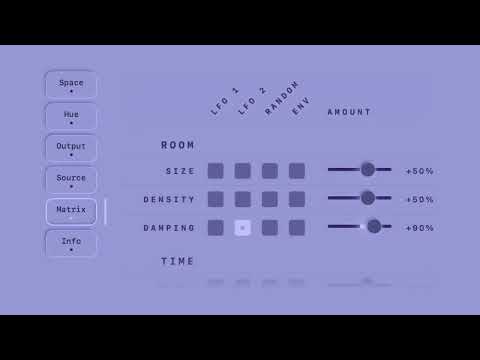
😉 Just waiting for App Store review at the moment. I've had a decent amount of feedback from @Gavinski on the earlier builds and this one is definitely in a MUCH better place as a result. I've spent a lot more time on preparing this one for release to make sure that I don't have the same broken layout or AI description smell issues that Dahlia launched with. I imagine it'll be out within the week (but have my fingers crossed it'll be within the next day or 2). There's a couple more audio demos, screenshots and the manual for it here.
https://horse-parade.com/solitvde/
I really don't know the extremes of what this is capable of - so can't wait to get some feedback once it's released and see what people do with it and in which direction it should evolve.
Great, I'm looking forward to it!