Loopy Pro: Create music, your way.
What is Loopy Pro? — Loopy Pro is a powerful, flexible, and intuitive live looper, sampler, clip launcher and DAW for iPhone and iPad. At its core, it allows you to record and layer sounds in real-time to create complex musical arrangements. But it doesn’t stop there—Loopy Pro offers advanced tools to customize your workflow, build dynamic performance setups, and create a seamless connection between instruments, effects, and external gear.
Use it for live looping, sequencing, arranging, mixing, and much more. Whether you're a live performer, a producer, or just experimenting with sound, Loopy Pro helps you take control of your creative process.
Download on the App StoreLoopy Pro is your all-in-one musical toolkit. Try it for free today.
The new Drone Meditations app
Drone Meditations is easily the best drone app I’ve ever used.
No connectivity but it has a trusty little recorder so I don’t care.
What follows was fashioned using 4 samples of a bowed glockenspiel and no other sound source.
Comments
Damn that does look awesome. Nice demo track too @rottencat .
https://apps.apple.com/us/app/drone-meditations/id6773486909
Awesome! I just bought Drone Meditations, it sounds so good. It also works on MacOS.
For anyone wanting to try first there's a free web-version
It didn't click with me due to the UI/UX but it might for you.
Nice tip 👍
I waited on purpose until after my gig to listen since I know your Ambient is always soothing. This is no exception. Beautiful gorgeous work!
Well now I'm rethinking about getting Drone Meditations. I'll decide tomorrow.
UI is definitely not ideal, from my perspective, clearly vibe coded, but it definitely seemed pretty cool in terms of functionality. One important thing I noticed was that it seemed fairly easy to tune the oscillators, which is crucial with something like this. Didn't spend enough time with it to really decide on sound quality, glad there's a free web version to check out.
@Gavinski I’m trying to understand about AI. When you say “clearly vibe coded,” what are the giveaways?
You just see a preference for ui elements with a certain look, and a general lack of skill in ui design. I mean, I could be wrong, but I doubt it!
Im a sucker for drones but i try to weight up what i might do with what ive got against a new app like this…, this definately makes drone creation quicker but im not sure quicker is what i need…. Looks fascinating…. Keeping an open mind
Great stuff - I’m messing with the free web version - I’m a bit confused as to what would be the benefit of paying a tenner for the app though? Feels a bit like stealing, but what would the app give me that I can’t do on the web?
As far as I could tell, there’s no file import on the web version. Which, to me, was well worth $10. And what sets this apart from any other drone app that I’m aware of.
There is, right under the wave selector (image).
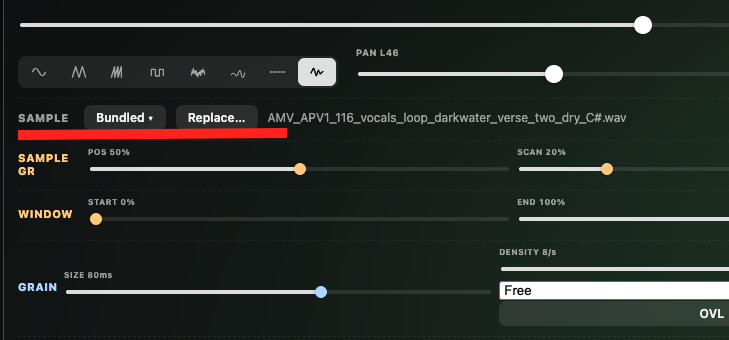
Were you able to get that to work?
When I use that and go to the files app all the individual samples are grayed out.
Thank you - that’s exactly what I was after - a very good reason to invest. I’m in.
My sample is loaded on the screenshot so, yes no problem.
Edit: to clarify, I'm using Chrome on desktop (Mac mini).