Loopy Pro: Create music, your way.
What is Loopy Pro? — Loopy Pro is a powerful, flexible, and intuitive live looper, sampler, clip launcher and DAW for iPhone and iPad. At its core, it allows you to record and layer sounds in real-time to create complex musical arrangements. But it doesn’t stop there—Loopy Pro offers advanced tools to customize your workflow, build dynamic performance setups, and create a seamless connection between instruments, effects, and external gear.
Use it for live looping, sequencing, arranging, mixing, and much more. Whether you're a live performer, a producer, or just experimenting with sound, Loopy Pro helps you take control of your creative process.
Download on the App StoreLoopy Pro is your all-in-one musical toolkit. Try it for free today.
Controller data to last selected AUV3

Hi Folks,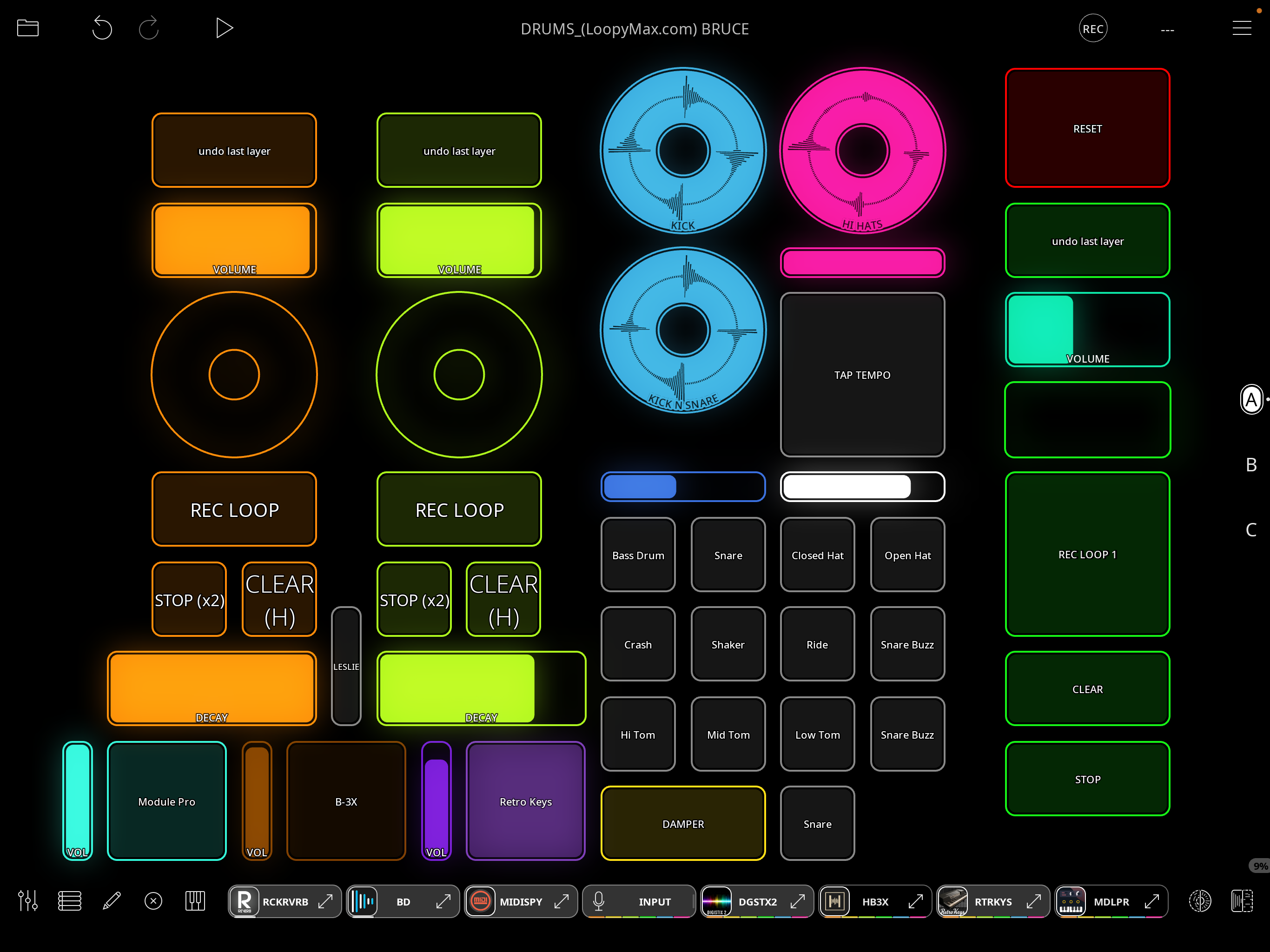
Loving Loopy Pro here. This is my latest main template. In the bottom left hand corner there are three buttons that select AUV3 apps along with their associated volume controls. These widgets are also duplicated on another page where presets are selected.
What I would like to happen is to have my foot volume controller to affect only the last selected AUV3 instrument. Action like this:
1) Select eg Module Pro and then use my foot controller to control the volume. The volume will stay at that volume when another instrument is selected.
2) Select another instrument eg Retro keys. The same foot pedal is now focused on Retro Keys. It will now be used for volume controller to affect only the Retro keys UNTIL another AUV3 is selected
Thinking I can get a lot of mileage out of this technique with other controls other than volume also.
Any thought on how to implement this?
.
Comments
@Bellows : I think this wiki page will provide the information you need:
https://wiki.loopypro.com/Controller_Target_Switching
Basically, you will set up a control profile with the AU-specific bindings for each AUv3 you want to switch between.
Thanks, I was looking in the wiki but couldn’t find it. 👍
Thank you for your help. I am making real progress but not there yet. With the help of your links and your you tube tutorial I created the three control profiles that I needed. I put the grey slider you see on the left hand side to select the control profiles at least for testing.
It work’s perfectly. In the upper position it selects the control profile for the Retro Keys which allows my foot pedal to control the volume for the retro keys.
In the mid position it selects the control profiles at for Module Pro which allows the same foot pedal to control the volume for Module Pro.
In the lower position it selects the control profile for for the B-3x which allows the same foot pedal to control the volume for B-3x.
Also as you leave a profile the volume stays right where you left it. This is the desired action.
The square instrument buttons toggle mute/unmute the auv3s and they can be all on or off at one time.
The action that I want is when I press a square instrument button the control profile for that instrument will be selected so I can adjust the volume. At present I am trying to control the slider with a message from the button but really am stuck at this point.
The square instrument buttons needs to turn the control profile on but only another square instrument button needs to change the control profile.
I hope this explained clearly. Please let me know your thoughts.
I am not seeing the picture. May I ask why you chose a slider rather than a stepped dial to switch profiles?
I would help to see screenshots of your slider’s actions and your button actions to know why it isn’t working.
I choose the slider because it was used in an example in the wiki tutorial. Also, I intended to have a few more instrument slots. I was thinking that I would be cc numbers to select the control profiles. It was really just a way to test the control profiles. I am completely open to suggestion. I did not really see how the midi clip fit into the plan.
@Bellows : on the page, I suggest using a stepped dial or radio buttons for doing the switching. You may want to take another look.
The part of the article that mentions a slider is about how to use profile switching so that an onscreen slider can send cc messages whose target is changed with a profile switch.
Thank you so much Espiegel. I changed the slider to the stepped dial and figured out the target switching using the midi loop.
That was a tough one to wrap my head around but it all working now as intended.
It is one of those things that are so simple that they are hard to see. I believe I will use this technique extensively.👍🎶