Loopy Pro: Create music, your way.
What is Loopy Pro? — Loopy Pro is a powerful, flexible, and intuitive live looper, sampler, clip launcher and DAW for iPhone and iPad. At its core, it allows you to record and layer sounds in real-time to create complex musical arrangements. But it doesn’t stop there—Loopy Pro offers advanced tools to customize your workflow, build dynamic performance setups, and create a seamless connection between instruments, effects, and external gear.
Use it for live looping, sequencing, arranging, mixing, and much more. Whether you're a live performer, a producer, or just experimenting with sound, Loopy Pro helps you take control of your creative process.
Download on the App StoreLoopy Pro is your all-in-one musical toolkit. Try it for free today.
Open Project FOLDER

Greetings fellow Loopy Pro user,
I hope this finds you doing well!
I greatly appreciate the fact that Loopy Pro's widget Button is able to trigger the "Load Project" capability.
Currently there are five different methods/options for loading a project:
1) "Next Project In Folder"
2) "Previous Project In Folder"
3) "Next Project in Set List"
4) "Previous Project in Set List"
5) "Specific Project"
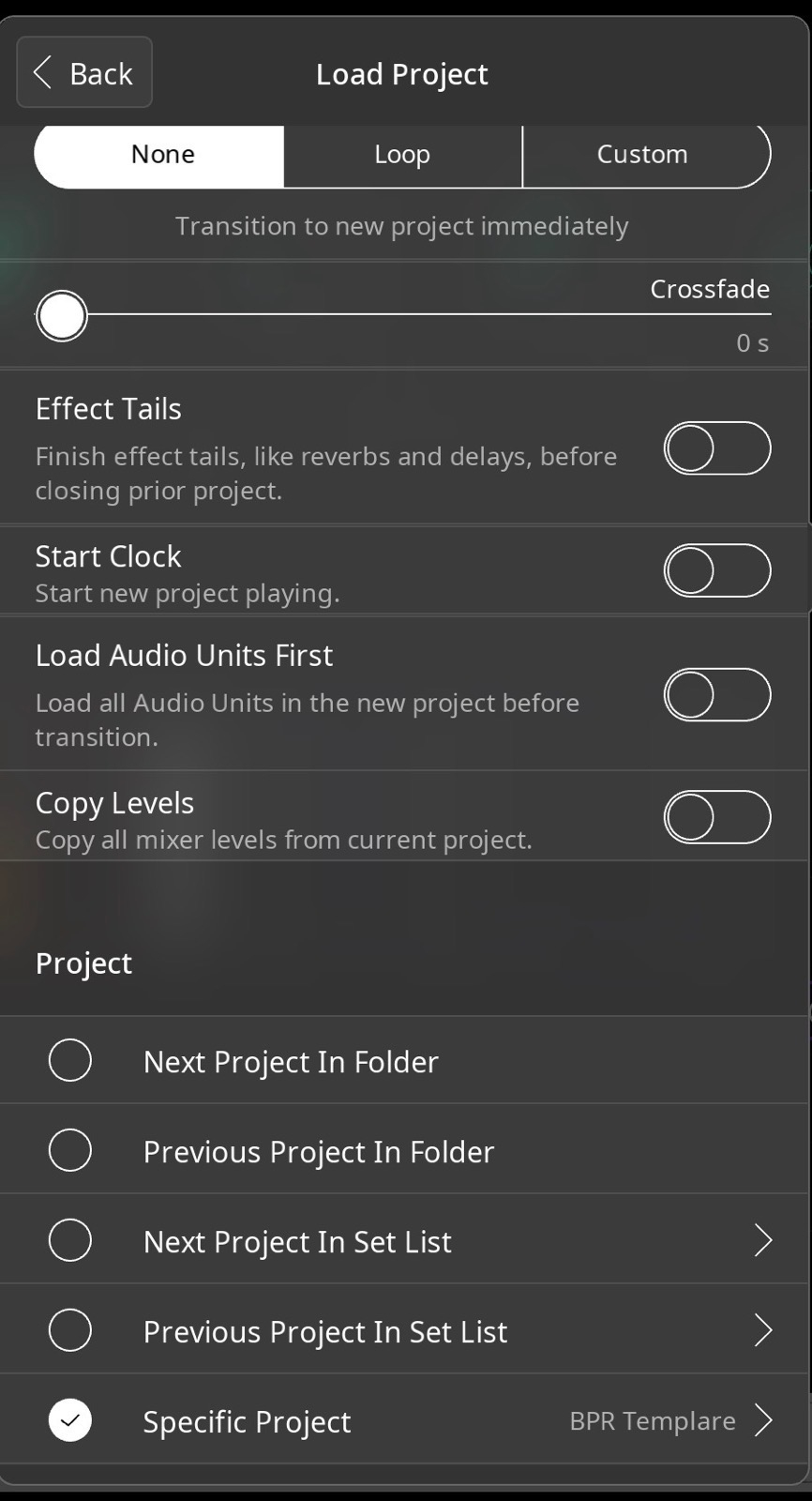
Personally, I would love there to be one more option added to the end of that list, and perhaps it it might be called: "Specific Folder." Basically, if you pressed the midi-cc-binded-widget-button that you created, the browser window would immediately pop open showing the contents of the targeted folder. Right now, it takes it takes three taps on three different parts of the screen to browse a specific folder. As we all know, during a gig, the ability to make transitions happening between songs quickly is a magnificent thing.
Why/how this feature would be great for my situation... I'm playing in a band where I'm solely I'm relying on my iPad as the sound-making source. At gigs, we play 30 or 40 or so tunes in an evening. For most tunes, I use the same Loopy Pro project—I think of this project as my "standard template" because it contains all the instruments/effects needed play the majority of the tunes in a given evening. However, during a gig there's a handful of tunes when I might want/need some fancier/different sounds, and for these tunes I need open a different Loopy project. Then, right after that more-specific-song is over, I go right back to my "standard template" Loopy Project. I spend the majority of my playing time in the "standard template" project.
Technically, I could use the "Next Project in Set List" feature as a work-around, but this option is relatively cumbersome for a few different reasons:
1) My band has a habit of changing the set list order on the fly, so pushing the widget-button trigger "next project in set list" would waste time loading projects that didn't need to be loaded.
2) In that set list, the "standard template" project redundantly interleaved between other projects over and over again.
3) For each gig, I already have to physically organize all all my sheet music anyway, I really don't want to organize a second list inside of Loopy Pro.
In short, I'd be in heaven if I could just tap once to show the band's project folder, and then tap whichever song was next on the set list.
Thank you for reading!
-James
p.s. please note... I do think the "next project in set list" feature is great for other situations. If I was playing a concert where each piece had a different Loopy Pro session, I would absolutely employ that feature.
Comments
Just a suggestion. The forum uses Markdown formatting and a line starting with the "#" sign is the largest size of title. Try not to do that.
Feature requests here are great for generating discussion, but aren't tracked or prioritized. It would be best to head over to https://feedback.loopypro.com. Search to see if there's a similar request already on the roadmap to comment on/upvote. If there isn't one you can add it. Either way, if you post the link here then it will make it easy for people to upvote if they would like to see it as well.
... or place a backslash
\before the # sign to keep it from being recognized as a formatting character.\# Becomes ...# Becomes ...
uncledave and wim,
Thank you both for your suggestions. I should have more carefully proofread my post before submitting (which I guess I'll do tomorrow since it's getting late ), but I did fix the font-size-explosion by eliminating the octothorpe.
Don't forget the feedback site. Posting here, even with immaculate formatting won't get 'er done. 😉
Wim, the "feedback site" that you're mentioning is the same link you gave me on your first reply, correct?
There is also a link to it in Loopy Pro’s Help menu.
yes. I'm just reiterating so that your efforts here don't get wasted. (Also, I think there is already a request for something like this. If you can find it then you may get a bit of a head start with existing up votes.
wim, thank you for your suggestion. And, you were correct: the feature request idea (Load Project--Specific Folder) I'm raising here has already been requested and I was now the 12th person to give it a yes vote. Thanks for pointing me in the right direction.