Loopy Pro: Create music, your way.
What is Loopy Pro? — Loopy Pro is a powerful, flexible, and intuitive live looper, sampler, clip launcher and DAW for iPhone and iPad. At its core, it allows you to record and layer sounds in real-time to create complex musical arrangements. But it doesn’t stop there—Loopy Pro offers advanced tools to customize your workflow, build dynamic performance setups, and create a seamless connection between instruments, effects, and external gear.
Use it for live looping, sequencing, arranging, mixing, and much more. Whether you're a live performer, a producer, or just experimenting with sound, Loopy Pro helps you take control of your creative process.
Download on the App StoreLoopy Pro is your all-in-one musical toolkit. Try it for free today.
AlchemDie - Alchemical Synth by Diego Capoccitti (Released)

https://apps.apple.com/app/id6781726685
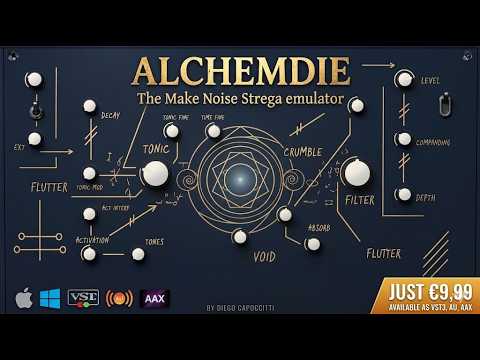
AlchemDie is an alchemical synthesizer — spill the tonic into time, let it decay through the filter.
Inspired by the patch-and-pray spirit of experimental sound boxes, AlchemDie turns a single tonic oscillator into evolving drones, brittle lo-fi echoes and unpredictable textures. It is built to be played by touch and by chance: nudge a knob, trigger a gesture, and let the patch surprise you.
— SOUND ENGINE —
• TONIC oscillator with coarse, fine, interference and modulation depth
• TIME delay with lo-fi BBD/PT2399 character and companding
• DECAY, ABSORB and BLEND to sculpt the feedback path
• FILTER with vactrol-style slew for organic, rubbery sweeps
• ACTIVATION and AGITATION (LFO) for self-playing, generative movement
• Stereo widening and output level
— GESTURE PADS —
Six one-touch gestures to instantly reshape the sound:
CRUMBLE · SURGE · FREEZE · VOID · FLUTTER · BURN
Tap to throw the patch into a new state — perfect for live performance and happy accidents.
— MADE FOR iOS —
• Standalone app and AUv3 plug-in
• Runs inside GarageBand, AUM, Cubasis, Drambo and any AUv3 host
• Pinch-to-zoom interface, optimised for iPad and iPhone in landscape
• 25 factory presets to get started, plus your own savable patches
• MIDI input: play the tonic pitch from your host or controller
Whether you are scoring, sound-designing, or just chasing strange and beautiful noise, AlchemDie rewards curiosity. Less a synth to program, more an instrument to explore.
Details:
Universal: Yes
Minimum OS version: 12.0
Comments
The Developer posted a demo video on you tube
Looks appealing. This screams for a sound demo.
I can’t keep up with all these new things. I know nothing about these Make Noise boxes. Time for some research I guess. Only 4.99…
Other than the name, I like everything about this!
One, it doesn't look like some of the vibe coded crap we've been seeing flood the AppStore lately.
And two, the developer actually took the time to create a sound/function demo video for his/her new product.
Please, take my $5!
@Gavinski vid:
Dammit...I hate developers who know how to do a proper demo...up goes my Aube score for the 2nd time today..
I came into this thread with both barrels of my snark gun loaded and am relieved to find this is a welcome change from the latest nonsense releases
Instabuy...
getting some Hilda vibes from the UI, maybe Bam was influenced by the same piece of hardware this was (at least visually)?
Indeed, reminds me of Hilda!
Both are homages to the MakeNoise Strega.
Bram was influenced by the Strega too, yes
The sounds remind me of the ivcs3 a bit, wonderfully weird but never had a clue what I was doing. This looks like a more controllable chaos.
I hope this dev or someone else does an homage/port of 0-Coast. But yes, this one took me about 2secs to buy
Great news!
https://apps.apple.com/us/app/ripplemaker/id1207806723
Yeah, 0-Coast's and Strega's have been on my wishlist for years, so this one has saved me a few quid.
I really wish @brambos would make Ripplemaker and Hilda Mac compatible - I'd happily pay again for desktop compatible versions. I could cross an 0-Coast off my list too then.
Really? It seems so strictly West. To think I had it this whole time. Cool.
And a real live manual!
If you look at the “modules” & patch points of RippleMaker & 0-Coast, they are not exact, but the sure do favor each other a lot.
Good looking out, appreciate you. I’m learning as I go (into the GAS Hades of eurorack)
https://www.diegocapoccitti.it/INSTALLERS/AlchemDie_Manual.pdf
Manual linked above for those who want to read it
Noticed the dev has some very cool other synths on his webpage, I hope he ports more of them to iOS
It's only gone and done it....forScore has been knocked into second place.... !!
Ah but that's the UK AppStore. The US AppStore is the more real measure of success tbh, it's still just number 5 there but it'll be likely number 2 a few hours from now. I'd be very surprised if it gets to number 1 on the US store, that's so rare for audio production apps, even number 2 is a great achievement.
spent most of my time yesterday with this in synth mode, but tested some of the FX presets at the end and was very impressed with those, too.
I’m loving this!!! Just making me want Strega badly 🙈
I’m curious about sonic comparisons (I know UI was discussed above) between this and Hilda.
on first play, this one is a bit more unpredictable, it's less feature rich than Hilda, apart from the delay modulation stuff, but it has a much more 'analogue' raw feel. I think they are both amazing and different enough to warrant having both ( especially at this price). I don't have a strega so I can't compare directly to hardware. Hilda has a more specific 'west coast' feel with the lpgs and wave folding.
That’s interesting to hear, I’ve had Strega for a while and it’s definitely unpredictable/wild. I’ll surely pick this up at some point and be able to compare…
Definitely got the same flow and feel for the most part. Definitely not as wild and downright filthy as my hardware though, but that could be a good thing tbh as it’s dam hard to dial the real thing in sometimes, and almost impossible to get the same sound twice. Nice to have in the palm on your hand, still glad to be lucky enough to have the real one in the studio…
This is always in drone mode, right? No way like in Hilda to turn drone mode off and just rely on the decay knob?