Loopy Pro: Create music, your way.
What is Loopy Pro? — Loopy Pro is a powerful, flexible, and intuitive live looper, sampler, clip launcher and DAW for iPhone and iPad. At its core, it allows you to record and layer sounds in real-time to create complex musical arrangements. But it doesn’t stop there—Loopy Pro offers advanced tools to customize your workflow, build dynamic performance setups, and create a seamless connection between instruments, effects, and external gear.
Use it for live looping, sequencing, arranging, mixing, and much more. Whether you're a live performer, a producer, or just experimenting with sound, Loopy Pro helps you take control of your creative process.
Download on the App StoreLoopy Pro is your all-in-one musical toolkit. Try it for free today.
Volume Pedal AUv3 demo by Jade Starr

I hope it’s okay to share this here.
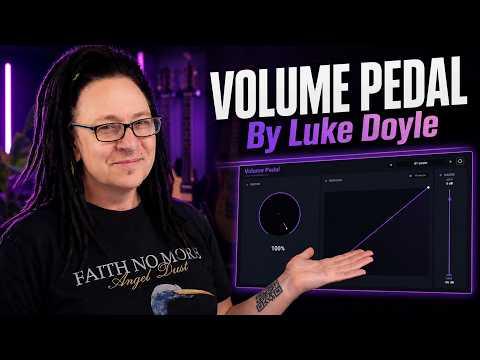
Jade Starr (How To App on iOS) recently published a walkthrough of Volume Pedal, one of the AUv3 apps I’ve been developing over the past year or so. I thought it might be of interest to some of the iOS musicians here to see an independent review from someone well known in the community.
If you’re curious about what it does, or whether it might fit into your own setup, Jade does a great job of explaining the app and demonstrating it. Many thanks to Jade for taking the time to cover it.
A little background: development of this utility plug-in actually started with iOS/iPadOS in mind, although macOS and Windows versions are available now as well.
Comments
This is great and very useful!
But what I would need even more than changing the volume curve only is to also change the curve for controlling FX plugins with my expression pedal.
As an example: I’m controlling the size of the EOS2 reverb in AUM with my expression pedal. But the reverb size is increasing way too fast. So it would be great if there was a way to change the midi curve to a very slow exponential one.
I wonder if that is something that could be implemented into this Volume Pedal app.
@jacou You can do something similar in Loopy pro with the toggle value / ramp feature when you midi learn or I am sure I could write something in Mozaic to accomplish this.
I'll add my name to the list who would test a Mozaic script for this. Often, linear increases don't work for FX and/or filters.
When I hear Mozaic my brain goes into a state of shock paralysis 😅 It’s always nice to have simple UIs for stuff.
Oh and I don’t use Loopy Pro 🫢
Maybe someone has made a MIDI utility (or script) to do that. Sometimes it's also a combination of the curve, but also a bit of damping so you don't get big jumps from 0 to 10 to 35 or whatever as you sometimes do with some expression pedals, ideally - you want 0 to 127 and all the numbers in between.
edit: you also might want to callibrate the range, toe down, toe up, that sort of thing.
I did this for Voltage Modular a few years ago:
https://store.cherryaudio.com/modules/cc-glider
@jacou What you’re describing is definitely an interesting use case, but it’s a slightly different problem from the one Volume Pedal was designed to solve. I originally built it to shape the plug-in’s own audio gain in response to MIDI or automation, rather than as a general-purpose MIDI CC processor.
@RobJackson_Music Thanks for mentioning CC Glider. It looks like the perfect MIDI tool for people wanting to reshape or smooth MIDI CC data for arbitrary plug-in parameters.
And it probably goes without saying that Mozaic is extremely powerful, and a user could likely achieve almost anything they set their mind to with it. Volume Pedal is the pre-cooked option: much narrower in scope, but ready to use without building the solution yourself.
@jacou I have a midi script in mozaic about complete. What would the max time you would want? if you were using the 16 pads to select the ramp speed? In loopy pro has 0 to 30s slider, I figured with the limited interface that mozaic has, pads would be easier to navigate and select the appropriate ramp time.
I also included incoming CC value for the expression pedal or knob or fader, and the output CC, the value you are sending to the software. Makes it easier to configure without having to look at the code. Still a few things I am thinking about with knob 0 or I might leave it blank for now.
Here is a test https://patchstorage.com/midiccramp/
@lukesleepwalker let me know what you think
I made a script for that. It is best to use the data reducer script on the pedal cc. Because the quaduplicator multiplies the data sent...
https://patchstorage.com/curvemaker/
Note that because of the way the forum uses markdown formatting, this link is not accurate, the _ symbols before and after the word curvemaker have been left out. Nice script btw @Alfred, found it a few days ago, thnx
Thanks for the links, folks. I'm testing the Mozaic scripts now and will reach out via DMs. Want to make sure we return this discussion back to the dev's original post. I do think the Volume Pedal app makes so many headaches dead simple to solve, so kudos to @Vaultnaemsae
i always liked that you can draw your own curves in sunvox. with a bit of non-linearity you can get more interesting filter sweeps and such, and make your knobs and sliders "feel right".
i've never really used it as a midi helper app for non-sunvox things but i'm sure that can be done too.
but yes, i agree that @Vaultnaemsae is offering a time-saving, ergonomic solution!
*learning curve puns are verboten.
Fixed, was in a hurry and did not check.
Thanks, for the compliment, thats always nice.