Loopy Pro: Create music, your way.
What is Loopy Pro? — Loopy Pro is a powerful, flexible, and intuitive live looper, sampler, clip launcher and DAW for iPhone and iPad. At its core, it allows you to record and layer sounds in real-time to create complex musical arrangements. But it doesn’t stop there—Loopy Pro offers advanced tools to customize your workflow, build dynamic performance setups, and create a seamless connection between instruments, effects, and external gear.
Use it for live looping, sequencing, arranging, mixing, and much more. Whether you're a live performer, a producer, or just experimenting with sound, Loopy Pro helps you take control of your creative process.
Download on the App StoreLoopy Pro is your all-in-one musical toolkit. Try it for free today.
Input routing to color channel

This is my other basic routing question, again probably in the manual so apologies there but I am struggling to understand (or relying too much on my experience with other DAWs) :
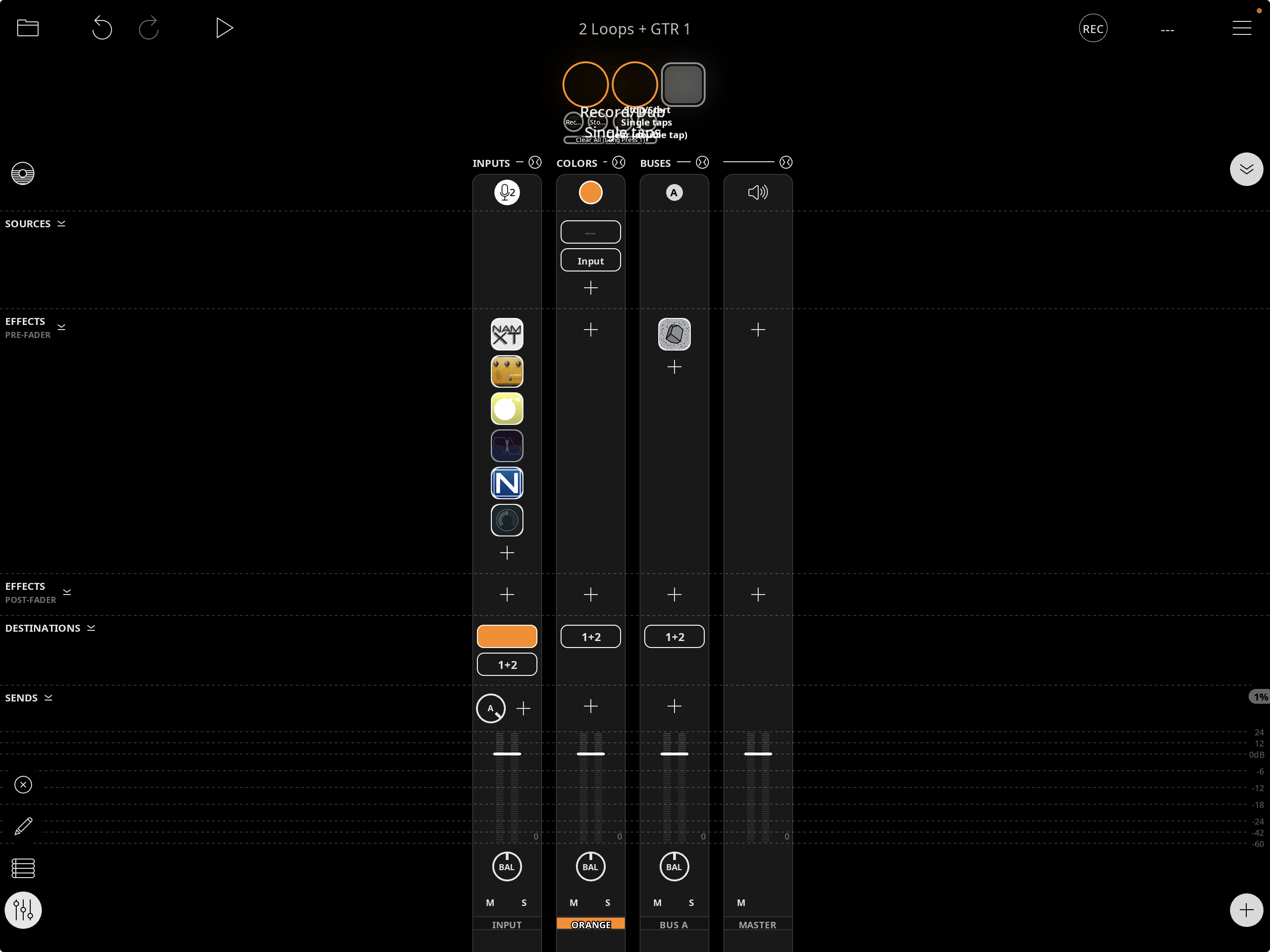
In the mixer setup below, I can either get an input to the orange channel (which appears to be like a bus channel for orange clips) by choosing 'orange' as a destination from the first channel or 'input 2' (which is also the input to channel 1) as an input to the orange channel. The graphic and audible result of these is identical, which is that orange clips are recorded with the effects shown on channel 1. I would have thought that choosing 'orange' as a destination from the first channel would result in clips being recorded with the effects, and choosing 'input 2' as an input to the orange channel would result in clips being recorded without the effects, but that isn't the case.
I am obviously missing something very basic in my understanding of how these color channels work so any clarity you can offer would be very much appreciated.
Thanks in advance
Comments
@thirdspace :
Color as a destination means “send the audio to that color for recording”. The 1+2 as a destination means send the audio out outputs 1+2.
In your picture, hardware input 2 is run through effects and will be recorded into orange clips when the record. It is also sent to hardware outputs 1+2 so that you can hear it.
The channel input is also sent to Bus A whose output only goes to the hardware output. Long-press on the send knob to determine whether the send is is pre/post fader and effects.
I’d suggest looking at the manual’s mixer section.
Thanks - and yes I will run through those manual pages again!
So I guess to set hardware input 2 without effects as the input to orange I would require a new channel (Hardware Input) routed to orange, and turn off the orange destination in the channel with the effects. I think partly what has confused me is that when you choose the colour destination in the hardware input channel it autofills the source in the color bus with 'CH 2' if the input is 2, whatever the channel that has orange as the destination, unless you name the channel. So I'll do that going forward - probably just me on this one
Thanks again for the help
If you want input 2 to sometimes have effects and sometimes not, there are several options.
The simplest is to add input 2 twice to the mixer. Have effects on one and no or different effects on the other. Set up a selector that unmutes one and mutes the other (as explained on: https://wiki.loopypro.com/Mixer_Actions#Mutually-Exclusive_Inputs)
You could also have a button that turns the effects on and off.
You could use an effects bus that you can turn on/off.
There are probably other approaches, too.