Loopy Pro: Create music, your way.
What is Loopy Pro? — Loopy Pro is a powerful, flexible, and intuitive live looper, sampler, clip launcher and DAW for iPhone and iPad. At its core, it allows you to record and layer sounds in real-time to create complex musical arrangements. But it doesn’t stop there—Loopy Pro offers advanced tools to customize your workflow, build dynamic performance setups, and create a seamless connection between instruments, effects, and external gear.
Use it for live looping, sequencing, arranging, mixing, and much more. Whether you're a live performer, a producer, or just experimenting with sound, Loopy Pro helps you take control of your creative process.
Download on the App StoreLoopy Pro is your all-in-one musical toolkit. Try it for free today.
Marco Synth and Bruno Drum Synth by Glenn Vassallo (Released)

Marco Synth: https://apps.apple.com/us/app/marco-synth/id6782900508
Bruno Drum Synth: https://apps.apple.com/us/app/bruno-drum-synth/id6782916009
Bundle, 25% off for both: https://apps.apple.com/us/app-bundle/marco-synth-and-bruno-drum-synth-bundle/id6793535135
MARCO
4-Oscillator Synth with Independent Shaping and Dual Hard Sync
Four fully independent oscillators, each with its own waveform, filter, envelopes and modulation, driving two hard-synced voices. A musical random generator and a Tweak system that's part of the writing. Available as a standalone app and an AUv3 plugin.
BRUNO
Powerful layered drum and pluck synthesizer
Six voices, four synthesis engines per drum. Stack Analog, FM, Fold and Resonant the way the pros build big drums for a punchy, mix-ready sound. Roll the dice on any engine, then tweak: a fast, musical workflow that keeps fresh ideas coming. Available as a standalone app and an AUv3 plugin.
THE DETAILS
There are far too many features and specifications to list here. They are all on the App Store pages and on our website and comprehensive user guides.
So instead, here are the five things that are special about Marco and Bruno.
DEEP ENOUGH FOR A SOUND DESIGNER, IMMEDIATE ENOUGH FOR YOUR FIRST SYNTH
Marco and Bruno are both deep instruments. Four independent engines, per-oscillator filters, layering, independent effects, LFOs, full master chains. But you do not have to understand any of that to get a sound you want to keep.
Hit the dice, tweak it, save it. Or dive in as far as you like. Same instrument either way.
That is why the intelligent randomiser and tweak system exist. I wanted a quick and easy way to get at everything these two can do, without spending an hour dialling things in. Of course you can also dial everything in by hand to your heart's delight!
INTELLIGENT RANDOMISER AND TWEAK SYSTEM
You choose what the sound is. The randomiser decides what kind.
Pick Kick in Bruno and every roll is a kick, because it knows what synth parameters create a kick. Same for Snare, Hat, Clap, Tom and Pluck. Marco works the same way across Bass, Lead, Pad, Keys, FX and Drone. Then you set how far it goes. Mild stays close to where you already are. Wild pushes much further. Recipe stamps a curated archetype onto it, and Marco has 35 of those with more on the way.
Tweak is the other half. You choose which oscillators or engines and parameter groups get touched, so a sound moves rather than starts over. 100 steps of history means you can roll and tweak fearlessly and walk back to the one that caught your ear.
MARCO HAS DUAL HARD SYNC
Many synths give you one hard sync pair. Marco gives you two, running in parallel, and they can be detuned against each other. There is no point me describing it, you just have to hear it. A single button cycles through every valid Dual Hard Sync configuration, so it is quick to find the combination that works. As far as I know, no other iOS synth does this (unless building a large modular patch).
MARCO OFFERS INDEPENDENT OSCILLATOR SHAPING
On most synths the oscillators share a filter and envelopes. With Marco each of the four oscillators has its own waveform, filter, envelopes, LFOs and glide. This means one oscillator can be using a 24db low pass filter, while another is using a notch filter, each with its own volume and filter envelopes and modulation. This provides an opportunity to create really unique sounds. Marco can also work as a traditional synth with a single shared filter and envelopes.
BRUNO BUILDS DRUMS THE WAY PROFESSIONALS DO
A kick is a sub, a click and a body, stacked and balanced. Normally that means juggling samples, plugins and routing. In Bruno it is four full synthesis engines - Analog, FM, Fold and Resonant - layered inside one instrument. There is a colour-coded spectrum analyser built in, so you can see exactly where each layer sits and stop them fighting for the same space.
Both apps run on iPhone, iPad and Mac, standalone or as AUv3.
If you make something you like, post it here, I would love to hear it. There is a proper video demo landing this week too, from someone who plays a lot better than I do.
Both apps also have an Artists preset category, and I will be adding user presets to it. If you build something good, send it in from the preset browser and it may end up shipping in the app with your name/username. Happy to answer anything here.
Comments
Thanks for sharing! This looks very interesting, and a bundle is always great, but are there any sound examples anywhere?
I know you mentions an upcoming video, but just looking for examples of the the basic sounds of the apps.
(Couldn’t find any in the webside nor at YouTube, but might have missed something.)
@catbox
It sounds very good. I've used them both in the last few tracks I uploaded. I'll post some links.
https://amici-instruments.com/bruno.html
Curious about the drum synth.
Ok, I took the chance. :-) Both are very nice. The drum synth reminds me a bit of the multi engines in Sugarbytes DrumComputer, which is not a bad thing.
Apologies, just saw this, I am in a very different time zone. Great to see @audiblevideo found the one I uploaded to Youtube.
Here are another 2 quick videos .... my style of music may not be for everyone
The lead in this is using Marco's Dual Hard Sync capability, so you can hear what that is all about
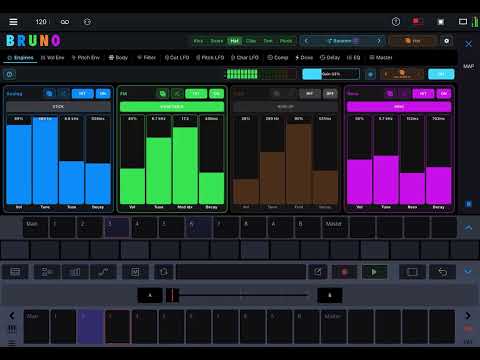
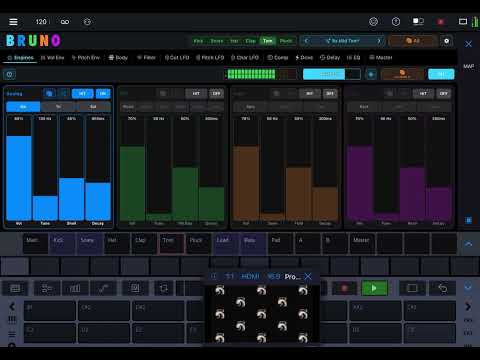
This one mainly focuses on Bruno, including a Pluck patch and some of the UI features. But Marco is also making some interesting created via the intelligent randomiser and tweak system around 1:50 into the video
Bought em both and have only tried Bruno so far.
First session impression: “GOOOOOOOAL!!”
@digitalferret be nice to here make a variety of noises on either app
@audiblevideo @catbox
Here are some more sounds, along with a demo on how you generate your own sounds using the Intelligent Randomiser and Tweak System.
Bonus: at the end of the video you get to hear me apologise to my wife for waking her up at 1am on a Monday night. Must remember to use headphones!
I will get better at making these types of videos, and will spend more effort on demoing how to use Marco and Bruno and showing what types of sounds it can create.
I can't work out how to use Bruno in Logic - every midi note appears to trigger only one drum, whichever is selected inside Bruno at the time. Do I need to use an instance of Bruno for each drum?
Bruno is cool ❤️
Easy to design good drum sounds and great randomisation.
Hope you add a mode where you can map and tune the six drums. Very nice you can play them as an instrument but so much easier just load and make the changes in one instance.
I look forward to play with Marco tomorrow 🙂
As I understand it, this is exactly the case. You can only have one drum sound at a time in an instance of the app.
@digitalferret
I absolutely love Marco, Dante, Bruno. Such fun sounding synths, and the Bruno drums sound great. I recently discovered that Marco and Dante sound pretty insane within wav collider.
@Jens, @FastGhost, @catbox
The loading of one instance per voice/sound/instrument was an intentional design decision for the following reasons.
Would love to hear some of the sounds you are making!
Just a note, you can use 2 Marco's instead, Dante was the early testflight code name of the app when it was being developed, it will like expire soon.
Good and strong arguments 😊
I have so much fun using Bruno chromatically and lots of happy accidents
Bruno must be a sign that I should learn to be better with drambo 😀
I have setup templates for loopy pro, … and can work with this.
Much smaller suggestion. It would be nice to keep track of drumsets. Maybe have an additional filtering text field that act as prefix for preset name
Marco demo video from the Sound Test Room
How could I forget to mention Loopy Pro! Which I love also. Creating your own control surface with Loopy is amazing.
Not sure I understand this part. Would love to understand, feel free to message me.
Lovely update! Thx
love the sound of Marco!
i am trying to set up a polyphonic session in aum. using e.g. four instances of Marco Synth and entonal studio that spreads played notes across a range of midi channels.
would be great if Marco supported midi programm change so one would be able to change presets for all instances at once.
how would you guys try to achieve a polyphonic setup?
So glad you are enjoying Marco!
If you are using AUM, you already have access to program change of presets. The first step is to save a preset in AUM, look for the folder at the top left. Once you have saved a preset, you can then assign program change to the preset, by pressing the fader icon in the top left, then Preset load.
If you are just wanting to cycle through presets, then Marco has MIDI parameters to achieve that, they are called "PS: Next Preset" and "PS: Previous Preset" (towards the buttom of the list)
You would have noticed that Marco isn't like any mono synth you would have ever seen or used before, as each of its oscillators has the ability to provide independent control of it shaping.
If I were to develop a poly synth, it would have be just as unique as Marco with capabilities not seen on other poly synths.