Loopy Pro: Create music, your way.
What is Loopy Pro? — Loopy Pro is a powerful, flexible, and intuitive live looper, sampler, clip launcher and DAW for iPhone and iPad. At its core, it allows you to record and layer sounds in real-time to create complex musical arrangements. But it doesn’t stop there—Loopy Pro offers advanced tools to customize your workflow, build dynamic performance setups, and create a seamless connection between instruments, effects, and external gear.
Use it for live looping, sequencing, arranging, mixing, and much more. Whether you're a live performer, a producer, or just experimenting with sound, Loopy Pro helps you take control of your creative process.
Download on the App StoreLoopy Pro is your all-in-one musical toolkit. Try it for free today.
Loading a project in Koala In AUM?

Koala supports loading saved projects in when loaded in AUM, right? When I try to load a .koala file, local or iCloud, they are all grayed out.
Comments
Hi. Do those Koala projects include AUv3 plugins? If so, they cannot be loaded in AUM, because a host cannot load another host app.
Thanks @uncledave. There’ were definitely no AUv3s loaded in the projects but just to eliminate any other problems I’m created a new project from scratch with just a couple pads with audio from the mic and saved it. Tried the same from within AUM also, same result- grayed out. Here’s a screenshot
Its because you have the koala files compressed (zipped) so koala AU can't load them. When I zip one of my koala file it greyed out.
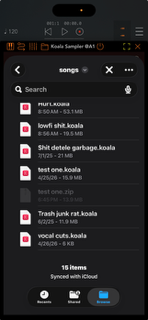
Thanks @hacked_to_pieces - I appreciate the information.
I wish that I could follow your instructions, but the files are not compressed as far as I can tell. I actually tapped one of them and compressed it and it shows a .zip extension afterwards, and won’t open in the standalone. All of the files with the exception of the one that I manually zipped open properly in standalone mode, but just not in AUM. It’s the same in EG Nodes. It does seen very odd that the icons on mine are different than yours and mine look like compressed files.🤔
Below are some screenshots of how the files look in AUM and standalone and also the file details on one of them In iCloud. I have also removed and reinstalled Koala and restarted the iPad.
Hmm. Maybe the files were created using an earlier version of Koala, and formats are incompatible. Try loading one of the files standalone, save it with a new name, then try opening it in the AUv3.
That is one of the things I tried. 🤔 The project called “test no auv3.koala” was created brand new. I also tried creating and saving a new project after the reinstall. Good suggestion!
Update - I have the exact same problem on my iPhone on which I rarely use Koala. Here’s what it looks like:
When you initially launched the Koala AUv3, did it ask you to select the directory to use? That looks like the AUv3 wasn't given permissions to that folder. If you move those documents to the iCloud Koala folder can you access them?
Is there any chance those documents were created with an old version of Koala and need to be opened and resaved in the standalone?
Excellent questions - thank you. Unfortunately no. I’ve actually gone through a number of steps to try to remove any remnants of the past including deleting Koala, deleting all Koala folders, locally and in iCloud, and all .koala files. Then restarting the iPad, reinstalling Koala, verifying that no files are there and creating brand new ones from scratch. No change. There did appear to be some sort of “ghost” Koala related folder that would show up in a search in the Files app, but after clearing everything out and restarting several times, it appears to be gone.
Regarding the permissions to the folder question, I don’t recall what Koala asked when it was installed on the device for the very first time since it was about 1.5 years ago when I got the new iPad Pro M5, but everything on it was transferred from a previous iPad M1 with Koala and that was first installed years ago. It never asked for permissions or a folder location during recent reinstalls. The files behave the same and look the same locally and on iCloud.
Not to go too deep, but during further troubleshooting, and this may be a stretch, I tried changing the associated app for .koala files from Koala to another app (like Hilda) and I’m unable to change it back. Still, the files open just fine in standalone mode, so it doesn’t appear to have worsened the problem. If this line of investigation is relevant, I can provide more details.
Did you try re-saving the files in standalone after opening them?
Yes - I’ve saved the files in standalone, and created new ones from scratch in standalone and saved those. Edit: Yes, I also resaved the files and resaved with new names.
Have checked in a different host?
Yes - same in EG Nodes.
What OS version?
iPad OS 26.5.2
iPhone 15 is 26.5
I’m also unable to open Koala projects on my older iPad M1, which is on iPad OS 18.6.2 and an older version of Koala. I’m wondering what could be the common factor here. This is a screenshot showing the local Koala folder.
Are your files in iCloud? Could that be a problem?
No - I tested opening the files from the local Koala folder. As part of troubleshooting I removed all files from the koala iCloud folder, and am working only locally on all of the devices.