Loopy Pro: Create music, your way.
What is Loopy Pro? — Loopy Pro is a powerful, flexible, and intuitive live looper, sampler, clip launcher and DAW for iPhone and iPad. At its core, it allows you to record and layer sounds in real-time to create complex musical arrangements. But it doesn’t stop there—Loopy Pro offers advanced tools to customize your workflow, build dynamic performance setups, and create a seamless connection between instruments, effects, and external gear.
Use it for live looping, sequencing, arranging, mixing, and much more. Whether you're a live performer, a producer, or just experimenting with sound, Loopy Pro helps you take control of your creative process.
Download on the App StoreLoopy Pro is your all-in-one musical toolkit. Try it for free today.
Paint Audio Midi Captain FootSwitch - Is this finally THE one ?

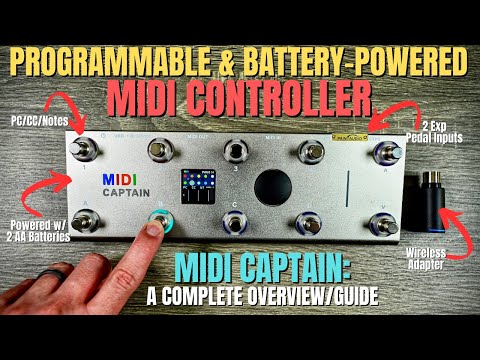
https://paintaudio.com/products/paint-audio-midi-captain-blue
Came to AB Forum to see if anyone was using this , but search produces zero mentions.
Seems folks are too busy in the silly season posting stupid genius threads to have noticed this arrival ?
Could this be the footswitch to finally rule ? Certainly seems well specced & to answer many
previous requests .
Comments
looks very similar to the midi commander. which works great for me.
i modified mine a little to make it easier to use barefoot and a cover to keep me from accidentally going to extra banks of midi
This seems deeper + on board programming (6 on press + 6 off press note/cc/pc per switch) & colours .
Spacing seems tight for my clumsy feet though, & I wish switches were alternated in the 2 rows -
is yours tricky to use ? @eross
edit - seems we cross posted - I didn’t see your 2nd post when I asked about tricky to use
yeah, that was the only tricky thing about it. i made and aluminum cage on the right to keep my dumb feet away from those controls, and it works great now. I also made a guitar foot stool/expression pedal that i plug into the back of the midi commander.
They have a very comprehensive web page covering all it can do and then some.
I want one, with that foot controller - a bit over my budget though, pity.
I’ve just purchased the midi captain mini six. I’ve tried to use the midi learn function in Loopy Pro, but because of the complexity of this pedals mid language I can’t get it to do the most simple thing. I have scoured the web for videos or text instructions or anything that would explain what’s going on without success. I’m trying to learn or understand the mid language but my brain gets fogged.
I can see from videos that are using this on effect pedals that is very powerful, but it’s crying out for a more detailed instruction book, or a piece of software that interfaces so it’s easy for idiots like me.
I’m sure in time someone will figure this out, but for me, it’s very frustrating so I wouldn’t recommend this pedal right now.
You want the pedal set up to do nothing more then send an ON message (cc value greater than 0 or note with a non-zero velocity) when pressed and OFF when released (cc value 0 or note off/velocity 0) when released.
Step 1 is troubleshooting to see what your pedal sends by using a midi monitor.
See https://wiki.loopypro.com/Footswitches
I bought the Ten button version , tried the computer editing route but didn’t really understand it .
Luckily Firmware 3.5 includes Geek Mode , which contrary to the name , is the easiest to understand because it
uses the device with screen for editing (& there are Youtube videos on this) .
The newer SuperMode adds a lot of extra functionality but , needing computer editing & without sufficient guidance seems overly complicated .
I’ve just looked at the 6 manual & it seems only SuperMode is available - no option for Geek Mode .
My recommendation would be to return the pedal & find the extra cash to upgrade to the Ten button,
to be able to program on the device in GeekMode as main reason - the extra buttons would be a secondary bonus.
It works fine & I am confident in how to program it ( although page up/down is a little confusing as they have to be edited on the higher or lower page ) .
I can recommend the Ten button version with Geek Mode .
I have the Mini 6 and use it with a guitar / iPad / AUM setup - works great. But...
The default first page is not what you want, i.e. it doesn't work "out of the box" as a MIDI CC controller that you can MIDI learn. It's kinda weird they didn't have the first page as just a basic MIDI CC on / off thing.
Basically you need to set up your buttons something like this:
[key0]
keytimes = [2]
ledmode = [normal]
ledcolor1 = [0xff0000][0xff0000][0xff0000]
ledcolor2 = [0x000000][0x000000][0x000000]
short_dw1 = [1][CC][20][127]
short_dw2 = [1][CC][20][0]
So this would send a CC 20 on / off as a toggle. Note the ledcolor2 is basically black, and "on" is red.