Loopy Pro: Create music, your way.

What is Loopy Pro?Loopy Pro is a powerful, flexible, and intuitive live looper, sampler, clip launcher and DAW for iPhone and iPad. At its core, it allows you to record and layer sounds in real-time to create complex musical arrangements. But it doesn’t stop there—Loopy Pro offers advanced tools to customize your workflow, build dynamic performance setups, and create a seamless connection between instruments, effects, and external gear.

Use it for live looping, sequencing, arranging, mixing, and much more. Whether you're a live performer, a producer, or just experimenting with sound, Loopy Pro helps you take control of your creative process.

Download on the App Store

Loopy Pro is your all-in-one musical toolkit. Try it for free today.

2024 iOS App Sales & Discussions

1127128130132133221

Comments

  • edited September 2024

    @GeoTony said:
    @rs2000 and @Kashi , works for me (iPad Pro (12.9-inch) (5th generation))… 16GB
    Took about 20 minute to ‘Initiate’ having downloaded the model. Now only takes a few seconds to load.
    Each image takes about 15 seconds to generate and they don’t look bad.
    By default the Safe Content Filter is On and that seemed to block 80% of images even for the most mundane of prompts but having switched it Off I’ve not had anything remotely offensive generated.
    It still struggles with things like numbers of fingers on hands and basic text 🤨

    Yea it did take about 10 minutes to download model then intiate model.

  • I like the idea of an intimate model @Poppadocrock 😊

  • edited September 2024

    @GeoTony said:
    I like the idea of an intimate model @Poppadocrock 😊

    lol, I just realized I made the auto complete typo and adjusted it. Definitely funny. Maybe I should have left it for posterity. Lol

  • @Fear2Stop said:
    Nightcafe Studio is free to use and makes pretty good art these days

    https://creator.nightcafe.studio/?ru=fear2stop

    Cheers!

  • @Fear2Stop said:
    Nightcafe Studio is free to use and makes pretty good art these days

    https://creator.nightcafe.studio/?ru=fear2stop

    Very few uses before needing to pay.

  • @Darkstring said:

    @Fear2Stop said:
    Nightcafe Studio is free to use and makes pretty good art these days

    https://creator.nightcafe.studio/?ru=fear2stop

    Very few uses before needing to pay.

    Not really..:you earn 5 credits daily, 25 every five days as well. You also get additional free credits once you reach certain milestones. I’ve never paid a cent the year I’ve been using it . Currently have over 600 credits

  • @ejacul337 said:
    Fiddlecator 2 Core is on TestFlight rn, if any1 is interested I’ll post the link

    Please do.

  • @ejacul337 said:
    Fiddlecator 2 Core is on TestFlight rn, if any1 is interested I’ll post the link

    Def!

  • @Fear2Stop said:
    Nightcafe Studio is free to use and makes pretty good art these days

    https://creator.nightcafe.studio/?ru=fear2stop

    There are probably 4 or 5 new fairly good sites a week being started now. It’s good for competition.

    Check out http://www.OpenArt.ai … they have some interesting features I haven’t seen anywhere else before.

  • @reasOne said:

    @ejacul337 said:
    Fiddlecator 2 Core is on TestFlight rn, if any1 is interested I’ll post the link

    Def!

    Third.

  • edited September 2024

    @Fear2Stop said:

    @Darkstring said:

    @Fear2Stop said:
    Nightcafe Studio is free to use and makes pretty good art these days

    https://creator.nightcafe.studio/?ru=fear2stop

    Very few uses before needing to pay.

    Not really..:you earn 5 credits daily, 25 every five days as well. You also get additional free credits once you reach certain milestones. I’ve never paid a cent the year I’ve been using it . Currently have over 600 credits

    Do you have to create an account, I’m guesing you do, but do you have to login every day to get the daily credits? Or do you get them automatically with an account?

  • @Poppadocrock said:

    @Fear2Stop said:

    @Darkstring said:

    @Fear2Stop said:
    Nightcafe Studio is free to use and makes pretty good art these days

    https://creator.nightcafe.studio/?ru=fear2stop

    Very few uses before needing to pay.

    Not really..:you earn 5 credits daily, 25 every five days as well. You also get additional free credits once you reach certain milestones. I’ve never paid a cent the year I’ve been using it . Currently have over 600 credits

    Do you have to create an account, I’m guesing you do, but do you have to login every day to get the daily credits? Or do you get them automatically with an account?

    Hi! (First time poster here.)

    You do have to go to the site and claim your daily credits. I don’t do it too often but I’ve somehow accumulated a few hundred credits between the daily, milestones, and art challenges. It’s ai image generation with a community element on the side.

  • @Poppadocrock said:

    @Fear2Stop said:

    @Darkstring said:

    @Fear2Stop said:
    Nightcafe Studio is free to use and makes pretty good art these days

    https://creator.nightcafe.studio/?ru=fear2stop

    Very few uses before needing to pay.

    Not really..:you earn 5 credits daily, 25 every five days as well. You also get additional free credits once you reach certain milestones. I’ve never paid a cent the year I’ve been using it . Currently have over 600 credits

    Do you have to create an account, I’m guesing you do, but do you have to login every day to get the daily credits? Or do you get them automatically with an account?

    Gotta log in every day to get the credits .

  • edited September 2024

    Is this the cheapest ever? Can’t imagine it’ll last long.

    Edit: Just watched the Sound for More tutorial for Riffler. Clearly a brilliant app but feels a bit too much like cheating for me. Are there non-generative uses for it that I’m missing or is that it’s only use (which it seems to do very well).

  • edited September 2024

    @Robin2 said:
    Is this the cheapest ever? Can’t imagine it’ll last long.

    Edit: Just watched the Sound for More tutorial for Riffler. Clearly a brilliant app but feels a bit too much like cheating for me.

    Wow, the cheapest I am aware of. I got it immediately on its debut for $10. I think it’s usually higher than that.

    Are there non-generative uses for it that I’m missing or is that it’s only use (which it seems to do very well).

    I can’t pass up this opportunity to self promote :)

    Building Looks That Kill rhythm part from scratch in Riffler:
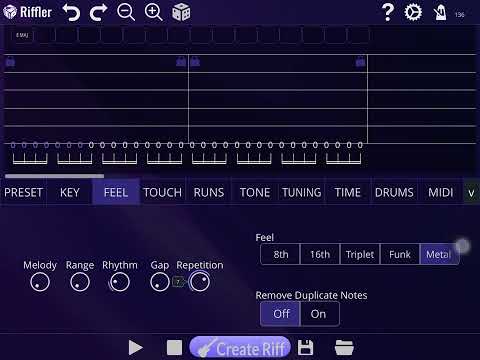
    But yeah, you can edit notes. I haven’t figured how to create new ones without generating entire riffs.

    Some of the presets suggest that it’s also meant to be used as a practice tool to try generated riffs on your own guitar.

    Isolated guitar original for comparison:

  • @AlexY. Brilliant, thanks. Never having used the app myself i couldn’t quite follow exactly what you were doing but you were clearly editing it to create what you wanted and not generating it. Seemed quite an effort to get there though - i think I’d find it quicker to do the same on a piano roll myself? Thanks for showing me what’s possible, appreciate it. Cheers.

  • edited September 2024

    @Robin2 said:
    @AlexY. Brilliant, thanks. Never having used the app myself i couldn’t quite follow exactly what you were doing but you were clearly editing it to create what you wanted and not generating it. Seemed quite an effort to get there though - i think I’d find it quicker to do the same on a piano roll myself? Thanks for showing me what’s possible, appreciate it. Cheers.

    Yw!

    It would definitely be a lot more direct if one could just draw the notes on the TAB diagram instead of having to tweak the knobs to create the base notes and then buttons to move them up or down the strings.

    Assuming you know about GeoShred already, another option might be Jam Maestro.

    https://apps.apple.com/us/app/jam-maestro-create-guitar-tab/id596628003

    It looks like it can sequence other apps, but not sure if it will receive midi. It also only seems to support IAA if that is a dealbreaker.

    Edit: for what it’s worth, I think an update to Riffler that will allow it to receive midi is in the works. I believe I saw that in the forum’s Riffler thread, so it might be worth your investment at this price. 👍

  • edited September 2024

    @Robin2 said:
    Is this the cheapest ever? Can’t imagine it’ll last long.

    Edit: Just watched the Sound for More tutorial for Riffler. Clearly a brilliant app but feels a bit too much like cheating for me. Are there non-generative uses for it that I’m missing or is that it’s only use (which it seems to do very well).

    Lowest Price Evah!
    https://apps.apple.com/us/app/riffler/id1556225557

  • Techné Media Sale

    Different Drummer is 50% off at $4.99
    https://apps.apple.com/us/app/different-drummer/id525272276

    Guide Track is $1 off at $3.99 - iPad only
    https://apps.apple.com/us/app/guide-track/id873642046

  • Utility

    Merge Voice Memos is free usually $3.99 - merge 2 audio recordings
    https://apps.apple.com/us/app/merge-voice-memos/id6476123178

  • edited September 2024

    I Definitely recommend Riffler at $2.99

    Yes it has multiple use cases.

    Audio In AU - use guitar sound audio in AU
    Audio in standalone export audio track
    MIDI Out in AU - send midi to anything in host
    MIDI export in standalone
    Guitar Practice/Jam Along/Riff Writing

    I personally like to use the midi for leads and bass lines, but the audio is solid too. I always wished it exported the chords on a 2nd midi channel, but other than that great app. Lots of settings to tweak or presets to use to generate new riffs every time. Fun and useful.

  • Welcome @DSZA and thank you for the information.

    @Fear2Stop thank you as well

    A simple login is not a big deal, and worth some good ai art generation, cheers.

  • The user and all related content has been deleted.
  • From my experience, original flavor Riffler is for hard to heavy metal rock riffs. I I noticed that the power chords in it can’t seem to go past the first three or four strings. The presets have stuff like glam rock, doom, grunge and even funk.

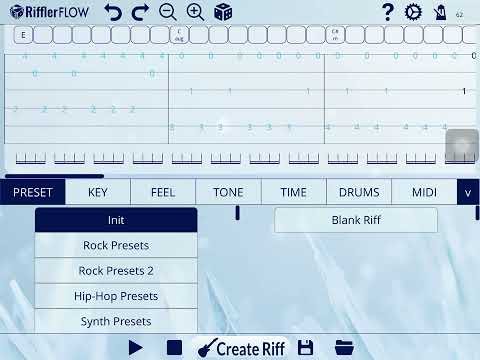
    Riffler Flow struck me as dream for soft rock and ballads, though I am sure it covers other genres that I haven’t explored yet. One thing it has that I wish original Riffler had are diminished chords, add9 chords and sus chords.

    Here’s an example of it

    Riffler flow balladish
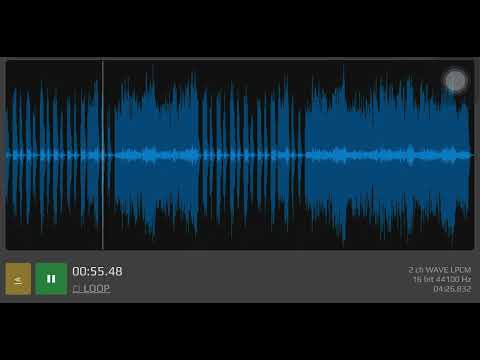
    Extended and slightly modified idea but using the midi with plain piano

    Piano ballad idea
  • @AlexY said:

    @Robin2 said:
    @AlexY. Brilliant, thanks. Never having used the app myself i couldn’t quite follow exactly what you were doing but you were clearly editing it to create what you wanted and not generating it. Seemed quite an effort to get there though - i think I’d find it quicker to do the same on a piano roll myself? Thanks for showing me what’s possible, appreciate it. Cheers.

    Yw!

    It would definitely be a lot more direct if one could just draw the notes on the TAB diagram instead of having to tweak the knobs to create the base notes and then buttons to move them up or down the strings.

    Assuming you know about GeoShred already, another option might be Jam Maestro.

    https://apps.apple.com/us/app/jam-maestro-create-guitar-tab/id596628003

    It looks like it can sequence other apps, but not sure if it will receive midi. It also only seems to support IAA if that is a dealbreaker.

    Edit: for what it’s worth, I think an update to Riffler that will allow it to receive midi is in the works. I believe I saw that in the forum’s Riffler thread, so it might be worth your investment at this price. 👍

    Thanks @AlexY, appreciate it. Cheers.

  • As an old metalhead, Riffler has been mind-blowing for me. You can also use it as an AUv3 and run its clean dry tone through Rhino/Tonestack/Nembrini amps to achieve a good amount of sonic violence.

  • @Poppadocrock said:
    Welcome @DSZA and thank you for the information.

    @Fear2Stop thank you as well

    A simple login is not a big deal, and worth some good ai art generation, cheers.

    Just don’t use it for album art unless you want to look like a boomer ;)

  • New Release

    Carnatic Keys is new and currently $.99
    https://apps.apple.com/us/app/carnatic-keys/id6480026052

  • edited September 2024

    @RonnieOmelettes said:

    @Poppadocrock said:
    Welcome @DSZA and thank you for the information.

    @Fear2Stop thank you as well

    A simple login is not a big deal, and worth some good ai art generation, cheers.

    Just don’t use it for album art unless you want to look like a boomer ;)

    I thought that's what we have XP4N for...? 🤔

    Edit: but srsly, I'm going to be using a combo of XP4N and Imaginando VS (and better learning of alpha layers) to add to my loopy music vids to give em a bit more than just "Heres Donuts! Here's the sequencer! Aaaaand back to Donuts!" until I can add live play footage to the mix

Sign In or Register to comment.