Loopy Pro: Create music, your way.
What is Loopy Pro? — Loopy Pro is a powerful, flexible, and intuitive live looper, sampler, clip launcher and DAW for iPhone and iPad. At its core, it allows you to record and layer sounds in real-time to create complex musical arrangements. But it doesn’t stop there—Loopy Pro offers advanced tools to customize your workflow, build dynamic performance setups, and create a seamless connection between instruments, effects, and external gear.
Use it for live looping, sequencing, arranging, mixing, and much more. Whether you're a live performer, a producer, or just experimenting with sound, Loopy Pro helps you take control of your creative process.
Download on the App StoreLoopy Pro is your all-in-one musical toolkit. Try it for free today.
Comments
I think it has to be the WIDI Master, Jack or Uhost, the Bud Pro is supposed to go on the computer side.
Thanks, that is good to know, I've got it on the list as well. I've got an older CME WIDI Master that seems to work well so far, though I know CME has continued to evolve and add new devices. I haven't looked at the WIDI Bud Pro, but it's good to have there if I do hit issues with the WIDI Masters ... which I probably need to update at some point, but nothing in my way yet.
Ah - yeah, I haven't stayed up to date, but have a couple of the WIDI Masters, one of which I'm using now with an old Evolution X-Session, which is alright. Think I'm going to need to play with what I've got for a little bit and get a better sense of exactly what buttons/knobs/faders and counts I really want on a device before I go grab anything. I have a specific workflow I'm trying to achieve, and I'm getting closer every moment. Ultimately, the less I have to touch the screen, the better.
Kinda nuts to me to rely on Bluetooth for a live situation. At home you have maybe a handful of Bluetooth devices around. In a live venue you could have hundreds. Bluetooth is radio communication. Potential for interference is huge.
(on the other hand, so is potential for ripping out a cable by accident. But at least that's predictable. 😎)
Yeah, I agree with that. It's fine for what aim doing in the studio for the moment. All the other hardware I've got is connected physically for MIDI. I could add more otherwise unneeded hardware to connect the X-Session, but for the moment the WIDI Master just happened to be the fastest thing at hand to get going. If/when I do upgrade my controller, going to need a MIDI merge box as well, as there will be at least three input devices now. Might want another anyway for outs just so I don't have to disable local on the Summit.
While Ive heard of people talking about periodic disconnects, I rely on M-Vave pretty much exclusively for all my in home production (all Bluetooth) and have had zero disconnect issues. All have treated me quite well
Smc-pad, -mixer (8 track lanes of 360 encoder, fader, 4 aux buttons [mute, solo, etc, but editable], transport controls), and 2x chocolates
I also use their wireless guitar adapter (less regularly, but still on brand)
And I use two of their bt midi adapters, one (all the time) on my launchpad X, and one on a nanopad (while they have the same names on screen, they read independently when connected simultaneously)
I'm not using them ALL at the same time all the time, but I swap between em for hours long sessions and have never had even a hiccup from any of em
As someone with almost liturgically consistent tech issues (after the wife noticed, she mentioned something about 'sliders' she'd heard about. Not the capital S tv show Sliders), the solid use I've gotten from M-Vave products for the past year+ is constantly surprising (and comforting? )
)
But take that as you may, of course
Always good to have direct feedback from hands-on experience. Which iPad to you use them with?
Sorry, you’re right - I use the Bud Pro with an Ableton Move and got confused… 😕
Widi Master with the 5-pin midi out port on the MiniLab… 👍
I've got 3 mwave controllers, one mixer and 2 keyboards. Haven't experienced any disconnects, very, very happy with them, nice build for the money too
@wim @PapaBPoppin
On that note, from what I can tell, the M-Vave SMC Mixer (which I think I'd prefer over the Pad, not sure) supports MIDI over USB as well, so seems it can also be used non-wireslessly (that felt weird, but I'm going with it).
For other things in a similar form factor (so I can fit it on top of the SL88), one advantage it also has (for me anyway) over the Akai MIDIMIX, Korg nanoKONTROL2, Korg nanoKONTROL Studio, and Studiologic SL Mixface is endless encoders. The Behringer X-Touch Mini seems to as well, but has only a single fader and less buttons. Perhaps that can be worked out smoothly with paging, not sure.
I also think if I was using sound sources on the iPad rather than all external gear, and/or even drum machines on the iPad instead of the DrumBrute Impact, the SMC-Pad might feel like a stronger candidate compared to the Mixer.
But yes, that SMC-Mixer seems like a pretty decent grab, with a form factor a little less than a couple centimeters deeper than the Evolution X-Session, so workable.
I have a nanokontrol studio, and I prefer the build of the mwave mixer. Be aware that you need some kind of third party app to customize things on the iPad. Forget the name, Cube something or other. That app is not great, but it does the job. App is the weakest aspect of the experience, the controllers themselves are great value
I don't mind the one time hit. I had to do a dig to come up with the ancient (now) software app to configure the Evolution X-Session as well, since since of the controller CCs had been tweaked. Eventually followed links to archive.org, as everything leading to m-audio was dead.
The app itself isn't great either - it's confusing to understand exactly what CC's are getting written to what, it has several presents with a blanket CC range, but no clear indication of what is getting assigned to individual controls. In the end I don't actually care, as long as I can use MIDI Learn and map whatever I'm touching.
So yeah, one time to get anything setup I need to, no problem. I ordered one for around $45 for here in Mexico where I'm currently at. Won't get it for a week or so, but that's fine, will keep going with the X-Session for now and figuring out more of my workflow.
Thank you! Good find, great to get feedback on this!
Yes, it can be used non-wiredly, wiredly, wirelessly, and non-wirelessly. Or even wired to a power plug and wirelessly to the iPhone/iPad at the same time, as well as powerdized, batteryized and all the rest.
Lol, let the wiredly, wirelessly, unwiredly, unwireless journey begin at the start of the first entry prior to what comes after.
I decided to give the SMK-25 Mini a chance. At first I thought that the wireless connection seemed kind of high in latency, but then when I tried a wired connection and felt the same sort of latency, which made me think that this was more about the feel of the keyboard than a connection issue.
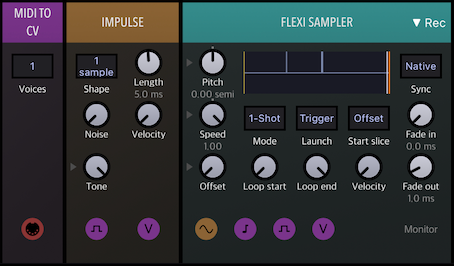
To test my idea, I set up Drambo to listen for events coming from both connections and saved a single impulse sample to an audio file, like this:
Then I used Audacity to measure the time between the two impulses:
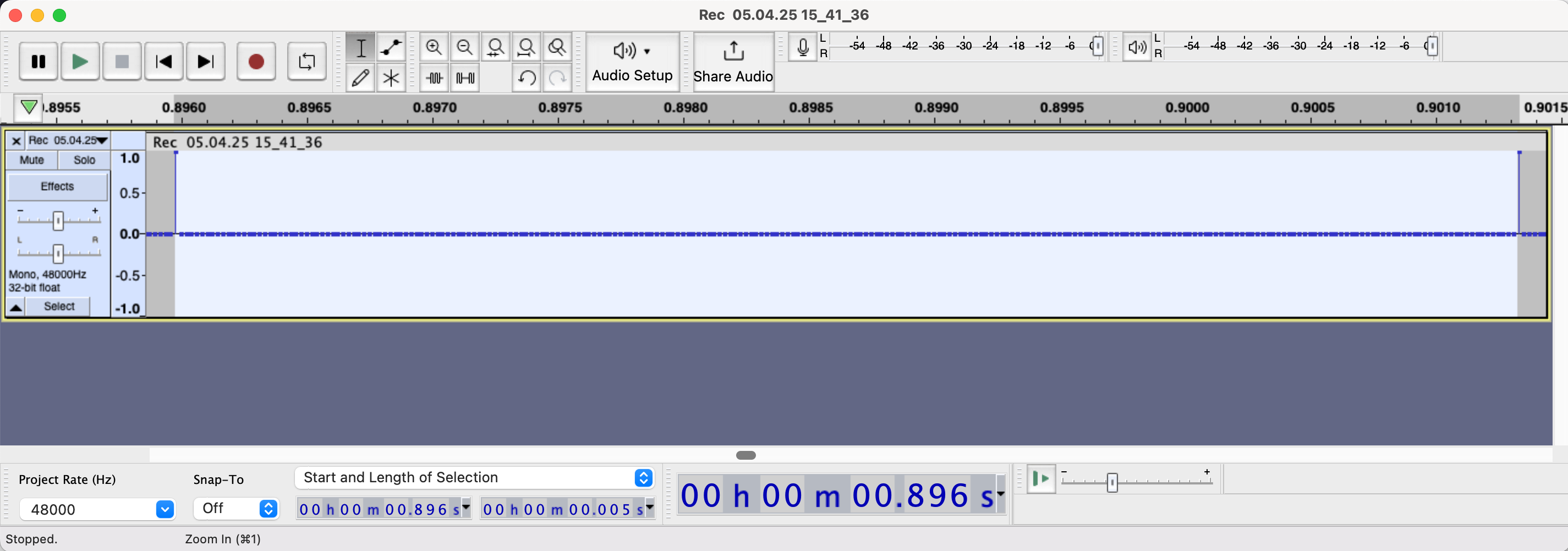
This seems to indicate that the difference between wired and wireless is just 5 milliseconds, which is actually quite good. Does this approach to measure latency seem reasonable? Have you experienced "mushiness" in other M-Vave keyboard models that could be interpreted as latency?
Edit: to be even more precise, the distance between the impulses is 257 samples, which is 5.35 milliseconds at 48 kHz.
That latency is along the lines of what I have measured with a different method BUT I found BT latency to have variation from 2 to 10 ms. For me that is acceptable and works ok. I have come across people for whom that slight variability is a buzz kill.
5ms is more latency than the difference between BT and direct USB than I’ve measured with NanoKEY Studio. My tests had sub 3ms, and usually less than 2ms.
@espiegel123 @wim thanks! I wasn't aware that 2–3ms was expected, especially since CME advertises WIDI's 3ms as "ultra-low". I really like the convenience of the wireless connection but the fact that even when wired this keyboard seems slow-reacting to me makes me think that the bluetooth latency is not my issue with it.
Well, it turns out that my inner nerd won out this time: here's my recently modded Keystep 37:
There's now a Widi Jack and a lithium-ion battery pack inside of it. It involved very little soldering and the only functionality I sacrificed was powering it through the barrel connector. Again, latency tests exhibited very similar results to the SMK 25 mini, so it's quite clear to me that what I originally thought was latency is actually just the feel of the keyboard.
Here's what I like:
Push Encoders
Display
Buttons
I'm about to do the same, power source inside sounds good!
Did you use a power bank or just a Li-Ion battery? If so, which voltage and connected to what?
And what about charging?
It's a 4400 mAh Li-Ion (this one) connected to a charger module (this one). I think the battery has way too much capacity for this purpose, so I may change it for a single-cell Li-Ion (2200 mAh) or a smaller LiPo that will also fit better. The SMK 25 itself uses a 350 or 720 mAh LiPo, I forgot exactly what. I thought about using a power bank first, but I couldn't find anything that would actually fit inside.
I re-routed the incoming power of Keystep's USB input to the charger input power, and, similarly, I re-routed the Keystep's switch to engage or disengage the charger module's output power going to where the USB power originally went. This was all made quite easy because the Keystep power goes through a JST connector, so I just had to unplug that and make the connections to the plug and the receptacle. I can provide a circuit schematic I drew but that I put away elsewhere.
I don't know if you plan to bring the wireless MIDI module inside too, I just used a 2.5mm TRS plug and cable and soldered the wires to the MIDI out on the board. If there was a smaller footprint module I'd rather use that (like the old Quicco Mi.1), but the WIDI Jack fit great inside the keyboard and the wireless connection has had no issues.
This thread is making me nostalgic for lockdown and my greatest DIY achievement. 8 wooden Bluetooth push encoders. A teensy board, a Yamaha ud-bt01, li-po battery and an unfeasible amount of wires rammed into a vintage cigarette box - was like getting a ship into a bottle (not that I’ve ever tried that).
Still my pride and joy, though mostly ornamental despite all the effort that went into it.
It is a great ornamental piece though, that's beautiful! What did you use for charging the battery?
That's great @Grandbear, thanks a lot!
In fact I currently have my Quiccos connected but I found out that the Yamaha MD-BT01 can be opened easily and they have wonderfully tiny PCBs inside, perfect for implanting into the Keystep.
So to make sure I understand, the charger PCB acts both as a USB power to LiIon charger as well as a boost converter that can feed the Keystep from the LiIon battery on the Keystep's USB power line?
I'm asking because if you switch the power between step-up converter and Keystep then the converter will continue to draw power from the battery even if the Keystep is switched off, no?
I'm thinking about repurposing an old powerbank now because these usually switch off the internal converter when there's no load at the 5V USB output.
Aah, that's great, can they be hooked up directly to the MIDI DIN pins? How do they get power?
Yep, that's all correct, the converted even "helpfully" tells you it's drawing power with a green LED in this case. I'm planning to break apart one of the connections between the battery and converter and use the other pole of the switch that's now unused (that's what controlled the power from the barrel connector).
Yeah, if you can find one that fits that's definitely better I think, and doesn't require insulation. Please let me know which one if you do find one.
Well, all my ornaments are things that are still going to useful any day now…
Battery is a dismantled ‘Juice Cube’, basically just a regular 5v power bank, so I can charge with a micro usb cable to the original port.
Yes, same as the Quiccos, they're powered by the 20mA current loop provided at the MIDI Out port.
Hey, good idea!
I'll have a look which ones actually stay powered on with the relatively low power draw of the Keystep. My biggest power bank doesn't, that much I know 😅