Loopy Pro: Create music, your way.
What is Loopy Pro? — Loopy Pro is a powerful, flexible, and intuitive live looper, sampler, clip launcher and DAW for iPhone and iPad. At its core, it allows you to record and layer sounds in real-time to create complex musical arrangements. But it doesn’t stop there—Loopy Pro offers advanced tools to customize your workflow, build dynamic performance setups, and create a seamless connection between instruments, effects, and external gear.
Use it for live looping, sequencing, arranging, mixing, and much more. Whether you're a live performer, a producer, or just experimenting with sound, Loopy Pro helps you take control of your creative process.
Download on the App StoreLoopy Pro is your all-in-one musical toolkit. Try it for free today.
Help making Dedf1sh (Splatoon series) style music
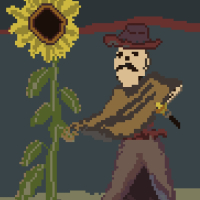
Check out Dedf1sh’s music here: 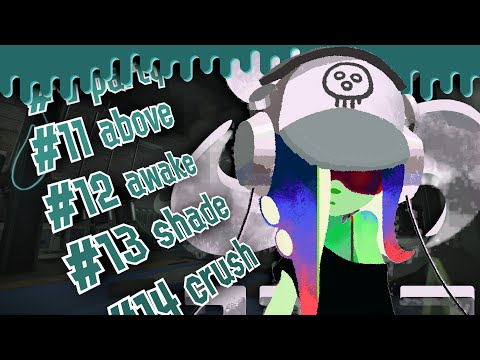
I'm eager to dive into a music project inspired by Dedf1sh, the fictional artist from the Splatoon series. Think lo-fi vibes, glitchy sounds, lots of synths, and heavy loops. I’m planning to tackle this using Groove Rider 2 and/or Cubasis 3, but I’ve got a solid collection of other DAWs and tools too (Drambo, Koala, Loopy Pro, Logic, you name it) along with a good lineup of synths.
I’m really focused on finishing a project. I've been learning and experimenting a ton over the last few months, but I want to pull everything together and create some tracks I can genuinely be proud of.
I’m particularly aiming to capture the essence of these tracks:
- shell
- ripped
- thirsty
- regret
Here’s what I need help with:
- Glitch effects and resampling advice. This is all pretty new to me, since I usually come from a guitar/drum background (unless you count my Tom Morello-inspired glitch solos, haha).
- Suggestions on synths, sequencers, drum machines, or anything else that fits this style.
- Workflow tips. Should I start with beats? Find a good synth first? Pick out some chord progressions? I know it’s subjective, but I’d appreciate hearing different ideas.
Right now, I’m working on emulating the vibe of “8. regret.” It seems pretty straightforward—I’ve got some drum samples that I ran through RottenPoolVerb for some gritty reverb, and I’ve sampled in Koala. I’m using a standard electric bass for a two-note line, but I’m stuck on the synths. Is that a sample being played in reverse? What about that wobbly lead melody?
I know this is a broad question, but I’ve been eager to tackle this project for a while, and I’ve done my research but could really use some guidance now. If this isn’t the right spot for this post, just let me know!
Comments
Here’s another song I really like. #47 onward
This might be the one I analyze as the cornerstone of the project.
Video on replicating Splatoon style vocals:
First of all, I'm a HUGE fan of Nintendo music, from the NES days through to now. I won't lie, I'm much more familiar with the soundtracks for the Animal Crossing series than the Splatoon series. 😂 (Animal Crossing nerd alert, lol.)
Second of all, upon first listen (actually paying attention rather than listening passively), the tracks sound a lot like Lofi and Drum-n-Bass had a few lovely children, with some tracks having a bit more of a Dubstep beat. You may want to look into sample chopping.
Lastly, I'm going to analyse the music (this may take a day or two) and try to possibly create something in Cubasis 3 for you, jotting down notes as I go along. You say you have Koala, which is what I usually use for drums in Cubasis 3. Tell me, what synths do you already have? If we share some of the same synths, I can concoct something in Cubasis easily.
Also, do you have all the IAPs for Cubasis 3? Like NeoFM, FM Classics, Halion, Iconica, etc?
Being a Nintendo music fan doesn’t surprise me since you mentioned a love for Chiptune music
I have the following Cubasis 3 IAPs
Here’s a couple screen grabs of my instruments from Aube 2:
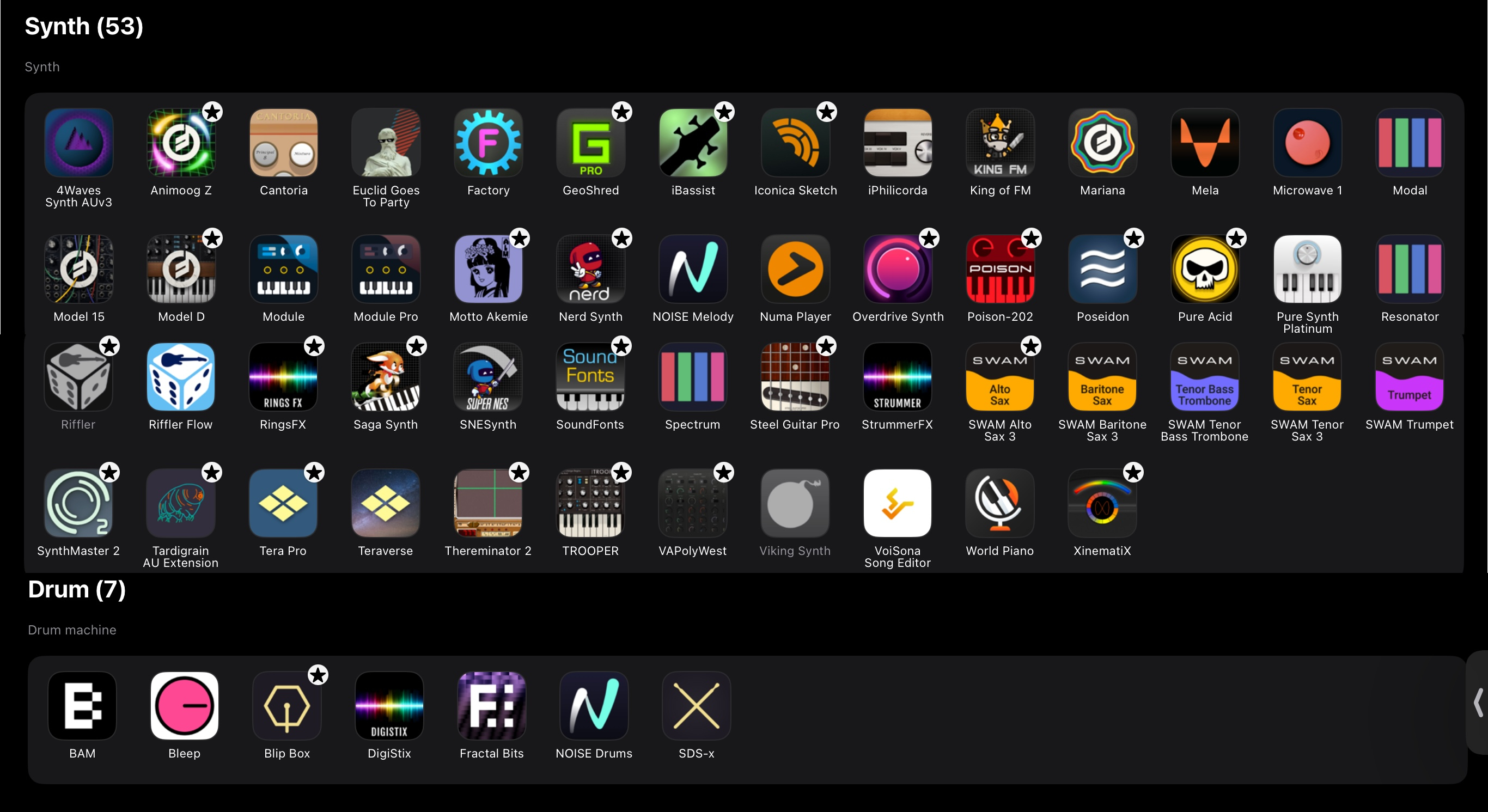
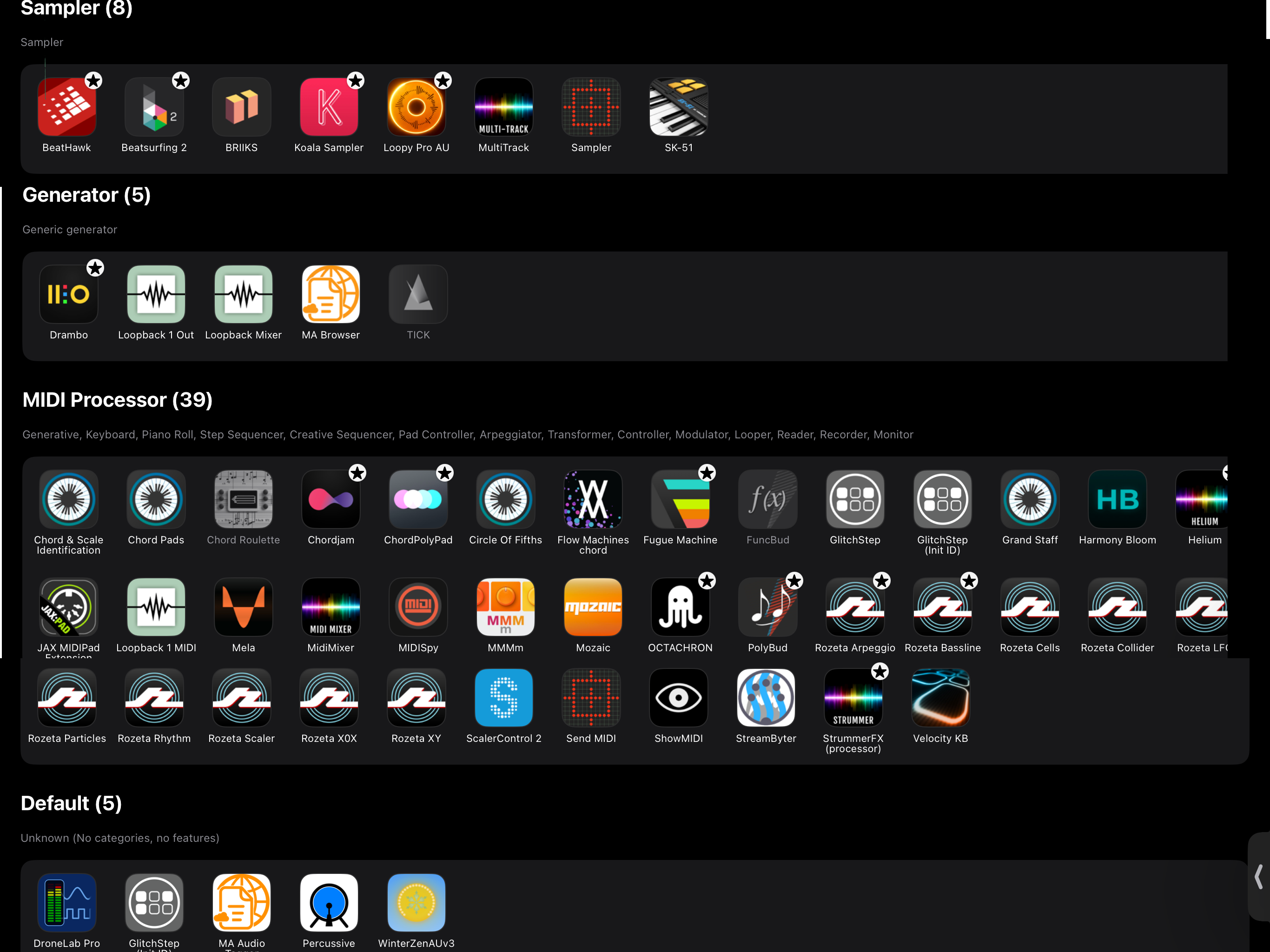
I also have the Lumbeat drummer suite which may prove useful.
Perfecto! Thank you for the screenshots and the info. This will definitely help me to help you, mate. I do highly recommend Halion, FMClassics, and NeoFM as IAPs in Cubasis 3. Especially Halion.
Here’s my plugins as listed by Aube 2. I don’t want to get too plugin reliant but I’m not afraid to reach in the toolbox.
This definitely helps a lot. Okay, so you want to stick more to internal sounds?
  I suggested you get the Halion, FMClassics, and NeoFM IAPs as soon as you possibly can. I may or may not use sounds from those. I'll try to stick to Micrologue as much as I can for the synth sounds, but can't make any promises.
Edit: And Poison-202 as well, which is a great synth.
The answer to any question is… Drambo. It can be loaded into any DAW and can be loaded there as an Instrument or an FX app. So, many of the required FX features could be created as Drambo “Presets”..
Drambo has multiple file types and frankly I haven’t done the work to learn it but it’s deep. And over the long term would be the low cost solution.
If you’re interested @rs2000 will he someone you should get to know.
“Just use Drambo I heard it’s good” is a pretty shallow response and doesn’t address anything regarding my original post.
You are definately new here… but someone will help you and I hope you appreciate the effort. DRambo can glitch, pitch shift,
and supply dozens of modules. The alternative will be to learn each tool and it appears you may need help on each.
Good luck. I do thank you for exposing me to “Splatoon”. Goona check that shit out.
Yeah I realized I was pretty snappy after writing that. Apologies for being so short!
You can’t be much shorter than 5’ 7’.
It’s a good strategy to break a big ask into smaller questions. Every conversation moment keeps your thread alive.
I would like to enjoy good answers but sometimes a quit question needs a long answer. A long question definitely barely needs a lot of work.
Personally, I’m interested in glitching to start… I probably own a few glitching apps. Rapid triggers of one-shot samples with a choke feel n the new note is an easy start.
I like that style, it sounds like a modern, refreshed "Nintendo" version.
First of all, yes, this could all be done inside Drambo with built-in modules but this is true for other DAWs/Grooveboxes as well.
Your questions are fairly generic - is there anything specific you'd like to start but struggling with?
Maybe start with one sound?
With my foot hopefully dislodged from my mouth, I’ll say I’m definitely open to Drambo. Seems Drambo + Koala in a half decent DAW can get you pretty much anywhere you want to go.
Glitching is definitely my blind spot on this project. Fractal Bits is giving me some cool sounds to sample, and seems like Glitch Step could do good work here.
@jwmmakerofmusic with the Steinberg sale going I grabbed Halion and NeoFM. I’m excited to give them a go so don’t feel like you need to shy away from those.
@FizzyLizzy27 Got a sound example (time position in a video) for the kind of glitching you're after?
I’ve vibed hardest with “#8 regret” which starts at 8:02 on the video in the OP. That fluttery stutter effect that comes in right after the drums is an example. Around the 9:50 mark there’s some broken record effects going.
The opening song “#0 shell” has so many noises floating around that I’m not sure how to tackle that. That pulsing broken record “wah” instrument, lots of reverb heavy metallic clacking sounds, chirpy noises phasing in and out.
The second video “#47 onward” has a breakdown at 01:20 with the gliding synths and some stuttering. I’m realizing the stuttering and pulsing are what I need to figure out
This is a good effect to learn about… I think of glitching as rapid drops in the volume and have seen someone in Cubasis use volume automation (CC 1 or maybe 7? Google that Alexa or have Siri do it or I’ll use Gemini).
I’m sure someone will have solid tips on the audio segment you suggest. The secret is to keep you thread from retiring on to the lower pages to be forgotten.
Sadly though I have Drambo I haven't tried it out in near 4 years. I'll let @McD educate both of us. 😅
Once I'm home I'll check what glitch effect apps I have. I think Effectrix would work for this style to be honest, but I'll look further into what else there is that I've purchased.
Excellent work! You won't be sorry with those purchases.
This__ one shows how to do glitching by editing in Cubasis:
Mark was very active here for abot a year… as the @bedheadproducer. His video library of tutorials cover a huge amount of
technoiques and demonstrate his amazing guitar shredding skills. The video editing is also top notch and filled with humor.
You can definitely do this in Drambo. In fact, I just did…
I whipped up a tune in Drambo using only stock instruments and effects that is similar to “8 - regret” in the first video you posted. The file is attached and I’ve annotated the tracks to explain some of the glitch effects you can do with modulation. For my money, nothing gets glitchy like Drambo when you start getting into its toolbox. And of course, if you add Auv3 synths and effects to the mix you can create some amazing stuff.
Let me know if you have any questions
Definitely super helpful, even for me who thinks I know it all. 😂 Thanks for posting this mate.
. sorry I needed to delete an extra comment
Reminds me of Tom Morello’s “kill switch” and DJ emulation style solos in “Sleep Now in the Fire” and “Guerrilla Radio”. Here’s a video:
Basically have one pickup full volume with the other off and flip the pickup switch back and forth on sustained notes. I used to do it all the time which may explain why the volume switch is finicky on my old electric.
Here’s a video of him talking guitar techniques in general. I’ve done a lot of this on guitar, so it’s helping translate it back to electronic music by thinking in terms of guitar effects.
Hey @FizzyLizzy27 , I apologise for the length of time it's taken me. Were you yet able to make something in this style?
Also, if anyone else has advice on this topic, don't hesitate to share. ☺️ Thanks.
I actively listened to the original 21-minute video about three times today (rather than passively listened). What I've noticed is how most of the tracks seem to be written in some sort of mellow Drum & Bass genre. Some drum patterns are that of Dubstep, and some are HipHop. But I didn't find any "four on the floor" grooves in the Dedf1sh tracks (thank goodness, since I'm burnt out on the "four on the floor" grooves).
Okay, so instead of creating a complete project and sending that to you and explaining everything at once, I'm learning alongside you @FizzyLizzy27 . I will eventually send to you the final project regardless, but only once it's complete.
So, what I did for this first attached example was lay out the chords and bass with the default piano sound. I set the BPM to 160, and used A Minor for the key (not that the specific key and chord progression matter since you can go with whatever chord progression and key you desire). No melody juuust yet (if there'll be one that is, or the chords will be the main feature). The idea sketch isn't exactly what will end up being the final thing. I may chop up the chords for some rhythmic effects once I copy/paste the MIDI to a pad. Or I may use Effectrix or even simple audio editing. To be determined.
(I need to check above to see if you yet have Effectrix. If not, unfortunately it is a $25 full unlock IAP which I can't gift you (since Apple in their infinite lack of wisdom decided to not allow the gifting of non-subscription IAPs, sigh).
Then what I did was lay out the drum samples in Koala Sampler. I heard a lot of very simple punchy drum samples rather than anything complex, so I used the samples from the infamous "Superdrums 8000" sample pack (not sure if it's now discontinued, but it's the late and great Doru Malaia's masterpiece!) I used one choke group for the kick, snare, and tom fill. I used another choke group for the hi hats. The crash cymbal is...a crash cymbal, obviously. The reverse crash is actually a ride cymbal reversed and stretched to one bar.
I mostly programmed the kick and snare on an 8th note grid, the hi hats on 16th notes, and for the "glitchy" effect, programmed those drums on 32nd notes.
Anyways, hope this helps so far.
Okay, so I realised that an "idea sketch" is not really all that great for giving advice, so I decided to break each section down in the attached walk-through (see below all this text for said audio walkthrough).
As mentioned, the track is in A-Minor at 160bpm with the DnB style. You can choose any BPM, key, and chord progression you wish. It's all up to your imagination.
The first 8 bars show off the basses. There's a subbass (a sinewave from Micrologue) being affected by Bleass Saturator. Nothing much to write home about as it's more of a utilitarian thing. 😂 Then there's the midbass, which is the more interesting of the two effects. I used two sawtooth waves an octave apart, and I slightly detuned the second oscillator. I also used Bleass Saturator on this, but of course used Cubasis' studio EQ to shave off a bit of low-end so the subbass shines through. Of note, I used Micrologue's LFO to add some movement to the filter cutoff as well as a slight pitch wobble. 😉
The next 8 bars shows off Cubasis' Lofi Piano. This has a lot of glitchiness to it. I tried to use Effectrix, but it was lackluster for my purposes. So what I did instead was I froze the MIDI to audio, made a shitload of edits by hand (making use of the fade handles, repeating some audio, reversing some audio, etc etc etc), then freezing the audio again. I slapped on Cubasis' reverb and studio EQ.
Then the next 8 bars shows off Cubasis' NeoFM Gentle Synth Pads. Similar process as the Lofi Piano where I froze to audio, made a bunch of edits, froze to audio again, and added reverb and EQ.
The next 8 bars are the drums, which I explained in the previous reply. However, I'll reiterate that I used Koala Sampler, choke groups, and a lot of 8th notes, 16th notes, and 32nd notes. This helps give the whole thing a glitchy feel. I did use ToneBooster's Reverb on this one since I could shave off the low-end with its internal EQ in order to prevent muddiness. I noticed reverb on the drums in many of the Splatoon Dedf1sh tracks, so decided to add a small amount of that.
Next 16 bars compile everything together. (The reason I did 16 bars is the drum pattern is slightly different from the first 8 bars to the other 8 bars).
And, if you notice, there is some sidechain ducking going on with the basses, Gentle pad, and Lofi piano. This was achieved by placing Cubasis' Channel Strip and routing the Koala track to each channel strip. I turned off the auto makeup gain, reduced the length of the release to taste, and adjusted the threshold to taste. (A small "rule of thumb" for sidechain ducking - the higher an instrument's notes are in a mix, the shorter the release time should be, and the less intense the threshold should be. Basses require just a bit more threshold and release to let the kickdrum shine through. Then again, "rules of thumb" are meant to be broken, but stick to this "rule of thumb" just for now.)
In summary - just freeze most things to audio and edit by hand. Drums can be glitched out with Koala using choke groups and somewhat clever note programming. Other elements (especially sustained ones) should be frozen to audio and edited further from there. Cubasis has fade handles, the "repeat" handle at the middle of the right side of each clip, you can select a group of clips in a lane and adjust the fade handles all at once, etc. Then Cubasis has a transpose function where you can transpose a clip by cents, semitones, and/or octaves. And if you double-tap a clip, you can even reverse it in Cubasis' simple audio editor.
Yes, I discovered all this through trial and error. From what I've discovered, editing everything "by hand" may be a bit of a pain in the ass, but it allows me a lot more control over the final results.
(Also, you can even edit the final audio loops even further if you really want to!)
Hopefully this helps. Now for me to structure out and finish the piece of music.
@jwmmakerofmusic nice work evaluating and creating a project in this style.
Thanks mate. I'm not quite finished with the project. Gotta structure it out, maybe add something here and there, maybe a B section as well. Not sure juuuust yet. 😂 We'll see soon where my creativity takes me.
I don’t really know a lot about this genre, but here’s a couple of links that might be of interest…
https://apps.apple.com/gb/app/beatly-pro/id1550189157
And from YouTube…
Great work @jwmmakerofmusic
Man, I’ve been trying to type up my progress for a few days but am having a hard time figuring out where I’m at. Here’s a brain dump of where I’m at:
There’s been a lot of sound hunting and active listening so far. #8 regret is hands down my favorite track. Every time I load up the video it’s the first and last song I listen to. It’s more lo-fi and chill than some of the other tracks, but it’s the one I keep trying to replicate.
AUv3s and instruments I’ve been testing out with thoughts:
FilthyPoolReverb with Koala is working well to get grit on percussion. Still haven’t landed on something I really like. I’m lacking on samples and would appreciate suggestions.
Ochtacron is a good sequencer
Motto Akemie is fun
Koshiba is cool for glitchy gates based on presets and finagling with it for a bit.
VHS synth has some great pads. Cool with Koshiba
Poseidon has some presets I like. Cool with Koshiba
Loopy Pro - still learning but good for sketching ideas. Is running multi bus inputs in AUM a good way to implement loopy?
Mariana feels good for sub and bass
iBassist is real heavy running through Mammoth. Very similar to the bass in #2. Is using iBassist cheating?
Hardware input:
I’ve been trying to get some audio samples from my electric bass for some “physicality” but it sounds out of place so far.
Electric guitar might work for some spacey leads or a pad like effect using some Moogerfoogers, black hole, ghost chorus, and/or other desert cities. That would be way more expressive than MIDI.
Thoughts:
I have a lot more fun sound hunting and working on ideas in AUM than Cubasis. Cubasis might be the place to bring ideas into once they’ve cooked a bit. I do like the drum machines and haliosonic instruments.
I’ve got more notes on the songs and structure but I’ll get to that another time. I think a drum module or two, a King of VHS pad, a lead synth, an electric bass (iBassist, Cubasis, or GeoShred might be contenders), and some strings would be good starts. Using dynamic plugins will help bring in the glitch.
I’ve read the responses so far but haven’t had time for direct responses. Just know I’m finding all the input very useful!