Loopy Pro: Create music, your way.
What is Loopy Pro? — Loopy Pro is a powerful, flexible, and intuitive live looper, sampler, clip launcher and DAW for iPhone and iPad. At its core, it allows you to record and layer sounds in real-time to create complex musical arrangements. But it doesn’t stop there—Loopy Pro offers advanced tools to customize your workflow, build dynamic performance setups, and create a seamless connection between instruments, effects, and external gear.
Use it for live looping, sequencing, arranging, mixing, and much more. Whether you're a live performer, a producer, or just experimenting with sound, Loopy Pro helps you take control of your creative process.
Download on the App StoreLoopy Pro is your all-in-one musical toolkit. Try it for free today.
Morningstar MC6 Pro Question

Trying to use MC6 Pro to control loopy.
Turned off device feedback.
Also I see this:
https://manuals.morningstar.io/mc-midi-controller/loopy-pro-app
Has anyone had recent experience with this and can offer any thoughts on which option from the above link is preferable (ie: setting on/off explicitly on the loopy pro settings side or doing this in the MC6Pro editor) and also I'm wondering about the following...
I tried explicitly changing the Hold setting that erroneously appeared when I did midi learn with the MC6 Pro, changed that to On/Off in Loopy Pro.
I bound this to a button in Loopy Pro that toggles the start/stop clock and expected pressing the switch on the MC6Pro to toggle the clock on and off, just as would happen if I press the button multiple times.
But the pressing the MC6Pro switch only starts the clock, but doesn't stop/pause it, any idea why?
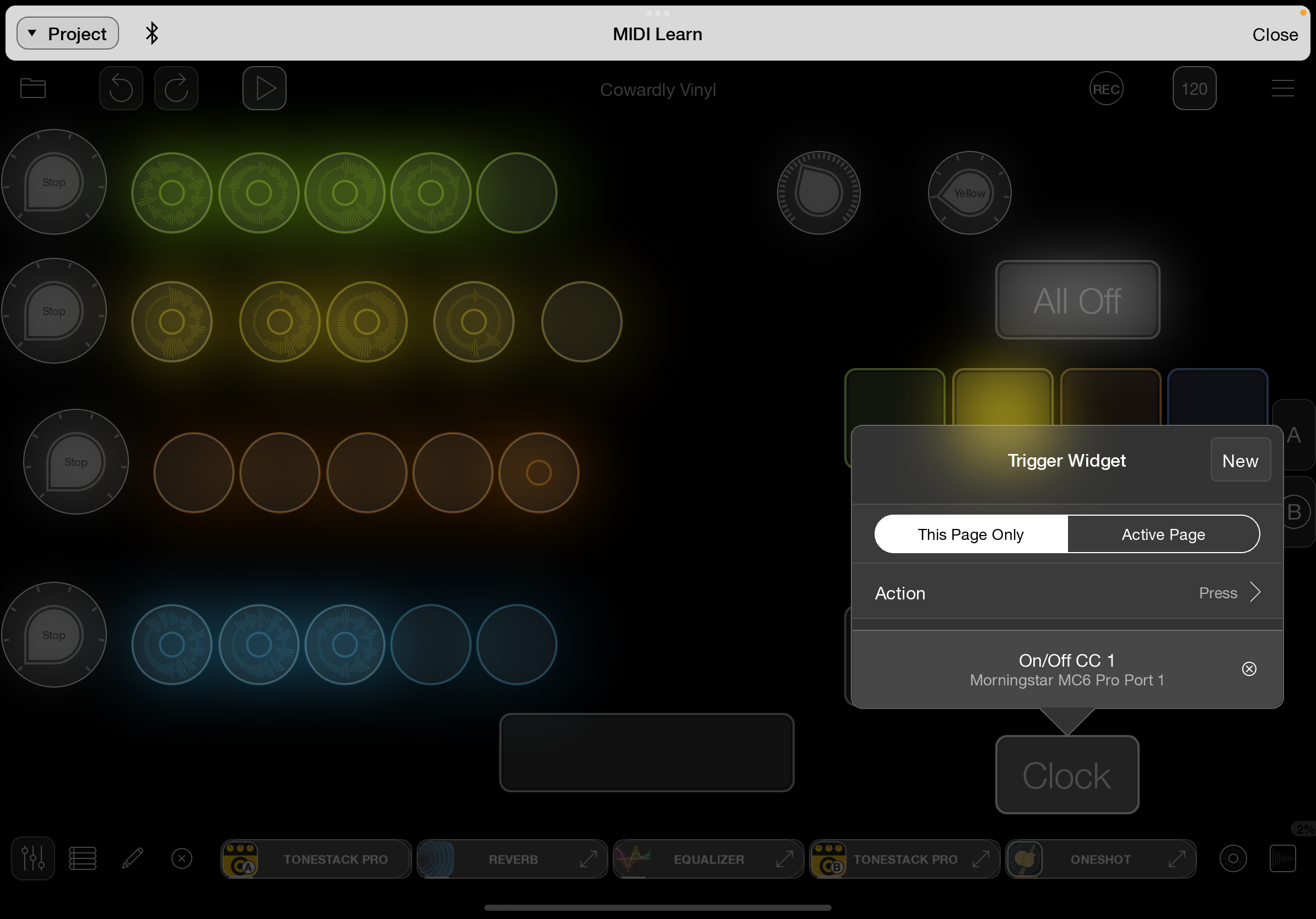
Thanks
Comments
@danm: step 1 is use a midi monitor to see what the iPad is actually receiving. If you tapped and loopy midi learned a hold, the MC6 is probably not set up correctly with true momentary behavior.
Did you try setting the trigger to on?
You don’t show the actions in the button being triggered. Does it work correctly when pressed?
I suggest taking a look at at:
https://wiki.loopypro.com/Troubleshooting_MIDI
and
https://wiki.loopypro.com/Footswitches
@espiegel123, setting trigger to 'On' (instead of On/Off) in Loopy Pro works (ie: mc6pro now starts and stops clock with successive switch presses via midi), can you explain why that works, but not on/off? What cases would use On/Off?
Yes, the button works correctly when pressed.
Will look at those urls, thanks.
@danm: see the manual re on/off triggers and when they are used.
For anyone following along, here's the URL:
https://loopypro.com/manual/#triggers