Loopy Pro: Create music, your way.
What is Loopy Pro? — Loopy Pro is a powerful, flexible, and intuitive live looper, sampler, clip launcher and DAW for iPhone and iPad. At its core, it allows you to record and layer sounds in real-time to create complex musical arrangements. But it doesn’t stop there—Loopy Pro offers advanced tools to customize your workflow, build dynamic performance setups, and create a seamless connection between instruments, effects, and external gear.
Use it for live looping, sequencing, arranging, mixing, and much more. Whether you're a live performer, a producer, or just experimenting with sound, Loopy Pro helps you take control of your creative process.
Download on the App StoreLoopy Pro is your all-in-one musical toolkit. Try it for free today.
Scenes or snapshots in AUM?

Hi folks,
Is it possible to save and recall different configurations of track states, devices, etc (mute, volume, fx on and off, even parameters perhaps) within a session, all with a single MIDI message? Like Line6 Helix’s snapshots, basically.
Beyond AUM, is this something that Drambo or Loopy Pro can do?
Thanks for your help!
Comments
Loopy Pro can do this. I'm not aware of whether AUM can do it with midi. I found this quote from Michael, responding to another user with a similar question:
"There are a few options available - you can have a totally different project for each song, and you can switch between them in a set list, with a MIDI control, including with a smooth crossfade, or preserving any effect tails, on the beat or immediate.
Or, you can do it all in the one project, and make a control to switch through presets. A stepped dial or a radio widget is good for that - put actions to apply all your presets/etc for each step. You can then bind a button to step forwards through those."
Thanks, this may be a good reason to finally give Loopy Pro a serious go 👍
Pinging @espiegel123, who may have some input as to ways to do this in the current and upcoming Loopy Pro releases.
If you use an intermediate control system like LP or Surface Builder, you have access to their own snapshot features, within AUM. Also, you can pass everything through this Mozaic patch, that I think was built by @wim : https://patchstorage.com/controller-tracker-and-snapshots/ , which will snap/store/retrieve the current state of its buffer.
@insucedible Have you checked out 4pockets MidiMixer?
https://apps.apple.com/ca/app/midimixer-for-aum-auv3-plugin/id1542209150
MidiMixer is an AUv3 plugin specifically designed for AUM which allows you to control your mix and record automation synced to AUM's timeline. You can control up to 12 AUM channels at once and create up to 8 snapshots of the mixing desk. You can smoothly fade from one snapshot into another at the touch of a button and even record these transitions as part of the automation for your song.
Automation recording is a big part of MidiMixer, and as such can record real-time movement of controls or add them directly to the visual editor. Editor tools allow you to draw automation for each control in real time as your song plays.
MidiMixer ships with a couple of default AUM session templates that will help you quickly configure AUM and MidiMixer ready to create your new song.
MidiMixer works by sending control messages to AUM. It relies on the default settings for AUM which makes setup very quick and easy. By default, you have control over 12 AUM tracks and a single group track for overall volume. You can control AUM's fader, pan, mute and solo settings for each of the 12 channels. We also provide a user option which allows you to send custom data to control other AUM settings (or a piece of MIDI equipment of your choice).
Features:
• 8 mixer snapshots with smooth fade over 0-5s.
• Record real-time control changes.
• Graphical editor with editing tools.
• Clipboard functionality for copying sections of automation.
• 2 default AUM templates provided.
• Fader lock allowing control of all faders at once.
• Control up to 12 AUM channels.
• Load and Save mixes.
• Full song state saving.
Checkout the 'Paul the Musicman' YouTube channel for a preview of this app in action.
Please Note: Although this plugin can technically be loaded into any DAW, it was designed purely for use in AUM and as such its use outside of AUM is extremely limited. Also not recommended for use on iPhones with less than 6.5" display.
... which coincidentally has just been re-released as Controller Buddy 1.0 - enhanced with support for relative encoders and take-over / pickup mode.
Unfortunately, that doesn't go as far as loading plugins, etc. It only helps at all for controllers passed through it, and only if changes are only made by the controller. It won't help if changes are made in the host or plugins directly.
Currently, there isn’t a comprehensive snapshot system…so switching projects with the project load action as Mr Tapeworm mentioned is the closest equivalent .
We are planning to add some sort of snapshot animation in the future. But it won’t be in the upcoming update. I can’t estimate anything beyond that .
AUM can load full sessions from a single midi message. There will be some delay while plugins load though.
Loopy Pro has smarts to smooth the transition between projects, so could be a better choice.
Groove Rider 2 has a way to smoothly transition between projects while running. It also has "part presets" which are basically like Ableton tracks. And, it has an advanced feature to store "parameter sets" within a part (track) and change between them live. Unfortunately, none of those are able to be activated by MIDI at this time.
None of which are exactly like what you're looking for, but those are the closest I can think of.
Thanks everyone for your input and comments 🙏
Seems like MIDI Mixer is another one to follow up next 👍
I have been building a template using AUM with TouchOSC as a control surface with the Patch Manager released in the OBXd controller and it is working great. I have 130 patch and 1200 patch versions.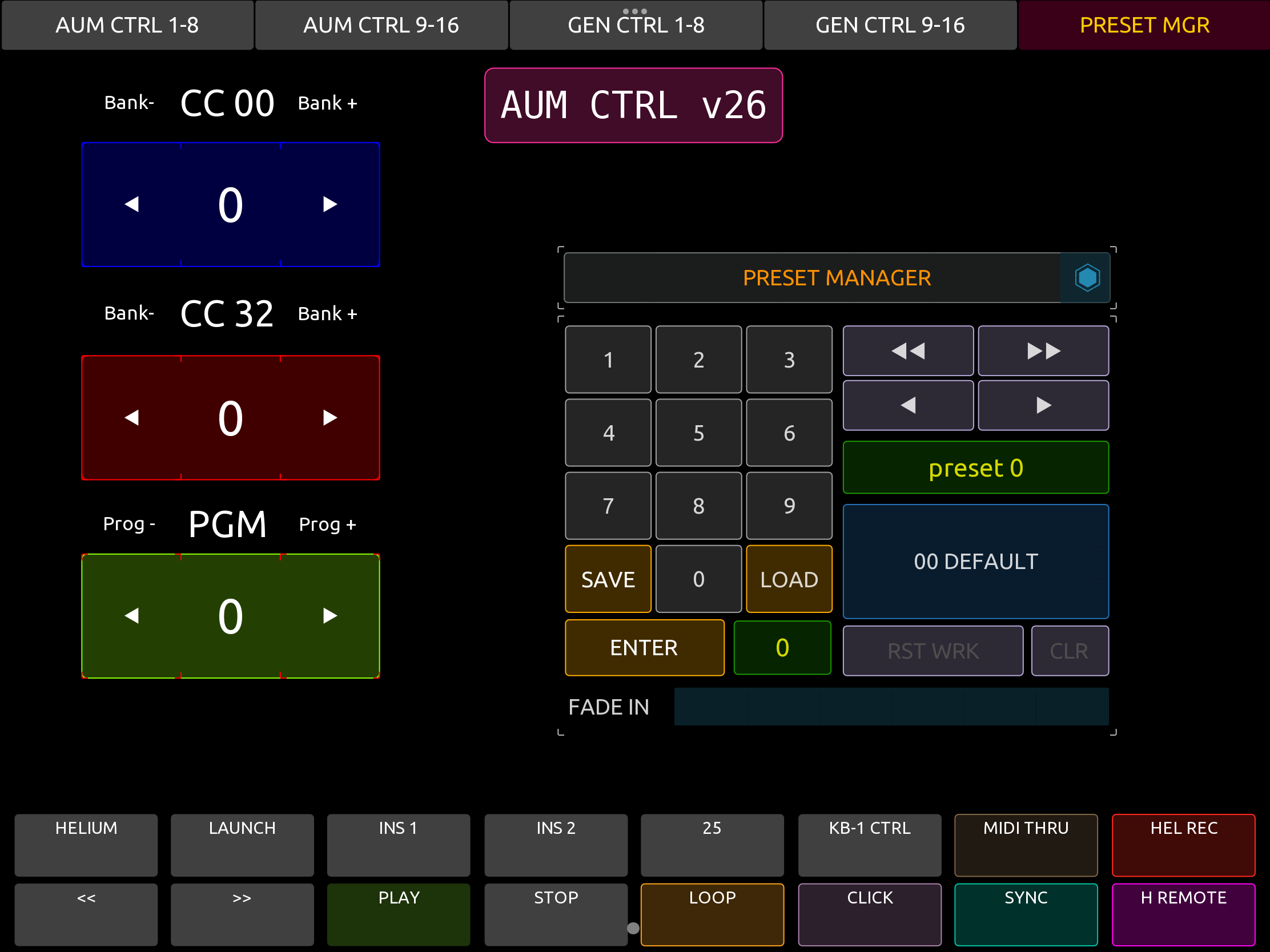
Hey everyone,
Coming back to report that I purchased Loopy Pro and can confirm that it can do Scenes / Snapshots in a variety of ways, even with smooth transitions, all in all fairly simple and very well thought out. Kudos 👌
I also have to comment on a KILLER feature: the same hardware MIDI controller, with the same MIDI CCs, can be used for completely different purposes on each layout page. This allows for unprecedented flexibility setting up a (small) physical pedalboard to control as much as you want with just a handful of foot switches. And that’s on top of identifying a wide variety of simultaneous triggers (press, release, hold, double tap and more). Chef’s kiss.
Best 💸 in a long, long while.