Loopy Pro: Create music, your way.
What is Loopy Pro? — Loopy Pro is a powerful, flexible, and intuitive live looper, sampler, clip launcher and DAW for iPhone and iPad. At its core, it allows you to record and layer sounds in real-time to create complex musical arrangements. But it doesn’t stop there—Loopy Pro offers advanced tools to customize your workflow, build dynamic performance setups, and create a seamless connection between instruments, effects, and external gear.
Use it for live looping, sequencing, arranging, mixing, and much more. Whether you're a live performer, a producer, or just experimenting with sound, Loopy Pro helps you take control of your creative process.
Download on the App StoreLoopy Pro is your all-in-one musical toolkit. Try it for free today.
Action timing

Good evening all
I think there is only one little thing to solve, and then I’ll almost be good to go : ))
@espiegel123 showed me a template to control Lumbeat Drum apps, and I am glad he did.
Here I am trying to manipulate one of the live pads. I send a note to SoftDrummer to activate one of the pads. Same thing as in the template so far and works. Then I add another step, a G3 to stop everything and add a timing to it —> after last, with a delay of 2 bars, whatever.
I expected it to switch to that pad, to play it for one bar and then to stop.
Instead it stops immediately without going to that pad first …
See photos
I assume that there is only some trifle that I’m missing
Comments
You show the timing of one action. What about the other? Is it possibly set to be quantized rather than delayed?
If you could include the images in the posts rather than as a link, that would be great.
@Zsolt can you post a screenshot also of the loopy AU instances that shows its clock
You might want to look up how to take screenshots in the device itself
@Zsolt : if by any chance the loopy AU tempo is set to 0, delays won’t have an impact. Make sure that the tempo is set
So the clocks are set to the same value on both Loopy AU instance and the project. Ableton link is always on.
This is the AU
/var/folders/nt/6wg9cj1x0831bbcmmm7677qw0000gn/T/com.apple.useractivityd/shared-pasteboard/items/641BD72D-3215-477F-9A7E-6B491A3875B8/IMG_0131.png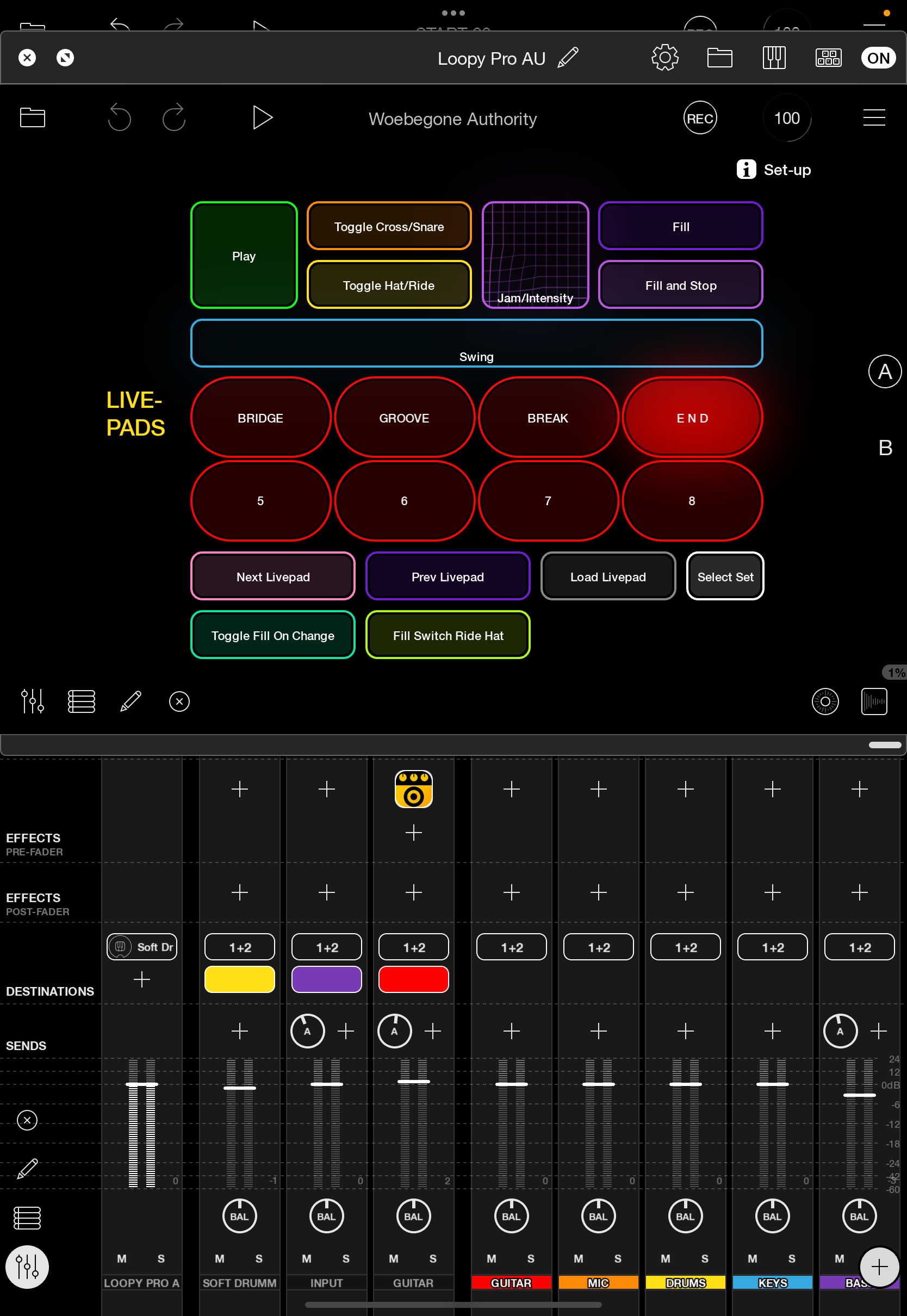
This is button 4, I want it to switch to a certain pad on soft drummer, play that for 1 bar and then to stop.
/var/folders/nt/6wg9cj1x0831bbcmmm7677qw0000gn/T/com.apple.useractivityd/shared-pasteboard/items/735DE074-F422-4FA1-83D7-64123F956C6C/IMG_0132.jpeg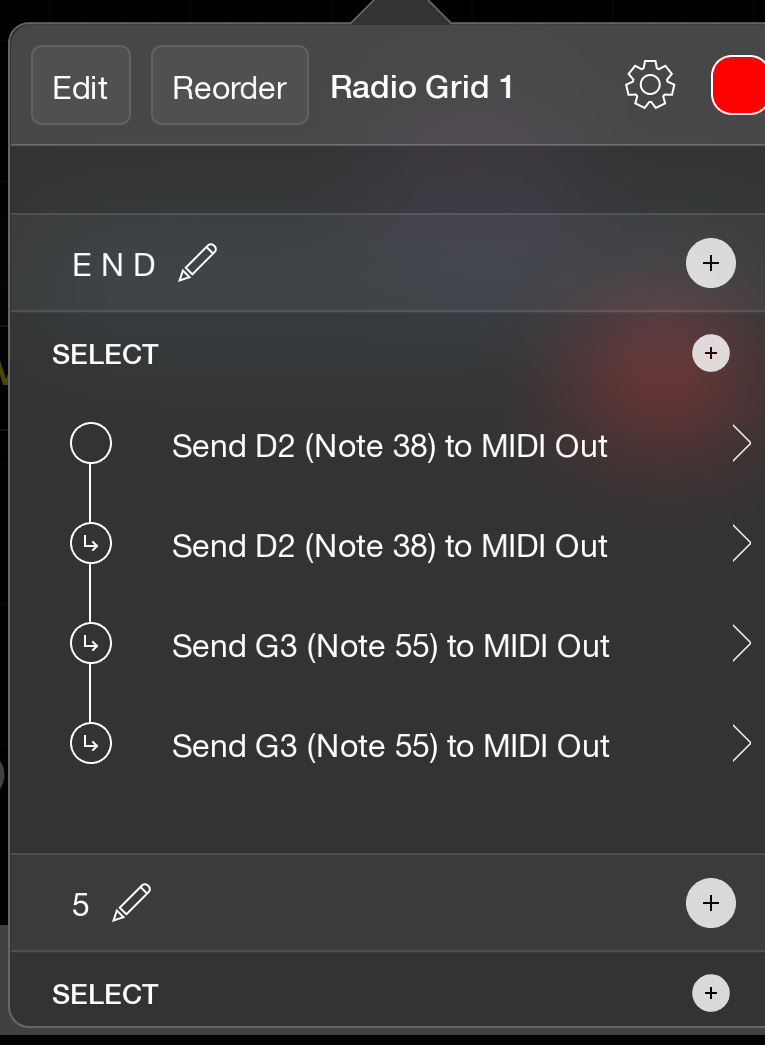
Send D2: CH10, 38/D2, 127
Send D2: CH10, 38/D2, 0, delay 0.1 beats after last
Send G3: CH10, 55/G3, 127, delay 1 bar after last
Send G3: CH10, 55/G3, 0, quantisation 1 bar after last
It does work this way.
But: I experimented a lot with the timings, and I came to this solution by trial and error, and to be honest - I don't understand it. With one or two bar delays it didn't stop on a 1 but sort of one and a half beats later or earlier etc. It doesn't seem to be logical and it does not behave as I expect. I don't even understand why the messages on the radio grid need two messages each, one 127 and another 0, but a little while later? Didn't see that mentioned in the manual?
(The green "play" button does the same thing, and it only sends one G3 message ...)
I don't understand why it is enough to press the bridge button around beat 3 to make the change happen on the next 1, while it is necessary to press the End button --> before beat 2 to have the same.
I really would like to understand what the trick is and how I could learn it, because I need to use exactly this feature as an important automation for live setting.
Sorry for long text – appreciate your patience
Zsolt
I just want to mention that sending a Note On MIDI message with velocity 0 is equivalent to a Note Off message. Maybe the Note On presses the Soft Drummer pad, and Note Off releases it. That would be typical behavior for a feature that is "played" by a note.
@Zsolt as uncleDave m nations a complete note is really a note on and note off (note with velocity 0 counts as a note off).
I learned by trial and error that the lumbeats apps require a note on and off for some triggers to work. Press/release when sending a midi note sends note on on press and note off on release. When send midi message happens as a select action, I send the note on followed by note off after a slight delay.
In your messages, that last one doesn’t need quantization. I’d use a slight delay though none might be needed.
Btw, I suggest using a midi monitor to spy on the messsges being sent to understand their timing.