Loopy Pro: Create music, your way.
What is Loopy Pro? — Loopy Pro is a powerful, flexible, and intuitive live looper, sampler, clip launcher and DAW for iPhone and iPad. At its core, it allows you to record and layer sounds in real-time to create complex musical arrangements. But it doesn’t stop there—Loopy Pro offers advanced tools to customize your workflow, build dynamic performance setups, and create a seamless connection between instruments, effects, and external gear.
Use it for live looping, sequencing, arranging, mixing, and much more. Whether you're a live performer, a producer, or just experimenting with sound, Loopy Pro helps you take control of your creative process.
Download on the App StoreLoopy Pro is your all-in-one musical toolkit. Try it for free today.
Comments
Now added some preview material to my youtube channel. This is the craziest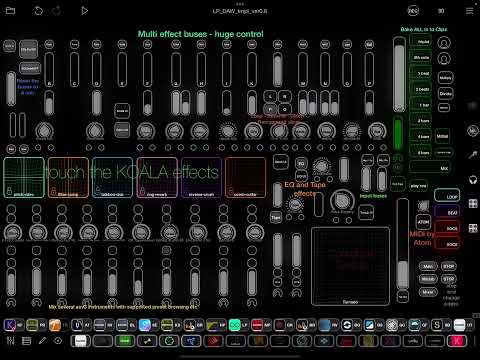 You could easily manipulate single sounds or effects or whatever with this.
https://buymeacoffee.com/akivilla
I will offer even with 1$ coffee the access to my templates - the latest ones and also effect presets in zip file.. Later on sounds, loops , templates. I'm not money hungry, but building up with strength from coffee and enthusiasm.
Hi. Please check my coffee page even if no coffee to me, there is more detailed description about the template.
Also some sound manipulations in here:


Next I will create songs, so You will see how quick it is to produce with this template
Published a small description of my future plans with the template
https://buymeacoffee.com/akivilla/future-plans-actions
First demo song - only took a 15 min to create this demosong
Wanted to demonstrate, how quickly and spontaneously you can create songs with my template.. so created another demosong, which might even sound better.. will not publish more here. Maybe in my Youtube channel though..
Are you using the biggest size of iPad Pro here?
Yes 13” in this picture. I have also 10.5”.. so maybe I finetune this for it also🤔
I don't own Loopy Pro cause I don't do looping and I work mostly in midi world. I am curious, what are the advantages / disadvantages of using LP as a DAW over a traditional DAW?
I am so happy You asked this 😊
For me there are no loops in LP. It`s all about the clips and I see them as a part of tracks that can be looped. You can also have oneshots and everything can be in specified lenght or unset. They can dragged around toa new clip or mixed to existing content of the other clip.
In traditional daw you normally divide the song to intro, chorus, verse, hooks, ending and most of them like to do it in timeline. In this template you can use scenes or just remix any combo of clips. Clips are just sliced tracks, e.g. with follow actions you can make them continue from one to another.
I begin to think that traditional workflows are killing creativeness some how. Thats why created a page for creating sound or track separatelly where you can sculpture sonic possibilities and build ideas like in the groovebox scenario and then by push of button to bring to song page and drag it to any place in the puzzle, and change the place at any point of process. Remix or any clip can be exported as an audio file with handy LP functionality.
Build up sound creation page has so huge potential and is so inspiring, wish I had more time to dig to there.. It is quite similar that you have AUM inside a DAW.
Performance is an issue, which I coped by letting the sing page handle only audio clips. Midi can be used in sound / track creation though
Hope you read this with a thought. I come from using Ableton Live Suite, Logic Pro, Cubase, Studio One just to mention few big ones.. My goal is to create a template, which has all the relevant features for creating unique and spontanious music quickly and experimentally.
I probably will not even use DAW as a description for this - instead it is a recording studio template for audio tracks and sound / track generator with auv3 instrument mixer and a huge and flexible effect station.
FYI - Trying to get my template up and running in 10.5” M1. Noticed some serious issues in performance and usability.. but creating a version to it. Need cut few effects and instruments to make it. Now eg Grand Finale is failing quite a lot. And could be partly covered by effect handling. I probably set the effects off when bus is zero 🤔
Also noted some routing issues. Getting some phase effect while having instrument inputs routed to both colors and 1+2 outputs. Disabled 1+2 and routed only to colors and from there to master output.. Lets see, trying to find best routings 👍
@AkiVilla : there are cases in the App Store version where bus routing of a live input has a slight delay that can cause phase artifacts. This should be solved in the coming update.
Thanks for the info. I’m gladly building templates to another level after the next update.. Can you mention about the level of performance, is it better? I think I have brought some customers to Loopy Pro by building up different templates.. At least some comments etc pointing to that 👍
@AkiVilla : what do you mean by the level of performance?
Hitting cpu peaks with a load.. dont remember was multicore support coming?
The update doesn't have what you mean by multi-core.
There are performance improvements, but if you are using a lot if AUv3, you may be running into cpu load related to the AUv3 themselves.
Ok. Thanks for the clarification 👍 Noticed the load differences are huge with different plugins, so need to select the most cpu effient ones.. as appaholic I have so many.. So far Korg Module Pro is one of the suitable..especially with stability and preset handling.. same with Koala
btw - just bought GR2 so maybe I think about having instruments in there and record to Loopy Pro song page. And extend with some effects like Looperator, Turnado and Koala. or maybe even combo workflow for Koala, LP and GR2. Man can dream or 😂 Ipad has never ever been so into music making as now ✌️
GR-2 might not be a good choice. Most importantly, it's not AUv3, so it doesn't have state saving - meaning it doesn't remember how it's set up in a project. Saving the Loopy Pro project doesn't save the GR-2 project. This means that you have to remember to save the GR-2 project every time before you close Loopy or change songs, and you have to find and load the right GR-2 project each time you open a project as well. Also, there is only one output for the whole GR-2 project.
@wim Thanks I fully agree, Lp and Koala are very strong together..Especially because Koala can be auv3 as an instrument or effect in LP.
Anyways when having multiple ipads and audio interfaces I would probably just record from GR2 to LP audio clips the output just like I’m considering with mpc and sp. The sound creation page in my LP template works as a multieffect station in.between.. and really like LP clip handling for the final song
Btw - alteady thinking my macbook as a sound source to LP. Maybe I’m a bit too much into it 🤓
Thanks for your answer. I don't feel like Cubasis as a DAW is killing my creativity. More the opposite, i was wondering why would someone want to use a looper as a DAW
@ecou : there is much more to Loopy Pro than looping. It is a highly configurable multi-track recording environment/audio unit host/mixer with customizable work surfaces. Recording and playback need not be loops.
@ecou @espiegel123 When I have used a daw, always tend to bounce my midi track to audio. Btw have also Cubasis and all its content.. But LP can be so much better with audio regarding to clips, they can also played once ang grouped in flexible ways. For Cubasis and even Logic pro fo Mac - they are sound modules or sources for recording in my workflow.. Have to admid that Cubasis has a benefit in auv3 performance related to cpu. I have tested project with 64 auv3 instruments and huge number of effects with it.. @espiegel123 sidenote GR2 didnt click me, its pretty though, but sticking tightly with LP audio recording and sound sculpting and mixer iin separate pages and keeping Koala +Korg module Pro as a main auv3 instrument
Here is the latest video about how to use effect buses and create some "different" drums. Now dealing with Beathawk. But mostly like using Koala as an auv3 (It could conveniently handle all my percussion and drum loop libraries, and I could just choose anyone by dial).
The purpose of the video is to show how easy to mix and match clips in the sound creation page and then bring it to song page. Song page is mend to be playing audio clips, so it's really light on cpu..
Also investigating good combos related to plugins and their stability and performance. This combo seemed good in Air 13" M3, but suffering in Air 10.5" M1. I will try to get a good combo with smaller Ipad also..
Had to do a video again about this combo (Koala+LP), I like it so much.

You can certainly use Koala with any loops and it has really good timestretching and combined to this effects station / sound manipulation workflow and creating a song is so straight forward..
@AkiVilla The level at which you are at with LP is quite mind blowing. I know LP is a powerful tool but I just find it’s not to intuitive when it comes to setting up and getting going. The way things work don’t become obvious coming from a linear DAW background. I can use AUM all day but just fine what you are showing very intimidating to even start to construct!
I speak as someone who hasn't done this to a proper level yet, but I think you have to see setting up your template as part of the creative process with Loopy Pro. Because that's what it is - there are some many possibilities and layouts. It's one of those things where the whole picture - ie. your ideal setup - is pretty intimidating to think about creating, but each individual part of making it is a very achievable action. I'm hoping to set up a few different basic templates for different songwriting scenarios and go from there.
That's a bit what I do right now. Having a more groovebox-ish background, templates for me are like creating small performative instruments that work like mini-grooveboxes. I often start from a blank template, then jam around until I have a good groove going, then look what parameters would be nice to change on the fly. Finally, I try to think how to make it more flexible for other instruments/songs and save it as a template. Each template has a different workflow, that helps to keep me creative and having jams that sound vastly different from each other.
Thanks for Your kind words! The original idea was to build template to replace all daws I have had. Have now given up on that goal. Its more that LP is separated to recording studio with realtime huge multieffect station to sculpture and manipulate loops and sounds and bake all the textures to clip and then use this clips and scenes in flexible way in song page, offering multiple approaches to recording.. LP is the One daw to me, because liking the audio clips.
Thanks for the feedback! I will soon start more tutorial and demos to show, what is under the hood. Maybe I get some credits to enormous amount of work done around this. Additional work also in investigating auv3's performances both effs and instruments. Trying to find a good combo like Koala and LP with Korg Module, maybe Beathawk and some synths.. So it's much more than offering LP templates to be modified 😎 but will gladly do that also 👍