Loopy Pro: Create music, your way.
What is Loopy Pro? — Loopy Pro is a powerful, flexible, and intuitive live looper, sampler, clip launcher and DAW for iPhone and iPad. At its core, it allows you to record and layer sounds in real-time to create complex musical arrangements. But it doesn’t stop there—Loopy Pro offers advanced tools to customize your workflow, build dynamic performance setups, and create a seamless connection between instruments, effects, and external gear.
Use it for live looping, sequencing, arranging, mixing, and much more. Whether you're a live performer, a producer, or just experimenting with sound, Loopy Pro helps you take control of your creative process.
Download on the App StoreLoopy Pro is your all-in-one musical toolkit. Try it for free today.
Vocoders and Loopy Pro
Hey Folks! Would I be able to use vocoders in Loopy Pro? I know Loopy Pro doesn't do sidechaining, but I don't know exactly how vocoders work, sooo.... I just understand that it needs 2 signals and I think I've seen some apps having shared memory when put on different channels (like MuteMaster). Before splurging on GSDSP MagicFusion, I would like if this is possible! Thanks 
Comments
Some vocoders don’t require that the host support multi-in/out plugins. The vocoder in the KQ Voice Plugin bundle doesn’t require host side-chaining. There are a few others where you can feed a carrier and modulator in the left and right channels.
Do you know about GSDSP MagicFusion in particular? I was interested in some of the features of this one! It is written it works with Garageband, does Garageband support multi-in/out plugins?
I don’t know
I wrote to the developer and it seems it doesn't work. If I remember well multi-in/outs is in the plans but not for 2.0, right?
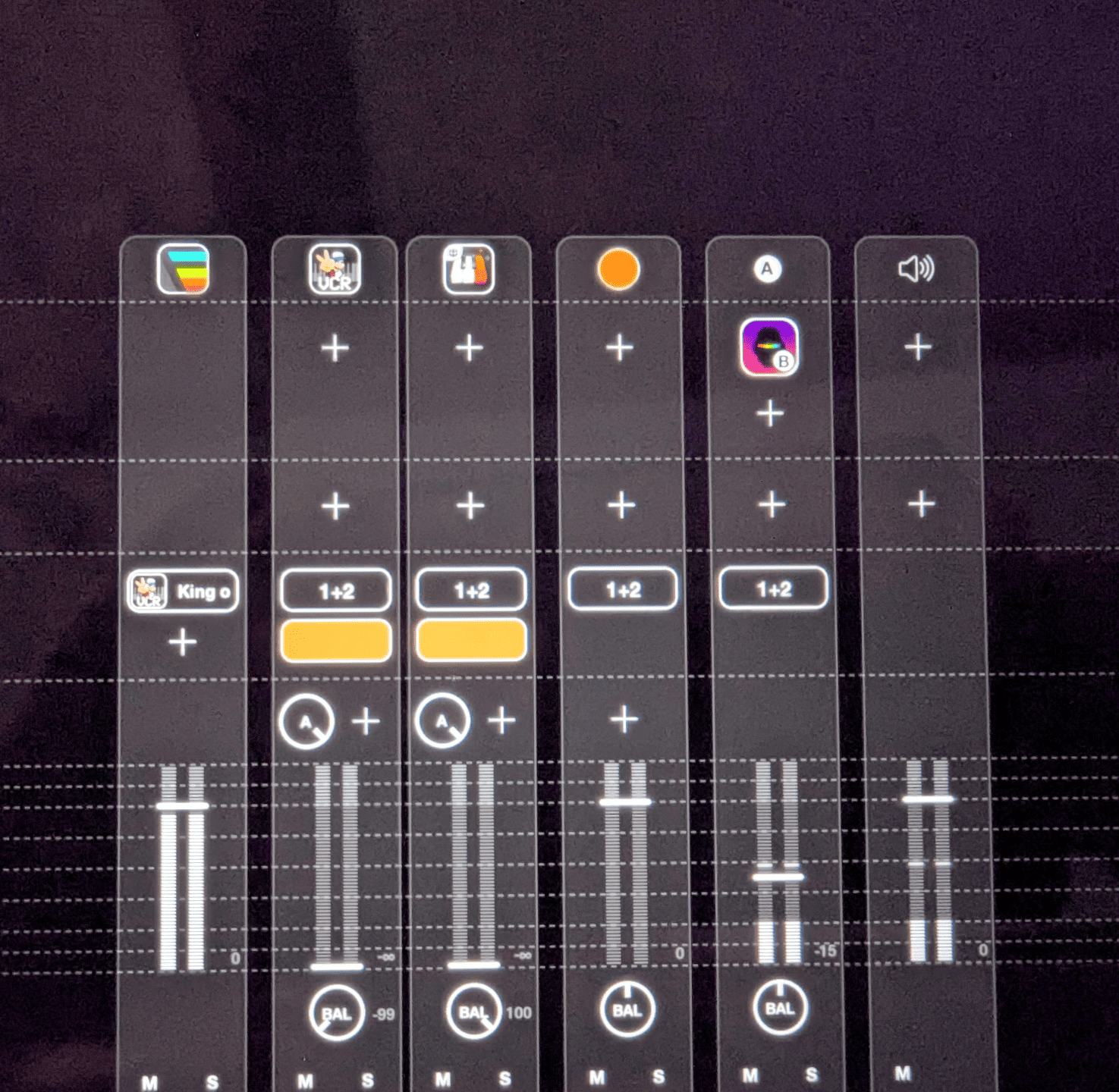
@espiegel123 I tried DerVoco while waiting for the multi-in/outs. It uses the L/R pan trick, but I don't seem to be able to make it work in Loopy Pro. Can you please validate if I do something wrong? Thanks!
It's planned for post 2.0, but high priority.
The trick is to set the sends to be after the fader (long-press the knob to get menu of options) because the pan doesn't apply to pre-fader sends
This worked. Thanks for the tip, I did not know the before/after faders/effects bus options. This opened a whole world to me I appreciate your help!
@oscillotus 👍