Loopy Pro: Create music, your way.
What is Loopy Pro? — Loopy Pro is a powerful, flexible, and intuitive live looper, sampler, clip launcher and DAW for iPhone and iPad. At its core, it allows you to record and layer sounds in real-time to create complex musical arrangements. But it doesn’t stop there—Loopy Pro offers advanced tools to customize your workflow, build dynamic performance setups, and create a seamless connection between instruments, effects, and external gear.
Use it for live looping, sequencing, arranging, mixing, and much more. Whether you're a live performer, a producer, or just experimenting with sound, Loopy Pro helps you take control of your creative process.
Download on the App StoreLoopy Pro is your all-in-one musical toolkit. Try it for free today.
Help mapping widgets

Hello all, I am trying to map widget buttons to controltrack mutes in octachron…… still
I know this is basic shit, but I just don’t understand what LP is offering me, so much stuff about loops I don’t really get, I just want to make buttons to control apps and hardware…
Does anyone have the patience to assist? Or point me to a tutorial for children?
Comments
Hosting octa (beta 2.1.0) in loopy pro (beta 2.0) I can assign a “toggle value” button to “octachron mute track 1” param but yeah, no joy when press button.
Same process successfully allows me to toggle between fader values in digistix 2 or mute drum 1 in battalion… couldn’t find any params to assign to when drambo loaded in LP…
Not sure where the problem lies exactly but you’re not going mad, I can’t mute octa tracks from button widgets either.
Anyone else?
@PLASMO : you might want to change your title to include Octachron as this sounds like an Octachron/Loopy-specific question.
If you have tried something that doesn’t work, posting screenshots of the widget setup and actions might help someone help you.
It works fine for me here:
Press Actionand add anAdjust MIDI AU ParameterToggle ValueThat should be all that's needed.
Thank you, though I cannot map anything to anything…. All those options that lp offers, I can find no explanation of what they are. I can do this no problem in Ableton, lp seems to assume tech knowledge I lack.
Ok edit done, but it’s not octa, I just don’t get how to map to apps or hardware, and I cannot find any resources to explain. The manual assumes I know what these options mean, to me it’s impenetrability cryptic
Thank you. I have stared at the Target list many times, it still only lists clips or colours, ie it can only offer me it’s own looping targets, no apps or hardware target’s …. Where are they?!!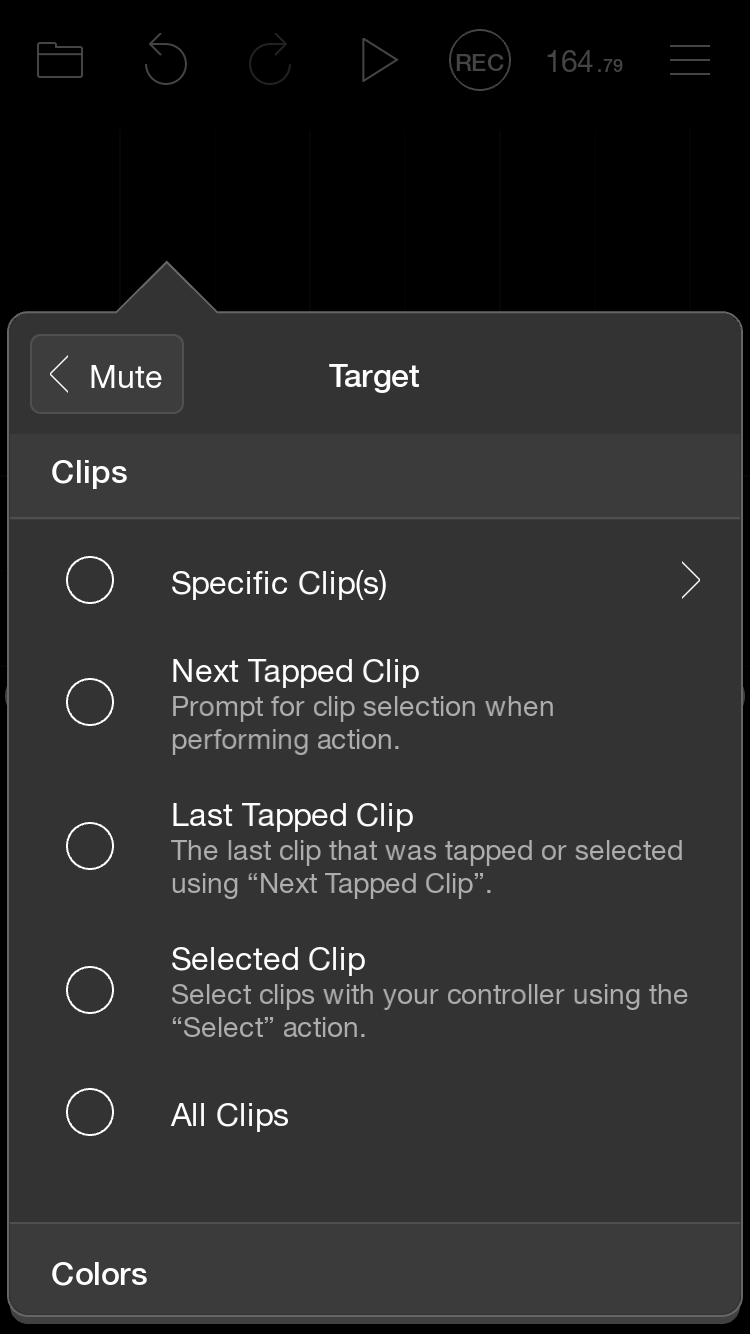
Let's start with Octachron. What you will be changing with the button are called "AUv3 Parameters". Changing something on a hardware app is different. That's done by sending it midi. We can cover that later.
Actions- basically things that can be done with a widget (or other things).Adjust MIDI AU Parameterand tap on it. You should see a dialog box that looks like this:Target- that is, what you want the button to control. Tapping onSelect Target, you should see a list of all the Parameters that Octachron exposes. You'll see MUTE TRACK 1. Select that.Actionto Toggle< Backrepeatedly until you get back to where you selected thePressaction. Tap outside the dialog box to close it.That's all you need to do. Open Octachron so that you can see what's going on, and then tap the button. If all went well, the first track mute should go on and off.
Controlling plugins through Parameters is the most common way to control AUv3 plugins, but that's not always the case. Some apps don't expose Parameters but do respond to midi sent to them. Hardware is controlled that way as well. I can cover that in the next post if you're with me so far.
Let's say instead that you want to control a piece of hardware or an app that uses midi control instead of AUv3 parameters. For this you need a button that sends MIDI. Setup is similar, but you will need to know what midi message(s) you need to send.
In step 5 above you selected
Adjust MIDI AU Parameter. To send midi you need to findMIDI Actions> Send MIDI Message. Again, first set theTargetif you don't see the hardware or app you want to control there, then you'll need to go back and figure that part out. But hopefully you do. If so, select it, then set the midi messages you need.One thing to keep in mind: With AU parameters, Loopy gets feedback from the plugin about what changes. That's why the button above lights when the Octachron track is muted and dims when it's not. With midi, Loopy doesn't get any feedback about the state of the hardware or app, so there's no matching feedback on the button. There are some workarounds to simulate that, but it's best to get these basics down first.
I hope these two posts help. Please ask as specific questions as possible.
I didn't see this post before writing the two posts above. The thing that's tripping you up here is the starting point. You are looking at
Clipactions rather than AUv3 plugin actions. Those are to mute clips (loops), not to act on a particular plugin. Context is everything in figuring out which actions you need.Hopefully the step-by-step above will get you where you need to go to get started. After that it might help to scroll that whole list to see the various types of actions there are. It will seem daunting at first, but probably gradually start to make sense. If not, please ask.
Thank you so much, that is very kind and helpful …. Will report back when I get a chance to sit down with the toys again
@PLASMO : if the manual doesn’t work for you, there are now a lot of Loopy Pro tutorial videos. Some are comprehensive series and some are shorter tutorials where people show cool tips and tricks. There links to some that people find helpful at:
https://wiki.loopypro.com/Main_Page#Videos_and_Tutorials
And more can be found searching on YouTube
There are also quite a few projects at patchstorage.com that are great both for using but also for studying.
I would be interested to know some specific parts of the manual that you find cryptic.
When you look at the tutorials, note that I have a lot of short tutorials demonstrating how to do some things people have mentioned having trouble figuring out.
FWIW: octa beta doesn’t work hosted in loopy beta. Button widget in loopy fails to activate mute button in octa.
Octa app store version does work correctly in loopy beta. All works as described above.
Please let the Octa developer know
Ok this is working… thank you to all here …
one more question,
I have my drum mutes lined up onscreen and working now, is there a way to make them toggle with a swipe across several mute buttons?
This is how the mutes on volcas work and I like it for performance to be able to mute, say, all three TomToms in one swipe, as well as touch on-off… is this possible?
I am afraid not.
Hmm, that is disappointing…. It is possible in TouchOSC, I was really hoping to use loopy for ease tho…
Can Loopy do like my Elektron mutes, where I hold function key before I select mutes to toggle, which change simultaneously when I release function key?
You could set something like that up; it would probably need a combination of dials (which could be put on another page to hide them) and buttons.
There isn’t a built-in ready-to-go option like that
Thank you