Loopy Pro: Create music, your way.

What is Loopy Pro?Loopy Pro is a powerful, flexible, and intuitive live looper, sampler, clip launcher and DAW for iPhone and iPad. At its core, it allows you to record and layer sounds in real-time to create complex musical arrangements. But it doesn’t stop there—Loopy Pro offers advanced tools to customize your workflow, build dynamic performance setups, and create a seamless connection between instruments, effects, and external gear.

Use it for live looping, sequencing, arranging, mixing, and much more. Whether you're a live performer, a producer, or just experimenting with sound, Loopy Pro helps you take control of your creative process.

Download on the App Store

Loopy Pro is your all-in-one musical toolkit. Try it for free today.

Waymaker by Aqeel Aadam (Released)

13»

Comments

  • edited May 2025

    @oldsynthguy said:
    Is there any way to record, or export MIDI generated from this app?

    Looks great, but without a bundle deal or dual Mac integration, I’m struggling to justify adding yet another sequencer to my already massive existing collection!

    Recording MIDI in say, Logic Pro or Atom (via AUM) might tempt me off the fence.

    It sends out midi in real time, as every midi app does, and u can record that midi with a midi recorder like Atom2, Helium etc inside AUM. An export function wouldn't be needed and wouldn't even make much sense tbh for an app like this

  • edited May 2025

    @Gavinski said:

    @oldsynthguy said:
    Is there any way to record, or export MIDI generated from this app?

    Looks great, but without a bundle deal or dual Mac integration, I’m struggling to justify adding yet another sequencer to my already massive existing collection!

    Recording MIDI in say, Logic Pro or Atom (via AUM) might tempt me off the fence.

    It sends out midi in real time, as every midi app does, and u can record that midi with a midi recorder like Atom2, Helium etc inside AUM. An export function wouldn't be needed and wouldn't even make much sense tbh for an app like this

    Cheers Gav, good to hear, plus I have his other two apps so it’d be handy for the additional features it includes for those. Might still wait for a sale though, as I do already have a lot of other options. I like the subtle ‘jamming’ you can do with this one though.

    Export-wise - I do a lot of to-ing and fro-ing between iPad and desktop, so sharing MIDI files is a bonus for me.

  • @oldsynthguy said:
    Is there any way to record, or export MIDI generated from this app?

    Looks great, but without a bundle deal or dual Mac integration, I’m struggling to justify adding yet another sequencer to my already massive existing collection!

    Recording MIDI in say, Logic Pro or Atom (via AUM) might tempt me off the fence.

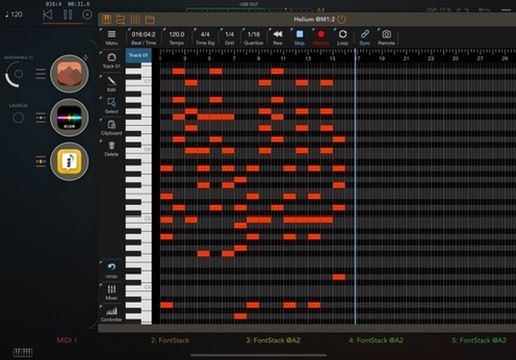
    I know you got the reply from Gavin already but I made the trouble of making a screenshot, and, I don't like to waste my time (I'm joking, it's all I do - waste time). Here Waymaker is connected to Suggester1 >> Helium so I got some hefty chords.
  • @Pxlhg said:

    @oldsynthguy said:
    Is there any way to record, or export MIDI generated from this app?

    Looks great, but without a bundle deal or dual Mac integration, I’m struggling to justify adding yet another sequencer to my already massive existing collection!

    Recording MIDI in say, Logic Pro or Atom (via AUM) might tempt me off the fence.

    I know you got the reply from Gavin already but I made the trouble of making a screenshot, and, I don't like to waste my time (I'm joking, it's all I do - waste time). Here Waymaker is connected to Suggester1 >> Helium so I got some hefty chords.

    Ah great, that looks perfect, thank you!

  • @AqeelAadam posted a nice little case-use walk through video today:

    Stuff like this really helps me get my eyes, and ears, and mind, playing with the app.

    I think there are ways the visual design and UI elements could possibly be improved to help our minds visualise (audiate) what this very interesting plugin is doing with our MIDI data.
    I reckon they will emerge in updates.

    For me, it is an app well worth the very reasonable asking price.

    As a Mac and iOS musician/producer I would love some sort of universal bundle, or good upgrade models, but I also know developers are very much constrained by requirements of Apple, and other app distribution platforms.

    If you are in any way into generative music from midi sources, or enjoy either Weeping Wall or Ridgewalk, then this app is rather delicious.

    cheers,

  • @RiverbendSim said:
    @AqeelAadam posted a nice little case-use walk through video today:

    Stuff like this really helps me get my eyes, and ears, and mind, playing with the app.

    I think there are ways the visual design and UI elements could possibly be improved to help our minds visualise (audiate) what this very interesting plugin is doing with our MIDI data.
    I reckon they will emerge in updates.

    For me, it is an app well worth the very reasonable asking price.

    As a Mac and iOS musician/producer I would love some sort of universal bundle, or good upgrade models, but I also know developers are very much constrained by requirements of Apple, and other app distribution platforms.

    If you are in any way into generative music from midi sources, or enjoy either Weeping Wall or Ridgewalk, then this app is rather delicious.

    cheers,

    Lovely, wish there were more videos of waymaker usage, would love to see all the creativity that’s happening with this one. (I started dipping my toes in the “branches” aspect/function, nothing promising yet but I got it to ratchet notes!)

  • @Squishy said:

    @RiverbendSim said:
    @AqeelAadam posted a nice little case-use walk through video today:

    Stuff like this really helps me get my eyes, and ears, and mind, playing with the app.

    I think there are ways the visual design and UI elements could possibly be improved to help our minds visualise (audiate) what this very interesting plugin is doing with our MIDI data.
    I reckon they will emerge in updates.

    For me, it is an app well worth the very reasonable asking price.

    As a Mac and iOS musician/producer I would love some sort of universal bundle, or good upgrade models, but I also know developers are very much constrained by requirements of Apple, and other app distribution platforms.

    If you are in any way into generative music from midi sources, or enjoy either Weeping Wall or Ridgewalk, then this app is rather delicious.

    cheers,

    Lovely, wish there were more videos of waymaker usage, would love to see all the creativity that’s happening with this one. (I started dipping my toes in the “branches” aspect/function, nothing promising yet but I got it to ratchet notes!)

    It's definitely one of those deep apps that somebody could make loads of videos on. I really need to get round to watching some of Mario's extensive collection of vids on Harmony Bloom, as I know I'm using it nowhere near its potential. Problem is that he has so many vids and they tend to be so long, I just wouldn't fancy the time investment.

  • @Gavinski said:

    @Squishy said:

    @RiverbendSim said:
    @AqeelAadam posted a nice little case-use walk through video today:

    Stuff like this really helps me get my eyes, and ears, and mind, playing with the app.

    I think there are ways the visual design and UI elements could possibly be improved to help our minds visualise (audiate) what this very interesting plugin is doing with our MIDI data.
    I reckon they will emerge in updates.

    For me, it is an app well worth the very reasonable asking price.

    As a Mac and iOS musician/producer I would love some sort of universal bundle, or good upgrade models, but I also know developers are very much constrained by requirements of Apple, and other app distribution platforms.

    If you are in any way into generative music from midi sources, or enjoy either Weeping Wall or Ridgewalk, then this app is rather delicious.

    cheers,

    Lovely, wish there were more videos of waymaker usage, would love to see all the creativity that’s happening with this one. (I started dipping my toes in the “branches” aspect/function, nothing promising yet but I got it to ratchet notes!)

    It's definitely one of those deep apps that somebody could make loads of videos on. I really need to get round to watching some of Mario's extensive collection of vids on Harmony Bloom, as I know I'm using it nowhere near its potential. Problem is that he has so many vids and they tend to be so long, I just wouldn't fancy the time investment.

    “Know that” skip 30 secs “I know that” skip 2 minutes “already know thaaat”… I feel ya, man hehe

  • I just paid way more for FMR, but feel less inclined to buy this. Maybe because it isn't immediately obvious what it offers> @Gavinski said:

    @Squishy said:

    @RiverbendSim said:
    @AqeelAadam posted a nice little case-use walk through video today:

    Stuff like this really helps me get my eyes, and ears, and mind, playing with the app.

    I think there are ways the visual design and UI elements could possibly be improved to help our minds visualise (audiate) what this very interesting plugin is doing with our MIDI data.
    I reckon they will emerge in updates.

    For me, it is an app well worth the very reasonable asking price.

    As a Mac and iOS musician/producer I would love some sort of universal bundle, or good upgrade models, but I also know developers are very much constrained by requirements of Apple, and other app distribution platforms.

    If you are in any way into generative music from midi sources, or enjoy either Weeping Wall or Ridgewalk, then this app is rather delicious.

    cheers,

    Lovely, wish there were more videos of waymaker usage, would love to see all the creativity that’s happening with this one. (I started dipping my toes in the “branches” aspect/function, nothing promising yet but I got it to ratchet notes!)

    It's definitely one of those deep apps that somebody could make loads of videos on. I really need to get round to watching some of Mario's extensive collection of vids on Harmony Bloom, as I know I'm using it nowhere near its potential. Problem is that he has so many vids and they tend to be so long, I just wouldn't fancy the time investment.

    Your videos could do with a bit of time efficiency themselves :P

  • @Darkstring said:
    I just paid way more for FMR, but feel less inclined to buy this. Maybe because it isn't immediately obvious what it offers> @Gavinski said:

    @Squishy said:

    @RiverbendSim said:
    @AqeelAadam posted a nice little case-use walk through video today:

    Stuff like this really helps me get my eyes, and ears, and mind, playing with the app.

    I think there are ways the visual design and UI elements could possibly be improved to help our minds visualise (audiate) what this very interesting plugin is doing with our MIDI data.
    I reckon they will emerge in updates.

    For me, it is an app well worth the very reasonable asking price.

    As a Mac and iOS musician/producer I would love some sort of universal bundle, or good upgrade models, but I also know developers are very much constrained by requirements of Apple, and other app distribution platforms.

    If you are in any way into generative music from midi sources, or enjoy either Weeping Wall or Ridgewalk, then this app is rather delicious.

    cheers,

    Lovely, wish there were more videos of waymaker usage, would love to see all the creativity that’s happening with this one. (I started dipping my toes in the “branches” aspect/function, nothing promising yet but I got it to ratchet notes!)

    It's definitely one of those deep apps that somebody could make loads of videos on. I really need to get round to watching some of Mario's extensive collection of vids on Harmony Bloom, as I know I'm using it nowhere near its potential. Problem is that he has so many vids and they tend to be so long, I just wouldn't fancy the time investment.

    Your videos could do with a bit of time efficiency themselves :P

    It's hard to make short vids. Mine are definitely tighter now than they used to be mind you!

  • @Gavinski said:

    @Squishy said:

    @RiverbendSim said:
    @AqeelAadam posted a nice little case-use walk through video today:

    Stuff like this really helps me get my eyes, and ears, and mind, playing with the app.

    I think there are ways the visual design and UI elements could possibly be improved to help our minds visualise (audiate) what this very interesting plugin is doing with our MIDI data.
    I reckon they will emerge in updates.

    For me, it is an app well worth the very reasonable asking price.

    As a Mac and iOS musician/producer I would love some sort of universal bundle, or good upgrade models, but I also know developers are very much constrained by requirements of Apple, and other app distribution platforms.

    If you are in any way into generative music from midi sources, or enjoy either Weeping Wall or Ridgewalk, then this app is rather delicious.

    cheers,

    Lovely, wish there were more videos of waymaker usage, would love to see all the creativity that’s happening with this one. (I started dipping my toes in the “branches” aspect/function, nothing promising yet but I got it to ratchet notes!)

    It's definitely one of those deep apps that somebody could make loads of videos on. I really need to get round to watching some of Mario's extensive collection of vids on Harmony Bloom, as I know I'm using it nowhere near its potential. Problem is that he has so many vids and they tend to be so long, I just wouldn't fancy the time investment.

    I can speed them up to x1.3 - x1.4 normal playback and still catch all the info.
    If you can handle listening to fast talkers, like Ben Shapiro fast, you can probably handle x2 speed. 😅

  • @RiverbendSim said:
    @AqeelAadam posted a nice little case-use walk through video today:

    Stuff like this really helps me get my eyes, and ears, and mind, playing with the app.

    I think there are ways the visual design and UI elements could possibly be improved to help our minds visualise (audiate) what this very interesting plugin is doing with our MIDI data.
    I reckon they will emerge in updates.

    For me, it is an app well worth the very reasonable asking price.

    As a Mac and iOS musician/producer I would love some sort of universal bundle, or good upgrade models, but I also know developers are very much constrained by requirements of Apple, and other app distribution platforms.

    If you are in any way into generative music from midi sources, or enjoy either Weeping Wall or Ridgewalk, then this app is rather delicious.

    cheers,

    Nice demo, but why does he need two instances? Can't he just add the chord module in the original instance?

  • @Darkstring said:
    I just paid way more for FMR, but feel less inclined to buy this. Maybe because it isn't immediately obvious what it offers

    I don't have either of those two apps (yet!), but this one seems far more capable and interesting to me. I like the modular aspect of building a sequencer. If you don't have experience with modular sequencing, this might be a good way to get started. But really there is nothing you cannot do in VCV Rack or a similar virtual modular.

  • @Darkstring said:
    I just paid way more for FMR, but feel less inclined to buy this. Maybe because it isn't immediately obvious what it offers> @Gavinski said:

    @Squishy said:

    @RiverbendSim said:
    @AqeelAadam posted a nice little case-use walk through video today:

    Stuff like this really helps me get my eyes, and ears, and mind, playing with the app.

    I think there are ways the visual design and UI elements could possibly be improved to help our minds visualise (audiate) what this very interesting plugin is doing with our MIDI data.
    I reckon they will emerge in updates.

    For me, it is an app well worth the very reasonable asking price.

    As a Mac and iOS musician/producer I would love some sort of universal bundle, or good upgrade models, but I also know developers are very much constrained by requirements of Apple, and other app distribution platforms.

    If you are in any way into generative music from midi sources, or enjoy either Weeping Wall or Ridgewalk, then this app is rather delicious.

    cheers,

    Lovely, wish there were more videos of waymaker usage, would love to see all the creativity that’s happening with this one. (I started dipping my toes in the “branches” aspect/function, nothing promising yet but I got it to ratchet notes!)

    It's definitely one of those deep apps that somebody could make loads of videos on. I really need to get round to watching some of Mario's extensive collection of vids on Harmony Bloom, as I know I'm using it nowhere near its potential. Problem is that he has so many vids and they tend to be so long, I just wouldn't fancy the time investment.

    Your videos could do with a bit of time efficiency themselves :P

    Tough crowd.

  • @aqeelaadam has posted 10 videos in his awesome tips and tricks thread.

    this series covers the unique ways to utilize his various sequencers.

  • Waymaker is great, and the videos are really well done.

    I wish there were some more ways to branch out of the sequence chain, for instance, having the first sequencer output on one channel and ones further down in the chain output on others.

  • wimwim
    edited July 2025

    Waymaker got a nice update. I'm posting it here as a shameless bump 'cause I absolutely love this sequencer, and it doesn't get a lot of attention. I've gotten bored with most slider-type sequencers very quickly. This one is so much more and is just endless fun to mess around with.

    Version 1.0.4
    New features:

    • Robust syncing controls for keeping Waymaker synchronized to your DAW. Waymaker can now be started and stopped via MIDI notes, CC messages, and parameter control.
    • Beat sequencer has a new "Morph" mode, for creating rhythms that randomly change overtime.
    • Beat sequencer also has a new mode for following pitches, for producing ratchets and modifying the timing of other melodies.
    • The Probability module now contains a fully fledged sequencer, for creating a sequence of probabilities with an independent speed.
    • When a sequencer is progressed by MIDI notes, output notes can be held until the next note is received, for a variety of note lengths.

    Improvements:

    • Changing Morph sequencer's range no longer changes the pitch of locked stages.
    • All sliders in the UI have a default value, which can be double clicked to restore.
    • Sequence lengths and Beat's euclidean options can now be controlled by parameters.
    • Per-stage note length and velocity can now go up 1000% of the normal value for a broader range.
    • Buttons for loading presets are now animated and more obvious.
    • Sequence slider popups now show the number of semitones a note is away from the root.
    • New presets.

    Fixes:

    • Branch sequencers now handle duplicated notes better.
    • Some issues with resetting sequencers are now patched.
    • Some minor UI bugs.
  • @wim said:
    Waymaker is great, and the videos are really well done.

    I wish there were some more ways to branch out of the sequence chain, for instance, having the first sequencer output on one channel and ones further down in the chain output on others.

    I like lots about Waymaker, and the tips videos are great, but I do find it difficult to learn.
    I keep looking for another page in the app where I can see how the different sequencers in a chain are relating to each other.
    The visual design doesn’t seem to help my mind connect to the sequence I am hearing.

    So I am currently having more fun with Art Kerns midiDREAMS STEPS and GATEs, and with Michal Macura’s sqsl Lottery and Latch.

    Lots of good sequencers available on iOS! 🙂

  • How do you delete a preset? Manual only refers to the desktop version.

  • Just got an email saying that the apps are on sale currently, but on the App Store Waymaker is £11.99,….which I thought was the regular price. Can anyone confirm either way?

  • @Kashi said:
    Just got an email saying that the apps are on sale currently, but on the App Store Waymaker is £11.99,….which I thought was the regular price. Can anyone confirm either way?

  • Emphatic. Cheers @Squishy !

  • Excited to see the new arpeggiator sequencer in Waymaker based on voices in a chord.

Sign In or Register to comment.