Loopy Pro: Create music, your way.
What is Loopy Pro? — Loopy Pro is a powerful, flexible, and intuitive live looper, sampler, clip launcher and DAW for iPhone and iPad. At its core, it allows you to record and layer sounds in real-time to create complex musical arrangements. But it doesn’t stop there—Loopy Pro offers advanced tools to customize your workflow, build dynamic performance setups, and create a seamless connection between instruments, effects, and external gear.
Use it for live looping, sequencing, arranging, mixing, and much more. Whether you're a live performer, a producer, or just experimenting with sound, Loopy Pro helps you take control of your creative process.
Download on the App StoreLoopy Pro is your all-in-one musical toolkit. Try it for free today.
Comments
Being interested to learn about plugins and synthesis algorithms is definitely the way to make progress! We are still working on a tutorial and hopefully it‘s up soon. In the meantime you could watch or read some general tutorials about granular synthesis. Or activate the tooltips and try to understand what‘s going on with the presets you like most. It will come, but like with learning to play an instrument it will take some time
@gsdsp I am finding it very accessible. I do have experience with other granular effects, especially Silo which is really well designed. The interface is great. I’ve been testing GRFX, and while I love Imaginando and it sounds great, the UI is maybe a bit too cool for school in a way that isn’t intuitive. Yours is a little plain jane but functional as hell and I appreciate that.
It’s also surprisingly useful for non-granular effects. Like, I made a patch that works like a simple sidechain compressor. How neat is that?? And it’s a great jumping off point for getting into rhythmic stuff.
It’s not so much a lack of understanding of granular synthesis… it’s not completely understanding the logic of your interface controls.
Look forward to your tutorial, thx
Thanks @timfromtheborder , glad you dig it
@skiphunt Feel free to send me a PM if there is something particular you don‘t understand, always eager to improve things!
Agree. For me, nothing beats a thorough, searchable manual.
@gsdsp hi, really getting into this app now… finally have most of it figured out. But I have a quick question… I see that I can either select input, sidechain A or B for my sources. If I add a couple multi-outs into a couple channels, those are sidechain A and B respectively.
However, it will also allow me to add a third multi-out. It shows its input as X with “none” selected as input and “pass-through” selected as well
Is there anything I can do with more than 2 multi-outs added? Or, are they not actually doing anything at all after the first 2 multi-outs are added?
I‘m not sure what you mean, if I open Quantum Granulator in AUM I see 3 Inputs and 1 Output. I don‘t think you can do anything with that additional one you mention, it’s not getting processed, that‘s for sure
Yes, that’s all I was asking… I can select between 3 inputs (input, sidechain A and sidechain B ) - but, since it will let me add another multi-out after the first 2 are added, I wondered if there was any use of any additional multi-outs added after the first 2, ie. if the additional ones can also be processed in any way. I see the answer is “no” on the processing of additional multi-outs beyond the 3 defined inputs.
However, I suppose you could get additional use of the additional multi-outs added by having different channel source to switch between, ie. change sidechain B to input “none” and then change the additional channel multi-out to sidechain B since it would then be available.
Looks like I could map AUM’s midi control to also switch between various source inputs, since guantum’s input source parameters are exposed.
You can give it a try
And yes, you can switch input sources using Midi, that‘s a good idea for live performance.
I've been able to get midi cc to cycle through "input/sidechain A/sidechain B ) each of A/B inputs... but it doesn't look like I can change the defined input each midi out channel. For example, if I want to change a multi-out channel instance from "X" to "Bus 2", it doesn't look like there's a midi parameter exposed to do that... unless I'm missing something.
Well, seems like AUM is limited there. You could use another instance of Quantum Granulator to process another 3 sources though
Ok, just making sure it wasn't user error. Another instance will do fine... although I'll likely mostly only ever use just one instance and a couple multi-outs. Cool app. Glad I purchased
Thanks @skiphunt glad you enjoy it!
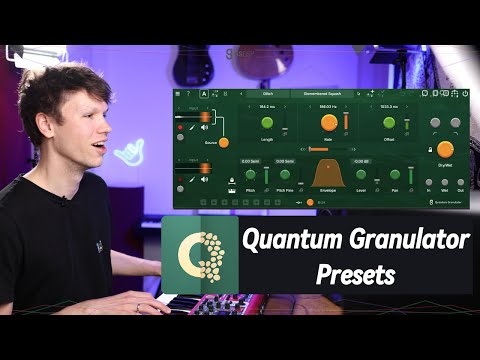
Here is a new video for the undecided:
What I like about the gsdsp apps (both the Magics and the Quantums) is once you learn the interface in one, you then understand all of them for the most part.
Thank you for the continuity @gsdsp
this ^
Great! I've already purchased, but I hadn't actually got around to trying many of presets yet. I wanted to understand it well enough first, so that I wouldn't use the presets as a crutch. However, after watching this preset walkthrough, it's even more impressive!
And here is the next update! For even more Live interaction with the Granulator but the update applies to all our plugins
great video!
Wowsers! Cool stuff, thank you!
Cool 😎 socks 🧦
Thanks to Doug for having a go on our latest plugin Quantum Granulator 🤩
Does anyone know if Quantum Granuator can take two audio inputs in AUM? It seems to have two separate inputs but not sure how that would be set up. @gsdsp
Yup, just gotta use the multiout and you can use two different audio sources for the buffers
Helpful thanks!
Silo is great, I use it as a makeshift apprehension engine by tweaking the SRPS (granulator) in realtime with string sounds, I can't wait to try out GDSP's though- as it sounds absolutely beautiful.
Sale ends tomorrow folks.
It's already ended in the UK. It was back to £14.99 at 2am this morning UK time.
UPDATE: It's showing at £9.99 again a few hours later. How strange!