Loopy Pro: Create music, your way.
What is Loopy Pro? — Loopy Pro is a powerful, flexible, and intuitive live looper, sampler, clip launcher and DAW for iPhone and iPad. At its core, it allows you to record and layer sounds in real-time to create complex musical arrangements. But it doesn’t stop there—Loopy Pro offers advanced tools to customize your workflow, build dynamic performance setups, and create a seamless connection between instruments, effects, and external gear.
Use it for live looping, sequencing, arranging, mixing, and much more. Whether you're a live performer, a producer, or just experimenting with sound, Loopy Pro helps you take control of your creative process.
Download on the App StoreLoopy Pro is your all-in-one musical toolkit. Try it for free today.
basic Setup for loopy pro 'Live' performances

Hi,
I've just discovered that my TC-Helicon Play Acoustic does not allow 'live' or 'real time' effects processing to the vocals or the guitar outputs. The setup only allows for affecting the recorded loops. I'm looking to replace my TC-Helicon play acoustic with a {What?} midi controller or a class compliant audio interface that will process AUv3 effects such as ToneStack Pro, or any other voice and or guitar effects on input and send that to a Bose L1 amp without having to record the input into a loop. (I'll be using the loops for other parts of the performance)
I'd like the setup to send/receive midi so i can control the effects via a Loopy Pro template.
From what I've seen on the many youtube videos, many musicians have a very elaborate setup.
I'd like to keep it as simple as possible.
Any setup suggestions would be greatly appreciated.
Comments
hi, hard to believe the device doesn't allow for live processing the vocal and guitar signals, as it seems like it's built to do exactly this.
perhaps you accidently changed a setting that mutes the effects?
The loopy pro effects do work ok if I record them in a loop, but I do not want to record them, I need some these to just have the effects on my inputs direct out to the amp.
I think the "normal" setup is to use an audio interface that does not have any "built-in" effects. The TC-Helicon Play Acoustic has both guitar and vocal effects built in, and I've seen in posts where it has been suggested that the TC-Helicon isolates the output from any external source. That's why I'm thinking I'll need to swap out the TC-Helicon out for a 4 or 6 channel audio interface that is Class Compliant (no special drivers required). 2 channels for Vocals and Guitar and the others for external (Loopy Pro) effects.
I'm looking for suggestions on an audio interface that is not too expensive.
Do you maybe not have monitoring turned on? Or do you have the effects on colors rather than the input?
It should work fine to apply effects to your input and hear them .
Can you post screenshots of Loopy’s mixer in extended mode so we can see how you have it set up?
I just set all my levels (Voice and guitar) on the TC-Helicon to Zero, cranked up the volume on my amp, and bingo!
There are now effects on my vocals. My guitar is getting a ton of feedback.
You'll see on the second input, I have no colors selected as I do not want to record a loop and added ToneStack as an effect (with it's levels set high). Also, I strummed my guitar so one can see there is input and output, but nothing out to my amp.
I will need to do more investigation, but i'm getting closer.
Thanks for your help. Got to go for now...
Can you look up how to take a screenshot on the iPad itself and post that?
Also tap on each of the icons at the top of the mixer and screenshot those, too.
If you mute both input channels, is there any audio from your mic or guitar?
Keep in mind that acoustic guitars are prone to feedback if the audio from loudspeakers amplifying them is too high.
Can you describe the whole audio setup?
Note that the effects on the orange channel are only going to apply to recorded loops unless you have monitoring through a color turned on (in which case, you should make sure you are not also monitor through the mains)
I've made some headway on this and figured out there are guitar levels on the TC-Helicon that needed to be adjusted.
So, muting both input channels in loopy Pro both the mic and guitar have audio to the amp from the TC-Helicon.
Unmuting input 2 (guitar input) engages the ToneStack effects as desired.
I understand input 1 will record my vocal into into the orange loop.
I have some noise in the output, but I think that is just tweaking the levels and gain on my amp (more to do on that).
I also think there are more settings on the TC-Helicon that need to be adjusted to balance everything out.
Here are the screenshots:
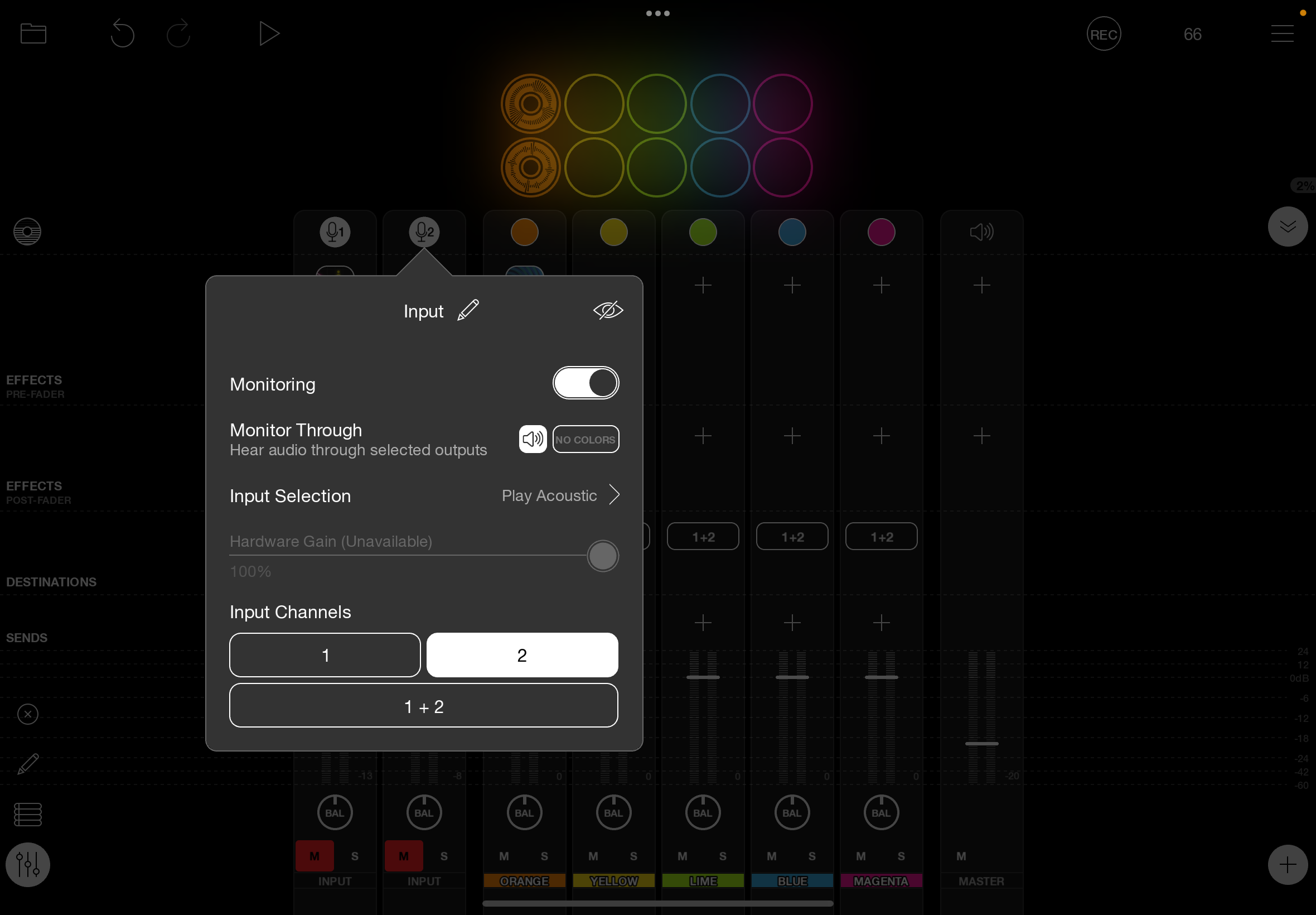
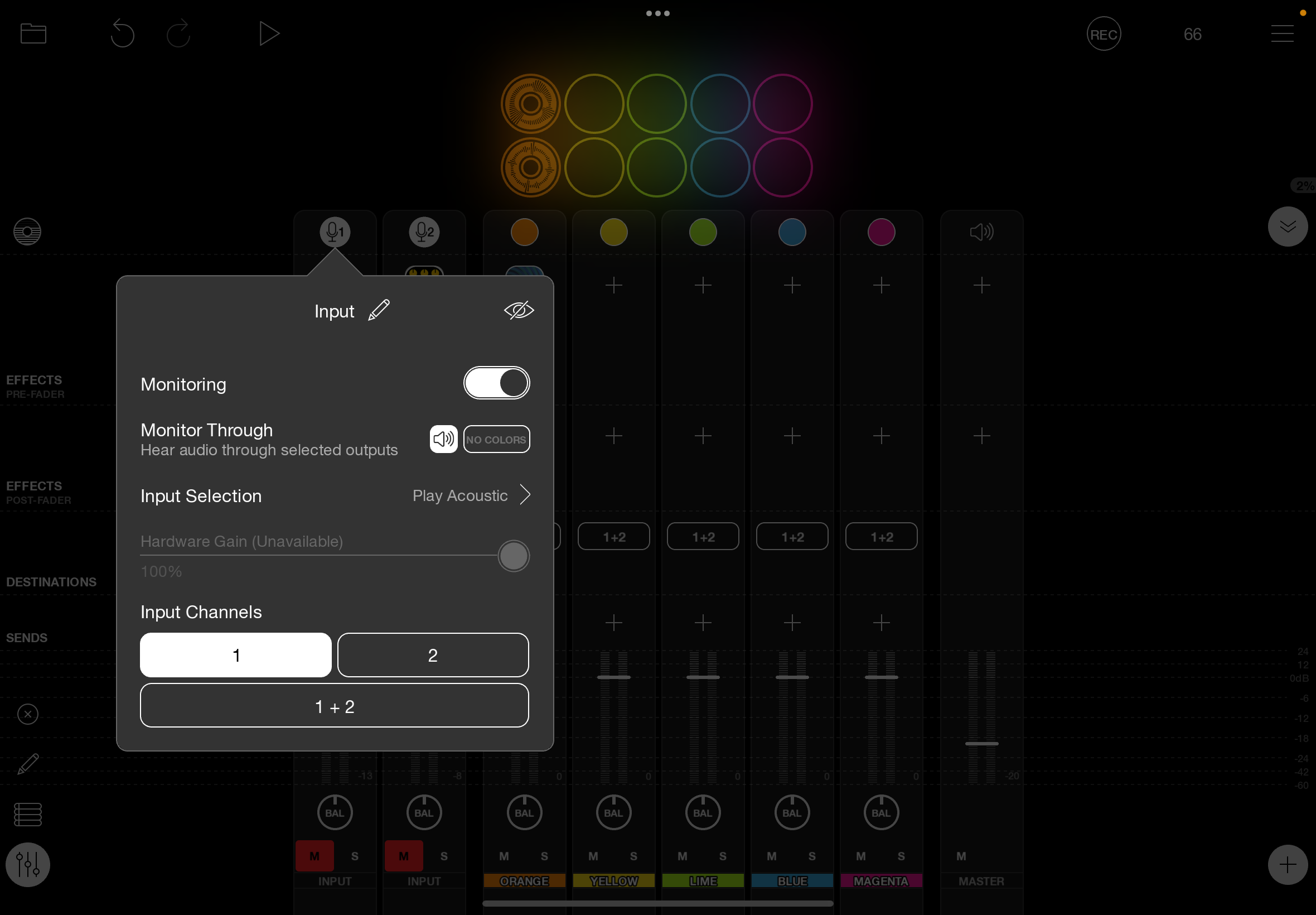
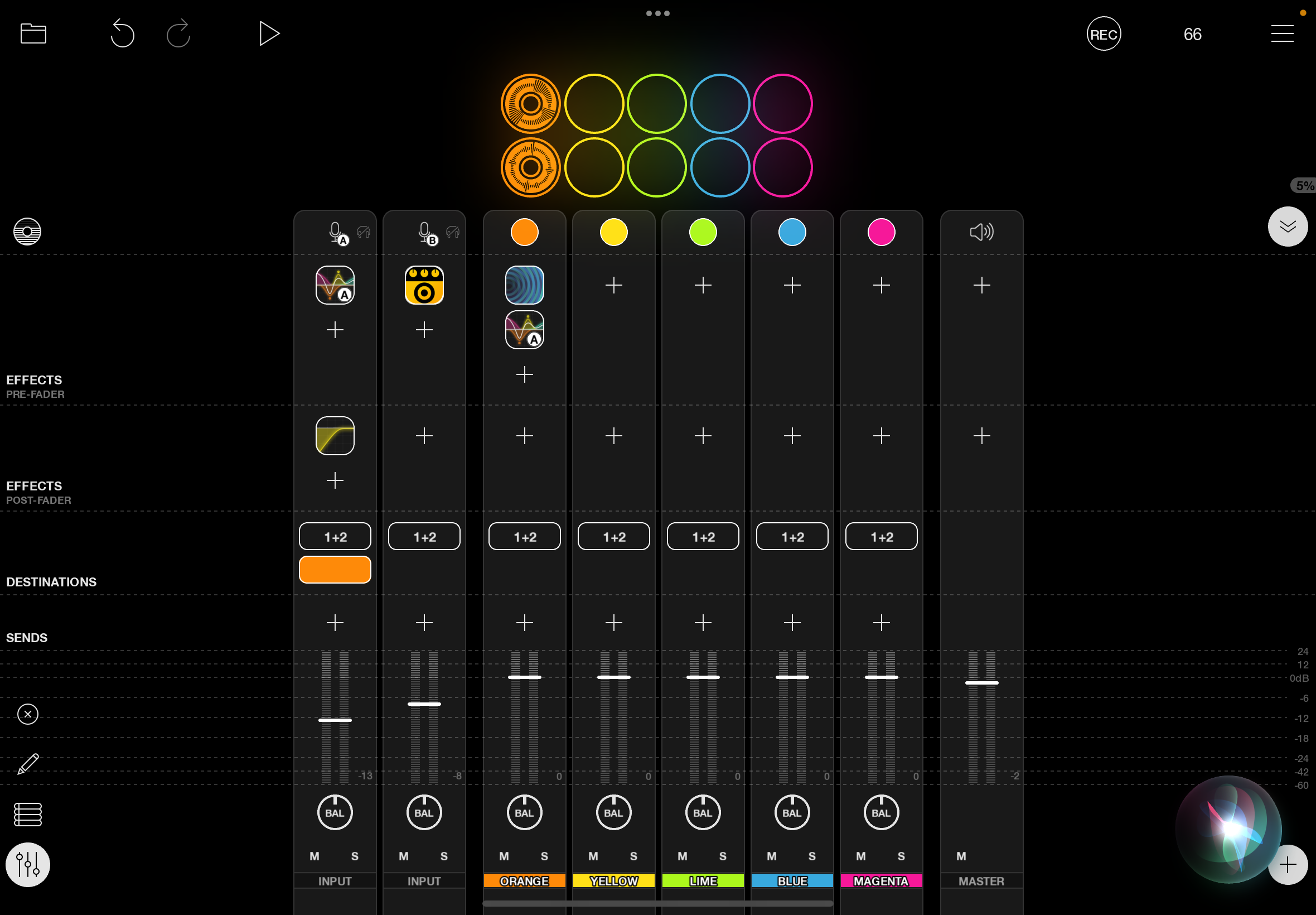
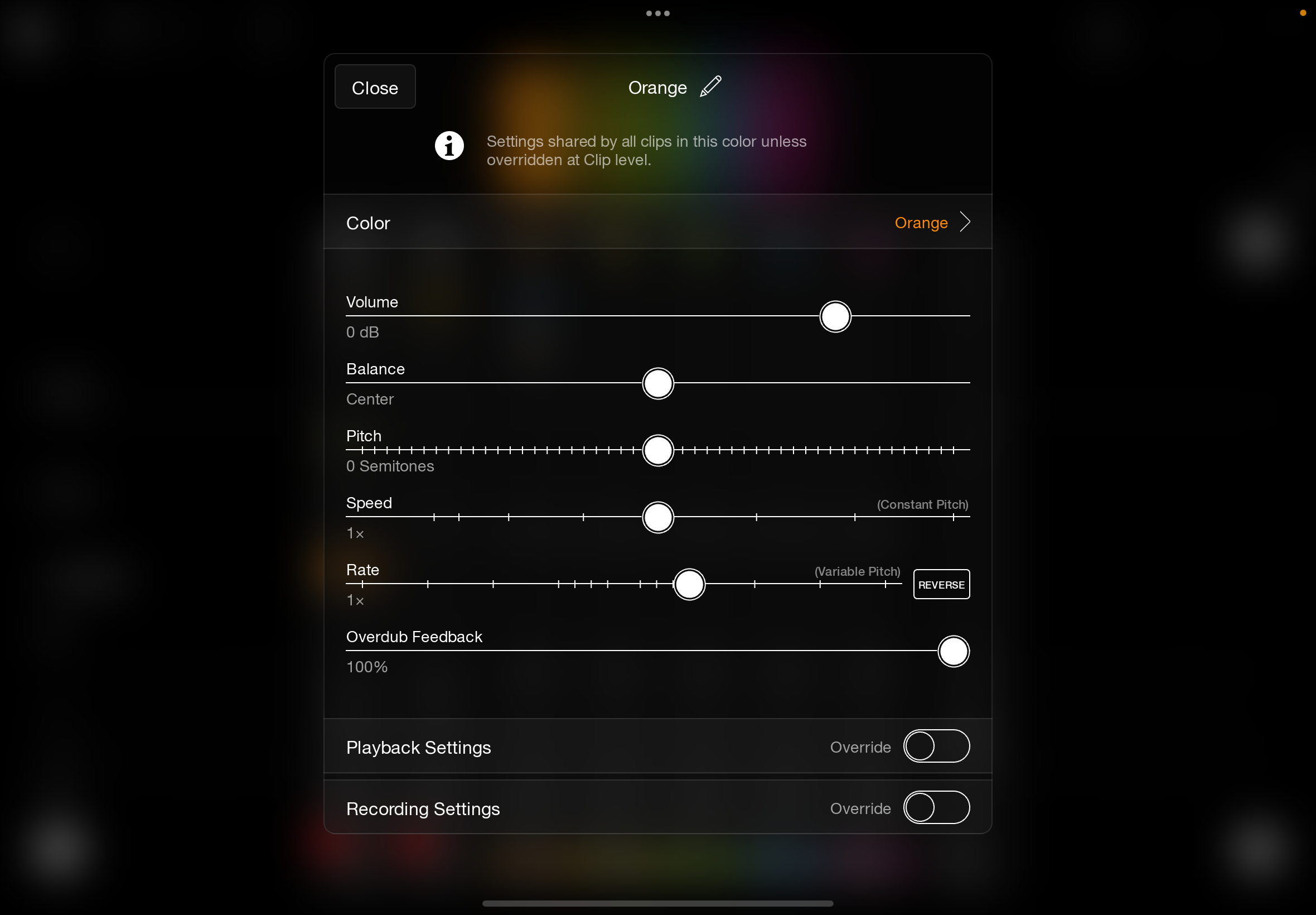
My Audio setup is:
Shure Beta 58a Mic and guitar input to the TC-Helicon.
The Mic out (Voice out Left) and the Guitar DI outputs (Guitar out Right) connect to my Bose L1 Compact.
The iPad USB connected to the TC-Helicon USB In.
That's basically the whole setup.
Any suggested TC-helicon settings you might think I need to address?
Anything else you suggest, I really appreciate it.
Thank you.
@jimf2 : if you are using guitar effects on the iPad you do not want direct monitoring turned on on the interface. If the guitar channel is muted in loopy pro and guitar signal is coming out of the amp that means you are direct monitoring. If you are using effects in loopy, you want only the signal from loopy otherwise you will always have some unprocessed guitar signal and it will be out if phase with the signal from loopy (which will be ever so delayed)
First, I really appreciate your comments and taking the time to respond to this.
OK, I do want to use guitar effects on the iPad, so just to clarify how I need to turn off 'direct monitoring',
Is all I have to do on the iPad is to go to the input 2 interface and make sure the 'monitor' switch is set to OFF?
Note: Even with this set as stated above, when inputs 1 & 2 are muted, I still get guitar and vocals output to the amp.
Is it possible that some setting in the TC-Helicon is affecting this?
My TC-helicon settings are:
- in Setup - page 1/10 (Input page) Guitar is set to 10db
- in Setup - page 2/10 (Output page) Output is set to Voice/Guitar (DI)
- In Mix - page 1 of 2 - guitar level, out level, room sense are set to -6db (as a nominal setting to start)
- In Mix - page 2 of 2 - USB input and USB output, harmony and delay/reverb all set to -6db
Also, I tonight when I turned on my setup, I could not get any of the iPad effects to work. I've gone over the settings many times. I don't know what changed from last night to tonight other than turning off the monitor switch on input 2. Toggling this off and on has no effect, my guitar and vocals are coming out of the amp even when muted in loopy pro.
My guitar (Input 2):
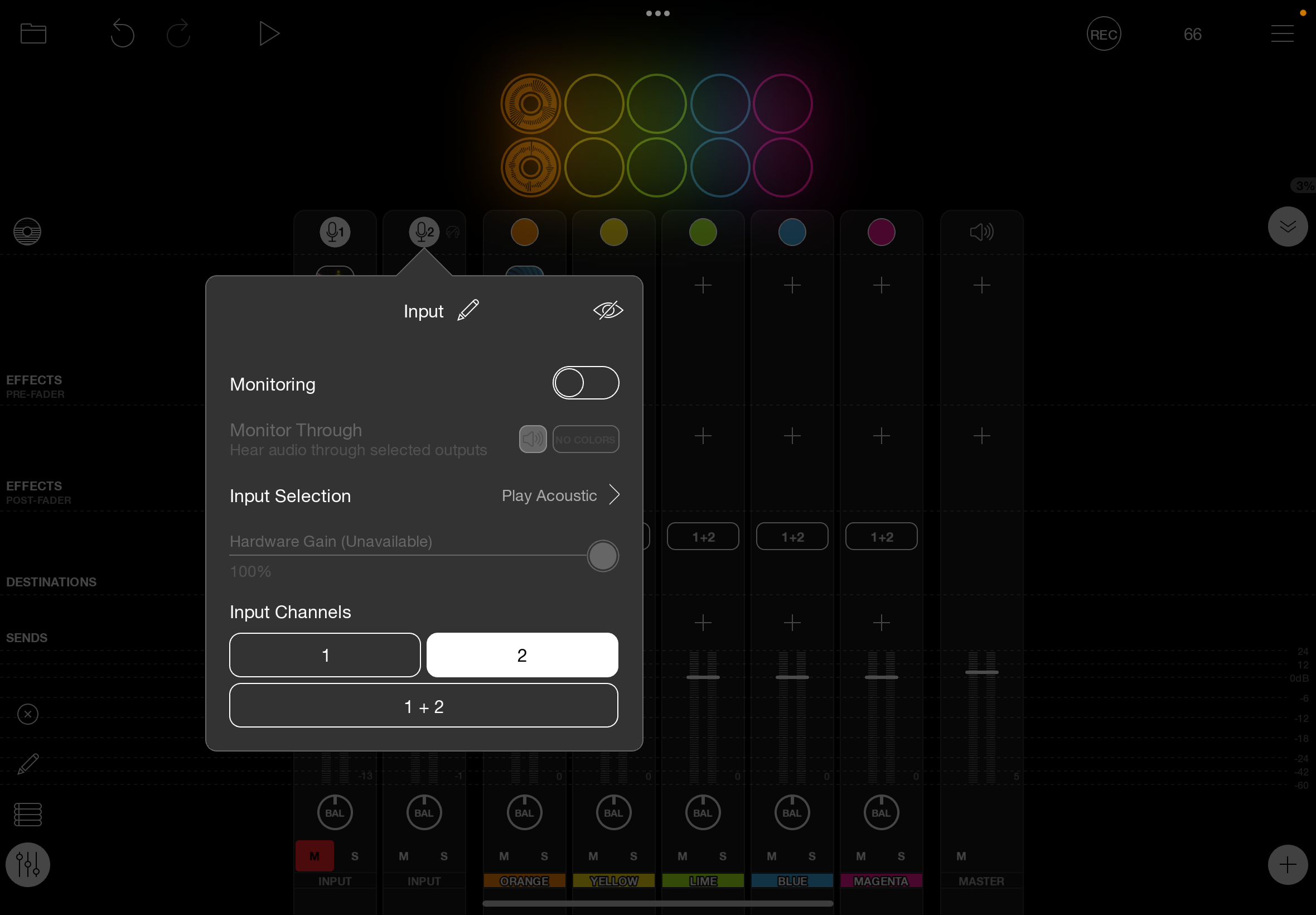
@jimf2 : direct monitoring is something you turn off on your interface. See its manual. You want monitoring on only the iPad. If you mute the input Loopy’s mixer, you will hear no signal if you turn off direct monitoring your interface. I don’t know the details of your interface to know how you turn it off.
@jimf2 : you will only hear the ipad effects if monitoring is on. You want monitoring on the iPad and direct monitoring on the interface turned off.
Have had some success building stuff with the assist of ChatGPT which scans this forum in formulating procedures albeit only up to a particular date it was trained on.
It hallucinates sometimes and presents impossible replies if it doesn't know how to do something and you have to watch it, but it can come up with some amazing workflows and builds on the fly that save a lot of time.
Once I asked it for the BPM and scale modulations in a certain song looking to dig further after it replied; it was spectacularly wrong about both and even mentioned the album the song was on -but the song wasn't on that album! I replied it had the BPM, mode, and album wrong, and it immediately admitted it didn't have access to the info I requested. It doesn't like to say I don't know and will answer when it doesn't incorrectly sometimes. Still it's great to use.
Don't expect perfection, especially with first answers. Probe and prompt it and it digs deeper. Sometimes strikes gold.