Loopy Pro: Create music, your way.
What is Loopy Pro? — Loopy Pro is a powerful, flexible, and intuitive live looper, sampler, clip launcher and DAW for iPhone and iPad. At its core, it allows you to record and layer sounds in real-time to create complex musical arrangements. But it doesn’t stop there—Loopy Pro offers advanced tools to customize your workflow, build dynamic performance setups, and create a seamless connection between instruments, effects, and external gear.
Use it for live looping, sequencing, arranging, mixing, and much more. Whether you're a live performer, a producer, or just experimenting with sound, Loopy Pro helps you take control of your creative process.
Download on the App StoreLoopy Pro is your all-in-one musical toolkit. Try it for free today.
Comments
So Logic Pro 2.2 doesn't support MIDI Real Time Start and Stop messages, as used by Novation LaunchKey controllers (some of the most popular controllers on the market) for their transport controls.
This seems to be because Logic always wants to be the master and, while it can send these commands, it can't receive them. Why does Apple always do things like this in such a ridiculously frustrating way? 🙄
Integration of ChatGPT with Writing Tools - requires ChatGPT extension and Apple Intelligence
Is this the first Apple Intelligence feature added to Logic so far? Interesting that it’s tethered to ChatGPT in some capacity. I’ve tried using the dam bot to automate production and it’s never done anything except lie about its capabilities and explain how to do something step by step.
The next Logi Pro update will have more ai “Candy”.. I think they’re working on something even more substantial for iOS 19
It's not just Apple. Most DAWs have been that way since there have been DAWs. The ones that don't insist on being the master are only that way because they were eventually dragged there kicking and screaming by user complaints.
@zzrwood : I can see them fixing that soon
Here’s hoping… 🤞
Koala doesn't yet support 'Touch & Release Events' in the AUv3 UI.
Once it does it will be possible to map the effect sliders using Logic's built-in Learn Midi function.
(I've sent Marek / @elf_audio an e-mail regarding this).
All in all Koala has 16 AUParameters (the performance effects) and the controls for the first 3 are show in the plug-in tile.
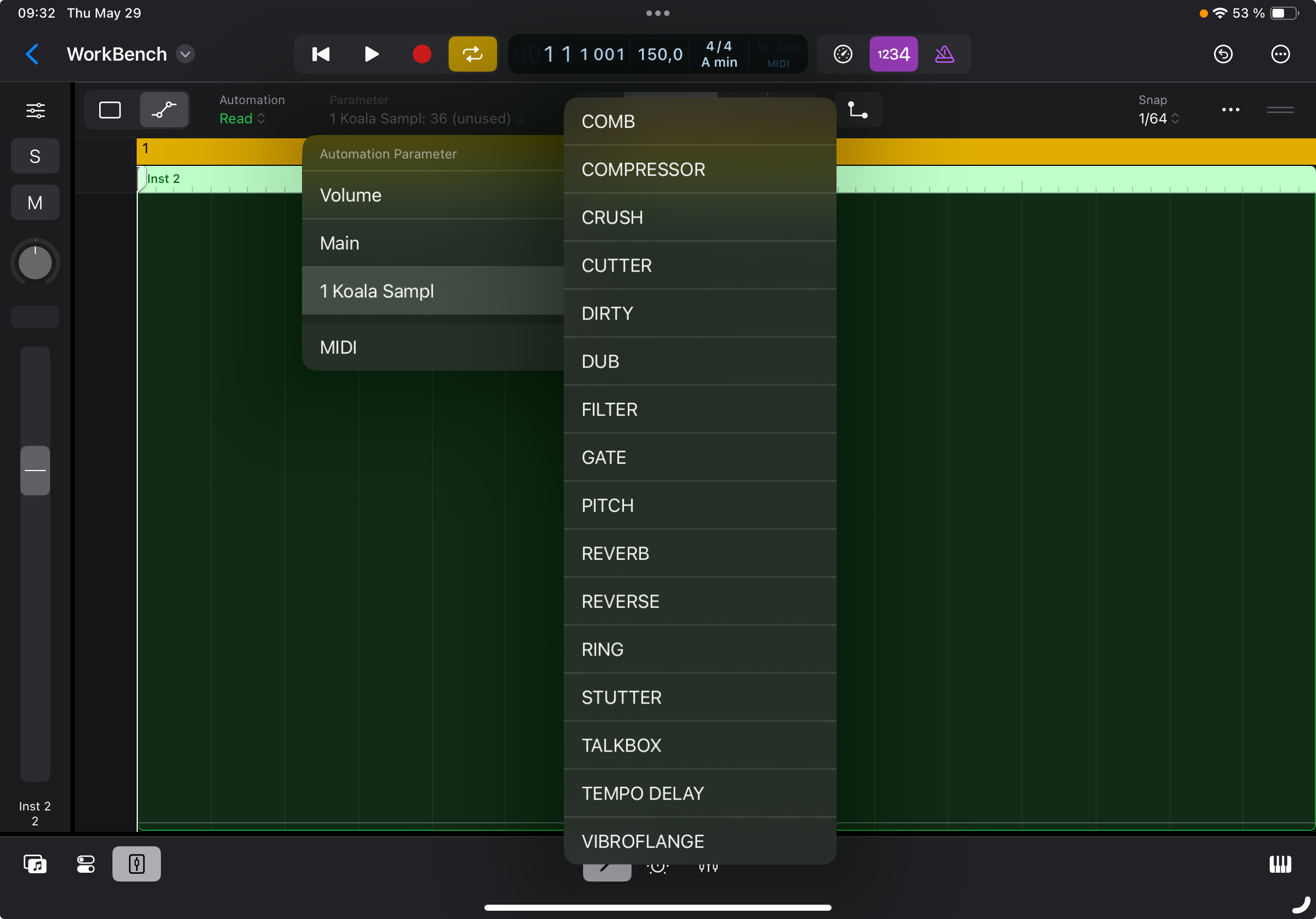
For now it's possible to 'draw in' automation for any of the 16 effects.
And when touch & release events are implemented it will be possible to map them using the Koala UI.
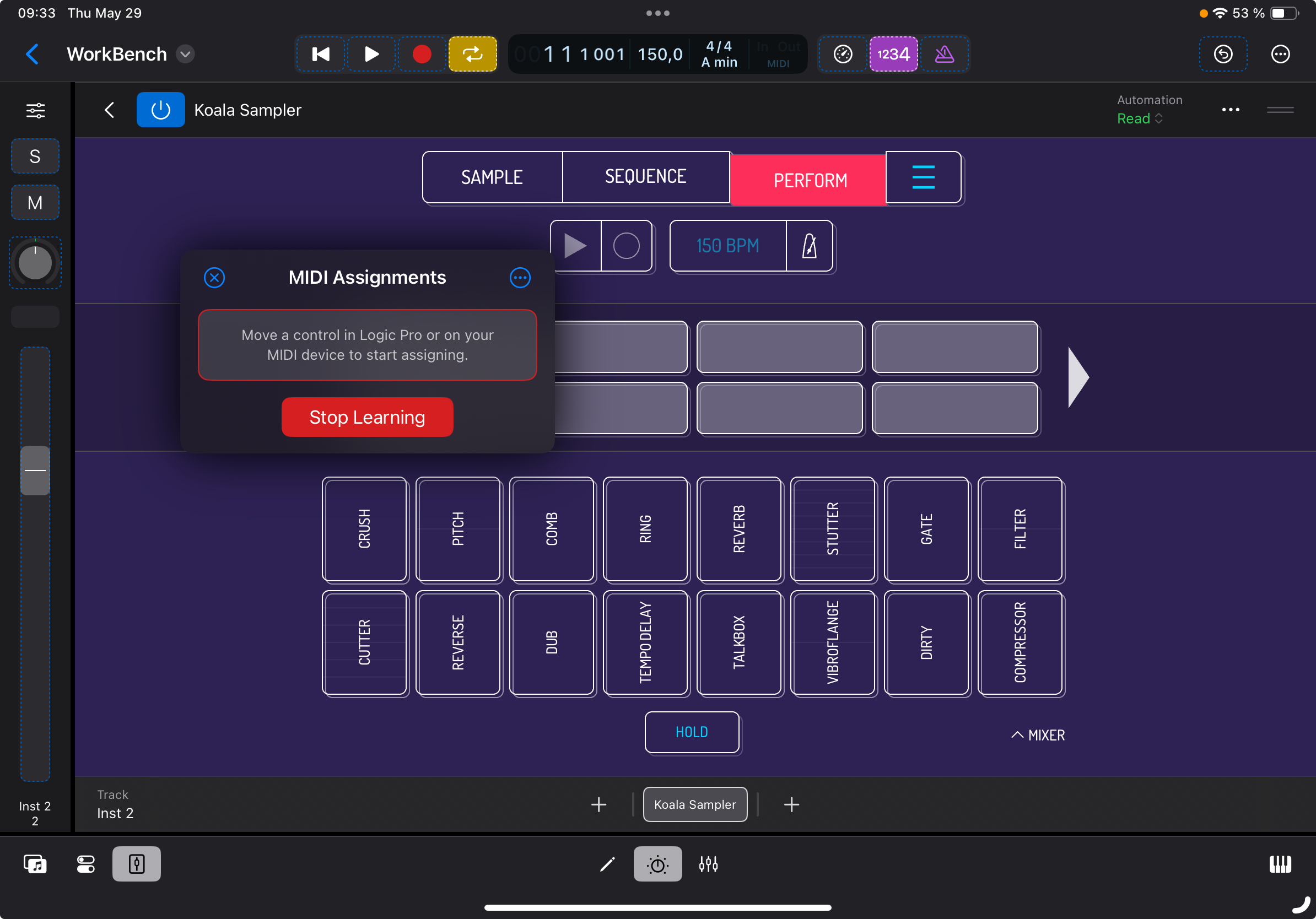
This AUv3 mapping already works for all AUv3's where the AUv3 UI has touch & release events implemented
can anyone check whether the sidechain inputs for external plugins (like tonebooster's compressor etc..) appear in this update?
i remember having to sometimes restart logic after the plugin was loaded for the sidechain input to appear, but now it doesn't seem to appear at all.. [it does for the logic stock plugins]
Something is definitely 'messed up' when using 3rd party AUv3's that provide side-chain input...
...this also affects 'MIDI-controlled Effects' that rely on the side-chain functionality to pipe in audio to process...
I've got a Launchkey Mk4, it came with an additional Logic script so gave some control already. I'm installing the desktop update now, see if that adds any extra beans.
oh no , do you see the option to sidechain [with external plugins] at all?
Nope, only the built-in ones...
I've already sent feedback to Apple about this using the form here...
https://www.apple.com/feedback/logic-pro/
(Mention version 2.2 in the message body as it's not yet selectable in the pop-ups).
...it's a sh*t show for sure
I did too. [but did not mention 2.2 as the pop-up did not show that, will send again]
Oof this is a bad one! I’ve also submitted via the form, fingers crossed we don’t need to wait months for a fix given it’s project breaking 😬
I loaded a project and straight away it couldn’t find the multi out channel for one shot. It popped up a message. Hopefully it’ll be fixed soon!!
@Samu :Why use Koala though w Logic? I’m guessing it’s because Logic only has “quick sampler”?
While Drum Machine Designer & QuickSampler might sound good on paper they are quite slow to work with in LogicPro for iPad. The Mac Logic version is way head of the iPad version with in-line view of the sample-editor / synth-sound and everything fits into one window while in LogicPro for iPad it's 'tile surfing deluxe'.
With the side-chain support for 3rd party AUv3's being broken in LogicPro for iPad 2.2 I'm very close to NOT renewing my sub unless it gets fixed before (23rd of June) it's time to renew...
Logic has a number of ways to deal with samples and drums.
I have problems with Multi out auv3 in old projects, in Logic Pro.
Patterning and battalion are affected...
The long awaited update, praise the Lord. Exactly by the time I was thinking I didn't need multi out and sidechaining anymore, Apple realises my dreams. Hallelujah ! 🤦
Yup, a proper shitshow. And seriously disappointing.
By the way, what are multi out and sidechaining doing exactly ? Do they make you want to take off your shirt and move your body on the dancefloor?
.
How do you trig Logic clips and scenes from external devices ?
Do any of these work?
This table is related to Logic Pro for iPad or the Mac version?
Mac version...
Yes.
I’m not sure if this is new in the latest update or I just missed it in the previous version or it’s something an OS update has brought but I am able to go “full screen” on a secondary monitor. Awesome!