Loopy Pro: Create music, your way.
What is Loopy Pro? — Loopy Pro is a powerful, flexible, and intuitive live looper, sampler, clip launcher and DAW for iPhone and iPad. At its core, it allows you to record and layer sounds in real-time to create complex musical arrangements. But it doesn’t stop there—Loopy Pro offers advanced tools to customize your workflow, build dynamic performance setups, and create a seamless connection between instruments, effects, and external gear.
Use it for live looping, sequencing, arranging, mixing, and much more. Whether you're a live performer, a producer, or just experimenting with sound, Loopy Pro helps you take control of your creative process.
Download on the App StoreLoopy Pro is your all-in-one musical toolkit. Try it for free today.
Fuguetron (for Drambo users)

Yes, I just had to do it.
Originally, I started using the Sequencer module but using it felt kind of clunky and then, playing a sequence in reverse did not swap Note-On with Note-Off messages which can sometimes be what I want, sometimes not.
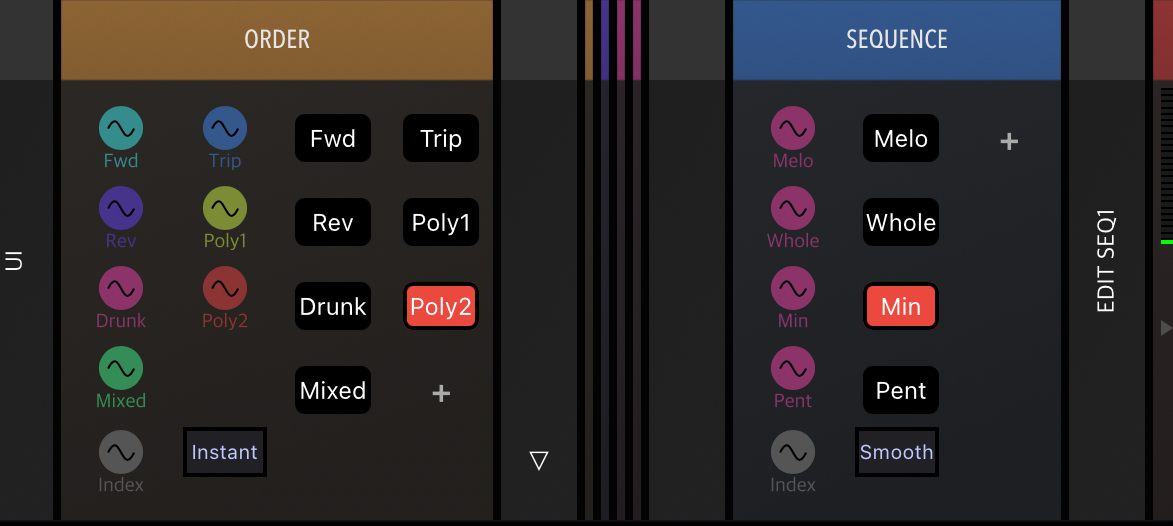
By coincidence I was reminded of the classic Sequencer modules and I like them a lot because editing and controlling them is quite straightforward, So I've built a sequencer that works like I want it to, with independent selection of note order, sequence and even speed control that lets you run through a sequence at any speed, forward, backward and with any weird curve you can imagine.
Here's my first version with 4 different sequences and 7 different playhead motions.
https://patchstorage.com/fuguetron/
Comments
Just downloaded. Will give it a try when back home, for sure.
This is just brilliant! Great job 👏
Thank you!!
@rs2000 Yea bro, you rock. Very good stuff
This is a seriously impressive project @rs2000!
Brilliant use of the shapers and GV Sequencers!
Thanks for sharing this, and thank you for proving once again that Drambo is still King!
Wow, it’s funny how fast time flies by just playing with different curves and shapes in the graphic shapers and watching how it affects the sequencers.
I do wish we could have the graphic shaper editing window open at the same time as the corresponding note sequencer. Maybe that’s something we could ask @giku_beepstreet for; pop up windows like the way the oscilloscope displays for audio outputs?
Also people, notice the clever usage of the math modules controlling the reverb mix on the drum track.
Thanks a lot Ed & @egobeats!
I could change the module placement into a multi-track view so that you can have curve editing and sequence editing open at the same time. I might give it a try, although it could become a little messy ... gonna think about it
Another option would be to add more empty/default curves and sequencers so you have plenty of space for your own experiments and still be able to save the project easily.
I changed the sounds to be a little smoother already, and I'll continue refining the patch.
I have a very shallow familiarity with Drambo only, but this is great fun and I have a semi decent idea of what’s going on, so that’s a bonus haha. Thanks for making and sharing @rs2000
@offbrands @distantstar @pedro @egobeats @Edward_Alexander @Gavinski
I just uploaded V1.1 with more shapes and sequences at your disposal, plus some more descriptive module names. Saving the project will save your custom sequences too. If you need more, just "Save As..." under a new name and go wild.
Thinking about different sounds now... Wavetable, FM, Virtual Analog - Drambo can do so much, I don't even know where to start 😉
PS: Well spotted, Ed! 👍🏼
Wonderful creation, thank you for making and sharing @rs2000. How i wish i had your understanding of how to use the full range of modules in Drambo! Cheers.
You know what?
In April this year, Drambo has celebrated its 5th birthday. And I have it since basically day one.
5 years to learn 😂
Well worth it though based on the evidence!