Loopy Pro: Create music, your way.
What is Loopy Pro? — Loopy Pro is a powerful, flexible, and intuitive live looper, sampler, clip launcher and DAW for iPhone and iPad. At its core, it allows you to record and layer sounds in real-time to create complex musical arrangements. But it doesn’t stop there—Loopy Pro offers advanced tools to customize your workflow, build dynamic performance setups, and create a seamless connection between instruments, effects, and external gear.
Use it for live looping, sequencing, arranging, mixing, and much more. Whether you're a live performer, a producer, or just experimenting with sound, Loopy Pro helps you take control of your creative process.
Download on the App StoreLoopy Pro is your all-in-one musical toolkit. Try it for free today.
Sessions: Plug-In Host by Open Planet Software (Released on iOS)

https://apps.apple.com/us/app/sessions-plug-in-host/id6478019823
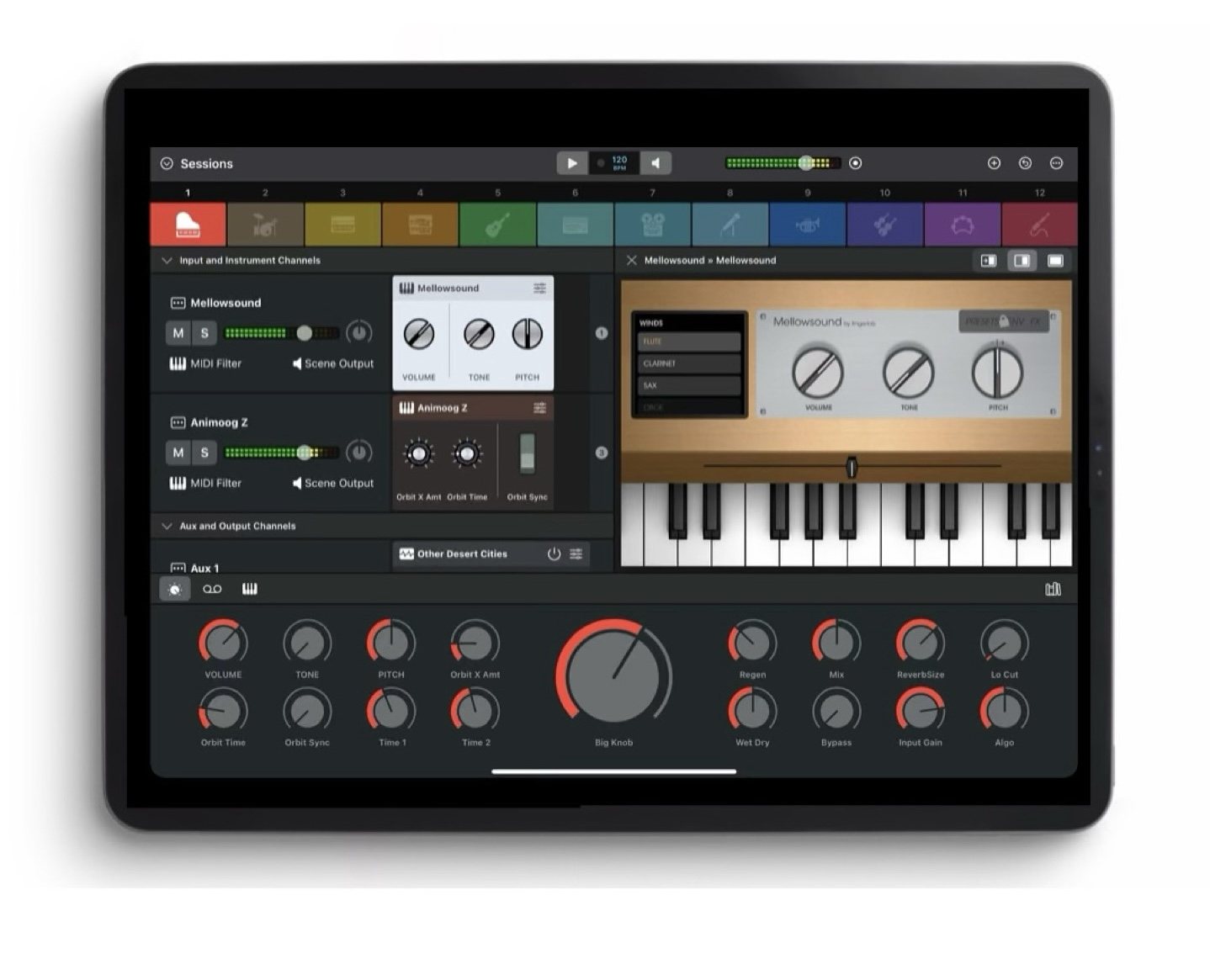
Sessions is the performance-oriented plug-in host that puts all your virtual instruments and effects at your fingertips. With powerful features and a streamlined workflow, musicians can enjoy ultimate freedom to explore, create, play and perform without a DAW.
Refreshingly straightforward, Sessions is designed to keep you 'in the moment' however you make music. Thanks to the fluid drag-and-drop interface and innovations like the Always-On Recorder, producers, songwriters and sound designers can quickly experiment with new ideas and jump-start the creative process. For live players, Sessions has everything you need for an impromptu jam or a professional stage performance including MIDI layers and splits, flexible audio mixing, seamless sound switching, MIDI control, Ableton Link support and so much more...
AUDIO / MIDI HARDWARE AND PLUG-INS
- Support for iPad compatible multi-channel audio devices for low latency audio input and output
- Support for MIDI keyboards and controllers
- Support for MPE controllers and plug-ins
- Support for AUv3 instrument and effect plug-ins
AUDIO MIXER FEATURES
- Unlimited number of Audio Input Channels for live audio sources
- Unlimited number of Instrument Channels for hosting instrument plug-ins
- Unlimited number of Auxiliary Channels
- 1 Master Output Channel per Scene
Unlimited number of effect plug-ins on each
Channel8 sends per Channel, switchable pre / post fader
- Auxiliary Channels can be routed to independent external outputs
MIDI FEATURES
- MPE support
- Create layers and splits using MIDI device, channel, note and velocity
- Note transposition on each Instrument Channel
- Use MIDI messages to control Scenes, Macros, Beat Clock and Metronome
PLUG-INS AND WIDGETS
- Plug-ins are represented in the Mixer by Widgets
- Widgets can be customized with knobs, sliders and switches to control up to 12 plug-in parameters
- Over 30 beautiful Widget themes are included, many inspired by the classic hardware of yesteryear
- Flexible Mixer / Plug-in split screen options: auto-sized, fixed 50/50 or full width
SCENES
- 12 Scenes, each with its own independent Mixer
- Seamless switching between Scenes
- Customizable with colors and icons
MACROS
- 16 Macro Controls and 1 Big Knob per Scene
- Macros auto-map to the first 16 Widgets parameters by default
- Macros can be configured to control multiple parameters, each with its own scale and range
PATCHES AND PROJECTS
- Save individual Channels and Scenes to the Patch Library for easy reuse
- Save the content of all twelve Scenes, Macros and the Beat Clock as a Project file
- Move Patches and Projects between Mac and iPad (third party plug-in availably may vary between platforms)
RECORDING
- The Always-On Recorder continuously records the last 5, 10 or 15 minutes
- Loop playback of recorded or selectable region
- Export recorded or selectable region as M4A or WAV
- Additional manual direct-to-file recorder for recordings of unlimited duration
BEAT CLOCK
- Start / Stop, Tempo and Time Signature controls
- Internal, Ableton Link and external MIDI clock sync sources
- Metronome with selectable tick sound
PLUG-IN LIBRARY
- Separate tabs for Instruments and Effects
- Independent Search and Favorites filter in each tab
- Plug-ins can be organised alphabetically or grouped by manufacturer
- Hide unwanted plug-ins using the Plug-In
Manager
AND MORE...
- Simple, drag and drop operation throughout
- Light and Dark modes - follow the system or manual selection
- Safe Start mode to help troubleshoot problematic plug-ins
Comments
Always on recorder killer feature ✊
Look awesome!
…but minimum iOS version is ios18… none of my machines are updated to 18 and I think will never be…
Also, multithread would be the big difference and make session a real alternative to AUM
Instabuy! This is exactly what I’ve been looking for. Plus retro recording!!!
Thank you @ninobeatz!
Deleted double post.
Can I ask why you're not interested in Camelot Pro or KeyStage? What do you find better about Session?
🤝
Actually a good question would be, does the always on recorder just record a master channel, or can it be set to separately record a few at the same time? (I currently use AUM to record live instrument jams with the idea that sometimes we can get a little bit mix down nicely later, but I always end up googerbytes of crap as well as the genius, be great to just grab the last fifteen minutes when we hit those sweet sweet gravies 😂)
Can midi generator plugins be loaded in this? Not obvious at first glance that they can. If they can be, how is it done? What's the process for loading a sequencer which will play a synth?
It doesn’t seem to show any MIDI generator plugins from either list (instruments or effects) at the moment
From what I can see this is more like a host for those performing live not relying on sequencers especially since the scene switching is seamless.
Personally I have no use for this but know people who do (primarily keyboard players who need a host with scene switching).
Right, that's what I thought but wanted to double check I wasn't missing anything, cheers Samu. So definitely no AUM killer after all, and not something I personally would have much use for either.
Maybe not yet, but the UI is definite more appealing with configurable widgets etc.
Personally I'm hardly using AUM at all these days and spend most of the time in using Koala, Drambo, Logic and/or Cubasis when I'm using the iPad.
AUM seems to scratch the itch for someone that likes to standup a rig of AUv3’s for specific performance events (which this app
may do with extra benefits) or using AUM for a creative session that produces an output file suitable for sharing or archiving.
I’m in the latter group and may continue to be.
If any diehard AUM users make the jump please share the additional benefits that @j_liljedahl can add to the roadmap
I would wonder if there's a plan to host midi plugins at all. Because the desktop version came out about a year ago I think, and yet, still no midi plugins. I find that a really weird omission. Any thoughts as to why they decided not to support those?
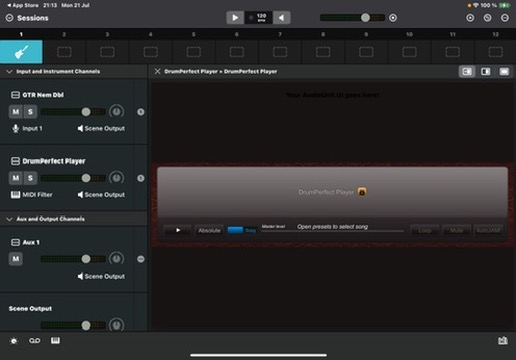
Trouble in paradise: DrumPP player want the host to present a list of presets and I can't find a way of doing that which makes it unusable. Am I wrong though? Anyone..!?
Yes, also dissapointed by this
Sorry for being lazy and not wanting to sit through a bunch of videos to find out. I don't see anything on the web site specifically about backing tracks. Can you load and loop them? I would assume so as it would be pretty useless without them. It would be pretty interesting as a streamlined performance host as long as it does. Even better if it has time stretch for audio.
Not that I need it with Loopy Pro, but it looks like it could be faster to learn and set up for straight-up live playing.
As others have mentioned it's designed as a plugin host that's driven by external gear rather than internal midi generators and as a live performance / studio based tool which you connect to a midi keyboard / controller. It also has unlimited audio input capability so you can include audio from external gear. At the price and considering it includes the desktop and iPad versions its a pretty good deal if you need a tool like this.
Understood, I kind of bought it in the hope of cleaner more 'visual' AUM. Was hoping I could set some midi generated loops going to jam over. Hammerhead/playbeat etc work so was suprised to see no midi effect implementation
So very cruel. It would be just what I wanted if plugin hosting plugins were a thing on Apple devices.
Does anyone know if it is possible to route the output into a Cubasis input?
I doubt it. IAA support would be required, but isn't mentioned anywhere.
I have used it on mac mainly because AUM is not there yet. It has its quirks but it’s fast and simple. You cannot host midi plugins but you can use external sequencers (for instance from an iPad)
Last time I spoke to the developers they mentioned both midi plugin support and iOS. I’m surprised iOS came before midi.
If you’re interested in midi plugin support it would be great to contact them. They listen.
Ah, the always on record function is global, not by track.
Now that, is poor.
I'd like to praise this app for what it is, not add to the battering for what it isn't. There's a free trial on desktop which I've found useful and instructive, enough to think it's worth buying for me. It's come down £10 in price (not sure how long for) and is now universal, so available on iPad for no extra money. It's elegant and well designed and there's a roadmap for development that seems to be progressing well.
I love AUM in so many ways, but sometimes using a different and more focussed interface can be of great benefit, for me anyway. I think I will use this a lot for feeding iPad audio to my desktop. In comparison to other options, I've used MainStage on a laptop, but always found the midi routing head-scratchingly over complicated, Sessions is so much simpler in that regard. I can't personally justify the cost of Camelot Pro in that I wouldn't use it enough, but this is priced that I can afford it as a useful option in several scenarios where I might want to play live without any kind of sequencing.
Congratulations to Open Planet for making Sessions and thank you to them for bringing it to iOS.
+1
❤️
+1. I'd like to praise this app for what it is as well.
Same here
Same, but I think it's really important to point out that it doesn't load midi plugins, as I think many who buy this will not be expecting that it has this limitation, and for some it will be a deal breaker.