Loopy Pro: Create music, your way.
What is Loopy Pro? — Loopy Pro is a powerful, flexible, and intuitive live looper, sampler, clip launcher and DAW for iPhone and iPad. At its core, it allows you to record and layer sounds in real-time to create complex musical arrangements. But it doesn’t stop there—Loopy Pro offers advanced tools to customize your workflow, build dynamic performance setups, and create a seamless connection between instruments, effects, and external gear.
Use it for live looping, sequencing, arranging, mixing, and much more. Whether you're a live performer, a producer, or just experimenting with sound, Loopy Pro helps you take control of your creative process.
Download on the App StoreLoopy Pro is your all-in-one musical toolkit. Try it for free today.
DrumPerfect Pro tips and workflows

The latest update of DrumPerfect Pro introduces the AUv3 DrumPerfectPlayer, packed with exciting new features such as AutoJAM!, full MIDI in/out, and an intuitive drag-and-drop of multiples samples for quick kit building. The possibilities with DrumPerfect Pro are extensive, making it a powerful tool for creative professionals and drum enthusiasts alike.
Recognizing the potential of DPP, developers Marinus and Gilbert are committed to sharing their expertise. Look forward to a series of YouTube tutorials, workflow guides, and tips on efficient drum/percussion track production, as well as information on integrating DrumPerfect Pro with other apps. This resource will help you make the most of DrumPerfect Pro and enhance your music production capabilities.
Comments
New video: DPP and AUv3 player inside Aum.
Thank you, really appreciate these tutorials.
If I may, I'd like to ask you to use the mouse in the next video. It will make it much easier for beginners to follow what you're doing.
Thanks for the suggestion.
Actually these videos are made with iPad, so I need to find a replacement for the mouse.
If anyone has a suggestion....
I don't understand ... You can use a mouse on iPad too, at least a wireless mouse. I use it every day.
@thesoundtestroom kindly showed me how to outline the mouse cursor for better visibility in videos. In
Device Settings > Accessibility > Pointer Control > Color, you can set a color and border width for the mouse pointer. You can also try turning offAutomatically Hide Pointerto see if having the pointer always visible is an improvement (or not).Has anybody purchased the DPPro HandPan IAP ($4.99). I cannot get any samples to load or play… the demo sounds so good. Does it work for anybody? I have reloaded the package 4 times. The samples seem to be in the local DPP folder but they are in a protected format. I’ll drop a message to the Dev’s support
Contact and update with any news.
I also purchase Cajon Flamenco and General MIDI packs and they work as expected. I’m using the MIDI out to drive a PianoTeq HandPan ($49) to scratch the itch for that special hand job sound.
Oh, I have always used the Apple pencil, but yes, there is bluetooth mouse for iPad. However would it be possible to show the pointer using the pencil instead of a mouse?
I bought it long ago and now with the update redownloaded it without issue so I think something must be wrong on your end. Hope you sort it, they sound wonderful.
Thanks for letting me know.
OK… I deleted the app and data, Then reinstaledl the app… on the IAP I pressed the “Buy” button and
got the hoped for “You own this… do you want it for free?”.
The sample Handpan songs are really good. I think I’ll splurge and buy another pack.
Just watched your video and wanted to say thank you, these are incredibly helpful.
I have owned drum perfect pro for years but it’s not for the faint hearted and I lacked the cognitive ability to fully understand it at the time so I shelved it. But… after this update I have a renewed sense of vigour and determination to get on top of, it has always been the best sounding drum app on iOS (IMHO).
If you do produce more supporting videos I am sure the app will have a surge in popularity as Doug Woods did his last videos on it 10/11 years ago, there is a whole new generation of young music makers out there who will now likely discover it and us oldies who will rediscover it, and purchase even more IAP’s (as I have just done).
Just want to encourage you to do more supporting videos and thank you for setting up this discussion group, I hope it gets good traction amongst this wonderful community.
Kind regards
I don't have a pencil so I asked ChatGPT and the answer is
"The cursor only appears for devices like a mouse or trackpad, which use a pointer-style interface. With the Apple Pencil, the system assumes you're drawing or writing directly "on the canvas," so there's no need for a pointer."
@gilbert, I’m trying to set up a crash hit on the first of every four bars, just like you do in the video, but I can’t get the Link button to do anything for the first stroke. The button does nothing. For any other stroke I can get it to go orange like it should. Any ideas?
[edit] nvm, I was having some other issues (purchased kits missing most sounds), so I re-installed. It’s working as it should now.
@wim hi,
interesting... and mysterious.
Let's recapitulate the steps: ( doing it as I am typing )
0- start DPP fresh, new empty pattern ( make sure that probability is all on A,
JAM! button is turned off ( gray )
and time shift is on zero ( do you know that since this update the first stroke may also have a negative value, like other strokes? )
1- draw the stroke ( green ) on the first step, beat1, Crash1 or Crash2 ( or any instrument for that matter )
2- select the stroke ( blue )
3- tap Linked Set button ( turn orange )
4- deselect stroke ( which turn orange )
5- enter value for LS: 4 at 1
6- play, it works!
if not, does anyone else encounter this issue?
Now there maybe another issue: if, when the stroke is orange one unintentionally swipe it down, it becomes silent ( changed to red ( mute ) stroke ).
Otherwise, I have no idea.
Thanks for asking.
Now ChatGPT may need to update its knowledge...
It may be useful to mention that there is ( buried ) in iOS18 settings a virtual trackpad with pointer that works with finger or pencil, however it masks part of the app buttons and commands. I still have to figure out if it can be used for making videos tutorials.
Thanks @Gilbert - a reinstall seems to have fixed it. I reinstalled due to not being able to get many of the sounds from purchased kits to work. For instance the RR kit, though restored more than once, would only sound the kick. All is working as it should now.
Thank you @keithmac for these kind words. Like you say, they renew a sense of vigor, in developing and offering tutorials for users, so that they can get the best of this app.
And yes, I believe DPP is about 10 years old ... and still giving
Or ... you could just break down and get a cheap bluetooth mouse. 😉
Ah, I may just do that 😉
Update: figured out. Actually it works quite well once we get used to it.
Problem solved.
Good idea I'm using this Logitech for almost 2 years without any issues.
https://www.logitech.com/en-us/shop/p/pebble-2-m350s-wireless-mouse
@wim 👍
Sorry, I have other questions:
See screenshots.
I also have these ??? I will be interested to see the answer to your question
Well, it is possible that some old files have not been deleted correctly at the time of packing the content. Yet checking the pack content manually, I don't see any of these kits.
And now after installing the PP2 pack, I still don't see this POP2 kit. So???
For the kits with a number, thanks, you made us find a little bug. When you tap on an empty kit button, it save it automatically with its number.
Anyway, if you load these "unexpected" kits and they don't load any samples, you can just delete them by sweeping left so they won't clutter your kit folder. But...there too a little issue: sweeping to delete doesn't work well. Will be fixed in next update.
My POP2 kit has always been empty also before the upgrade. I just thought it was an old name left there and the new name was PP2 Kit 2.
That's right. I started building it ( 5 years ago! ) by naming it POP2. Later I changed the name to PP2.
But what doesn't make sense is that it is nowhere to be found in the pack that was packed at that time. How could it appear in the IAP download??? 🤔
Thanks, Gilbert. I will delete the POP2 kit. Not sure where it was coming from (original app or IAC - I bought 5 or 6 in the meantime, I think I had just GM+PoP+Rock+Funk at the time of the screenshot), since I have not checked after each installation step.
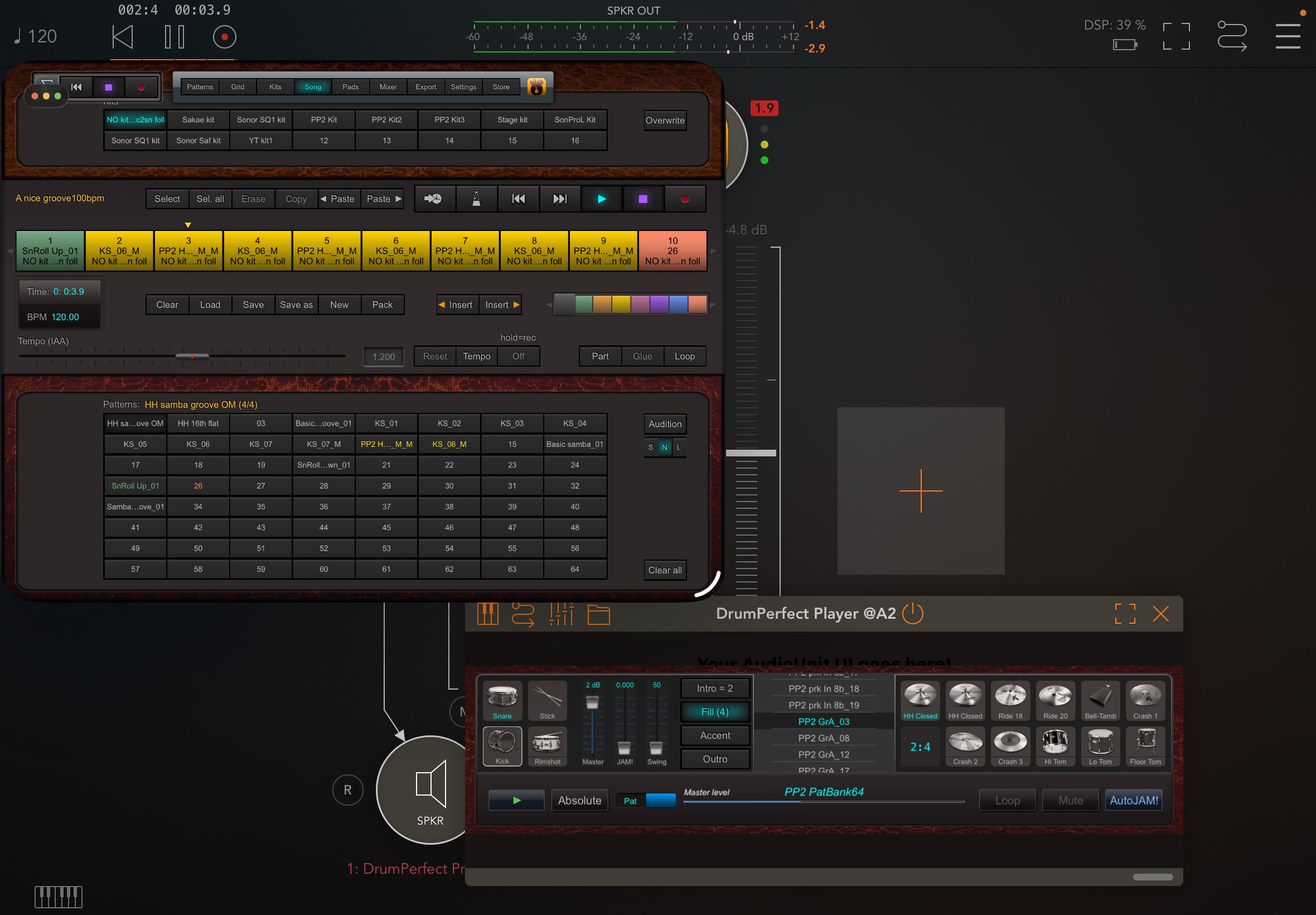
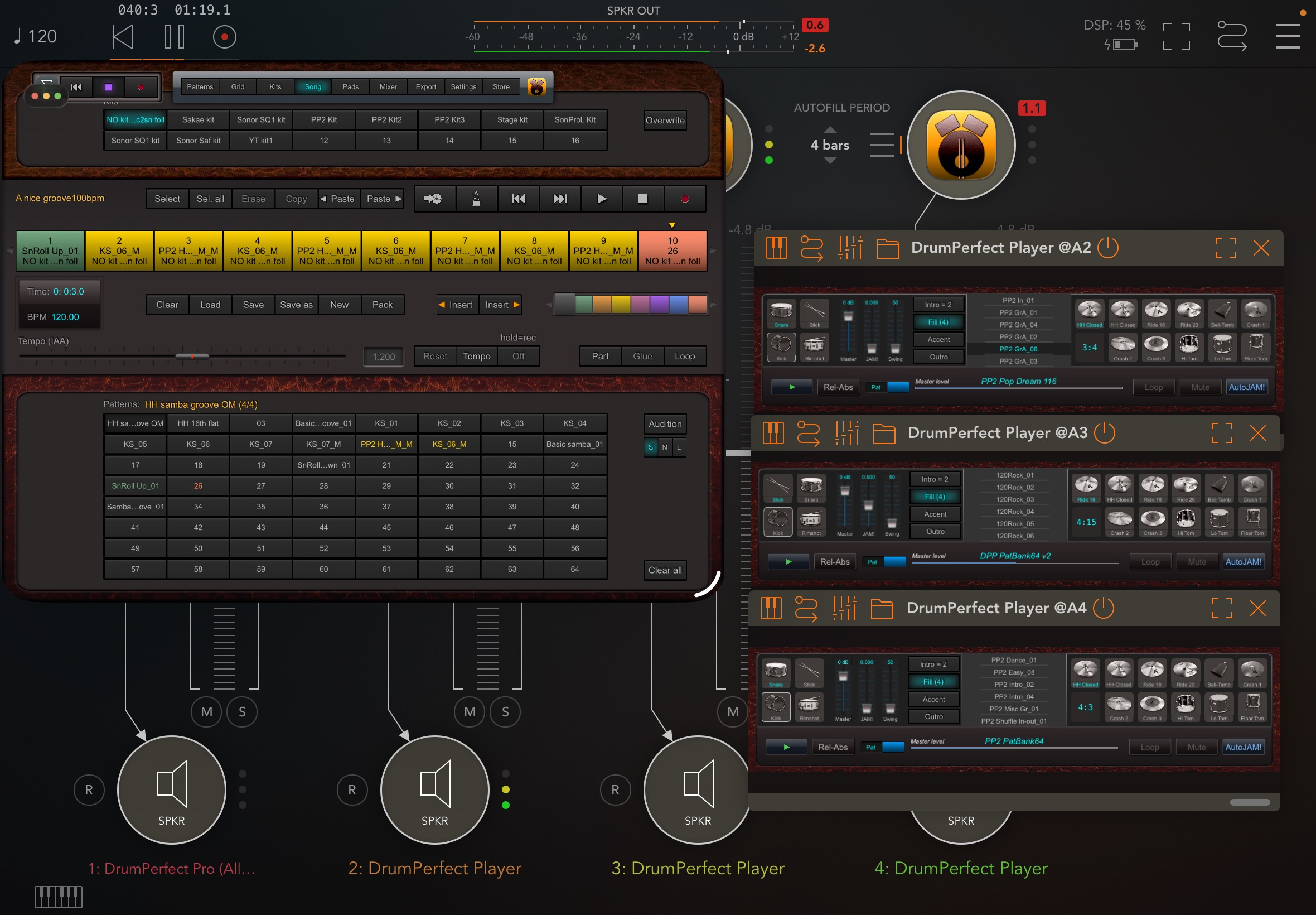
Two configurations inside Aum.
DPP + DPplayer Auv3. Editing of patterns and songs can be done in DPP window, and are immediately available in the player (s) preset list when saved.
DPP and 3 Auv3 players together
A control surface controlling DPplayer.
Would you mind sharing those control surfaces? Looks like Surface Builder Pro
excellent setup in AUM, for an excellent app Drum Perfect Pro. Thanks for the DPplayer app, this looks good.