Loopy Pro: Create music, your way.
What is Loopy Pro? — Loopy Pro is a powerful, flexible, and intuitive live looper, sampler, clip launcher and DAW for iPhone and iPad. At its core, it allows you to record and layer sounds in real-time to create complex musical arrangements. But it doesn’t stop there—Loopy Pro offers advanced tools to customize your workflow, build dynamic performance setups, and create a seamless connection between instruments, effects, and external gear.
Use it for live looping, sequencing, arranging, mixing, and much more. Whether you're a live performer, a producer, or just experimenting with sound, Loopy Pro helps you take control of your creative process.
Download on the App StoreLoopy Pro is your all-in-one musical toolkit. Try it for free today.
Adapting and Enhancing the EXAMPLE_Repeating_Widget project from the Wiki

Based on the idea in the EXAMPLE_Repeating_Widget project referenced on this Wiki page:https://wiki.loopypro.com/Actions_Tips
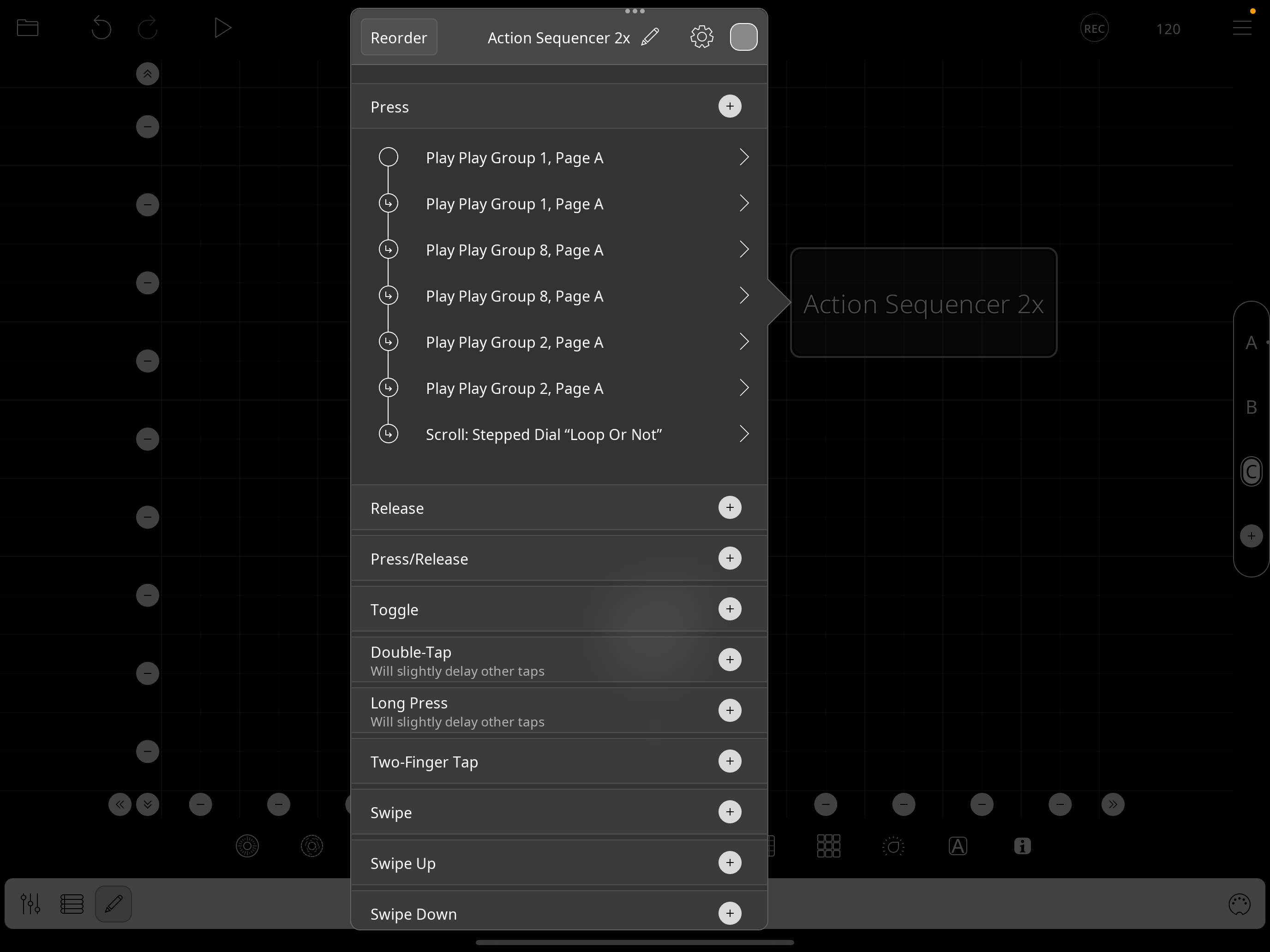
I'm trying to implement something similar, with the actions "Play"ing Play Groups instead of playing a single clip, as in the above example project.
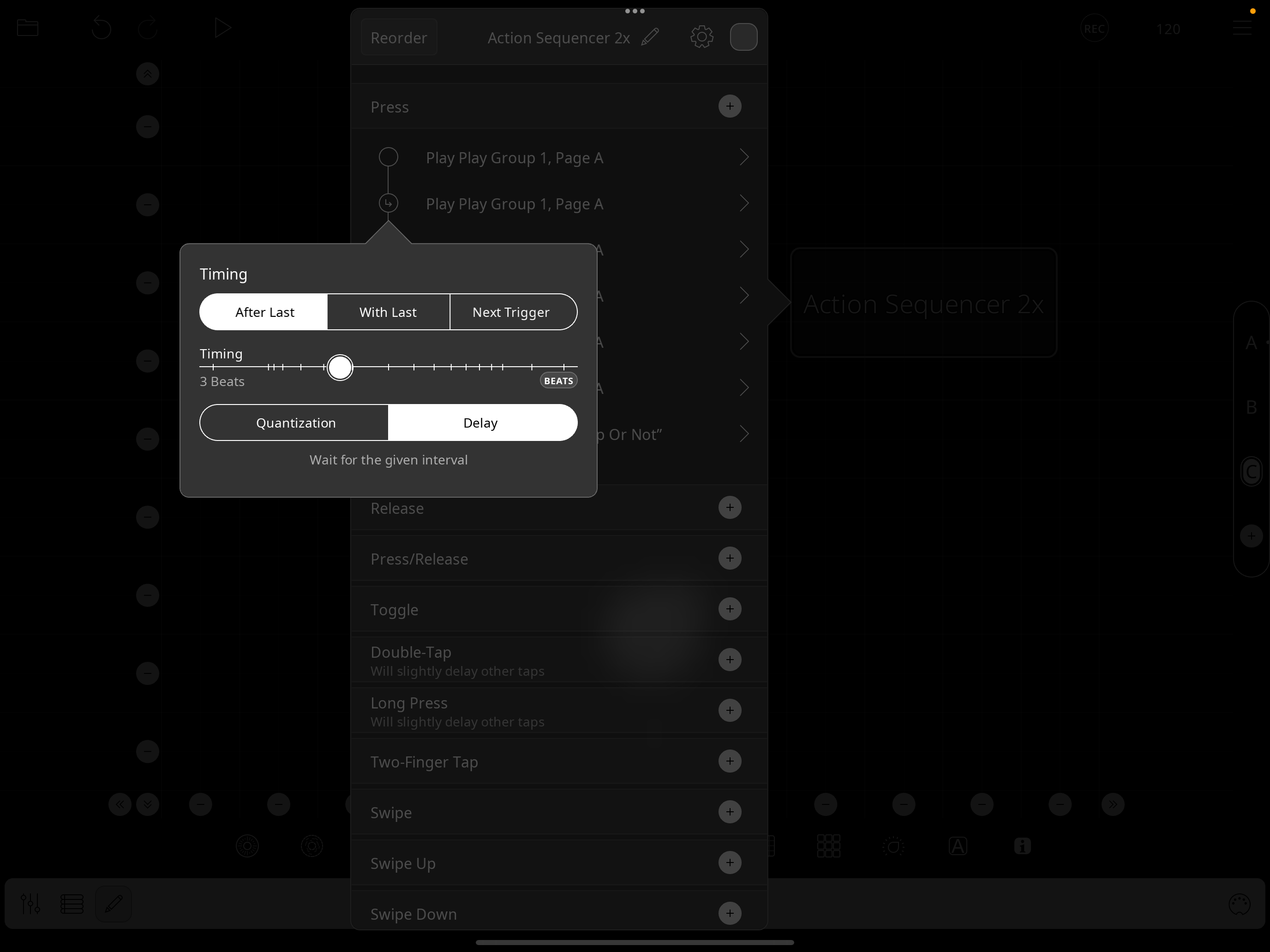
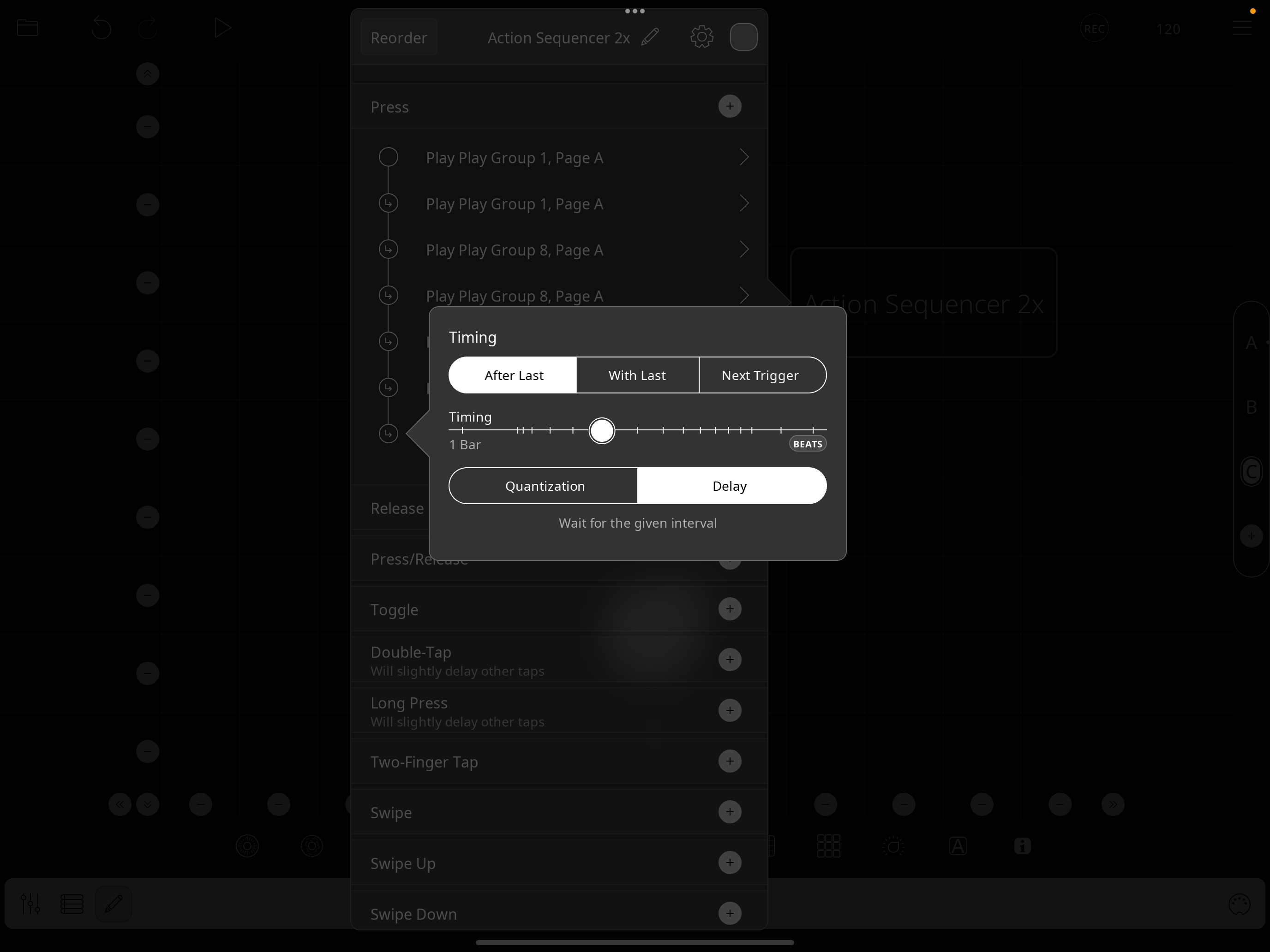
I'm struggling to get this to work as expected and continually having to tinker with the timing delays, I think because I'm having to have different delays based on the lengths of the longest clip in each play group.
I can't get things to work as expected, though I have gotten close.
What I'm trying to do with this the "Action Sequencer 2x" button is to have it play each of the first 3 play groups twice, then (if the stepped dial is in the "ON" position) to have it loop back to the beginning and continue through doing the same thing again.
I am able to get close, but the closest I could get is to have it sequence through the first 3 play groups as expected, but when it starts back up at the top again, it gets wonky and out of sync.
The other small issue is that some of the play group clips that are shorter than the longest clip in the group don't loop, but rather they play once and then stop.
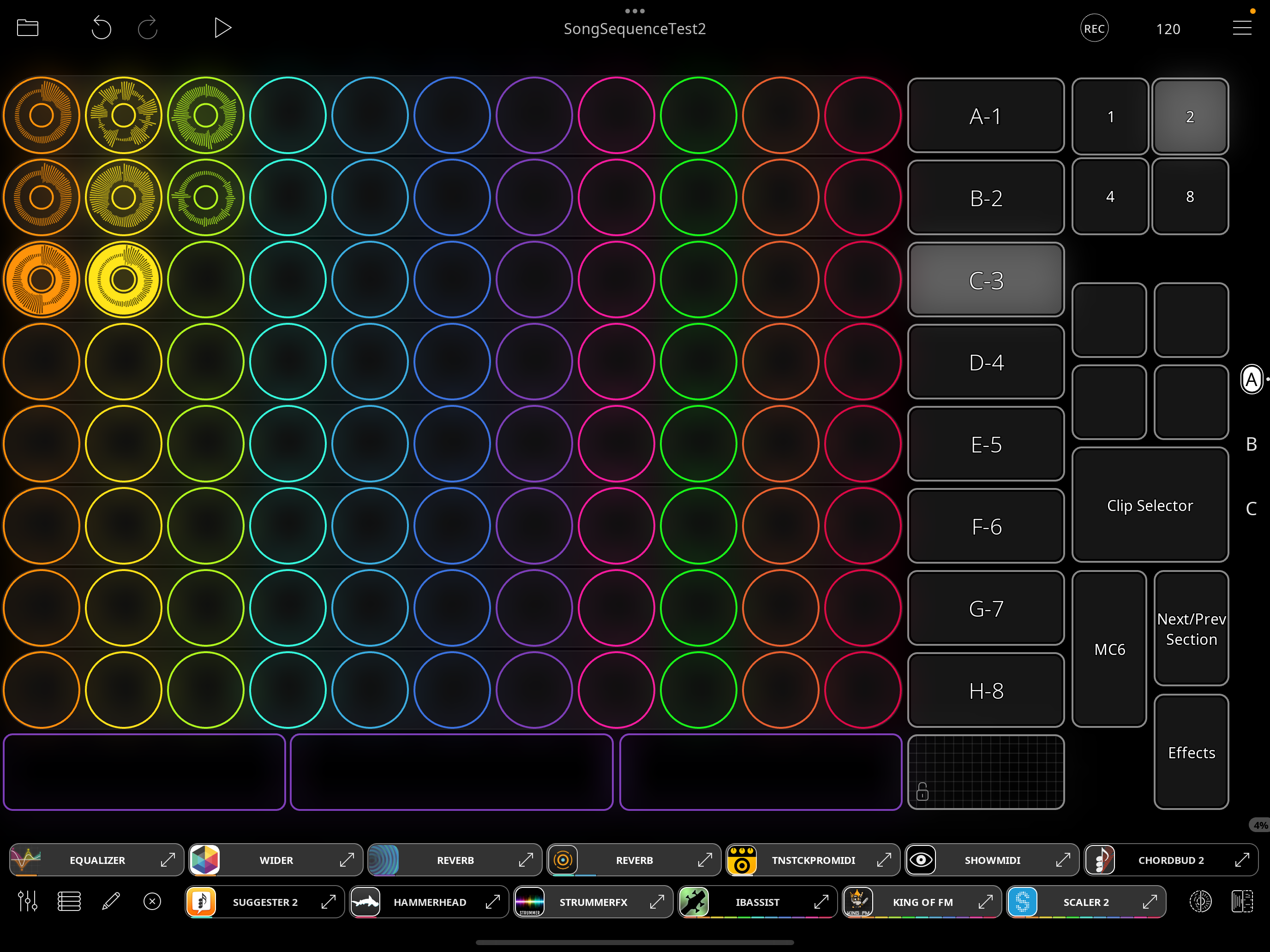
The top play group has 3 clips, each of 2 bars.
The 2nd play group has 3 clips of 2, 2, and 4 bars.
The 3rd play group has 2 clips of 4 and 2 bars.
Any thoughts on how I might simplify things and/or adapt the approach to get this to work?
I've also attached a video where you can see that it goes thru playing each of the first 3 play groups twice as expected, but then when it loops to the top, it gets all out of whack.
Thanks
Dropbox link to video:
https://www.dropbox.com/scl/fi/takb2js7az6a1gg41yyls/ScreenRecording_08-01-2025-17-13-09_1.mov?rlkey=nyh8cei517h2hzqtcfbfaeqal&dl=0
Comments
@danm: please show the actions in the dial you are triggering. If I understand correctly it is when you trigger the dial that things go off.
Thanks I may have figured out why it's getting "off", I'll let you know if I need more help on that.
More pressing is:
Any idea why the 2nd clip (the yellow clip) in second row down (B-2 row) is turning off early, when playing through twice using the "Action Sequencer 2x" button approach, but it doesn't act that way when I trigger the play group by pushing the B-2 button (ie: not doing the "Action Sequencer 2x" stuff at all, but just hit play and then tap the "B-2" button)...when doing it the direct way, and pressing the B-2 button to trigger the play group, then all three loops stay lit and play through as expected, but when triggering that play group via the "Action Sequencer 2x" approach, you can see in the video that yellow clip (in 2nd row down) is winding down and turning off earlier than I expect.
One difference is in the B-2 button, I do "Cancel Count-Ins/Outs" then "Play Play Group X", but from the "Action Sequencer 2x" button I simply "Play Play Group X"...might that have anything to do with it? I'm stumped
Thanks
@danm : can you zip and upload a copy of the project with no audio?
Sure, What are the steps to upload the project excluding the audio?
Are you suggesting to do that for my benefit or to reduce size of upload? Don't mind sharing the audio as it's test riffs for testing things out, if that would be preferable.
Also, where to upload? Post here?
Here is a link to the project in Dropbox
For future reference, I meant make a copy of the project, clear the audio from the clips, zip the project and upload the project into your post. Deleting the audio keeps the project small.
@danm : i think all you have to do is turn on retrigger in the first play action of the sequence. Also a delay of an eighth note will probably work for all of the actions.
Thanks. Can you explain why/how that would fix the issue, please...turning on retrigger in the first play action of the sequence didn't seem to change anything, not sure why, perhaps I misunderstood your recommendation ... did this change fix it for you?
Come to think of it, it shouldn’t be needed. I am not seeing the behavior shown in your video. Are you running version 2.0.2?
I thought i saw it once and that it went away after adding the retrigger. In retrospect, I think that was related to having stopped the transport and not having canceled pending actions.
Try adding cancel count in/outs and cancel pending actions as a stop clock follow action.
How to ensure that? If I go back to the app store, it just says "open" not update, is there some way to force an update to 2.0.2?
So, you are not seeing the same behavior on the 2nd row of clips as in my video? Can you confirm that, please.
If that's the case, then something is different in our runtimes for sure.
Where is this done? Did you already confirm that this resolved the issue in the project I sent you
Thanks
Tried adding those 2 things to as follow actions in Global clip settings and see no change in behavior, fyi
@danm: I didn't notice your post about the yellow clip. That looks like it is because Play Once is on. When applying that to the group, it looks like it applies play once to each loop. You can turn play once off in your action, it isn't needed.
Ah, ok. I was able to change "Play Once" to "Loop" in all but the top 2 actions (Play Play Group 1, Page A)...for some reason in that one Play Once/Loop is greyed out (with Play Once selected) and it's not allowing me to change, that...not sure why.
Regardless, changing Play Once to Loop did fix that issue of the yellow loop acting differently and stopping midway, thanks
Spoke too soon...that yellow loop in 2nd row from top, still have the audio cutting in and out during the 2nd time through, though it seems to behave better with the updates you suggest above (loop setting and also 1/8 note delay)
Try turning off intro in that yellow loop. While that shouldn’t interfere perhaps it makes a difference in some circumstances
@danm : the first group has a clip in it set to Play Once.
That seemed to help a bit but yellow loop still cutting out/no audio about a bar before it finishes playing the second time thru...odd.
It seems to have something to do with the yellow clip being 2 bars and the lime clip being 4 bars in this 2nd row...
(but thought changing the play once to loop would have helped if this was the issue, perhaps)
But if I remove the 4 bar lime clip and just leave the 2 two-bar clips, it doesn't have that unexpected behavior of the audio dropping out early
Couldn't find one that fits this description, if you can tell me the specific one I'll turn it "Loop", but couldn't locate one like this
Go through them one by one. I don’t recall which one or ones. I think there were several.
When I make the changes, I mentioned: turning of Play Once for both play actions that trgger the second row and turning off the yellow clip's intro, the second row's clips play fully. Are you sure you turned off Play Once in both play actions?
Thanks for mentioning that again...I had changed them all to "Loop" for testing at some point, but somehow (maybe bc I've been experimenting w/ so many diff variations) one of the "Play Once"s crept back in...You are correct, updating that to "Loop" fixed the odd early volume dropout issue. Thanks
Btw, turning the intro on in that clip is not causing problems for me now.
Interesting, thanks for sharing that. Can't retest that here right at the moment as I deleted that clip with the Intro and just recorded a new one without an Intro to get that variable out of the equation. I'll try re-recording one with an intro at some point and see how it goes, but good to hear it doesn't seem to be an issue. Overall the sequencing working well at the moment and if there was only a more clever way to repeat a section without having to just add it twice to the action list, that'd be cool but for now I can't think of a better way