Loopy Pro: Create music, your way.
What is Loopy Pro? — Loopy Pro is a powerful, flexible, and intuitive live looper, sampler, clip launcher and DAW for iPhone and iPad. At its core, it allows you to record and layer sounds in real-time to create complex musical arrangements. But it doesn’t stop there—Loopy Pro offers advanced tools to customize your workflow, build dynamic performance setups, and create a seamless connection between instruments, effects, and external gear.
Use it for live looping, sequencing, arranging, mixing, and much more. Whether you're a live performer, a producer, or just experimenting with sound, Loopy Pro helps you take control of your creative process.
Download on the App StoreLoopy Pro is your all-in-one musical toolkit. Try it for free today.
How to assigns buttons / sliders do trigger AUv3 app (not effect) functions?

I know how to do this for effects, but I just can't find the proper action for other apps - like the Hammerhead drum machine.
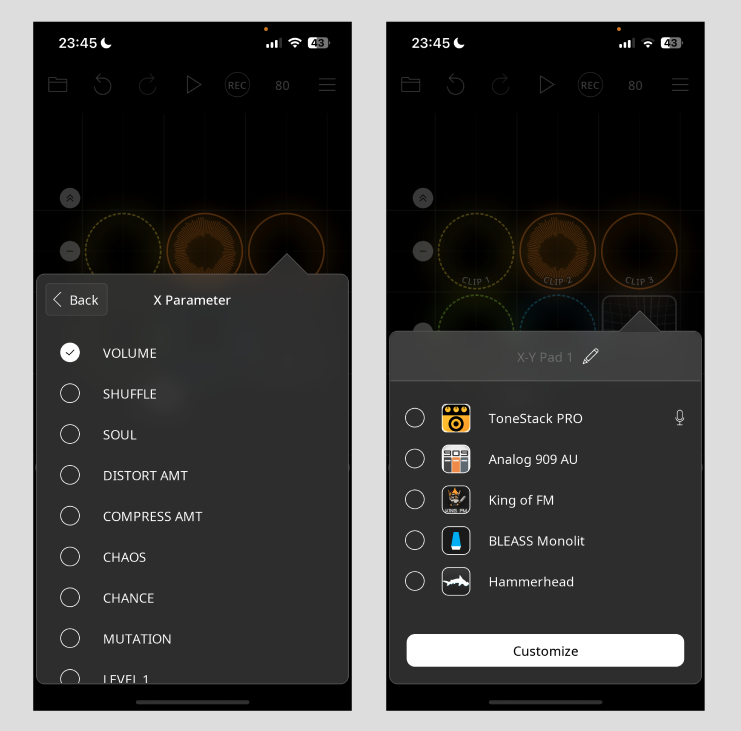
The only widget I was able to do this was the XY pad - but there I've had to select two parameters, and also I'd feel more control with a simple slider - for example to adjust the "randomizer" inside Hammerhead.
When it comes to buttons, it would be nice to have a dedicated mute button which only mutes the kick drums for example, but again - I just can't get to access the list of app specific actions I can assign to a button.
Any help is more than welcome!
This is what I want to achieve with buttons / sliders too:
Comments
@balu
These are the actions that adjust AU parameters. Effects includes effects AUv3. The other is for audio input instruments AUv3
If you look in Loopy Pro’s manual, there is a description of all the available actions that you might find worthwhile.
Thank you so much! I was looking for the solution in the manual at the button / slider section, but I just couldn't figure out where it was (I remember it had a link to "continuous value actions" but it was broken, and with page search I couldn't find anything useful for that term either ... I've tried probably every adjustment option but this... huge thanks again!
@balu : I’ll fix the link. Here is the section the continuous actions link was supposed to point to:
https://loopypro.com/manual/#action-types
It describes the the difference between impulse and continuous and Boolean actions.
See the sections below it to see actions available in the app by category.