Loopy Pro: Create music, your way.
What is Loopy Pro? — Loopy Pro is a powerful, flexible, and intuitive live looper, sampler, clip launcher and DAW for iPhone and iPad. At its core, it allows you to record and layer sounds in real-time to create complex musical arrangements. But it doesn’t stop there—Loopy Pro offers advanced tools to customize your workflow, build dynamic performance setups, and create a seamless connection between instruments, effects, and external gear.
Use it for live looping, sequencing, arranging, mixing, and much more. Whether you're a live performer, a producer, or just experimenting with sound, Loopy Pro helps you take control of your creative process.
Download on the App StoreLoopy Pro is your all-in-one musical toolkit. Try it for free today.
"SOLVED" How to Record with Both Fixed and Flexible Loop Lengths
Hello,
I would like to assign a fixed loop length to a clip using a button.
I tried using “Assign Clip Settings”—is that the correct method?
After that, I’d also like to have a button that removes the fixed length so the clip is no longer locked.
Finally, is it possible to set the recording loop length for all clips at once with a single button?
Comments
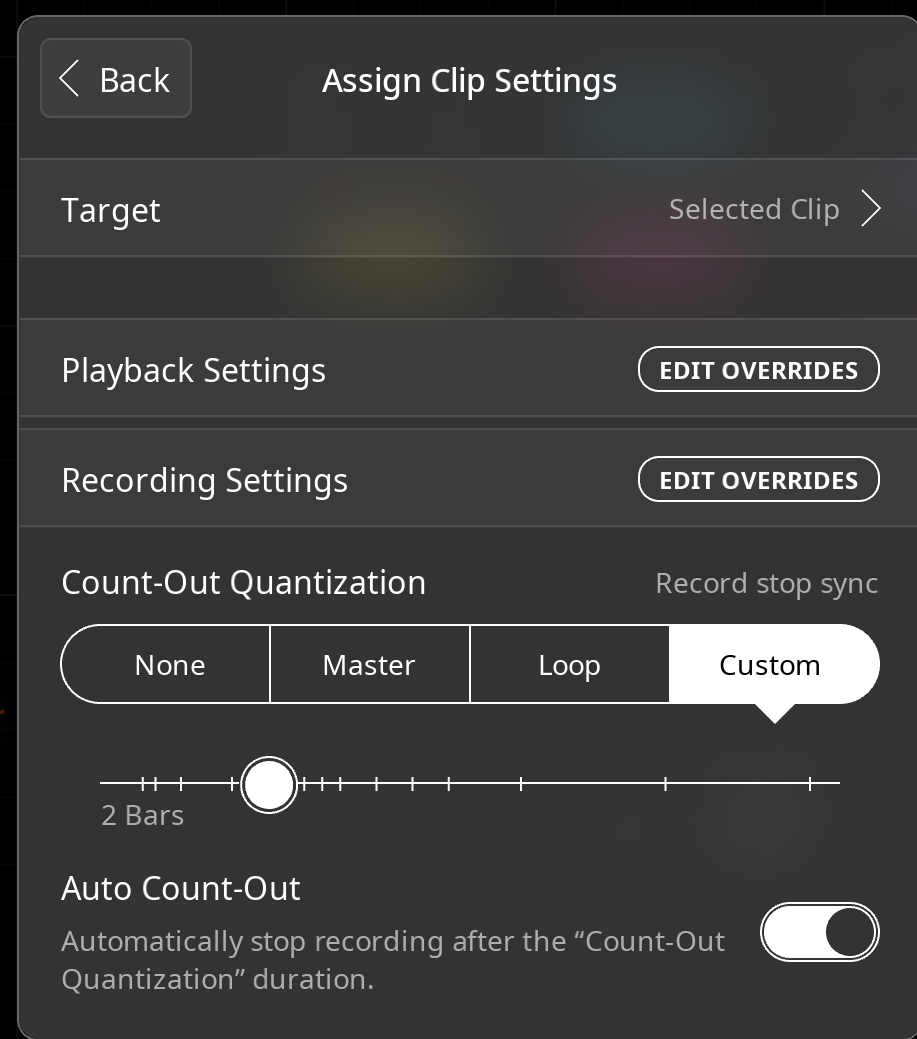
@cellicello : you can set a predetermined length by setting the desired length as the count-out and turning on auto count-out. That can be done with Assign Clip Settings. But you can’t set a fixed length in the sense of setting the length slider in an individual clip’s details panel,
Assign Clip Settings can also do the other things you ask about.
I suggest reading the manual’s description to understand the hierarchy of assignments.
With the default loop settings, all loops with unset length will record at the master clock length if auto count-out is enabled. You can set the master clock length with buttons or a dial.
I find using the master clock length with auto count-out far easier to keep track of than messing with individual loop lengths.
espiegel123 and win,
Thanks for your replies.
What I’m trying to achieve is a way to record loops with two different approaches:
Fixed-length loops (e.g., 1, 2, 4, or 8 bars).
Flexible-length loops that use both count-in and count-out quantization (so the start and stop points are quantized to the beat or bar).
The setup I found that works best so far is this:
Global Clip Recording Settings:
Count-in Quantization: 1 Bar
Count-out Quantization: Loop
Auto Count-out: ON
In addition, I created a button that overrides the Recording Settings to allow for:
Count-out Quantization: 1 Bar
Auto Count-out: OFF
What I don’t fully understand yet is why the recorded loop sometimes starts playing from the middle of the loop after the recording.
It seems to line up with the clock at the end of the cycle.
I’ll keep investigating this part.
Note: I also have a completely free-loop recording option available, with no count-in, count-out, or sync involved.
@cellicello wrote “What I don’t fully understand yet is why the recorded loop sometimes starts playing from the middle of the loop after the recording.
It seems to line up with the clock at the end of the cycle.
I’ll keep investigating this part.”
Please post a link to a demonstration. My guess is that you are sometimes starting a recording in the midst of a phase cycle without realizing it with phase preservation turned on.
Perhaps this wiki page will shed light on it:
https://wiki.loopypro.com/Phase_Preservation
espiegel123,
Thank you for your help.
Regarding Fixed and Flexible Loop Lengths,
I assigned buttons to control different Master Length bar settings, and I have one button set with no Auto Count Out, which works well.
About the Phase issue, I appreciate your detailed explanation and the videos you shared.
In my case, here’s what happens: when the Master Length is set to 8 bars, whether Phase Lock and Phase Preservation are On or Off, if I manually stop recording before the 8-bar loop completes, the loop seems to jump or shift unexpectedly within the loop without respecting the auto count off of 1 bar.
The same things happen with MIDI loops.
https://dropover.cloud/7152b5
I am having trouble following what you are doing in the video. We don’t see the settings. It isn’t clear to me what should be happening. It would be helpful if you could orient us . Are you recording the audio created by the midi loop?
Can you post still screenshots showing the settings.
Can you make another recording and explain what you think should happen and describe what happened instead? The screen recording stops without me getting a chance to have a clear idea of what got recorded.
In that example is the new clip phase-locked? Was phase preservation on?
@espiegel123
Actually, I think everything is working fine now.
I may have just spent too much time exploring and experimenting with different features in Loopy.
Sorry for any trouble I may have caused!