Loopy Pro: Create music, your way.
What is Loopy Pro? — Loopy Pro is a powerful, flexible, and intuitive live looper, sampler, clip launcher and DAW for iPhone and iPad. At its core, it allows you to record and layer sounds in real-time to create complex musical arrangements. But it doesn’t stop there—Loopy Pro offers advanced tools to customize your workflow, build dynamic performance setups, and create a seamless connection between instruments, effects, and external gear.
Use it for live looping, sequencing, arranging, mixing, and much more. Whether you're a live performer, a producer, or just experimenting with sound, Loopy Pro helps you take control of your creative process.
Download on the App StoreLoopy Pro is your all-in-one musical toolkit. Try it for free today.
How can I move my Apple Music playlist to Spotify?

Hi everyone,
I have a playlist on Apple Music that I really like, and I want to move it over to Spotify. I’m looking for an easy way to transfer all the songs without manually searching for them one by one.
Has anyone done this before? Are there any tools or services that work well for this? I’d appreciate step-by-step advice if possible.
Thanks in advance!
Comments
Hi,
There are online tools like https://www.tunemymusic.com/ (500 songs in a playlist)
I've done this and it worked well.
You can also use the Playlist shift app if you are on iOS
Normally the songs not found are kept in a separate .csv file.
But Spotify has a larger library than Apple Music, so I wouldn't worry that much.
There are several apps dedicated to doing this, but I’ve never personally done it.
Most seem to have IAPs but here’s a list of several options to get you started. You might want to do some digging to find best app at best price.
Switcheroo Transfer
https://apps.apple.com/us/app/switcheroo-transfer/id1529802783
MixLab free with $1.99 IAP
https://apps.apple.com/us/app/mixlib-playlist-converter/id1107917700
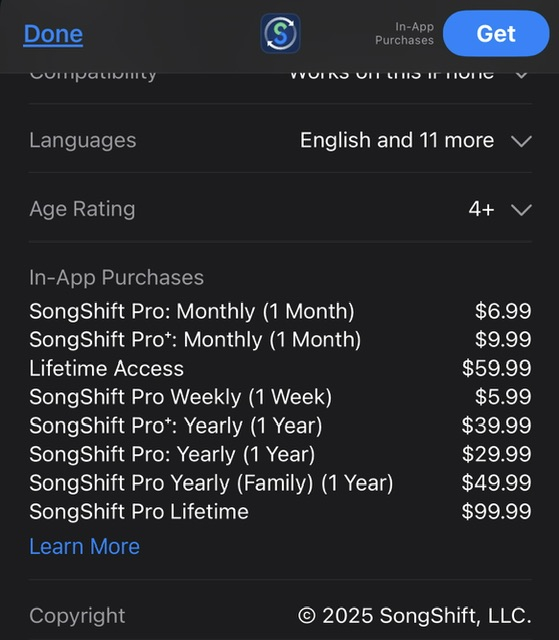
How much does SongShift cost?
Here’s the pricing on the USA App Store. There are probably free options available with a little digging…
One thing you should probably bear in mind is that Apple and Spotify have different licensing agreements, so songs available on one platform might not be available on the other, and you might not get 100% of them moving across.
How about moving from Spotify to Apple Music? I’m on the Apple Music trial and Dolby Atmos is quite a nice improvement to the listening experience.
@Vip8888 I just moved a playlist from Spotify to Apple using the free version of SongShift. It was effortless.
Also I think a donation of one weapon of mass destruction to Spotify and they do it for you.
Spotify bonus feature: playlist transfers include free conversion to AI generated music replacements.
Thanks for sharing! It seems that the weekly plan is enough for me.
I understand. But I don't want to rebuild a playlist.

The Dolby Atmos mixes on Apple Music definitely feel like a step up, especially with good headphones. I really dislike the experience on anything but my iPhone though. The Windows app isn't good, its missing features in my car, and Apple is very slow to update anything outside of its own ecosystem.
Here’s what’s worked for me—quick and painless:
Easiest (no files involved): Soundiiz or TuneMyMusic
1. Sign in to both Apple Music and Spotify
2. Pick your Apple Music playlist → choose Spotify as the destination
3. Review unmatched tracks → transfer
If you also want a local backup:
Try DumpMedia Any Music Converter to save your Apple Music playlist as MP3/M4A (keeps tags). Then, in Spotify (desktop): Settings → Local Files → Add Source to that folder and drop the tracks into a playlist.
Alternative app: FreeYourMusic (desktop/mobile) does the same with a slick UI.