Loopy Pro: Create music, your way.
What is Loopy Pro? — Loopy Pro is a powerful, flexible, and intuitive live looper, sampler, clip launcher and DAW for iPhone and iPad. At its core, it allows you to record and layer sounds in real-time to create complex musical arrangements. But it doesn’t stop there—Loopy Pro offers advanced tools to customize your workflow, build dynamic performance setups, and create a seamless connection between instruments, effects, and external gear.
Use it for live looping, sequencing, arranging, mixing, and much more. Whether you're a live performer, a producer, or just experimenting with sound, Loopy Pro helps you take control of your creative process.
Download on the App StoreLoopy Pro is your all-in-one musical toolkit. Try it for free today.
Sending Macbook audio to Ipad

I've seen this discussion in a few other places but I can't seem to find a definitive answer.
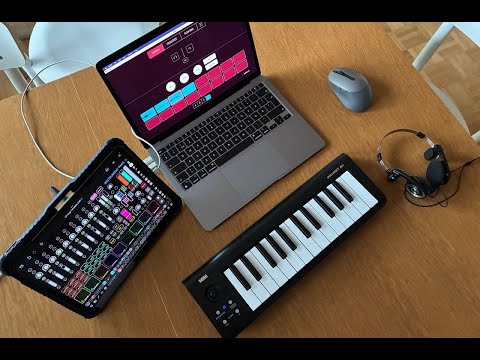
Is there a simple way to get audio from my macbook to the Ipad over USB? I'm using a finger drumming setup I have created via Addictive drums thru Logic Pro and I would like to use that as the drum loop in Loopy pro and then loop over that with a variety of Midi controllers and mics. Addictive drums isn't available for the Ipad or via Logic on the Ipad but I'd really like to use it as the finger drumming foundation for my Loopy pro setup. Is my only option an audio interface out of the Macbook into the Ipad? Is there a simple one that will work well? Why doesn't the mac give you the option of sending audio out of the mac and into the Ipad?
Comments
The very best way is with the iConnectivity Audio 4c or Lewitt Connect 6 interfaces that you can connect to both the Mac and iOS device at the same time. Otherwise you either need to take the headphone out from the Mac into a audio interface on the iOS device, which will result in some (small) loss of quality.
Half the time it's just a lot easier to render to an audio file on the Mac and airdrop it to the device.
IMO you can forget about the software solutions, Sonobus and Studiomux. Studiomux is unreliable. Both introduce latency that you need to correct for by adjusting the audio anyway. But some people do use Sonobus over Ethernet. Too much hassle for my taste.
Thanks so much for these responses! I’m trying for a live looping setup using loopy pro so latency and airdrop are not options for me unfortunately. In another forum someone seemed to have success with the ListenTo app but that includes something like a 10 dollar a month subscription. If it was really the best and only hardware free option I would maybe consider it but I would strongly prefer not to.
iConnectivity Audio 4c. Lewitt Connect 6. I think there's something from Motu. Those are the best options for low latency and two way audio (well, 4c does two way, I can't say for the others).
Or, headphone out to your interface on the iPad. That's only one way though, and doesn't get you midi either.
No software solution is going to do it for you if you care about latency, at least not over wifi. Ethernet might be OK, but that can be a hassle by the time you get adapters, cabling, etc.
One can also use two interfaces . The audio quality will be better than the headphone jack and if the interfaces are multi-channel one has more routing options. If one already has one interface, a second interface will be less expensive than getting an iconnectivity.
Slightly more latency though, I expect.
The Lewitt Connect 6 is slightly less pricy than the 4c, but not as full featured.
Interface’s often have lower latency than the headphone jack. If I recall, the Lewitt has much more limited routing of the audio between the devices than the iconnectivity.
Yes, the iConnectivity has much better routing options. The L6 also doesn't have MIDI, which makes it a no-go for me.
That's interesting about headphone jack latency. I'm tempted to investigate but surely won't because I wouldn't do either option anyway.
Btw, @espiegel123 - I was saying that the 4c or L6 would probably be a lower latency solution that two interfaces, not that headphone out would to one interface would be lower latency.
I can't back that up, but I do think I remember it being said of the 4c or the older iConnectivity Audio 4+.
Does anybody have any experience with the Topping E1X2 OTG USB Audio Interface? It looks like it does Loopback and has two USB C ports,
https://www.amazon.com/dp/B0DBPFVTBM?ref=ive_vftp_hero_cx_pfo_vse-cards-ingress0#averageCustomerReviewsAnchor
Funny you should mention! Mine arrives within the next hour or so! I'll let you know ! Looks perfect for my needs !
Looks good other than not having any MIDI capability.
Just plugged in my new Topping E1X2 OTG and in seconds it was working exactly as I hoped!! Audio in and out of the iPad seamlessly. 6 loopback channels and the headphone amp is the best I have ever had !
Will play around with a bit more and report back if anyone is interested. I have used Studiomux, IDAM, iConnectivity and all had issues of some sort. This just instantly worked the way I wanted!
Thanks for the update! Does the OTG port power the iPad? I presume neither ports power a MacBook.
No. Would be great if it did! I have a Ugreen "Adapter for iPad Pro"(CM317) which has a USB-C PD input and 2 USB 3 ports. So it gets power, midi on one port and audio in/out on the other port.
If you can find one, the iConnectMIDI2+ should do what you want. There is one on Reverb for USD 119.
https://www.iconnectivity.com/products/midi/iconnectmidi2plus/
https://reverb.com/marketplace?query=iConnectMIDI2+
Is there a downside to running an audio interface with each device and routing the audio using outs and ins? My case is having an iRig Pro Duo IO connected to my Mac and a PreSonus Audiobox USB96 to my iPad. Can I run the outs of each into the ins of the other without too much latency, ground hum, potential damage, etc? I’m not sure why I haven’t plugged it up myself other than not wanting to mess with half a dozen cables if there’s pitfalls to be mindful of going in.
Sounds like a good recipe for a feedback loop. You'd want an interface with at least 4 outputs, and connect outputs 3-4 to the other interface's inputs. Also, the Audiobox USB96's inputs aren't suited for line-level sources. It'll work, but the impedances will be mismatched, resulting in poor sound (mostly in the low bass and high treble), plus extra noise.
There's an inherent addition of noise whenever you sample (A/D) the analog output of a D/A converter. Because the samplers are not synchronized, and the D/A includes some analog filtering, the new sampled signal is not a perfect replica of the original digital signal. Whether this is a problem in a specific configuration is up to you.
Hi. Yes I truly wish that usb-c audio could also go from macbook to iPad.. just made one video of opposite Loopy Pro with Koala Sampler - Macbook and iPad audio integration - HUGE POSSIBILITIES!