Loopy Pro: Create music, your way.
What is Loopy Pro? — Loopy Pro is a powerful, flexible, and intuitive live looper, sampler, clip launcher and DAW for iPhone and iPad. At its core, it allows you to record and layer sounds in real-time to create complex musical arrangements. But it doesn’t stop there—Loopy Pro offers advanced tools to customize your workflow, build dynamic performance setups, and create a seamless connection between instruments, effects, and external gear.
Use it for live looping, sequencing, arranging, mixing, and much more. Whether you're a live performer, a producer, or just experimenting with sound, Loopy Pro helps you take control of your creative process.
Download on the App StoreLoopy Pro is your all-in-one musical toolkit. Try it for free today.
SMC Mixer

I have put together a simple MIDIFire project that lets you use the SMC-Mixer in its DAW mode as a controller for Loopy Pro. MIDIFire makes it possible to workaround a few annoying incompatibilities between Loopy Pro and controller.
Details on the wiki
Comments
Great, Thanks a lot! Having no programming experience, I managed to have ChatGPT help me create some extras. I have two of those mixers, and a loopy pro project with 16 channels.
But obviously they speak the same cc's in daw mode. So added a mfxConvert to convert the cc's so they don't conflict. Then changed the scope of the feedback to include those and got the buttons working.
Then, encouraged by the succes I added a streambyter script. I wanted to see if I can manage to have a selector to choose what channel the knobs send out their messages. So, I have a radio button in loopy that send a cc to midi fire and changes the midi channel of the knobs.
Now, I made a page with 8 rows of 16 knobs, for example for Battalion, each row 16 knobs with parameters for one track of battalion. Select channel one and the knobs control row one. Selected radio button two, sends a message to midifire/stream yter script to change midi channel and the knobs control row 2!
The beauty is, this works on all pages! So I have another page with Pure acid drum parameters in rows of 16, and with the same radio buttons I can modulate each row separately. So now my two mvave mixers can control 16x8 knobs (128) on basically as many pages as I want. Amazing!
Great!
Since I’m not so versed in this, I can’t seems to get the the transport button row to respond the way I’d like it, same as the rows of buttons above next to the sliders. I’d like to use the as a toggle for a radio button section, that works, but I wish it would light up the button corresponding to the radio button selected. Any hints?
Is feedback enabled for the SMC in Control Settings?
I'm not sure the SMC responds to feedback, but it definitely won't if feedback isn't enabled.
The wiki article linked to at the top of the page discusses the midi feedback with this mixer and the MIDI Fire hack that I use to make it work. I don't recall the situation with the row of transport buttons being discussed.
@Frank303 are you using it in CC mode or DAW Mode? Are you using the MIDI Fire project?
Hello @espiegel123,
Thanks for sharing!
Your project looks particularly interesting. I don't have MIDIFire yet. Would you share a a picture of the project on midifire to give and idea of how you made it? Maybe it's possible to do something similar in Mozaic?
Mozaic as a standalone doesn’t have the midi routing that would let it easily sit between Loopy and the mixer and handle the midi feedback. You could use mozaic or streambyter but a fair amount of work would be required to implement midi feedback.
Here is a picture of the MIDIFire project
Here is the streambyter script in it
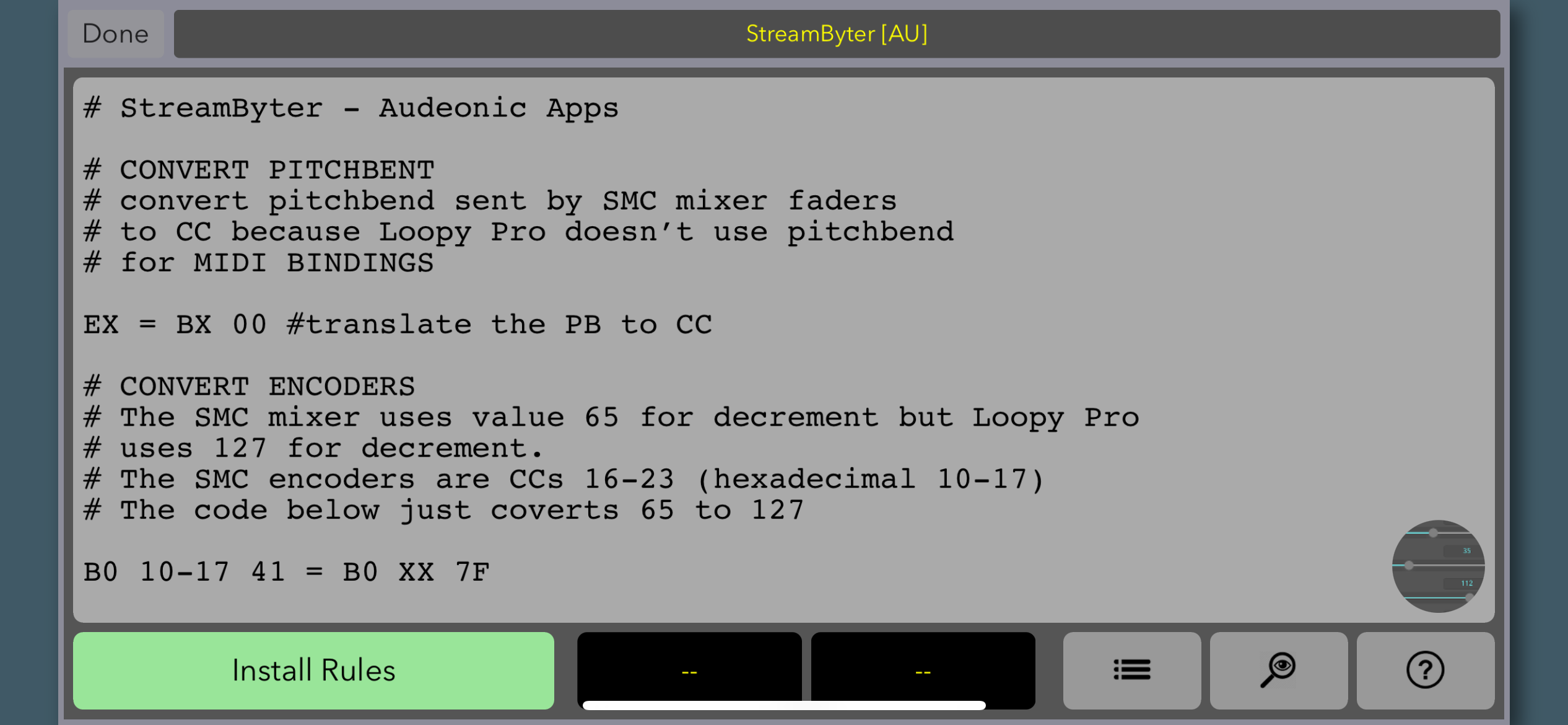
@espiegel123 awesome man. It's people like you that make us all better artists and educators. Thank You.
Thanks a lot. I will examine that. The StreamByter code is already pretty useful.
Hi, I am no programmer at all, but I am using the SMC mixer in AUM and am able to control my sessions with volume, mute, and solo etc. my problem is that the lights don’t light up on the SMC and sometimes I forget which number channels are muted.
Would the midi fire script make the lights turn on in AUM please?
I will happily purchase the required app it does what I need it to.
Thank you.
While I can't answer towards MidiFire
You can open up the Cubesuite app (iOS m-vave [ALL m-vave devices] setup app) and change buttons/pads to either "momentary (only on when pressed) or "toggle" (press on, press off)
This is NOT using midi feedback (not reactive to what's on screen) in any way... So if you have it set to Toggle, hit the pad to mute, then unmute ON SCREEN, the pad will be lit and then work in reverse. Easy enough to correct if accidentally out of sync
Wowwwzzzerrrr. Thanks for such a quick reply. I will try as soon as I can. If that works it’ll be such a massive help.
Thanks @PapaBPoppin
Hi. Since you're using AUM, you can directly access the SMC MIDI ports, so you don't need MidiFire. You just need the free StreamByter app with suitable scripting, or you can use Mozaic.
Can't make a guarantee, but I certainly hope it does! 🤘
@PapaBPoppin i changed one button in cubesuite as a tester, turned cycle off in AUM channel settings and it appears to have worked. Time to tell cubesuite to do the rest of them now.
Thank you so much.
@uncledave thanks for the info, I have both of those apps but don’t have enough knowledge at this time. It’s good to know and hopefully I’ll learn as I go.
@uncledave @bon
The purpose of the MIDIFire project is to alllow midi feedback to work correctly with SMC Mixer. AUM doesn’t do midi feedback. So if isn’t relevant to AUM. The purpose for using MIDIFire is so that there is a two way bottleneck through which all the needed transformations are handled.