Loopy Pro: Create music, your way.

What is Loopy Pro?Loopy Pro is a powerful, flexible, and intuitive live looper, sampler, clip launcher and DAW for iPhone and iPad. At its core, it allows you to record and layer sounds in real-time to create complex musical arrangements. But it doesn’t stop there—Loopy Pro offers advanced tools to customize your workflow, build dynamic performance setups, and create a seamless connection between instruments, effects, and external gear.

Use it for live looping, sequencing, arranging, mixing, and much more. Whether you're a live performer, a producer, or just experimenting with sound, Loopy Pro helps you take control of your creative process.

Download on the App Store

Loopy Pro is your all-in-one musical toolkit. Try it for free today.

Click to headphone output

Anyone know how I would get a click track from Loopy separate from my stereo outs with a Arturia Minifuse?

Comments

  • @slinky said:
    Anyone know how I would get a click track from Loopy separate from my stereo outs with a Arturia Minifuse?

    Does your minifuse have a separate output independent of the stereo output?

    The metronome setup panel lets you select which output the metronome goes to. You can send it to any output visible to the OS.

  • edited August 2025

    Not sure how I have access to 3-4 as the unit is only a stereo out.!
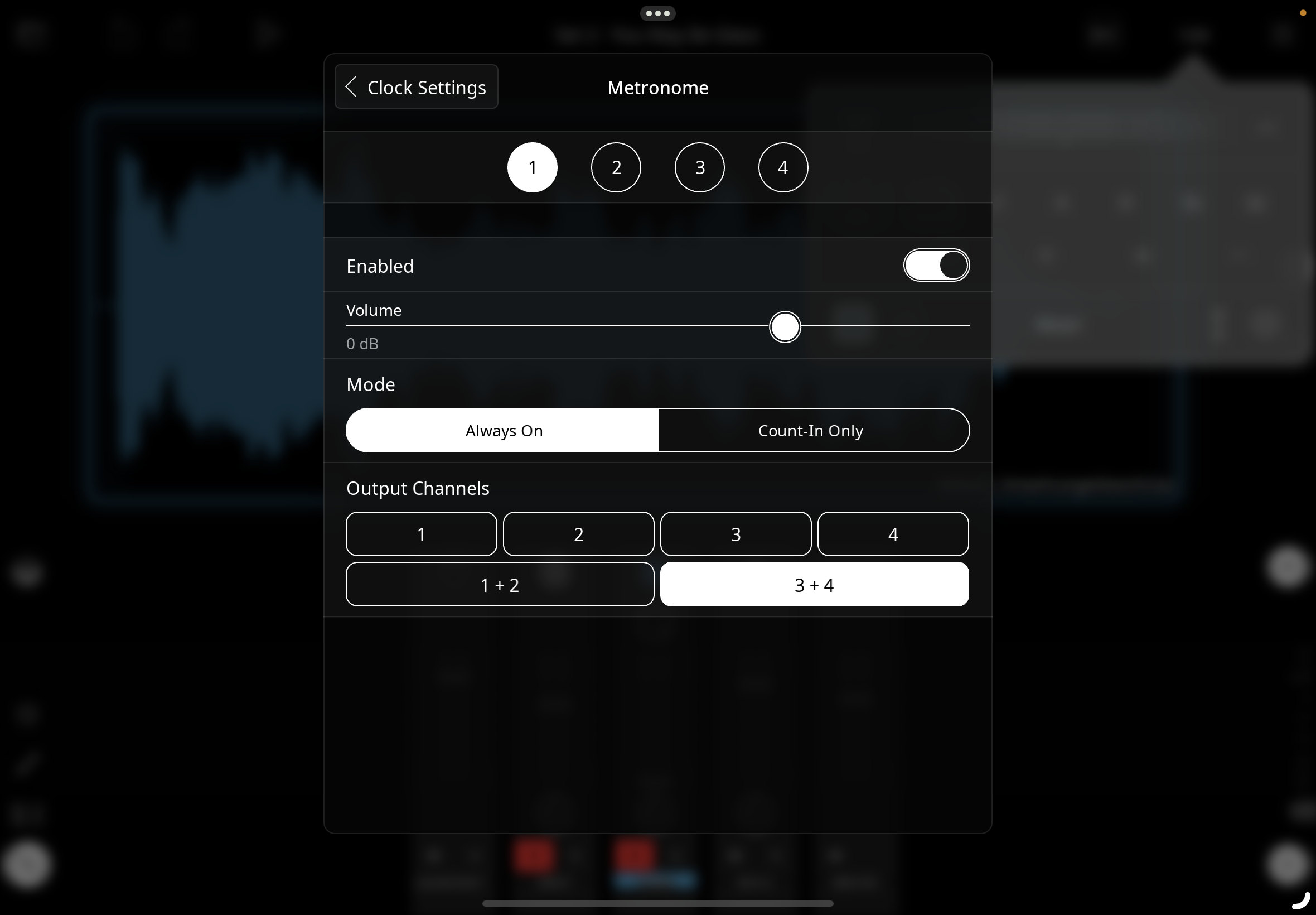
    Is there a setup in Loopy I need to do to have more than one output from the mixer?
    I am surmising that if I don't have access to Arturia software, I can't do this.

  • @slinky said:
    Not sure how I have access to 3-4 as the unit is only a stereo out.!
    Is there a setup in Loopy I need to do to have more than one output from the mixer?
    I am surmising that if I don't have access to Arturia software, I can't do this.

    Loopy Pro and other audio hosts can send to the outputs visible to them. They have no control over where an interface sends its output. You will need to find out how to configure your interface. Some interfaces aren’t configurable as to which outputs go to the headphone.

    For example, some always send 1/2 to the headphone. When that is the case you send your monitor mix with metronome to 1/2 and use 3/4 for main outs.

    I don’t know anything about the Arturia configurability. You may want to contact Arturia.

  • edited August 2025

    Thx for the insight.
    As I thought, there is no support for iOS for this unit.

  • edited August 2025

    Will Loopy slave to an external midi clock? External as in hardware.

  • @slinky said:
    Will Loopy slave to an external midi clock? External as in hardware.

    Yes.

  • If I have Loopy on an iPad and a phone, could I have the phone be the master and do it thru bluetooth?
    if so, how would I set it up?

  • wimwim
    edited September 2025

    Yes, but I'm not sure how stable the timing would be. Should be OK, but you'd have to experiment.

    • On one device go to Loopy Pro Settings Menu > Bluetooth Devices, then go to the Advertising tab at the bottom of the popup. Turn on Advertising.
    • On the other device go to the Bluetooth setup > Devices tab (the default) and connect to the other device. You can close the advertising window on the 1st device once connected.
    • On the master go to Synchronization and enable the other device as a MIDI Clock Destination
    • On the slave enable the master device as a the (only) MIDI Clock Source.
    • Experiment with latency compensation as needed.
  • You're probably better off using Ableton Link, even over wifi. But only experimentation will tell.

  • Pretty sure I know the answer but can I have audio going out of Loopy thru a USB audio interface and a separate out of the iPad itself? Trying to find a hack to get one more output for a click track as my interface is only 2 outputs (I need to have Loopy out put in stereo).

  • @slinky said:
    Pretty sure I know the answer but can I have audio going out of Loopy thru a USB audio interface and a separate out of the iPad itself? Trying to find a hack to get one more output for a click track as my interface is only 2 outputs (I need to have Loopy out put in stereo).

    Does your iPad have a built-in headphone jack? If so, you can try multi-route audio…which is a bit hit-and-miss

  • edited September 2025

    @espiegel123 said:

    @slinky said:
    Pretty sure I know the answer but can I have audio going out of Loopy thru a USB audio interface and a separate out of the iPad itself? Trying to find a hack to get one more output for a click track as my interface is only 2 outputs (I need to have Loopy out put in stereo).

    Does your iPad have a built-in headphone jack? If so, you can try multi-route audio…which is a bit hit-and-miss

    The hub does. Please share. Once I plug into the headphone jack, it seems to override the interface.
    That would definitely be the solution.

  • @slinky said:

    @espiegel123 said:

    @slinky said:
    Pretty sure I know the answer but can I have audio going out of Loopy thru a USB audio interface and a separate out of the iPad itself? Trying to find a hack to get one more output for a click track as my interface is only 2 outputs (I need to have Loopy out put in stereo).

    Does your iPad have a built-in headphone jack? If so, you can try multi-route audio…which is a bit hit-and-miss

    The hub does. Please share. Once I plug into the headphone jack, it seems to override the interface.
    That would definitely be the solution.

    I suspect multi-route audio won’t work in that case but you can try turning it on in Loopy Pro’s System Settings panel.

  • wimwim
    edited September 2025

    May not be relevant here but ...

    Make sure the headphones don't have a microphone, or that you use an adapter that converts the jack from TRRS to TRS. If not, the headphones will probably steal the interface altogether. iOS only allows one interface. Last one wins. Headphones with a microphone generally get recognized as an interface. Sometimes you can get around that by remembering to plug the headphones in first, then any other interface.

  • Thx. Will give it a shot.

  • edited September 2025

    @slinky said:
    Thx. Will give it a shot.

    Another workaround could be a second device (iPhone or even some Android device) that gets synced from your iPad via Ableton Link over WiFi. You only need to run some Link enabled app to generate the clicks on that device. I have used an old iPhone 5 that runs TICK Metronome to create sync clicks for Korg Volcas and an SQ-1 sequencer. G-Stomper Rhythm or GS Studio can do the job on Android.
    I am curious. What do you want to do with the click track? Just as a metronome, or do you want to use it as clock for hardware (Eurorack etc.)?

  • edited September 2025

    @catherder said:

    @slinky said:
    Thx. Will give it a shot.

    Another workaround could be a second device (iPhone or even some Android device) that gets synced from your iPad via Ableton Link over WiFi. You only need to run some Link enabled app to generate the clicks on that device. I have used an old iPhone 5 that runs TICK Metronome to create sync clicks for Korg Volcas and an SQ-1 sequencer. G-Stomper Rhythm or GS Studio can do the job on Android.
    I am curious. What do you want to do with the click track? Just as a metronome, or do you want to use it as clock for hardware (Eurorack etc.)?

    Click is to send to drummer to use backing tracks.
    I thought of the iPhone idea but really adds more complexity to everything I have going on. Don’t want to have to use another to device for this task.

  • @slinky said:

    @catherder said:

    @slinky said:
    Thx. Will give it a shot.

    Another workaround could be a second device (iPhone or even some Android device) that gets synced from your iPad via Ableton Link over WiFi. You only need to run some Link enabled app to generate the clicks on that device. I have used an old iPhone 5 that runs TICK Metronome to create sync clicks for Korg Volcas and an SQ-1 sequencer. G-Stomper Rhythm or GS Studio can do the job on Android.
    I am curious. What do you want to do with the click track? Just as a metronome, or do you want to use it as clock for hardware (Eurorack etc.)?

    Click is to send to drummer to use backing tracks.

    @wim said:
    May not be relevant here but ...

    Make sure the headphones don't have a microphone, or that you use an adapter that converts the jack from TRRS to TRS. If not, the headphones will probably steal the interface altogether. iOS only allows one interface. Last one wins. Headphones with a microphone generally get recognized as an interface. Sometimes you can get around that by remembering to plug the headphones in first, then any other interface.

    Only way to have the headphone jack accessible is thru my hub. So it will always come last in priority. I guess this rules out this possibility?

  • @slinky said:

    @slinky said:

    @catherder said:

    @slinky said:
    Thx. Will give it a shot.

    Another workaround could be a second device (iPhone or even some Android device) that gets synced from your iPad via Ableton Link over WiFi. You only need to run some Link enabled app to generate the clicks on that device. I have used an old iPhone 5 that runs TICK Metronome to create sync clicks for Korg Volcas and an SQ-1 sequencer. G-Stomper Rhythm or GS Studio can do the job on Android.
    I am curious. What do you want to do with the click track? Just as a metronome, or do you want to use it as clock for hardware (Eurorack etc.)?

    Click is to send to drummer to use backing tracks.

    @wim said:
    May not be relevant here but ...

    Make sure the headphones don't have a microphone, or that you use an adapter that converts the jack from TRRS to TRS. If not, the headphones will probably steal the interface altogether. iOS only allows one interface. Last one wins. Headphones with a microphone generally get recognized as an interface. Sometimes you can get around that by remembering to plug the headphones in first, then any other interface.

    Only way to have the headphone jack accessible is thru my hub. So it will always come last in priority. I guess this rules out this possibility?

    If multi-route does not make it accessible then you won’t be able to use your headphone dongle at the same time as your audio interface.

  • edited September 2025

    @espiegel123 said:

    @slinky said:

    @slinky said:

    @catherder said:

    @slinky said:
    Thx. Will give it a shot.

    Another workaround could be a second device (iPhone or even some Android device) that gets synced from your iPad via Ableton Link over WiFi. You only need to run some Link enabled app to generate the clicks on that device. I have used an old iPhone 5 that runs TICK Metronome to create sync clicks for Korg Volcas and an SQ-1 sequencer. G-Stomper Rhythm or GS Studio can do the job on Android.
    I am curious. What do you want to do with the click track? Just as a metronome, or do you want to use it as clock for hardware (Eurorack etc.)?

    Click is to send to drummer to use backing tracks.

    @wim said:
    May not be relevant here but ...

    Make sure the headphones don't have a microphone, or that you use an adapter that converts the jack from TRRS to TRS. If not, the headphones will probably steal the interface altogether. iOS only allows one interface. Last one wins. Headphones with a microphone generally get recognized as an interface. Sometimes you can get around that by remembering to plug the headphones in first, then any other interface.

    Only way to have the headphone jack accessible is thru my hub. So it will always come last in priority. I guess this rules out this possibility?

    If multi-route does not make it accessible then you won’t be able to use your headphone dongle at the same time as your audio interface.

    What do you know, it actually works. Thx so much. (on IpadOS 26)

Sign In or Register to comment.