Loopy Pro: Create music, your way.
What is Loopy Pro? — Loopy Pro is a powerful, flexible, and intuitive live looper, sampler, clip launcher and DAW for iPhone and iPad. At its core, it allows you to record and layer sounds in real-time to create complex musical arrangements. But it doesn’t stop there—Loopy Pro offers advanced tools to customize your workflow, build dynamic performance setups, and create a seamless connection between instruments, effects, and external gear.
Use it for live looping, sequencing, arranging, mixing, and much more. Whether you're a live performer, a producer, or just experimenting with sound, Loopy Pro helps you take control of your creative process.
Download on the App StoreLoopy Pro is your all-in-one musical toolkit. Try it for free today.
Can I monitor an Amp Sim another way than from ‘inputs’?

I’m switching what I’m putting to the soundcard, sometimes its not reasonable to have the guitar sim (tonestack) on the input section in Loopy Pro.
If I put tonestack on a bus I am unable to choose “monitor” it, like I can if its on the input section. I need to monitor, shall I keep it in the input section?
-I also want to make dedicated effect busses I can turn on and off. Do I use sends from the input and send it to an effect bus, choose what colors on that it is sent to? Do you have a Pro Tip, or a Top Tip? Also how should I think on Pre and Post fader effects?
Comments
Why you can't do that? Here is my test project where I'm feeding 2 amps in buses from one input:
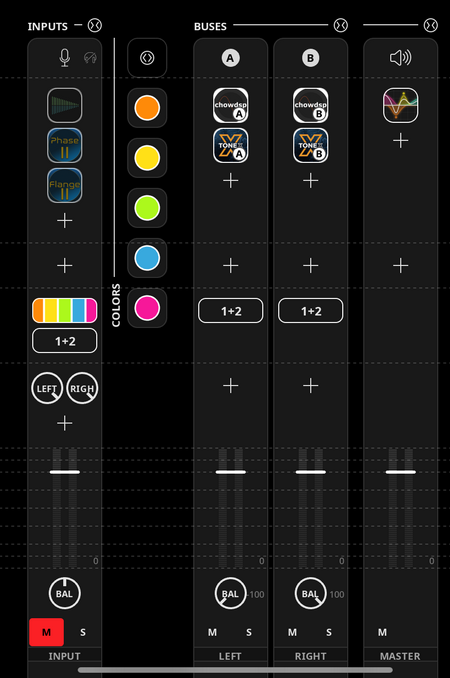
Monitor means “send the output to the speakers”. If you put effects on a bus, they will be monitored if you set one of the destinations to be the main output.
When using buses, you can control what gets sent to the bus and the bus volume with actions.
Whether the sends should be pre or post fader depends on your use-case. I suggest both reading about mixing : when people use pre and post fader sends (this is a general sound engineering topic about which you will find a lot of j formation). And also experiment yourself.
I realised the bus was monitored automatically, perfect! I guess I’m used to struggeling for my setups lately (:
Thanks for coming back