Loopy Pro: Create music, your way.

What is Loopy Pro?Loopy Pro is a powerful, flexible, and intuitive live looper, sampler, clip launcher and DAW for iPhone and iPad. At its core, it allows you to record and layer sounds in real-time to create complex musical arrangements. But it doesn’t stop there—Loopy Pro offers advanced tools to customize your workflow, build dynamic performance setups, and create a seamless connection between instruments, effects, and external gear.

Use it for live looping, sequencing, arranging, mixing, and much more. Whether you're a live performer, a producer, or just experimenting with sound, Loopy Pro helps you take control of your creative process.

Download on the App Store

Loopy Pro is your all-in-one musical toolkit. Try it for free today.

Fauve by K-Devices (Released on iOS)

13»

Comments

  • @timfromtheborder said:

    @Poppadocrock said:
    How is Fauve on DSP/CPU? Heavy, medium, low, etc…?

    In the project I posted here I had 5 instances running. M1 Air 5. Each is using 1% DSP. Seems super light to me.

    this is my experience too, very lightweight app

  • edited September 2025

    @Poppadocrock said:
    How is Fauve on DSP/CPU? Heavy, medium, low, etc…?

    DSP/CPU seems pretty average to me. Have 3 instances running in an AUM set with some other things and nothing out of the ordinary. That's on an old iPad Pro 2017.

  • Bought Tatat the midi generator

    Can I use it only in Aum or is garageband capable of handling midigeneration?

  • Just a little sound demo. Fauve definitely one of the better K-Devices releases I reckon
    https://youtube.com/shorts/T57U1tqYB8g

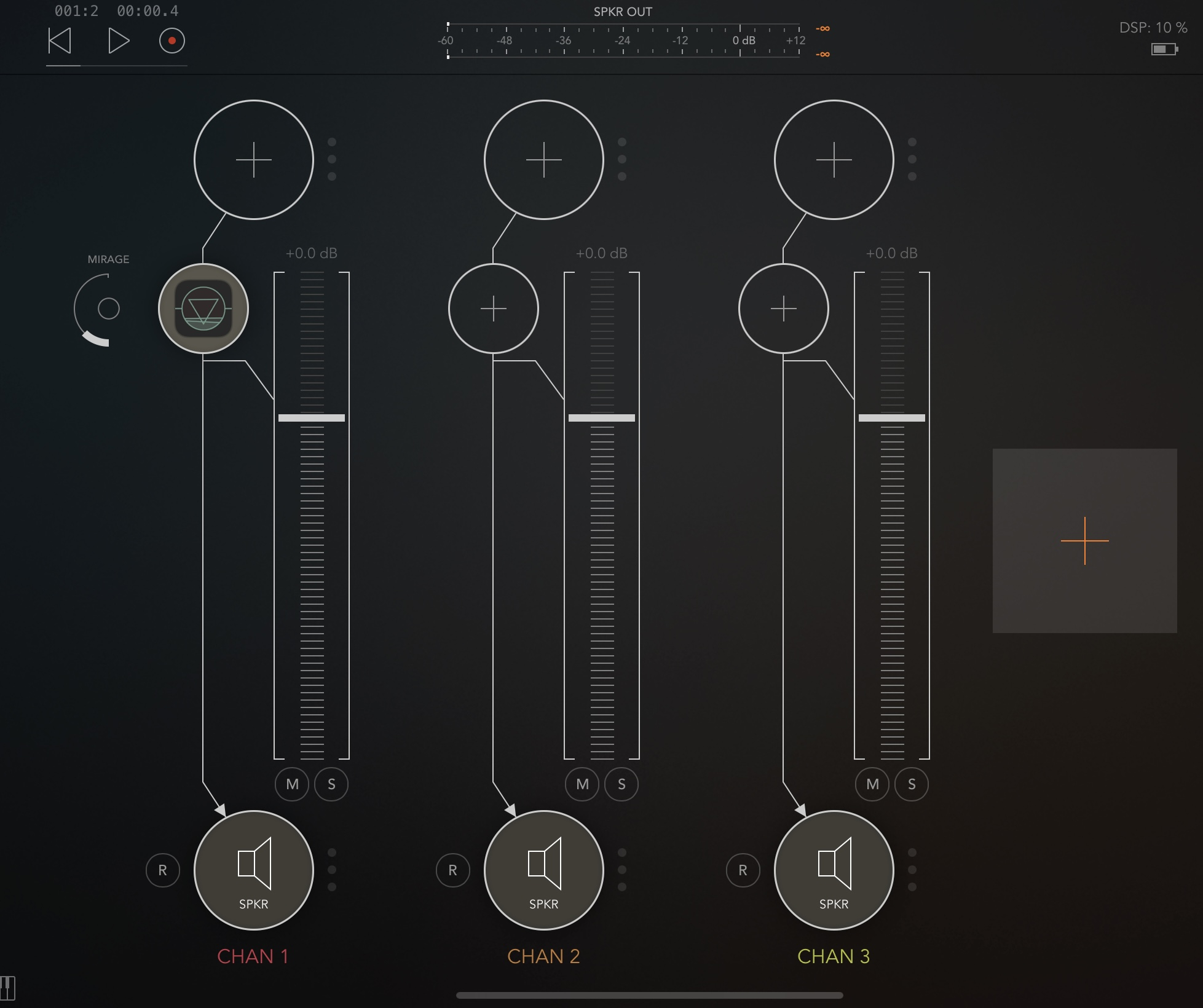
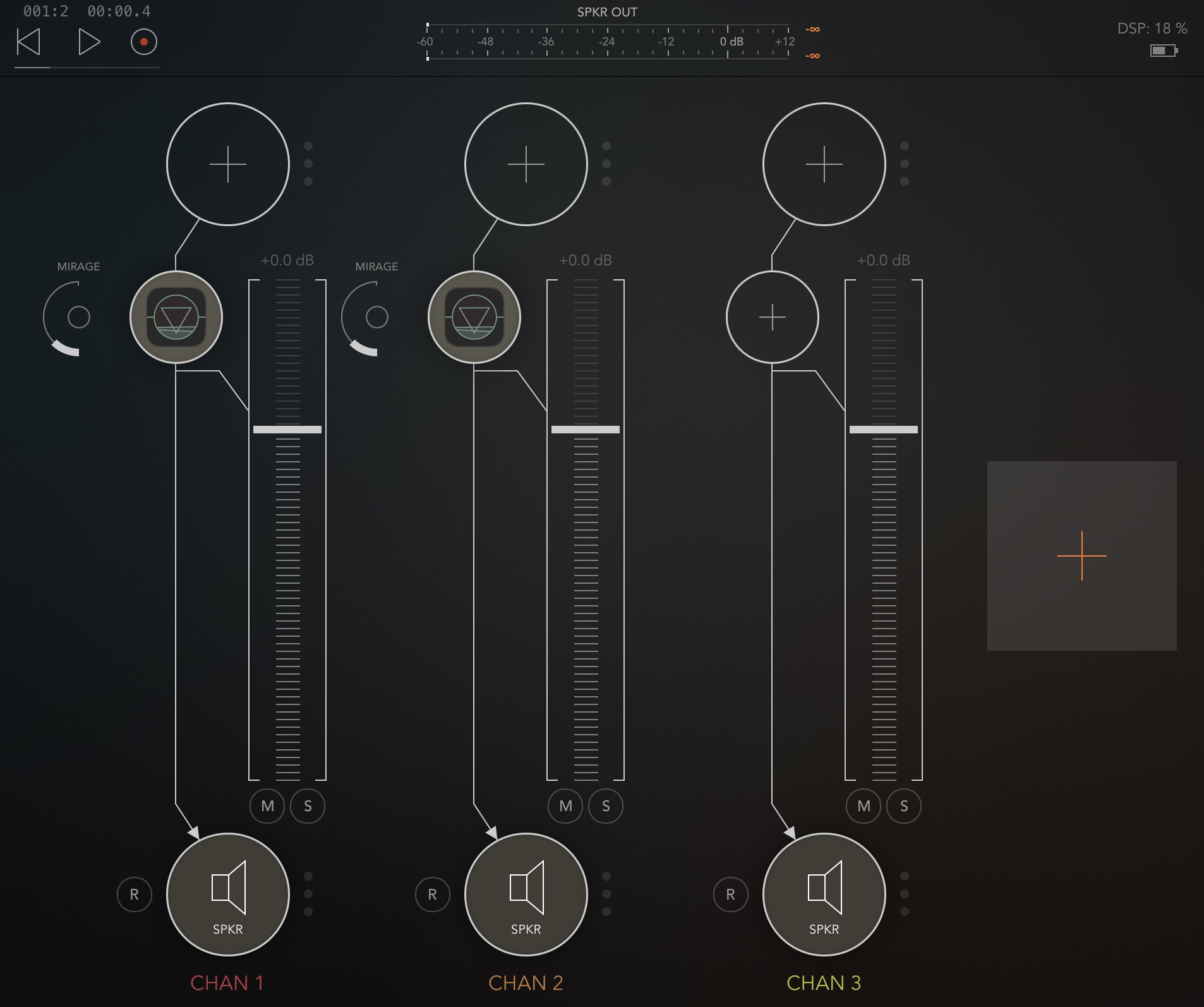
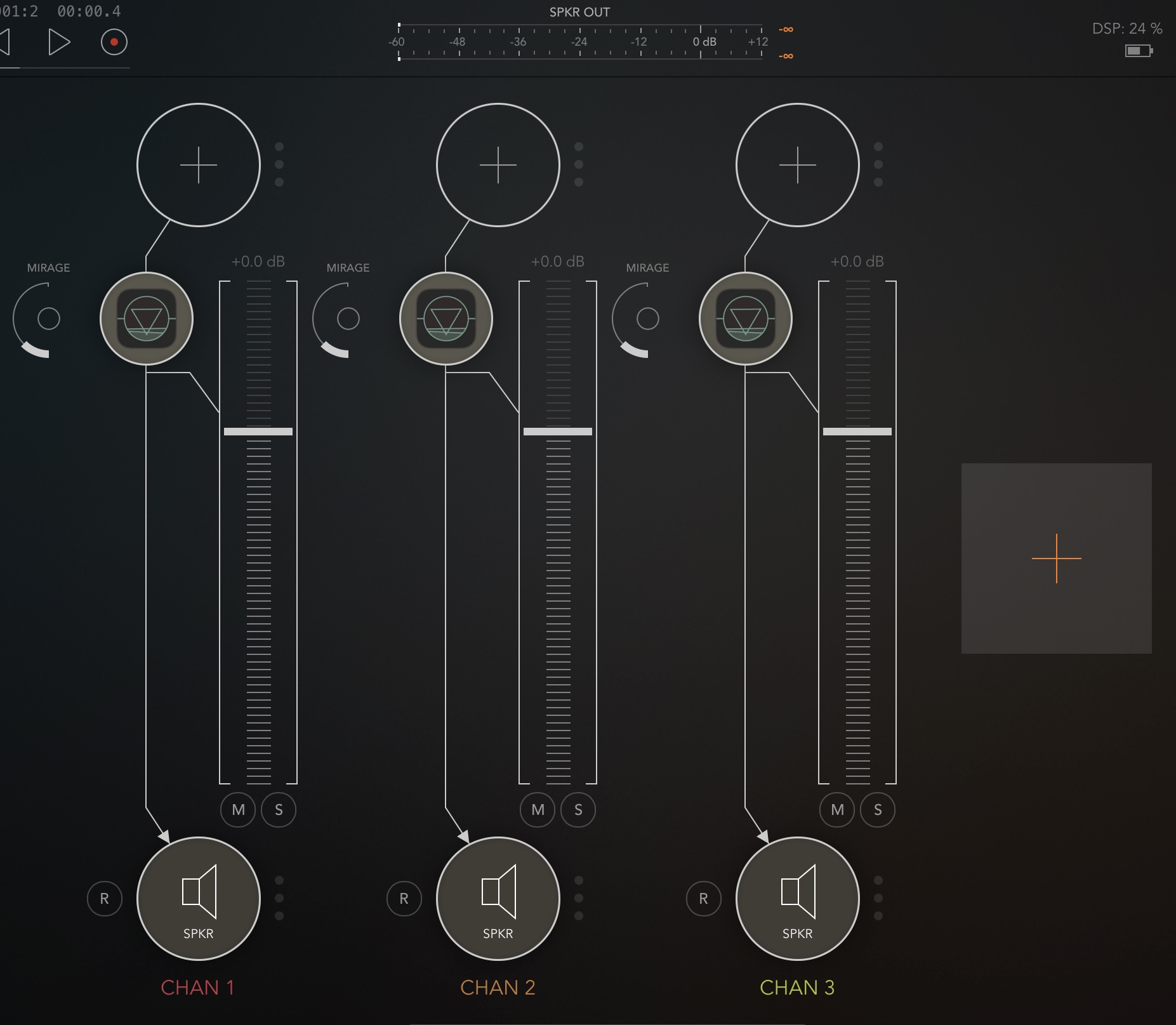
  • I wonder why it’s using so much for me then? @timfromtheborder, @drewinnit, @craftycurate.
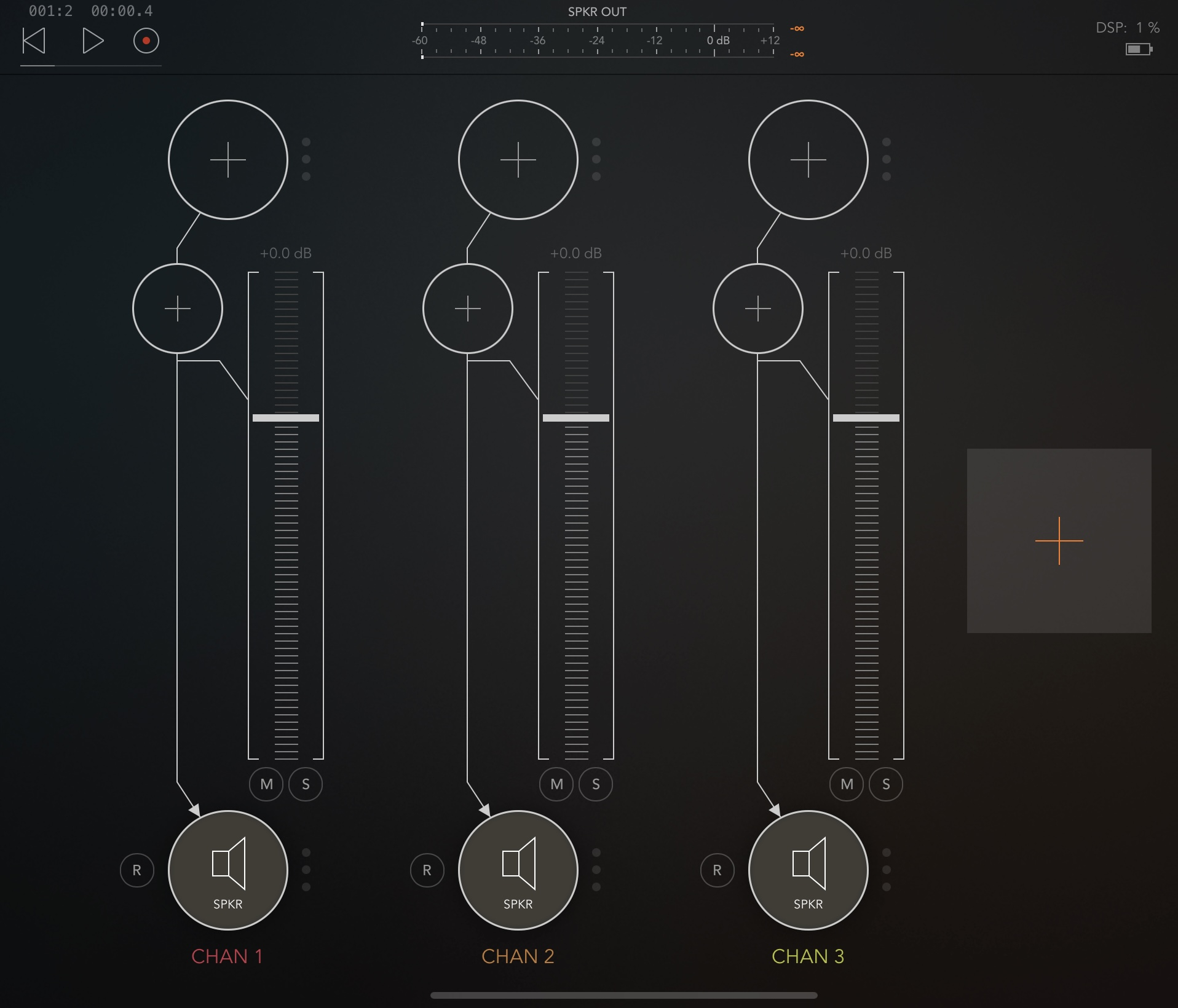
    This is a bit of a mystery to me. I can usually load a ton of apps with hardly any movement.
    Strange.


  • edited September 2025

    @robosardine said:
    I wonder why it’s using so much for me then? @timfromtheborder, @drewinnit, @craftycurate.
    This is a bit of a mystery to me. I can usually load a ton of apps with hardly any movement.
    Strange.

    Running Fauve in an otherwise empty AUM set is not a reliable measure of CPU usage, because the CPU % meter only measures the percentage of available CPU that is being used. Since the CPU is not under load in the above scenario, the processor clock speed is throttled back as a power saving measure, so what AUM considers to be 100% will only be some fraction of the iPad's full processing power - hard to say how much.

    Add a bunch of CPU-hungry apps, make a note of the CPU meter, then add Fauve and see if DSP% still jumps up by the same amount that it does in the above setup.

    I've also found that certain apps (Bleass for example) often give me DSP spikes in emptier sets, maybe because of what they're doing under the hood, because there are fewer apps around them to help even out the CPU load, but those spikes disappear when that same Bleass app is used in a busier set.

    I'd be interested to know what you find!

  • @craftycurate said:

    @robosardine said:
    I wonder why it’s using so much for me then? @timfromtheborder, @drewinnit, @craftycurate.
    This is a bit of a mystery to me. I can usually load a ton of apps with hardly any movement.
    Strange.

    Running Fauve in an otherwise empty AUM set is not a reliable measure of CPU usage, because the CPU % meter only measures the percentage of available CPU that is being used. Since the CPU is not under load in the above scenario, the processor clock speed is throttled back as a power saving measure, so what AUM considers to be 100% will only be some fraction of the iPad's full processing power - hard to say how much.

    Add a bunch of CPU-hungry apps, make a note of the CPU meter, then add Fauve and see if DSP% still jumps up by the same amount that it does in the above setup.

    I've also found that certain apps (Bleass for example) often give me DSP spikes in emptier sets, maybe because of what they're doing under the hood, because there are fewer apps around them to help even out the CPU load, but those spikes disappear when that same Bleass app is used in a busier set.

    I'd be interested to know what you find!

    Yes I actually thought that it might have been something like this - but I previously tried & just loaded again 3 instances of Pure Acid each with a Fauve - it was up at 32% each time.
    It’s not a big deal though really I can’t see myself using or needing that many instances. I’m having a bit of a struggle to get much musicality out of it tbh.
    I’m not hallucinating yet…. but I do have a slight headache 🤒

  • edited September 2025

    @robosardine said:

    @craftycurate said:

    @robosardine said:
    I wonder why it’s using so much for me then? @timfromtheborder, @drewinnit, @craftycurate.
    This is a bit of a mystery to me. I can usually load a ton of apps with hardly any movement.
    Strange.

    Running Fauve in an otherwise empty AUM set is not a reliable measure of CPU usage, because the CPU % meter only measures the percentage of available CPU that is being used. Since the CPU is not under load in the above scenario, the processor clock speed is throttled back as a power saving measure, so what AUM considers to be 100% will only be some fraction of the iPad's full processing power - hard to say how much.

    Add a bunch of CPU-hungry apps, make a note of the CPU meter, then add Fauve and see if DSP% still jumps up by the same amount that it does in the above setup.

    I've also found that certain apps (Bleass for example) often give me DSP spikes in emptier sets, maybe because of what they're doing under the hood, because there are fewer apps around them to help even out the CPU load, but those spikes disappear when that same Bleass app is used in a busier set.

    I'd be interested to know what you find!

    Yes I actually thought that it might have been something like this - but I previously tried & just loaded again 3 instances of Pure Acid each with a Fauve - it was up at 32% each time.
    It’s not a big deal though really I can’t see myself using or needing that many instances. I’m having a bit of a struggle to get much musicality out of it tbh.
    I’m not hallucinating yet…. but I do have a slight headache 🤒

    It's working best for me in a couple of ways so far:

    1. If I put some delay and reverb after it, esp if I want it to sound a bit more synced, or to have a more dreamy, reflective or nostalgic feel.
    2. Also getting some interesting results with a lo-fi feel e.g. with LO-FI-AF, to add a bit of degradation, maybe some vinyl noise, wow & flutter etc, tape delays etc.
  • @craftycurate said:

    @robosardine said:

    @craftycurate said:

    @robosardine said:
    I wonder why it’s using so much for me then? @timfromtheborder, @drewinnit, @craftycurate.
    This is a bit of a mystery to me. I can usually load a ton of apps with hardly any movement.
    Strange.

    Running Fauve in an otherwise empty AUM set is not a reliable measure of CPU usage, because the CPU % meter only measures the percentage of available CPU that is being used. Since the CPU is not under load in the above scenario, the processor clock speed is throttled back as a power saving measure, so what AUM considers to be 100% will only be some fraction of the iPad's full processing power - hard to say how much.

    Add a bunch of CPU-hungry apps, make a note of the CPU meter, then add Fauve and see if DSP% still jumps up by the same amount that it does in the above setup.

    I've also found that certain apps (Bleass for example) often give me DSP spikes in emptier sets, maybe because of what they're doing under the hood, because there are fewer apps around them to help even out the CPU load, but those spikes disappear when that same Bleass app is used in a busier set.

    I'd be interested to know what you find!

    Yes I actually thought that it might have been something like this - but I previously tried & just loaded again 3 instances of Pure Acid each with a Fauve - it was up at 32% each time.
    It’s not a big deal though really I can’t see myself using or needing that many instances. I’m having a bit of a struggle to get much musicality out of it tbh.
    I’m not hallucinating yet…. but I do have a slight headache 🤒

    It's working best for me in a couple of ways so far:

    1. If I put some delay and reverb after it, esp if I want it to sound a bit more synced, or to have a more dreamy, reflective or nostalgic feel.
    2. Also getting some interesting results with a lo-fi feel e.g. with LO-FI-AF, to add a bit of degradation, maybe some vinyl noise, wow & flutter etc, tape delays etc.

    Thanks, I will try that. I have LO-FI-AF 👍

  • edited September 2025

    Someone try it with an acapella for me please. I am curious to see how it sluts

  • @robosardine said:

    @Poppadocrock said:
    How is Fauve on DSP/CPU? Heavy, medium, low, etc…?

    I would say medium to heavy - this is on an Air 4 with Fauve only in separate lane effect slots.
    1=10%. 2=18%. 3=24%.

    @timfromtheborder said:

    @Poppadocrock said:
    How is Fauve on DSP/CPU? Heavy, medium, low, etc…?

    In the project I posted here I had 5 instances running. M1 Air 5. Each is using 1% DSP. Seems super light to me.

    Right on, thank you both for your help. it’s a very relative thing based on your device, OS, Host, and session size. I’m definitely interested in this one, but was wondering about all that real time audio processing, and how it performed. It sounds like it’s light to mid generally speaking. Thanks.

  • @drewinnit said:

    @timfromtheborder said:

    @Poppadocrock said:
    How is Fauve on DSP/CPU? Heavy, medium, low, etc…?

    In the project I posted here I had 5 instances running. M1 Air 5. Each is using 1% DSP. Seems super light to me.

    this is my experience too, very lightweight app

    @craftycurate said:

    @Poppadocrock said:
    How is Fauve on DSP/CPU? Heavy, medium, low, etc…?

    DSP/CPU seems pretty average to me. Have 3 instances running in an AUM set with some other things and nothing out of the ordinary. That's on an old iPad Pro 2017.

    Thank you both for this info, cheers!

  • Also @robosardine there is that memory threshold thing, where small sessions will only use a portion of the CPU on a device, but adding more apps will allow the device to break through that memory threshold and allow one to use the full processing power.

  • I've been making some good droney sounds by placing a slow delay after Fauve in my FX chain. Fauve adds some glitchiness that makes a dry drone more lively and dynamic, and the delay/reverb tames the glitches, which can otherwise feel abrupt and random, and makes them feel more naturally woven into the texture of the composition.

  • @aaa said:
    I've been making some good droney sounds by placing a slow delay after Fauve in my FX chain. Fauve adds some glitchiness that makes a dry drone more lively and dynamic, and the delay/reverb tames the glitches, which can otherwise feel abrupt and random, and makes them feel more naturally woven into the texture of the composition.

    Which reverb would you recommend?

  • @Poppadocrock said:
    Also @robosardine there is that memory threshold thing, where small sessions will only use a portion of the CPU on a device, but adding more apps will allow the device to break through that memory threshold and allow one to use the full processing power.

    Thanks - yes I’m sure that will be the case and it will all be fine. I just set it up in order to provide an answer for you. I didn’t think or know about what you were mentioning above, I haven’t really noticed it do it this high previously. It did seem a bit high to me as I can stuff AUM to the rafters with apps and it takes it all in its stride. I still feel that it’s unusual behaviour though and my attention would have been drawn to it had I been casually setting it up for use one day.
    Anyway we’re all sorted so that’s good 👍🏻

  • @Fear2Stop said:

    @aaa said:
    I've been making some good droney sounds by placing a slow delay after Fauve in my FX chain. Fauve adds some glitchiness that makes a dry drone more lively and dynamic, and the delay/reverb tames the glitches, which can otherwise feel abrupt and random, and makes them feel more naturally woven into the texture of the composition.

    Which reverb would you recommend?

    I don't think there's any special reverb needed, experiment with the ones you have! Bigger spaces, longer decay times etc will cause more smearing of the sound, if that's what you want

  • @Poppadocrock said:

    @drewinnit said:

    @timfromtheborder said:

    @Poppadocrock said:
    How is Fauve on DSP/CPU? Heavy, medium, low, etc…?

    In the project I posted here I had 5 instances running. M1 Air 5. Each is using 1% DSP. Seems super light to me.

    this is my experience too, very lightweight app

    @craftycurate said:

    @Poppadocrock said:
    How is Fauve on DSP/CPU? Heavy, medium, low, etc…?

    DSP/CPU seems pretty average to me. Have 3 instances running in an AUM set with some other things and nothing out of the ordinary. That's on an old iPad Pro 2017.

    Thank you both for this info, cheers!

    Further numbers here ... on my ageing iPad, in a moderately busy AUM set, adding another instance of Fauve increased DSP by about 2%.

  • @Gavinski said:

    @Fear2Stop said:

    @aaa said:
    I've been making some good droney sounds by placing a slow delay after Fauve in my FX chain. Fauve adds some glitchiness that makes a dry drone more lively and dynamic, and the delay/reverb tames the glitches, which can otherwise feel abrupt and random, and makes them feel more naturally woven into the texture of the composition.

    Which reverb would you recommend?

    I don't think there's any special reverb needed, experiment with the ones you have! Bigger spaces, longer decay times etc will cause more smearing of the sound, if that's what you want

    I just put it between Koshiba and Yukawa on an iVCS3 patch and I’m seriously questioning my life choices right now 😄

  • A dope forum member sent me an example of Fauve on an acapella, and I am very impressed. I'm absolutely going to pick it up for use with Vocals. If you are into GlitchStep / glitch music- it's a solid pickup.

    I was using stuff like scatterbrain, humanoid, Vancouver and GlitchCore to slut up the vox, but Fauve sounds so much cleaner- but still super slutty.

    Thanks @Squishy !!!

    I posted some acapellas in the Koala Acapella thread (patch sharing) if anyone wants to try it out.

  • @craftycurate said:

    @Poppadocrock said:

    @drewinnit said:

    @timfromtheborder said:

    @Poppadocrock said:
    How is Fauve on DSP/CPU? Heavy, medium, low, etc…?

    In the project I posted here I had 5 instances running. M1 Air 5. Each is using 1% DSP. Seems super light to me.

    this is my experience too, very lightweight app

    @craftycurate said:

    @Poppadocrock said:
    How is Fauve on DSP/CPU? Heavy, medium, low, etc…?

    DSP/CPU seems pretty average to me. Have 3 instances running in an AUM set with some other things and nothing out of the ordinary. That's on an old iPad Pro 2017.

    Thank you both for this info, cheers!

    Further numbers here ... on my ageing iPad, in a moderately busy AUM set, adding another instance of Fauve increased DSP by about 2%.

    That’s great to know. I might have to snag this. Thanks.

  • @robosardine said:

    @Poppadocrock said:
    Also @robosardine there is that memory threshold thing, where small sessions will only use a portion of the CPU on a device, but adding more apps will allow the device to break through that memory threshold and allow one to use the full processing power.

    Thanks - yes I’m sure that will be the case and it will all be fine. I just set it up in order to provide an answer for you. I didn’t think or know about what you were mentioning above, I haven’t really noticed it do it this high previously. It did seem a bit high to me as I can stuff AUM to the rafters with apps and it takes it all in its stride. I still feel that it’s unusual behaviour though and my attention would have been drawn to it had I been casually setting it up for use one day.
    Anyway we’re all sorted so that’s good 👍🏻

    Thanks.

    I learned this in the forum from someone, can’t remember who, maybe @NeuM but basically idevices only use a portion of their full processing power, unless more is required. This is why sometimes adding apps to a smaller session will reduce the cpu/dsp. That’s because you now need more processing power to run more apps, so once you cross this imaginary CPU threshold, your device puts the extra cores to work for maximum performance.

    This was true a few years back, and I’m just assuming it is still the way it works. it makes theoretical sense to me.

  • Kind of what @craftycurate is talking about above.

  • @craftycurate said:

    @robosardine said:
    I wonder why it’s using so much for me then? @timfromtheborder, @drewinnit, @craftycurate.
    This is a bit of a mystery to me. I can usually load a ton of apps with hardly any movement.
    Strange.

    Running Fauve in an otherwise empty AUM set is not a reliable measure of CPU usage, because the CPU % meter only measures the percentage of available CPU that is being used. Since the CPU is not under load in the above scenario, the processor clock speed is throttled back as a power saving measure, so what AUM considers to be 100% will only be some fraction of the iPad's full processing power - hard to say how much.

    Add a bunch of CPU-hungry apps, make a note of the CPU meter, then add Fauve and see if DSP% still jumps up by the same amount that it does in the above setup.

    I've also found that certain apps (Bleass for example) often give me DSP spikes in emptier sets, maybe because of what they're doing under the hood, because there are fewer apps around them to help even out the CPU load, but those spikes disappear when that same Bleass app is used in a busier set.

    I'd be interested to know what you find!

    This.

Sign In or Register to comment.