Loopy Pro: Create music, your way.
What is Loopy Pro? — Loopy Pro is a powerful, flexible, and intuitive live looper, sampler, clip launcher and DAW for iPhone and iPad. At its core, it allows you to record and layer sounds in real-time to create complex musical arrangements. But it doesn’t stop there—Loopy Pro offers advanced tools to customize your workflow, build dynamic performance setups, and create a seamless connection between instruments, effects, and external gear.
Use it for live looping, sequencing, arranging, mixing, and much more. Whether you're a live performer, a producer, or just experimenting with sound, Loopy Pro helps you take control of your creative process.
Download on the App StoreLoopy Pro is your all-in-one musical toolkit. Try it for free today.
Can’t replicate with footswitch (tap, double tap, hold) which works fine on screen

Sorry for the long post, just trying hard to find a solution.
I Haven’t still found my correct looper setup with a midi foot controller involved.
The whole setup works fine and as expected when I tap the widges on screen, no hardware involved. But when I use my midi foot controller with one switch sending the same commands as three of my onscreen widges, different things happen and I can’t figure out why and how to fix this. In detail:
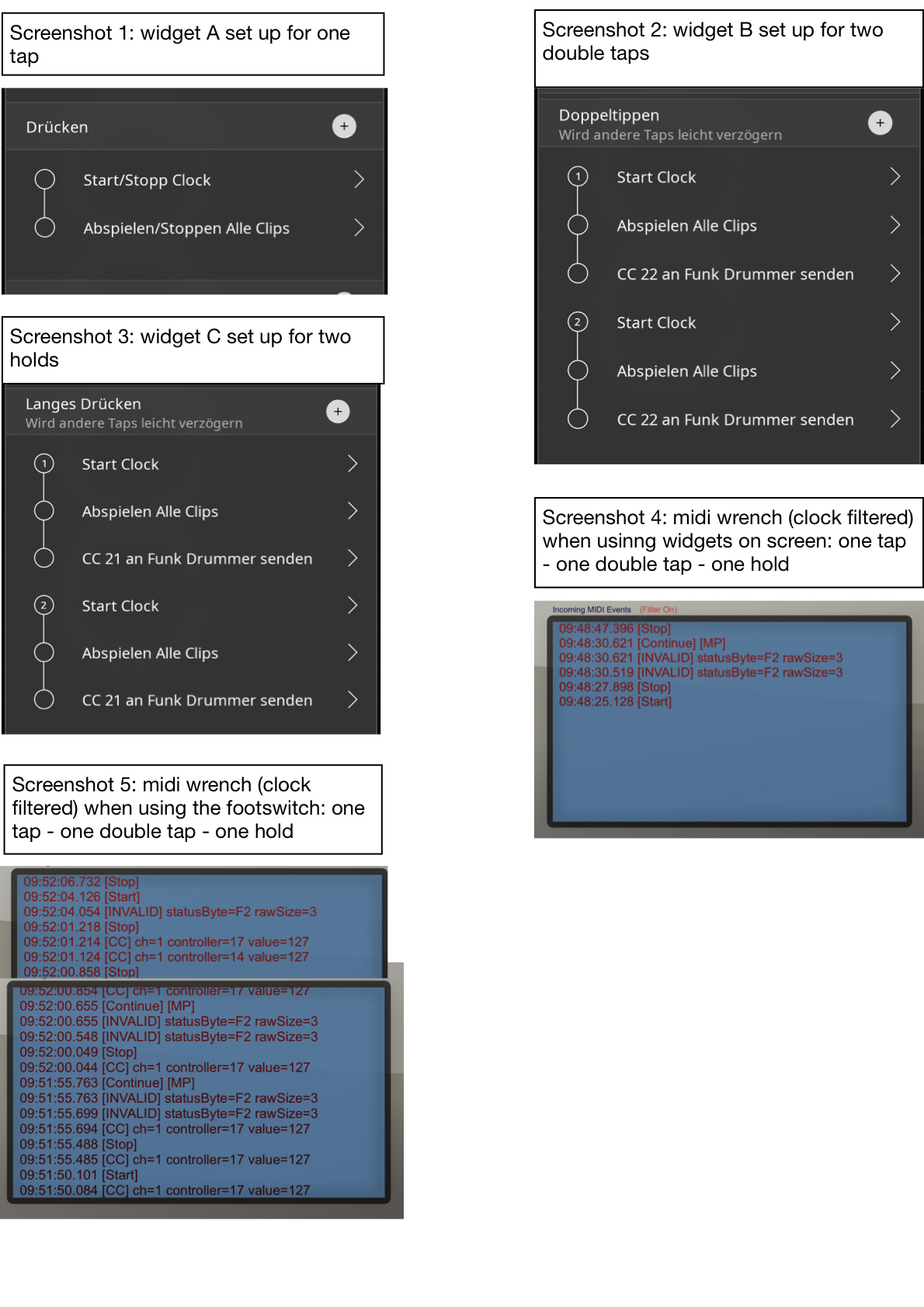
Three of my onscreen widgets (let’s call them A, B and C) are set up in Loopy like this, steering a drum app:
A = a single press (midi cc 17, val 127) for two simultaneous actions: start/stop midi clock + play/stop all clips
B = a double press (midi cc 17, val 127) for three simultaneous actions: start clock + play all clips + send cc 22 to drum app (to change the groove)
C = a hold (midi cc 17, val 127) for the same as B (but cc 21 sent for a different groove)
This works perfectly fine on screen. So I set up one switch of the footcontroller as momentary, sending the midi cc triggers that Loopy expects for the three widgets and checked with a midi monitor. One press = 1 midi cc17, double press = 2 midi cc 17, hold = 2 midi cc 17, the last one with a little delay as it has to be.
But Loopy reacts differently when I trigger the events with that footswitch instead of the onscreen widgets. For instance, instead of the midi clock stop the clock will continue after a short pause etc. The midi monitor shows invalid messages, Continue messages (see attached screenshots) etc. I guess this has to do with the triple actions for double tap and hold (see screen shots) which I set up to override the single tap actions and have immediate effect without waiting (no deferring actions, no timeline set back, no count ins).
What am I doing wrong here?
Thanks for your suggestions.
Comments
Just a note here. MIDI F2 is not invalid. It is the Song Position Pointer message. The value is the 14-bit SPP. It's likely being set to zero when the clock is stopped.
@Heinrich : I am not understanding your description. Let’s take things slowly to be clear.
Did you program different tap, double-tap and hold behavior into your footswitch or is the footswitch now strictly a momentary controller?
What I mean by strictly momentary is that each pedal has a cc number snd press always sends a single on value and release always the off value.
If you press twice fast, the pedal itself should not be doing something special. It should just be sending on for each press and off for each release.
There should be no hold programming in the pedal itself.
Without loopy running , can you post one screen shot of the midi monitor for each of the following:
Tap
Double-tap
Hold
AS SEPARATE individual SCREENSHOTS
post one screen shot for each midi binding and include its details.
You posted the action setup of your buttons. Those have nothing to do with the bindings. Midi bindings handle the connection between midi events and actions.
You will need separate tap (on) , double-tap and hold bindings.
Thank you @espiegel. Ok, let me clarify to the best of my knowledge 🫣:
As already mentioned, the controller footswitch in question is set up as a momentary switch (the other two switches of my controller are in sequential mode, working fine with my Loopy setup). You advised me in an earlier post to go momentary with that footswitch and let Loopy do the rest. About strictly momentary: I wondered at first how a momentary switch is suitable for a single press since it reverts back to the original state when released, but then found out that this should work.
However, my current momentary footswitch looks like this (see screenshot 1), but I already realise that this differs from your definition of a momentary switch (you said, no hold should be assigned):
I assigned three functions to my momentary switch (see the midi monitor screenshot 2-4)
1. a press (sending cc17, val 127), but NOT a release because I read the latter is not necessary. Is that correct?
2. a double tap (sending the same CC17, val 127)
3. and a hold (again sending the same CC17, val 127)
I am aware that the action setups are not the bindings. Just wanted to show that there are several actions triggered by one gesture. Anyway, I included the screenshots with the bindings for tap, double tap and hold (screenshots 5-7).
Thanks again for looking into this and for your prompt help. I definitely want to make this work for me because of all apps, Loopy Pro is the way to go.
Thanks @uncledave!
Ah, this clears it up, this whole midi thing is quite challenging if you really want to know what’s going on.
@Heinrich : a release is necessary. I tried to make that clear earlier and it is mentioned in the wiki pages I have point to. The switch should send on when pressed and off when released.
I don’t know how to be clearer: program your footswitch to send on when pressed and off when released.
Do not program your footswitch for double-tap or hold. Loopy Pro will handle that if you program your footswitch switch to just send on when pressed and off when released.
Add value 0 for release
Delete your double-tap and hold
With your switch set to be a simple momentary controller, loopy can disambiguate tap, double-tap, hold.
Thank you @espiegel123 . Now it’s more than clear and simple. I was mislead by the options under “momentary” in my footswitch editor and thought something has to be assigned here and not left just blank. So I assigned the same cc command, thinking Loopy will still need this.
Will change the setting and if it works, post it here to give something back to the forum.
@espiegel123 , this did the trick, everything works like a charm now! In the double tap and hold bindings I had to click the defer other actions button to keep the midi clock going without pause.
So, in case someone needs a looper setup with three switches (eg Pirate Midi Aero): Loop A and B with Rec-play-dub + undo/redo + clear track, and stop/start all + switching between grooves of a lumbeat drum app (ios), let me know if there is a place to upload the setup.
Patchstorage has a Loopy Pro repository that many of us use for sharing projects:
https://patchstorage.com/platform/loopy-pro/
Tried to upload but I’m getting constantly error -#200
EDIT: Never mind: I learnt this is a security subject of the website. Contacted the devs how to fix it.