Loopy Pro: Create music, your way.

What is Loopy Pro?Loopy Pro is a powerful, flexible, and intuitive live looper, sampler, clip launcher and DAW for iPhone and iPad. At its core, it allows you to record and layer sounds in real-time to create complex musical arrangements. But it doesn’t stop there—Loopy Pro offers advanced tools to customize your workflow, build dynamic performance setups, and create a seamless connection between instruments, effects, and external gear.

Use it for live looping, sequencing, arranging, mixing, and much more. Whether you're a live performer, a producer, or just experimenting with sound, Loopy Pro helps you take control of your creative process.

Download on the App Store

Loopy Pro is your all-in-one musical toolkit. Try it for free today.

AUM - External keyboard

Until now I have been using the built in keyboard with AUM which works as expected, sending midi and controlling the selected track.

Using an external (Microkey air) keyboard, when I have two AUV3s in separate channels, the midi is going to both.

Is there a quick and easy way to have it just going to the selected track/instrument, or do I have to set up filtered channels for each and then change midi channel on the microkey, which I am not even sure is possible!

Comments

  • edited October 2025

    @Bat71 said:
    Until now I have been using the built in keyboard with AUM which works as expected, sending midi and controlling the selected track.

    Using an external (Microkey air) keyboard, when I have two AUV3s in separate channels, the midi is going to both.

    Is there a quick and easy way to have it just going to the selected track/instrument, or do I have to set up filtered channels for each and then change midi channel on the microkey, which I am not even sure is possible!

    That should be easy to fix. You must unintentionally have your keyboard routed to both AUv3s. In the routing matrix that will look similar to the attached screenshot. You just need to make sure that the keyboard is only routed to one at a time. Just tap on the appropriate square on the matrix to disconnect whichever connection you don’t want.
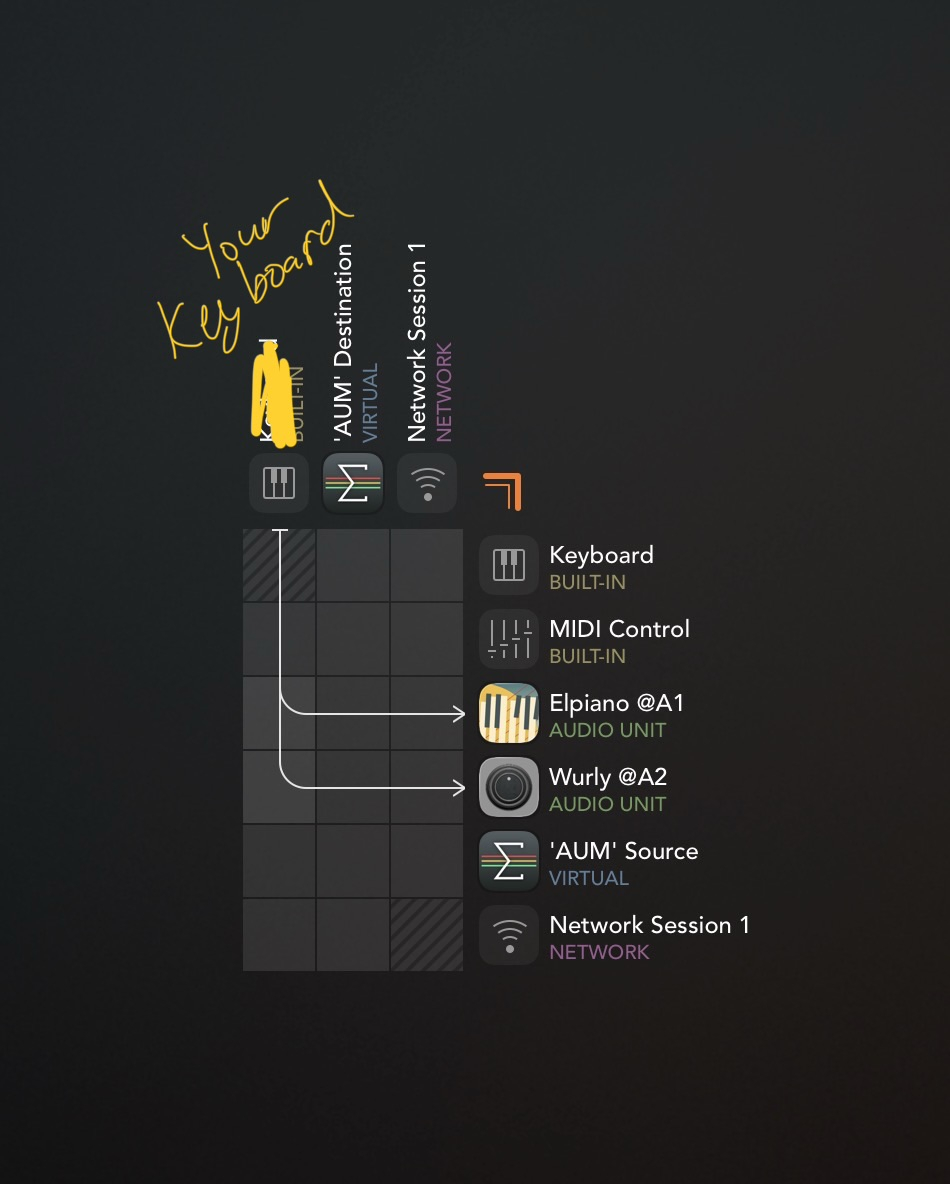
    If this doesn’t solve your problem, upload a picture of your AUM matrix, as this must be user error

  • I see...

    What I am trying to achieve is what happens in Cubasis, wherby I select a track and the midi routes only to that track

    Is that possible in AUM?

  • Don't worry. Worked it out with another keyboard which I can change midi channel easily on so can set it up as a template

    Not possible to easily change midi channel with microkey I don't think

  • @Bat71 said:
    I see...

    What I am trying to achieve is what happens in Cubasis, wherby I select a track and the midi routes only to that track

    Is that possible in AUM?

    Yes, you can easily set which midi channels any audio channel in AUM receives on. It's all explained in the searchable AUM manual on the dev's website. I also have a basic AUM tutorial here BTW which might come in handy if you're just getting started with it:
  • wimwim
    edited October 2025

    @Bat71 said:
    I see...

    What I am trying to achieve is what happens in Cubasis, wherby I select a track and the midi routes only to that track

    Is that possible in AUM?

    I understand what you're looking for. Unfortunately there is nothing like that in AUM.

    There are ways to make it easier by managing routing with midi busses or by using a channel changer app like mfxStrip. And of course any of the ways mentioned in the videos already posted, but there's not any way to make it so that all you need to do is (select) touch an AUM channel and midi is automatically routed there.

    Drambo has that feature. It makes a good AUv3 plugin host. It doesn't have to be complicated to learn if that's all you're doing with it.

  • @wim said:

    @Bat71 said:
    I see...

    What I am trying to achieve is what happens in Cubasis, wherby I select a track and the midi routes only to that track

    Is that possible in AUM?

    I understand what you're looking for. Unfortunately there is nothing like that in AUM.

    There are ways to make it easier by managing routing with midi busses or by using a channel changer app like mfxStrip. And of course any of the ways mentioned in the videos already posted, but there's not any way to make it so that all you need to do is (select) touch an AUM channel and midi is automatically routed there.

    Drambo has that feature. It makes a good AUv3 plugin host. It doesn't have to be complicated to learn if that's all you're doing with it.

    Oh thnx for clarifying, turns out I didn't fully understand what the OP was asking for

  • @Gavinski said:
    Oh thnx for clarifying, turns out I didn't fully understand what the OP was asking for

    You posted a load of good info for managing the situation though. 👍🏼

  • I simply disable the instrument (s) that I’m not using by swiping left. You could also just mute the track

  • edited October 2025

    @Bat71 said:
    Until now I have been using the built in keyboard with AUM which works as expected, sending midi and controlling the selected track.

    Using an external (Microkey air) keyboard, when I have two AUV3s in separate channels, the midi is going to both.

    Is there a quick and easy way to have it just going to the selected track/instrument, or do I have to set up filtered channels for each and then change midi channel on the microkey, which I am not even sure is possible!

    Hi. I guess you're "selecting" the instrument to control by tapping one of the keyboard icons in AUM. This automatically routes the AUM internal Keyboard to the selected instrument. If you route the external keyboard to the internal Keyboard, it will respond the same as the internal KB. The pic shows the routing, using the IAA Music Studio app as stand-in for the external KB. I did not route the Keyboard to AnalogySTR; it's just the last instrument selected.

    (I didn't know this, and it is a useful reason to route external MIDI to the Keyboard.)

    Edit: This is actually covered in the comprehensive AUM documentation, section "MIDI Keyboard".

  • wimwim
    edited October 2025

    @uncledave said:
    Hi. I guess you're "selecting" the instrument to control by tapping one of the keyboard icons in AUM. This automatically routes the AUM internal Keyboard to the selected instrument. If you route the external keyboard to the internal Keyboard, it will respond the same as the internal KB. The pic shows the routing, using the IAA Music Studio app as stand-in for the external KB. I did not route the Keyboard to AnalogySTR; it's just the last instrument selected.

    (I didn't know this, and it is a useful reason to route external MIDI to the Keyboard.)

    Edit: This is actually covered in the comprehensive AUM documentation, section "MIDI Keyboard".

    Whut?? That's huge! I had no clue about that feature. That works, and is so useful!

  • @uncledave said:

    @Bat71 said:
    Until now I have been using the built in keyboard with AUM which works as expected, sending midi and controlling the selected track.

    Using an external (Microkey air) keyboard, when I have two AUV3s in separate channels, the midi is going to both.

    Is there a quick and easy way to have it just going to the selected track/instrument, or do I have to set up filtered channels for each and then change midi channel on the microkey, which I am not even sure is possible!

    Hi. I guess you're "selecting" the instrument to control by tapping one of the keyboard icons in AUM. This automatically routes the AUM internal Keyboard to the selected instrument. If you route the external keyboard to the internal Keyboard, it will respond the same as the internal KB. The pic shows the routing, using the IAA Music Studio app as stand-in for the external KB. I did not route the Keyboard to AnalogySTR; it's just the last instrument selected.

    (I didn't know this, and it is a useful reason to route external MIDI to the Keyboard.)

    Edit: This is actually covered in the comprehensive AUM documentation, section "MIDI Keyboard".

    Yeah that's it! Cheers :)

  • Cheers @uncledave very useful!

Sign In or Register to comment.