Loopy Pro: Create music, your way.
What is Loopy Pro? — Loopy Pro is a powerful, flexible, and intuitive live looper, sampler, clip launcher and DAW for iPhone and iPad. At its core, it allows you to record and layer sounds in real-time to create complex musical arrangements. But it doesn’t stop there—Loopy Pro offers advanced tools to customize your workflow, build dynamic performance setups, and create a seamless connection between instruments, effects, and external gear.
Use it for live looping, sequencing, arranging, mixing, and much more. Whether you're a live performer, a producer, or just experimenting with sound, Loopy Pro helps you take control of your creative process.
Download on the App StoreLoopy Pro is your all-in-one musical toolkit. Try it for free today.
Any pixel art artists or fans of the medium?

I've fallen into its grips
Been a fan all my life (and chiptune. Og Anamanagucci was/is an obsession)
Got into perler beads in the mid 2ks and my cubical was covered in em
Never got into creatating my own, however. I did do a lot of recreates across various mediums over the years
I've attempted for a number of years on non-pixel-centric apps (desktop Adobe stuffs, iOS procreate mainly) but the itch hit hard about 2 weeks ago and I dove deep into iOS research
Came down to Pixquare, Pixaki, and Resprite
Ok, Resprite was out immediately due to subscription [EDIT: I missed the lifetime option available for $18], but that was my initial dive into what's out there. Both Pixquare and Pixaki are $20us as the holy grail of one time purchase (woot!)
Ended up on Pixquare. Great mix of features, procreate-esque pallet/control layout, THEMES (weirdly amazing), solid pen-only options
Then I discovered over a few Pixquare YouTube tutorials that various Creators have 30% codes on their vids (it's usually their name) so it came down to $12.99!!
And my brain just clicks with it (very much like loopy) - even the demo is simply locked to 3 projects, so I could play around and delete to test what I needed
But here's my first two days of actually creating something (not just general fking around)
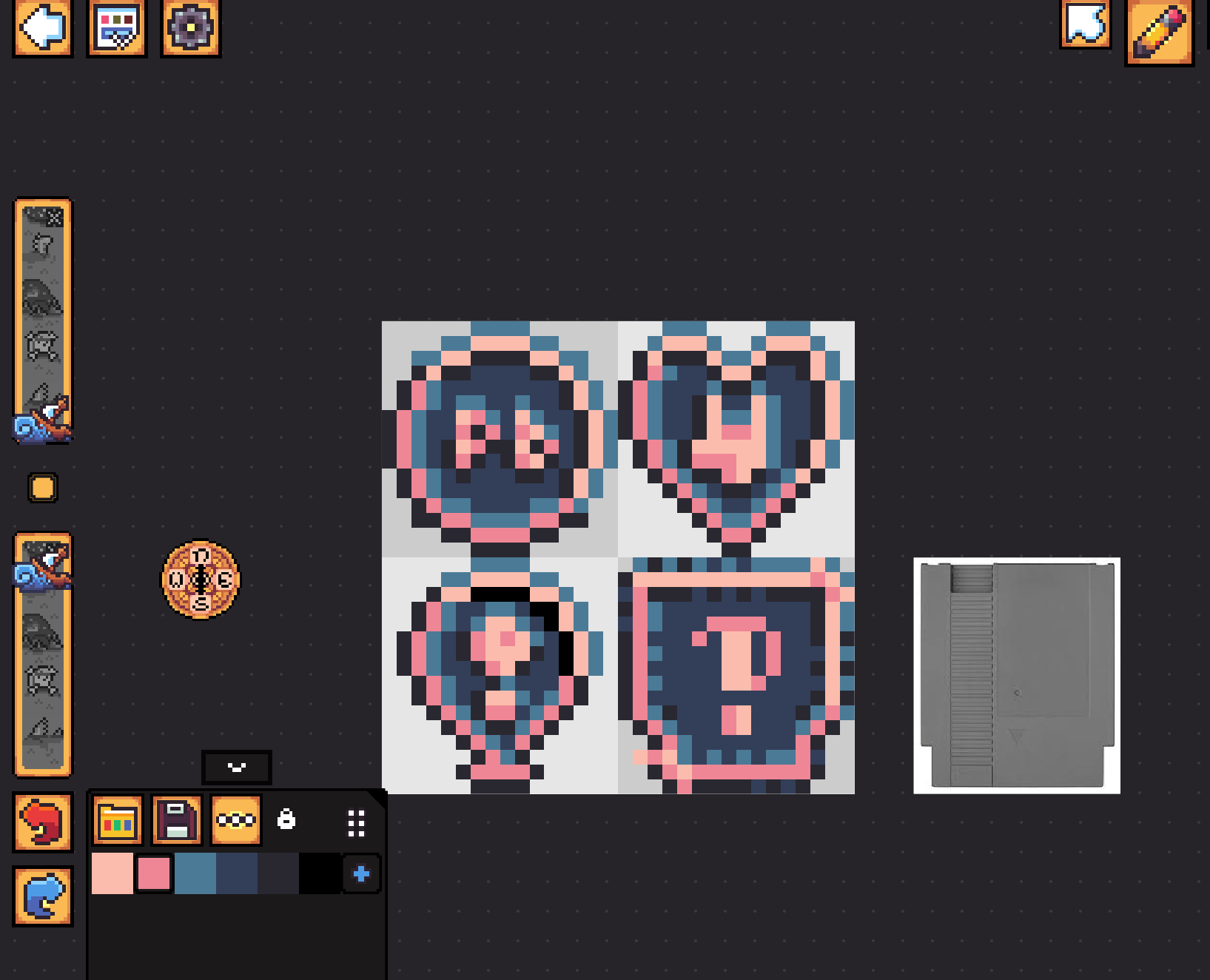
Day one was the Papa B Coin, just kinda fell out when I was laying down for the night. And today was the heart-horns, the exclamatory balloon, and the start of a thing with an interrobang
Not sure what they are at the start, but I'm hoping to use em with for popups while streaming
So: What are you using? Which/whose work do you enjoy? Any preferred era/art style of old games?
Any limited color palletes you just find exquisite? (I learned of Lospec a couple of days ago, and Pixquare has integration ::hhhhhnnnggg::)
Comments
Not necessarily with designing pixel art, but I do like some interesting pixel apps that distort and manipulate photos in really unique ways.
DestroyPix is free
https://apps.apple.com/us/app/destroypix/id1454410349
Pixel is Data is free
https://apps.apple.com/us/app/pixel-is-data/id622378844
https://apps.apple.com/us/app/new-pixels/id1175728706
Another great pixel art app with a very talented inapp community
I LOVE pixel art video games. Superbrothers Sword n Sorcery on my old iPod touch was so good and a very creative use of the art form (and the music by Jim Guthrie too 🤙)
Gotta shoutout my favorite game, Enter the Gungeon, as well
Unfortunately both iPhone only (I didn't stipulate anything towards that, just a [personally disappointing] commonality I find across a lot of photo manipulation apps. Makes sense with iPhone being a more used as Camera than an iPad) - however I AM leaving a lifetime of android for iOS next upgrade, so I'll snagging everything in the meantime lol
DestroyPix looks DOPE! Will certainly dig in there
The first Pixel Is Data pic I thought was a Minecraft world map 🤣
Honestly, first glance, my pedantic brain went 'eeewww, rounded things' - but the more I look, it looks like a really fun building tool!
Almost pixel meets Mii/CoD (Blops 3 on PC still has my Rick Sanchez graphic I made upon initially installing the game. And my wii has a dozen or so experimental 'layer' faces like Peter Griffin and such. I really liked breaking the constricting layering approach to those things)
Superbrothers and Enter the Gungeon are two great examples of Games I Wish I Liked More due to the amazing art/music styles. Just couldn't get into the games themselves (really sad about Gungeon... Been a rogelike junkie for a very long time)
Another series that sits in that camp for me is Thimbleweed Park. Everything about it screams 'Youll love this game!!' but I restarted a handful of times (similarly with Superbro & Gungeon) over the years, and never continue for more than a half hour or so with no moment of 'ooo I want to play more of that' after a day or so
But yes, superb examples none the less! Thank you
Ayyy, was Thimble that twin peaks point and click adventure game?! Lotta fun!
That's the one! I was hooked on Sierra and Lucas Arts games way back when so EVERYTHING about that game should hook me (not to mention a love of parody and X-Files)...
I don't have a list of regrets in my life
But an overwhelming list of things I wish I could enjoy lol (baked beans, country music, live sports, reality TV, Chuck Lorre sitcoms, Soulslike games. All things I've repeatedly and sincerely attempted to seek interest/enjoyment. And will try again at some point)
“Chuck Lorre sitcoms”
Lol truth
I've been making pixel art on and off as a hobby since making web comics using pixel art game characters back in middle school. Good old zeldacentral was my original forum stomping grounds - now named Kakariko Graveyard.
Pixquare is my favorite pixel art app in general - I prefer it even to Aseprite on PC. It has a joystick feature on screen that you can assign tools and shortcuts to, an on screen touch pad surface to do the same, great animation features, custom brushes, custom layouts. I'm pretty sure it supports scripting, has good color palette tools, works with Aseprite's file format. Drawing feels great - the app never feels like it gets in the way of me making art. Great usage of the Apple Pencil.
Are you sure Resprite is purely subscription? At one point they had a lifetime unlock that I bought - is that not a thing anymore? I'm not crazy on it and would definitely say go Pixquare.
I've used Procreate for some pixel art. It's my second favorite app for it. I got a pixel art brush set and have had a lot of fun using it. It's definitely not geared towards the medium, and if you want to get into animations, objects, etc. then you should consider a dedicated pixel app.
The app col.or is good for making color palettes. It goes on sale super cheap a lot. I really like the Home Screen widget that shows random colors - great for some inspiration. Similarly, Palette Hunt will make a small color palette from an image that you can save. These are great ways to start collecting color palettes.
Speaking of color palettes, https://lospec.com is the best place to get pixel art color palettes. There's even a feature in Pixquare (and most pixel art apps) that allow you to import palettes directly from Lospec. The Lospec Discord is also a great spot to find resources and get help.
Oddly enough, I've messed with a few pixel designs in Nomad Sculpt. It's a 3D sculpting app, but has a pixel filter. Not a very practical method but a very stylized way to go about it.
Here are links to the apps.
Pixquare:
https://apps.apple.com/us/app/pixquare-pixel-art-studio/id1659428179
Resprite:
https://apps.apple.com/us/app/resprite-pixel-art-studio/id1662335989
Procreate:
https://apps.apple.com/us/app/procreate/id425073498
Procreate Pixel Art brush set:
https://folio.procreate.com/discussions/10/28/46618
col.or - Color Name Identifier & Finder:
https://apps.apple.com/us/app/color-name-identifier-finder/id1528968321
Palette Hunt:
https://apps.apple.com/app/id6449098473
Nomad Sculpt:
https://apps.apple.com/us/app/nomad-sculpt/id1519508653
There are a ton of pixel art focused Discord servers. They're a great place to get help, find tools, and see some fantastic art. I find most pixel art communities to be super chill - similar vibes to this forum. Here are my recommendations on Discord servers related to pixel art.
Pixquare - https://discord.gg/RD6uwdbX4
Pixquare app help and art
Lospec - https://discord.gg/UBXHs8jD
Color palettes made from community members
Aseprite - https://discord.gg/FrZxE5Ta
PC app help and art
Saultoons - https://discord.gg/TzUsrePHB
Daily/weekly/monthly challenges.
Its an odd coincidence how his work lands here tho... I LOVED Grace Under Fire, Dharma & Greg, the og theme for TMNT, and Cybil. So everything he did to a certain point, I DID really like, so I feel like I should still
I guess Y2K or 9/11 or something musta reset his programming or sumshit 😁
Here are some books on the topic plus a few tutorials and resources for sprites and visual references.
Pixel Logic - a Guide to Pixel Art by Micheal Azze
https://michafrar.gumroad.com/l/pixel-logic
Pixel Art Knowledge: Isometric Games Don’t Exist by Thomas Feichtmeir
https://cyangmou.itch.io/isometric-games-dont-exist
Learning Pixel Art by Max Hervieux
https://www.amazon.com/Learning-Pixel-Art-Max-Hervieux-ebook/dp/B00V32EWRG
Interaction of Color Josef Albers
https://lookingatlooking.wordpress.com/wp-content/uploads/2011/01/albersinteractionofcolor.pdf
Artists’ Master Series: Color and Light
Home page: https://store.3dtotal.com/products/artists-master-series-color-light?srsltid=AfmBOop9lFL9D4Zznzmm7cq9fgPF5loa9NGuLhWkgW4Lki3wCoPFipHk
Kindle version: https://a.co/d/6Zvgf8t
Pixel Art Tutorials by Pedro Medeiros
https://lospec.com/pixel-art-tutorials/author/pedro-medeiros
Pixel Joint Pixel Art Tutorials
https://pixeljoint.com/pixels/tutorials.asp
finalbossblues Pixel Art Tutorials
https://finalbossblues.com/pixel-tutorials/
Gameboy Color Screenshots
https://lospec.com/screenshots/Game Boy Color
The Spriter’s Resource
https://www.spriters-resource.com
I love pixel art, thanks for asking! Let me catch up on this thread cause apparently there’s dozens of us
Amazing resources and info! Thank you SO much for the effort!!
Resprite: omg you are so right. There is a 17.99 lifetime unlock. I missed that. But I'm glad I didn't see it since I probably would have jumped on it without looking around, and I am adoring Pixquare
Aseprite: that's been on my steam wishlist for a good minute now. As a 'just in case' the pixel itch hit when my desktop was still alive and kickin
The aseprite file association with Pixquare was a major discussion point, so I'm appreciative for your confirmation that it's solid. Will be a boon when I get a new desktop
Procreate pixel brushes: Manero Brushes by chance? Big fan of his work on YouTube, have snagged a few of the freebie sets, but definitely bought his Pixel Art set. Absolutely stellar collection. Dudes a beast for procreate resources
col.or and Pallete Hunt: Oh word! Thanks a bundle! Will keep an eye on em!
Lospec: I learned of it's existence thru the integration with Pixquare. For good or for ill, I now have a new Tonehunt-level time-sink for searching and collecting on a dangerously obsessive level 😁
Nomad Sculpt: Oooo interesting! May have to experiment there too!
Discord servers: Amazing list thank you!! Will pop into em as time and need allows!
I highly recommend Pixel Logic - a Guide to Pixel Art by Micheal Azze, Artists’ Master Series: Color and Light, and Learning Pixel Art by Max Hervieux. Pixel Logic is a great high level view of pixel art laid out in easy to follow chapters. It has a vast amount of different styles from various eras of pixel art with great explanations of concepts and terminology. The main spot I'd say it's lacking is lack of exercises. If you want something more text book with chapter exercises go with Learning Pixel Art. The chapters are a bit more technical and have some good practice prompts at the end of each chapter, many of which build on themselves through the book. The Artist' Master Series is a must have for anyone who appreciates visual art. This one is very dense - I can chew on a page for an hour wrapping my head around the topics. Definitely the most theory heavy of the three, and not pixel art specific but the concepts are fundamental for visuals.
Omg another killer list of resources!! Looks like I asked the right forum!!
I am absolutely gobsmacked by the overlapping interests on LPF. I mean, I /shouldn't/ be (there's a certain way the brain processes production work, so we are all quite like-minded people), but its always a wonderful shock when other deep interests align as well 😁
This is really a long shot because I’d like to read it again, gpt failed me, but I remember I saw an article or blog, maybe 5+years ago, very detailed, lots of pictures, but looking old school, dark themed, that had a plethora of pixel art tricks and techniques. It was retro game design oriented. Might have found it on reddit.
Anyone saw that? Chatgpt showed me all sorts of interesting links but none was it. Maybe (probably) the site doesn’t exist anymore except perhaps on archive org (while it lasts). But I have no idea of the original link
Did you check any of the links I listed above? It might be https://www.slynyrd.com/blog which is a really good resource. Pixel Art Tutorials by Pedro Medeiros or a few of the forums near the bottom of the list might be it.
Is the word 'enough' missing from the first sentence?
Without it, it gives a very different perspective on those books 🤣
However, great rundown and I'll be sure to start looking thru them! Many many thanks, again, for sharing your expertise!
Yay, I think it’s probably that. Thanks! But I’ll need some time to read this thread, which I haven’t had so far but am looking forward to
I also love modern takes on pixel art, this isn’t really pixel art but it’s still pixelating things in creative ways (btw this is not my doing, I’m just a vessel)
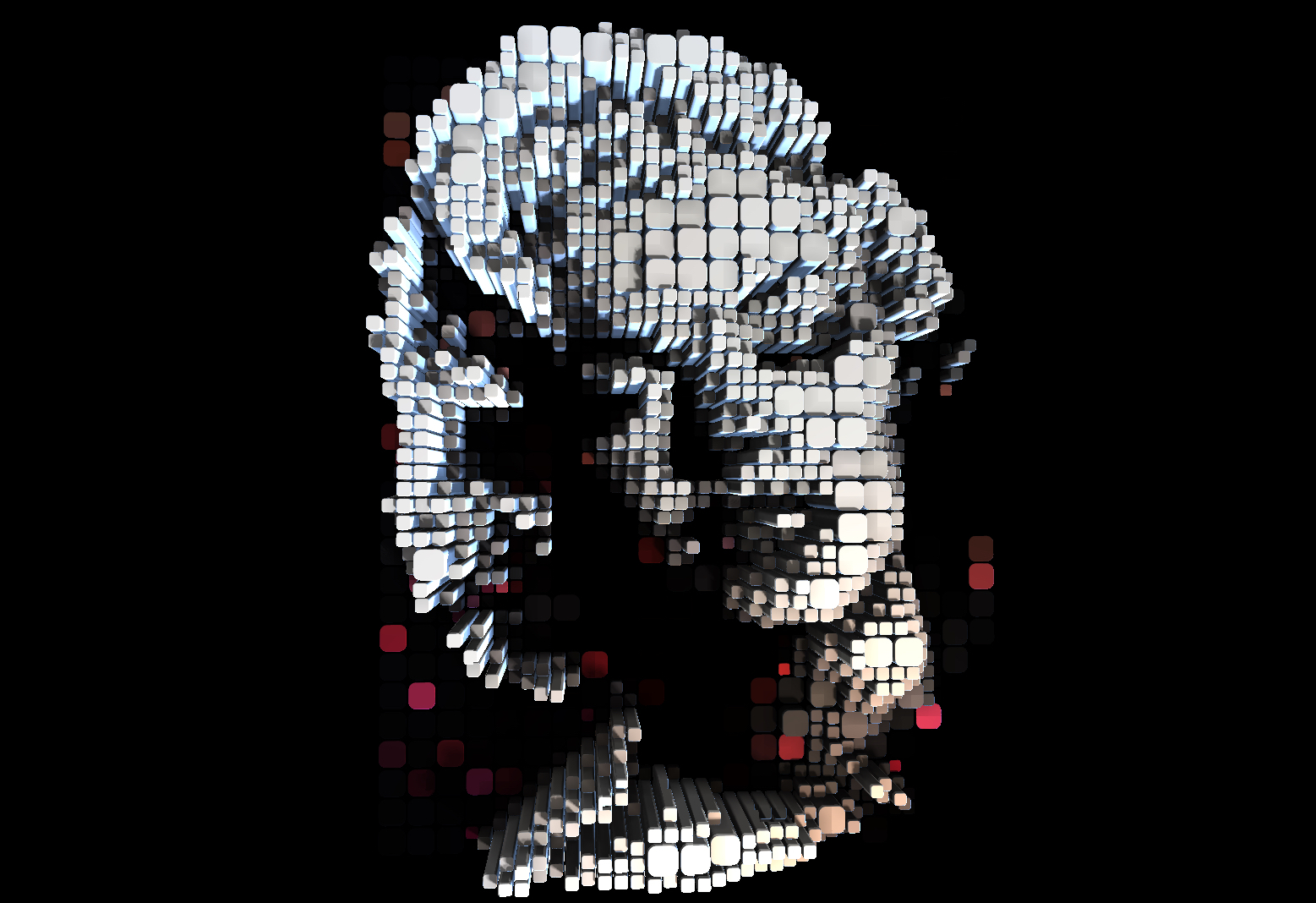
Whoops! 😬
That's really cool, is that voxelart maybe, never thought about it, googled it just now and found a couple pictures that technically looked a bit like the one you posted.
This is the source: https://www.shadertoy.com/view/tsdXDB
But it’s implemented in drambo
And zoom on the picture, if you haven’t 🤩
I've enjoyed loads of pixel art over the years in all sorts of games, but am relatively ignorant about the technique. I dabbled a bit with some PC and Android apps a couple of years ago, when I thought I might make a game, but gave up rather quickly.
I think I had a machine from most eras of gaming starting from a machine that could play pong and similar with very few big white pixels on a black screen that even had a light gun (well it was my father's, but I played it, too) an Atari 2600, a Commodore 64, Amiga 500, Master System, Mega drive and on, but I guess those are the pixelrelevant ones.
One of my all-time favourite games is Madness for the C64. I think it's the perfect onescreen puzzle platformer, with an awesome soundtrack and I get fuzzy feelings, when I see it, don't know if that counts as pixelart.
A more recent game I like is The Binding of Isaac.
Edit: sorry, not in context, just got carried away
Of course zooming in was the first thing, I did:)
Man I'm looking forward to the video features in Drambo!
This isn’t a drambo visual module, though. It’s that shadertoy code but that I ported to MSL (apple’s version of GLSL), and drambo is open enough to let you run your own GPU code
But you won’t need coding with drambo visuals, you just connect modules like it was music for your eyes 😄
This was just a fun experiment for my own learning, I don’t understand nearly half of it
Dang it, not loading on mobile for me. Gonna have to check this out on another browser or the iPad then
I mean, kinda in context. Dope af is the label I'd give it 😊
Haha you're telling my story! Somehow, Pixquare just clicks. I've never fallen into a style so quickly (save for when I leaned into boombap upon discovering Jurassic 5 25 [gasp] years ago)
I am quite unfamiliar with the run of systems prior to the NES (got it Xmas of '86), save for the 2600
I have this lingering desire to deep dive into C64, Amiga, and ZX Spectrum -- Sounds like Madness is a good place to start!
I do believe you've inadvertently given me a wonderful rabbit hole to get lost in for a while (...wait... this isn't another Drambo hole... Is it? If I get lost again like I did there, my wife's not gonna let me talk to you since you're a bad influence 🤣🤣)
I fking love BoI. Better yet, my oldest kid got into it HARD. Completely bypassed my knowledge as he's telling me about loadouts he achieved for X Y and Z, and I understood about half of it
Both the art and music are legendary, too
Edit: the other aspect I love about BoI, the super cartoon style to cover the absolutely crazy nutzo story (it was a lot of fun when my kid put everything together 🤣🤣. Luckily, he's our kid thru and thru, so the more twisted, the more fun lol)
@PapaBPoppin said:
I am quite unfamiliar with the run of systems prior to the NES (got it Xmas of '86), save for the 2600
I have this lingering desire to deep dive into C64, Amiga, and ZX Spectrum -- Sounds like Madness is a good place to start!
-Madness is always a good place to start, much madness is divinest sense to a discerning eye(;
I do believe you've inadvertently given me a wonderful rabbit hole to get lost in for a while (...wait... this isn't another Drambo hole... Is it? If I get lost again like I did there, my wife's not gonna let me talk to you since you're a bad influence 🤣🤣)
-Oh no, sorry about that, I wouldn't wanna be responsible for someone having fun out there;). With the 3 systems you mentioned, this rabbit hole can go rather deep I guess, I suspect they have several tens of thousands of games... many can be safely ignored, I guess.
I fking love BoI. Better yet, my oldest kid got into it HARD. Completely bypassed my knowledge as he's telling me about loadouts he achieved for X Y and Z, and I understood about half of it
Both the art and music are legendary, too
Edit: the other aspect I love about BoI, the super cartoon style to cover the absolutely crazy nutzo story (it was a lot of fun when my kid put everything together 🤣🤣. Luckily, he's our kid thru and thru, so the more twisted, the more fun lol)
-I quite recently started playing videogames with my five-year old (some old games mostly megadrive, some Lego games, some Kart-Games) but BOI is maybe a couple years off, but certainly on the list of videogames, movies and books, I'm looking forward to playing with him, when I think he's ripe for them.
Thank you for this nice info thread, I felt in love with pixel art since the C64 times, but never thought that time, to start creating pixel art ny myself.
In the early 2000 ths we had a very cool Electro Punk project CD and my girlfriend created some very nice pixel characters on a Win XP system with the built in grafic software.( forgot the name) 😀
https://www.kreatives.org/fruu_svenja_trifft_herrn_goetz/
A few years ago I wanted to create some videos for some of our favourite Hits, and start redrawing those characters on iPad using medi bang with an extreme low resolution.
We liked the results and so I created some very basic animations and awake them to live by using LumaFusion video editor.
We hope you enjoy as much as we did 😂
Thanks again for all nice info here,
Will definitely check it out.
kind regards,
Götz
Blasphemous has some great modern pixel art. It’s on iOS for anyone interested.
There’s a cool photo app called Kino Glitch that can do something similar to those pics, it’s quite interesting.