Loopy Pro: Create music, your way.
What is Loopy Pro? — Loopy Pro is a powerful, flexible, and intuitive live looper, sampler, clip launcher and DAW for iPhone and iPad. At its core, it allows you to record and layer sounds in real-time to create complex musical arrangements. But it doesn’t stop there—Loopy Pro offers advanced tools to customize your workflow, build dynamic performance setups, and create a seamless connection between instruments, effects, and external gear.
Use it for live looping, sequencing, arranging, mixing, and much more. Whether you're a live performer, a producer, or just experimenting with sound, Loopy Pro helps you take control of your creative process.
Download on the App StoreLoopy Pro is your all-in-one musical toolkit. Try it for free today.
"Rerecord If Stopped, Overdub If Playing” Option in If Clip Has Audio Menu
Hi everyone,
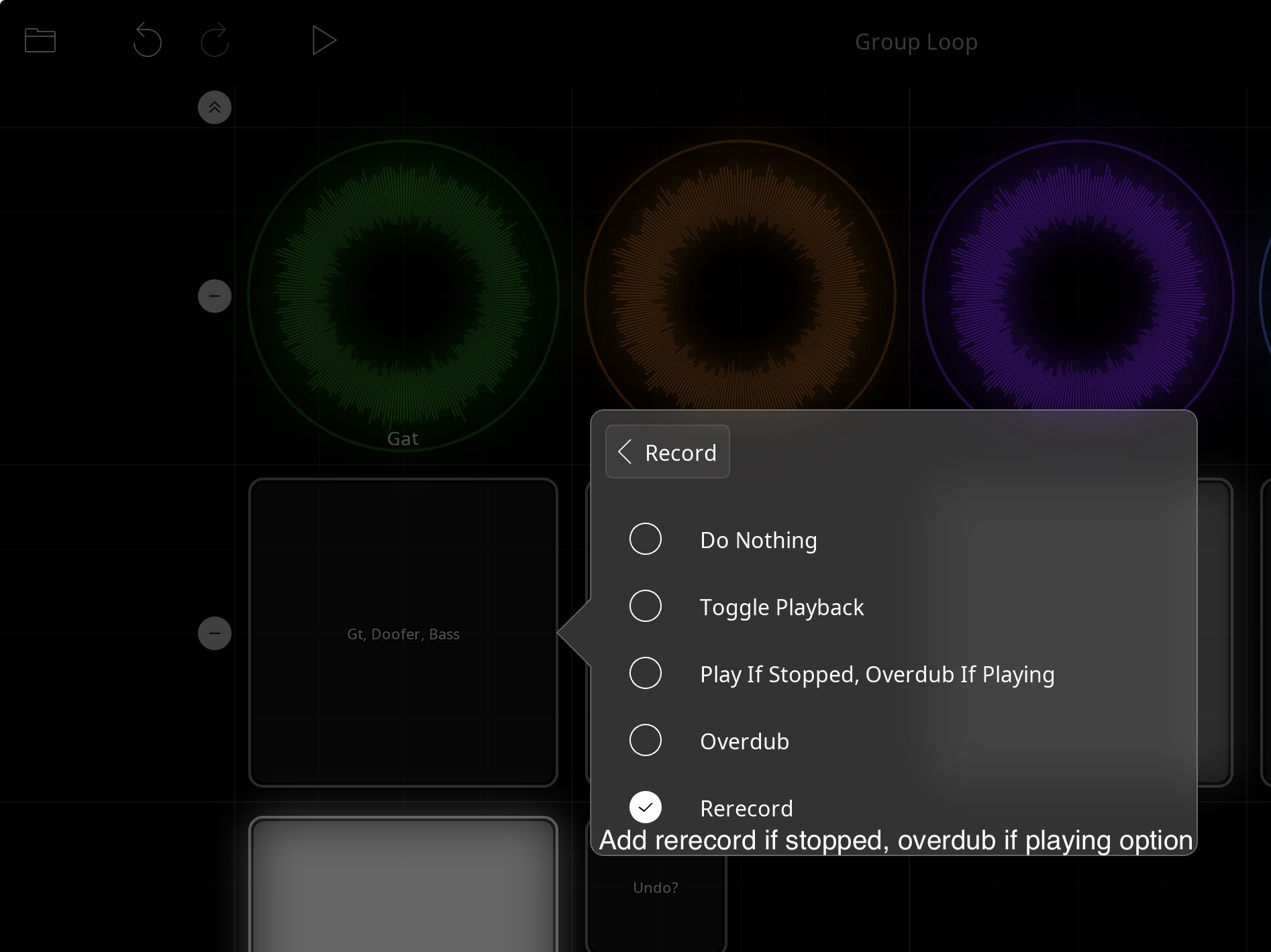
I’d love to see an extra option in the If Clip Has Audio menu under Record:
If the clip is stopped → Rerecord
If the clip is playing → Overdub
The idea is to have one control that behaves differently depending on whether the clip is stopped or playing - similar to the "Play If Stopped, Overdub If Playing" but allowing a different live workflow.
For my live looping setup, this would be huge — I often want to start fresh when the clip is stopped (without having to hit Clear first), but seamlessly add to it when it’s already playing. Right now, that means either two separate controls or changing settings on the fly, which isn’t ideal mid-performance.
It’s a bit of a niche request, but I think some other performers might find it really useful too.
Thanks for considering!
— Andy Parsons
Comments
Like so:
You could set this up now by using follow actions and a step dial (or two) for your record option.
The dial would be set to perform actions on activation with state feedback disabled. Set one step to be your non-stopped record action and the other to be your stopped option.
To record, you would trigger the dial.
@AndyP4 : are you wanting to re-record (which preserves the original length) or clear and record?
okay cool, I'll keep exploring and try figure that out. I'm wanting to clear and record. where do I find the step dial?
this app is flipping amazing!
Wow. I just got it to work! Thanks for the direction!
Great!
I want to chime in and say that I would absolutely love this feature. OP describes it as "niche", but this is how some of the more popular delay multi-pedal loopers work (Line6 DL4, Strymon Timeline, Eventide H90) and it is a very useful feature for live looping when you are doing on-the-fly loops (not creating songs ahead of time and not saving created loops for later).
It basically allows you to have 1 (or 2) fewer controls, and one less thing to think about. For example, if I create a composition with a few layers, then stop playing... now I can either just press "record" to start a brand new song, or press "play" to continue playing the one I had previously recorded. No need to think about clearing loops or not.
This is how I wish all loopers operated
I did try to recreate this functionality using the "step dial" hack, and it's a lot of work, fairly complex, and ultimately didn't get me 100% there either due to limitations (not sure if bug or feature) of follow action triggers. For example, it seems that moving from initial record to overdub triggers the "play clip" follow action, which is problematic because then the state change you need to make to the step dial can't tell the difference between whether you are currently playing the loop or overdubbing the loop. And going from overdub mode to play mode does NOT trigger the "play clip" action so there's another thing that prevents proper state change from being set on the step dial.
So my point is, this seems like it really belongs in the built-in options of what the record action can do -- would drastically simplify many things if one is looking for this kind of workflow. Thanks!
@jordanlev : it is not a bug that play and record follow actions are both triggered. They are not mutually exclusive follow actions. Begin Overdub and End Overdub can be used for detecting overdub start and stop.
Play/Stop as follow actions are independent from recording. They relate to whether a clip’s play state changes. There are use-cases where it is important to respond to playback state even if overdubbing is also happening.