Loopy Pro: Create music, your way.

What is Loopy Pro?Loopy Pro is a powerful, flexible, and intuitive live looper, sampler, clip launcher and DAW for iPhone and iPad. At its core, it allows you to record and layer sounds in real-time to create complex musical arrangements. But it doesn’t stop there—Loopy Pro offers advanced tools to customize your workflow, build dynamic performance setups, and create a seamless connection between instruments, effects, and external gear.

Use it for live looping, sequencing, arranging, mixing, and much more. Whether you're a live performer, a producer, or just experimenting with sound, Loopy Pro helps you take control of your creative process.

Download on the App Store

Loopy Pro is your all-in-one musical toolkit. Try it for free today.

Ova Ambient Synthesizer [Released]

124»

Comments

  • @Coloobar said:
    Feature request: Ability to change the isomorphic keyboard layout: https://hw.s-ol.nu/0x33.board/layouts/

    I initially thought about using an algorithmic layout approach, but it wasn’t feasible because of the infinite number of grid layouts due to varying pad sizes, screen sizes, and plugin window sizes. 😅

    So, the pads start from the bottom left corner (the 0, 0 position of the game engine) and populate in order, from left to right and from bottom to top. I also included the “shuffle” option to make it more interesting.

    That’s a great resource you shared. I’ll check if the algorithms can be applied to any x-y size of the grid. Otherwise, it wouldn’t work. But I can make the layout algorithms optional in the settings menu I guess.

  • @oldsynthguy said:
    Like the look of this, and note it's Mac compatible - has anyone tried it with Logic or Ableton on a Mac? Polybud works great in Mac Logic, would love to use this in that one too.

    Anyone? @cem_olcay ?

  • @oldsynthguy said:

    @oldsynthguy said:
    Like the look of this, and note it's Mac compatible - has anyone tried it with Logic or Ableton on a Mac? Polybud works great in Mac Logic, would love to use this in that one too.

    Anyone? @cem_olcay ?

    Yes, it's compatible with Mac and can work both standalone and AUv3 (Ableton, Logic, Garageband etc).
    Also the same for Testere and Nikaya :smile:

  • @cem_olcay said:

    @Coloobar said:
    Feature request: Ability to change the isomorphic keyboard layout: https://hw.s-ol.nu/0x33.board/layouts/

    I initially thought about using an algorithmic layout approach, but it wasn’t feasible because of the infinite number of grid layouts due to varying pad sizes, screen sizes, and plugin window sizes. 😅

    So, the pads start from the bottom left corner (the 0, 0 position of the game engine) and populate in order, from left to right and from bottom to top. I also included the “shuffle” option to make it more interesting.

    That’s a great resource you shared. I’ll check if the algorithms can be applied to any x-y size of the grid. Otherwise, it wouldn’t work. But I can make the layout algorithms optional in the settings menu I guess.

    Well, that was easier than I thought 😅

    The logic behind the algorithmic layouts was the intervals.

    • Mine was +1, +2, +3 ... (sequential)
    • Harmonic is +3, +4, +7, ....
    • Gerhard is +1, +3, +4, ....

    When I plugged those numbers, it just worked!

    • One downside is the layouts should be in chromatic scale
    • So I just highlighted the in-scale notes, easy
    • But bouncing balls are not producing pretty sounds because they trigger off-scale notes as well
    • It's really fun to explore with touch based input though!

    Here are the results, let me know what you guys think:


  • @cem_olcay said:

    @oldsynthguy said:

    @oldsynthguy said:
    Like the look of this, and note it's Mac compatible - has anyone tried it with Logic or Ableton on a Mac? Polybud works great in Mac Logic, would love to use this in that one too.

    Anyone? @cem_olcay ?

    Yes, it's compatible with Mac and can work both standalone and AUv3 (Ableton, Logic, Garageband etc).
    Also the same for Testere and Nikaya :smile:

    Thanks Cem, does it work as a MIDI FX in Logic? Live doesn't support AUv3 MIDI apps, but Logic does, so for example I'm enjoying using Polybud to trigger Logic instruments and plugins. It'd be great to be able to do the same with Ova :)

  • @oldsynthguy said:

    @cem_olcay said:

    @oldsynthguy said:

    @oldsynthguy said:
    Like the look of this, and note it's Mac compatible - has anyone tried it with Logic or Ableton on a Mac? Polybud works great in Mac Logic, would love to use this in that one too.

    Anyone? @cem_olcay ?

    Yes, it's compatible with Mac and can work both standalone and AUv3 (Ableton, Logic, Garageband etc).
    Also the same for Testere and Nikaya :smile:

    Thanks Cem, does it work as a MIDI FX in Logic? Live doesn't support AUv3 MIDI apps, but Logic does, so for example I'm enjoying using Polybud to trigger Logic instruments and plugins. It'd be great to be able to do the same with Ova :)

    Ova works as an AU instrument (audio) plugin on Logic.

  • edited October 2025

    @cem_olcay said:

    @cem_olcay said:

    @Coloobar said:
    Feature request: Ability to change the isomorphic keyboard layout: https://hw.s-ol.nu/0x33.board/layouts/

    I initially thought about using an algorithmic layout approach, but it wasn’t feasible because of the infinite number of grid layouts due to varying pad sizes, screen sizes, and plugin window sizes. 😅

    So, the pads start from the bottom left corner (the 0, 0 position of the game engine) and populate in order, from left to right and from bottom to top. I also included the “shuffle” option to make it more interesting.

    That’s a great resource you shared. I’ll check if the algorithms can be applied to any x-y size of the grid. Otherwise, it wouldn’t work. But I can make the layout algorithms optional in the settings menu I guess.

    Well, that was easier than I thought 😅

    The logic behind the algorithmic layouts was the intervals.

    • Mine was +1, +2, +3 ... (sequential)
    • Harmonic is +3, +4, +7, ....
    • Gerhard is +1, +3, +4, ....

    When I plugged those numbers, it just worked!

    • One downside is the layouts should be in chromatic scale
    • So I just highlighted the in-scale notes, easy
    • But bouncing balls are not producing pretty sounds because they trigger off-scale notes as well
    • It's really fun to explore with touch based input though!

    Here are the results, let me know what you guys think:


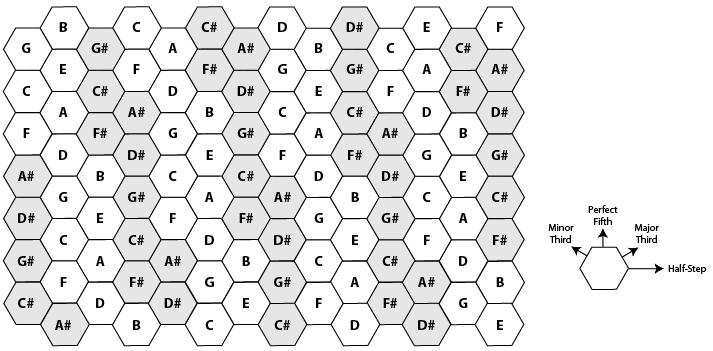
    Wow I’m glad you were able to find a solution so quickly. It’ll be nice to have other layout options. It doesn’t look quite right to me though… the harmonic layout should have all the notes of a chord adjacent to each other in a triangle like this:
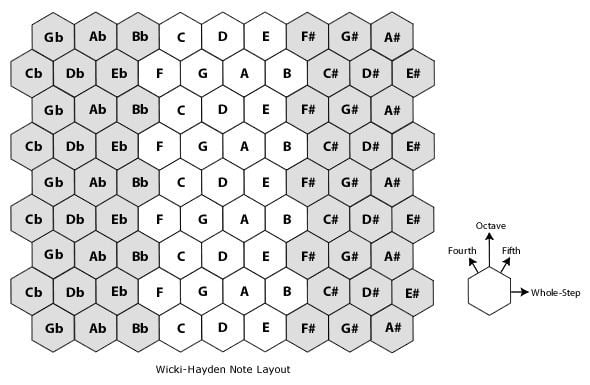
    And Wicki-Hayden should form the pentatonic scale for each key in the form of a hexagon:
  • @cem_olcay said:

    @oldsynthguy said:

    @cem_olcay said:

    @oldsynthguy said:

    @oldsynthguy said:
    Like the look of this, and note it's Mac compatible - has anyone tried it with Logic or Ableton on a Mac? Polybud works great in Mac Logic, would love to use this in that one too.

    Anyone? @cem_olcay ?

    Yes, it's compatible with Mac and can work both standalone and AUv3 (Ableton, Logic, Garageband etc).
    Also the same for Testere and Nikaya :smile:

    Thanks Cem, does it work as a MIDI FX in Logic? Live doesn't support AUv3 MIDI apps, but Logic does, so for example I'm enjoying using Polybud to trigger Logic instruments and plugins. It'd be great to be able to do the same with Ova :)

    Ova works as an AU instrument (audio) plugin on Logic.

    Ah ok, thanks.

  • The new version with increasing speed bug fix and speed variety knob is out!

  • thanks Cem!
    this became really interesting to play with!:)

  • Brought yesterday definitely enjoying using this very random at times and inspiring.

  • @cem_olcay said:
    The new version with increasing speed bug fix and speed variety knob is out!

    Thank ya kindly!

  • edited October 2025

    If anyone has some musical/pleasant results they want to share, please go ahead. So far, I’m getting Horror/depression basically no matter what I do.

  • will give a try to this one :)

  • @Coloobar said:

    @cem_olcay said:

    @cem_olcay said:

    @Coloobar said:
    Feature request: Ability to change the isomorphic keyboard layout: https://hw.s-ol.nu/0x33.board/layouts/

    I initially thought about using an algorithmic layout approach, but it wasn’t feasible because of the infinite number of grid layouts due to varying pad sizes, screen sizes, and plugin window sizes. 😅

    So, the pads start from the bottom left corner (the 0, 0 position of the game engine) and populate in order, from left to right and from bottom to top. I also included the “shuffle” option to make it more interesting.

    That’s a great resource you shared. I’ll check if the algorithms can be applied to any x-y size of the grid. Otherwise, it wouldn’t work. But I can make the layout algorithms optional in the settings menu I guess.

    Well, that was easier than I thought 😅

    The logic behind the algorithmic layouts was the intervals.

    • Mine was +1, +2, +3 ... (sequential)
    • Harmonic is +3, +4, +7, ....
    • Gerhard is +1, +3, +4, ....

    When I plugged those numbers, it just worked!

    • One downside is the layouts should be in chromatic scale
    • So I just highlighted the in-scale notes, easy
    • But bouncing balls are not producing pretty sounds because they trigger off-scale notes as well
    • It's really fun to explore with touch based input though!

    Here are the results, let me know what you guys think:


    Wow I’m glad you were able to find a solution so quickly. It’ll be nice to have other layout options. It doesn’t look quite right to me though… the harmonic layout should have all the notes of a chord adjacent to each other in a triangle like this:

    And Wicki-Hayden should form the pentatonic scale for each key in the form of a hexagon:

    Yeah, I just needed to tweak the algorithm a bit more but the main idea is the same.
    I just added 15 layout algorithms and they all look great! :smiley:


  • @cem_olcay said:

    @Coloobar said:

    @cem_olcay said:

    @cem_olcay said:

    @Coloobar said:
    Feature request: Ability to change the isomorphic keyboard layout: https://hw.s-ol.nu/0x33.board/layouts/

    I initially thought about using an algorithmic layout approach, but it wasn’t feasible because of the infinite number of grid layouts due to varying pad sizes, screen sizes, and plugin window sizes. 😅

    So, the pads start from the bottom left corner (the 0, 0 position of the game engine) and populate in order, from left to right and from bottom to top. I also included the “shuffle” option to make it more interesting.

    That’s a great resource you shared. I’ll check if the algorithms can be applied to any x-y size of the grid. Otherwise, it wouldn’t work. But I can make the layout algorithms optional in the settings menu I guess.

    Well, that was easier than I thought 😅

    The logic behind the algorithmic layouts was the intervals.

    • Mine was +1, +2, +3 ... (sequential)
    • Harmonic is +3, +4, +7, ....
    • Gerhard is +1, +3, +4, ....

    When I plugged those numbers, it just worked!

    • One downside is the layouts should be in chromatic scale
    • So I just highlighted the in-scale notes, easy
    • But bouncing balls are not producing pretty sounds because they trigger off-scale notes as well
    • It's really fun to explore with touch based input though!

    Here are the results, let me know what you guys think:


    Wow I’m glad you were able to find a solution so quickly. It’ll be nice to have other layout options. It doesn’t look quite right to me though… the harmonic layout should have all the notes of a chord adjacent to each other in a triangle like this:

    And Wicki-Hayden should form the pentatonic scale for each key in the form of a hexagon:

    Yeah, I just needed to tweak the algorithm a bit more but the main idea is the same.
    I just added 15 layout algorithms and they all look great! :smiley:


    Awesome, you rock!

  • @cem_olcay, would it be possible to have impulses instead of held notes, when using the balls? As an option of course.

  • The new hex layout update is the beta and will be live soon!

  • The new update is live! It adds 15 hex grid layouts.

  • @cem_olcay said:
    The new update is live! It adds 15 hex grid layouts.

    Huzzah! Thanks Cem. Ova just keeps gettin better n better

Sign In or Register to comment.