Loopy Pro: Create music, your way.
What is Loopy Pro? — Loopy Pro is a powerful, flexible, and intuitive live looper, sampler, clip launcher and DAW for iPhone and iPad. At its core, it allows you to record and layer sounds in real-time to create complex musical arrangements. But it doesn’t stop there—Loopy Pro offers advanced tools to customize your workflow, build dynamic performance setups, and create a seamless connection between instruments, effects, and external gear.
Use it for live looping, sequencing, arranging, mixing, and much more. Whether you're a live performer, a producer, or just experimenting with sound, Loopy Pro helps you take control of your creative process.
Download on the App StoreLoopy Pro is your all-in-one musical toolkit. Try it for free today.
Using MIDI loops in Oneshot/Cubasis

Hi,
I’ve been using Oneshot more lately as I prefer the sounds to session drummer & Rockdrummer.
I’ve been importing midi into CB from those two apps but does it also work to download/buy midi drum loop pack from sites like Toontrack/UGRITONE/groovemonkey and import them into Cubasis?
Thanks if anyone can help.
Chris
Comments
Yes I does. I have all the midi packs fro Ugritone. The problem with the Toontrack loop is that they are not named. The name is random so it’s difficult to figure out what they do.
If your interested, I use Helium to browse and add my midi files. Hers a exemple.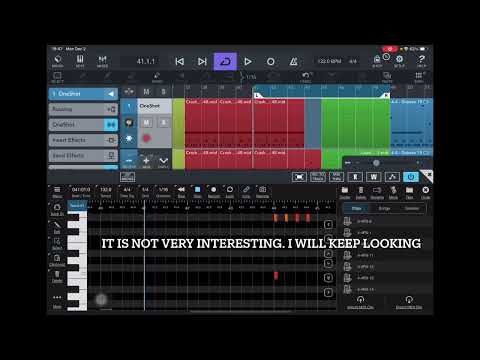
Thanks for the great info I’ll definitely get some Ugritone packs
I have some MIDI drum loops from Groovemonkee, and they work well for me, but it's the only place that I've actually purchased from. As shown by @ecou, using Helium to preview the MIDI files is a great way to try them out in an existing setup. You can also use Media Assistant which has some features available in the free version to browse MIDI files and load up a custom Soundfont with drum sounds and use that to play the files straight from the app, which provides a Files-like experience.
@ecou just seen this and its a great tip thank you
Happy to be of help 😃
@ecou how do you get Helium to auto play like in your video when auditioning the midi files? Mine does not? I guess its a setting?
If you have Sync enabled in Helium tool bar, you cannot preview midi clip while your DAW is playing. I have asked the developer to change that but never got a reply.
You could remove the sync and try to time your click on the preview but I found it very unpleasant way to work.
So what I do is audition track while not playing. When I find something I like I drag it in Helium at the bar it would go in Cubasis. Then listen if it fit. If so I click undo and drag the right beat in Cubasis timeline. If not I keep looking.