Loopy Pro: Create music, your way.

What is Loopy Pro?Loopy Pro is a powerful, flexible, and intuitive live looper, sampler, clip launcher and DAW for iPhone and iPad. At its core, it allows you to record and layer sounds in real-time to create complex musical arrangements. But it doesn’t stop there—Loopy Pro offers advanced tools to customize your workflow, build dynamic performance setups, and create a seamless connection between instruments, effects, and external gear.

Use it for live looping, sequencing, arranging, mixing, and much more. Whether you're a live performer, a producer, or just experimenting with sound, Loopy Pro helps you take control of your creative process.

Download on the App Store

Loopy Pro is your all-in-one musical toolkit. Try it for free today.

Tahti Studio iOS Testflight.

edited October 2025 in General App Discussion

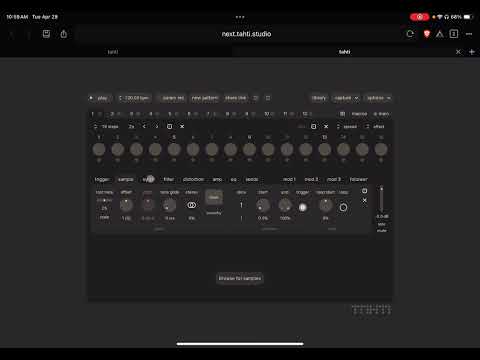
I thought it couldn't hurt to create a little extra buzz for the dev. This was brought to my attention by @sevenape in another topic. I completely missed on this synth that started as a web based synth https://next.tahti.studio but is now currently in development for iOS. It is a groovebox synth with Plaits stuff, sample import and all with a very Digitakt style to it.
https://testflight.apple.com/join/XjMpwXWh
Comments

  • this thing is very cool. great sampler with lots of creative sound design features , but yet a easy to use
    interface. it’s gonna be pretty popular when it gets released.

  • @eross said:
    this thing is very cool. great sampler with lots of creative sound design features , but yet a easy to use
    interface. it’s gonna be pretty popular when it gets released.

    I think so too. Always great to discover new stuff.

  • What a marvel — thanks for bringing this to our attention @Slush !

  • edited October 2025

    I found a previous beta of this app was draining my battery as a persistent background process. I wondered why my battery capacity seemed to be a bit lower than usual and there it was, at the top of the list under Settings > Battery. Hopefully this will be fixed at some point in the beta.

    Maybe something to keep an eye on during testing.

  • edited October 2025

    And if you wanted to message the developer Max directly, he can be found on the Tahti discord

    https://discord.gg/f3Cn5TFUj (link is valid for 60 days)

  • edited October 2025

    @Dasgoods2025 said:
    And if you wanted to message the developer Max directly, he can be found on the Tahti discord

    https://discord.gg/f3Cn5TFUj (link is valid for 60 days)

    Good idea.

    Especially since after reinstalled the beta, and not having run the app after reinstalling, out of the blue get a popup asking me if I want to allow tahti to use the microphone?!? What is it doing in the background without even being launched?

  • I’ve been enjoying this app a lot. I have been finding it a great environment to experiment with samples and grooves. I’ve been using it in AUM, Drambo and Loopy Pro primarily. It’s really good to work with in Loopy Pro as you can create the exact groove you want with a sample and then just record the audio into Loopy. It’s great on it’s own as well, I just like working with it as an AUv3.
    Max (the developer) is great to communicate with and is really keen to learn of any issues or ideas you might have to make the app better. He is developing this for multi platforms and so I think the more input and feedback he gets the better the app will get. For an app that’s still in Beta it’s pretty solid. I haven’t discovered any major issues with it and I’ve been using it pretty consistently since earlier this year.

  • What I really like about it is that you can start a jam on the desktop, copy the link and paste it into your auv3 and work on it further. (Currently there is a little bug that requires a restart after pasting the link).

  • @Mountain_Hamlet said:
    I’ve been enjoying this app a lot. I have been finding it a great environment to experiment with samples and grooves. I’ve been using it in AUM, Drambo and Loopy Pro primarily. It’s really good to work with in Loopy Pro as you can create the exact groove you want with a sample and then just record the audio into Loopy. It’s great on it’s own as well, I just like working with it as an AUv3.
    Max (the developer) is great to communicate with and is really keen to learn of any issues or ideas you might have to make the app better. He is developing this for multi platforms and so I think the more input and feedback he gets the better the app will get. For an app that’s still in Beta it’s pretty solid. I haven’t discovered any major issues with it and I’ve been using it pretty consistently since earlier this year.

    Mind going a bit further with this “samples and grooves” use you do in hosts with tahti? Do you mean you bring in your own drum one shots to build grooves? Or are you taking samples and drum loops and somehow manipulating them in tahti to new results? App looks cool, but I guess I’m still unclear as to what it’s capable of (thought it was just a groovebox but guess I missed over some features?). TYIA

  • edited October 2025

    @Squishy said:

    @Mountain_Hamlet said:
    I’ve been enjoying this app a lot. I have been finding it a great environment to experiment with samples and grooves. I’ve been using it in AUM, Drambo and Loopy Pro primarily. It’s really good to work with in Loopy Pro as you can create the exact groove you want with a sample and then just record the audio into Loopy. It’s great on it’s own as well, I just like working with it as an AUv3.
    Max (the developer) is great to communicate with and is really keen to learn of any issues or ideas you might have to make the app better. He is developing this for multi platforms and so I think the more input and feedback he gets the better the app will get. For an app that’s still in Beta it’s pretty solid. I haven’t discovered any major issues with it and I’ve been using it pretty consistently since earlier this year.

    Mind going a bit further with this “samples and grooves” use you do in hosts with tahti? Do you mean you bring in your own drum one shots to build grooves? Or are you taking samples and drum loops and somehow manipulating them in tahti to new results? App looks cool, but I guess I’m still unclear as to what it’s capable of (thought it was just a groovebox but guess I missed over some features?). TYIA

    Both. It also has it’s own synth engine as well. I tend to import sample and drum loops or synth lines - pretty much anything and manipulate it from there.

    There’s also a web based version…have a play and discover for yourself…. https://tahti.studio/ no download required. It’s pretty much the same thing. The AUv3 version gives you multi outs and a little more integration, but the processes are the same.

  • @Mountain_Hamlet said:

    @Squishy said:

    @Mountain_Hamlet said:
    I’ve been enjoying this app a lot. I have been finding it a great environment to experiment with samples and grooves. I’ve been using it in AUM, Drambo and Loopy Pro primarily. It’s really good to work with in Loopy Pro as you can create the exact groove you want with a sample and then just record the audio into Loopy. It’s great on it’s own as well, I just like working with it as an AUv3.
    Max (the developer) is great to communicate with and is really keen to learn of any issues or ideas you might have to make the app better. He is developing this for multi platforms and so I think the more input and feedback he gets the better the app will get. For an app that’s still in Beta it’s pretty solid. I haven’t discovered any major issues with it and I’ve been using it pretty consistently since earlier this year.

    Mind going a bit further with this “samples and grooves” use you do in hosts with tahti? Do you mean you bring in your own drum one shots to build grooves? Or are you taking samples and drum loops and somehow manipulating them in tahti to new results? App looks cool, but I guess I’m still unclear as to what it’s capable of (thought it was just a groovebox but guess I missed over some features?). TYIA

    Both. It also has it’s own synth engine as well. I tend to import sample and drum loops or synth lines - pretty much anything and manipulate it from there.

    There’s also a web based version…have a play and discover for yourself…. https://tahti.studio/ no download required. It’s pretty much the same thing. The AUv3 version gives you multi outs and a little more integration, but the processes are the same.

    Thank ya kindly 🤙

  • The auv3 also has ‘hands’ (original clap engine).

  • I do wish it was able to scale the UI to full-screen instead of a 'stamp' in the middle of the screen :(
    (Currently it's way too small for me to be able to use it comfortably without eye-strain on the 11" M1 iPadPro).

  • @Samu said:
    I do wish it was able to scale the UI to full-screen instead of a 'stamp' in the middle of the screen :(
    (Currently it's way too small for me to be able to use it comfortably without eye-strain on the 11" M1 iPadPro).

    You and i have the same iPad. This is as big as it can get it Drambo.

  • @Slush said:

    @Samu said:
    I do wish it was able to scale the UI to full-screen instead of a 'stamp' in the middle of the screen :(
    (Currently it's way too small for me to be able to use it comfortably without eye-strain on the 11" M1 iPadPro).

    You and i have the same iPad. This is as big as it can get it Drambo.

    Good to know, maybe I'll take a deeper look at some point...
    ...but honestly I am pretty allergic to the whole 'Franken DAW Concept' (ie. using 3rd party stuff to cover for what I consider core functionality). And the reliance on keyboard shortcuts doesn't make it any more appealing especially on an iPad which is a touch-first device, on the desktop it's another matter...

  • @Samu said:

    @Slush said:

    @Samu said:
    I do wish it was able to scale the UI to full-screen instead of a 'stamp' in the middle of the screen :(
    (Currently it's way too small for me to be able to use it comfortably without eye-strain on the 11" M1 iPadPro).

    You and i have the same iPad. This is as big as it can get it Drambo.

    Good to know, maybe I'll take a deeper look at some point...
    ...but honestly I am pretty allergic to the whole 'Franken DAW Concept' (ie. using 3rd party stuff to cover for what I consider core functionality). And the reliance on keyboard shortcuts doesn't make it any more appealing especially on an iPad which is a touch-first device, on the desktop it's another matter...

    No key shortcuts needed, really try it in auv3. Maybe it’s focused more on a specific music style, but the speed I can make the fundamentals for a track with this thing is just amazing. The randomization buttons deliver quick unexpected results as well. For me it’s a Techno paradise.

  • New TestFlight update for the iOS version:

    New:

    • ported the modal and wavetable synth engines from MI Plaits
    • "saw up" and "exponential curve up" mod shapes
    • sample position parameter for controlling sample playback with modulator
    • page for accessing macros 4-8
    • "record" button records triggered steps in addition to parameter movements
    • welcome dialog for first-time users
    • button for downloading factory samples in the library

    Improved:

    • envelope hold time maximum value increased to 64 steps
    • some background tasks show their progress in the UI
    • hihat engines have a bit of stereo width by default (to get rid of stereo width, use the stereo width control on the amp page)
    • add more snap points to rate parameters
    • midi notes now launch patterns between 0 and 11, play chromatically between 12 - 95, and slices between 96 and 127
    • better audio engine performance
    • add pattern context menu for the current pattern next to the pattern button
    • iPad: each parameter gets its own value overlay when changing multiple parameters at once
    • names of multi-outs

    Fixed:

    • iPad: FX plugin version now accepts MIDI input
    • iPad: library should not fail to load files anymore
    • iPad: drag and drop was broken
    • missing samples should start loading again after the missing file is restored
    • getting stuck on inactive sequencer page
    • mod target parameter sometimes got stuck
    • track context menu paste options were mixed up
  • this one passed me by but I am digging into it now and very impressed!

Sign In or Register to comment.