Loopy Pro: Create music, your way.
What is Loopy Pro? — Loopy Pro is a powerful, flexible, and intuitive live looper, sampler, clip launcher and DAW for iPhone and iPad. At its core, it allows you to record and layer sounds in real-time to create complex musical arrangements. But it doesn’t stop there—Loopy Pro offers advanced tools to customize your workflow, build dynamic performance setups, and create a seamless connection between instruments, effects, and external gear.
Use it for live looping, sequencing, arranging, mixing, and much more. Whether you're a live performer, a producer, or just experimenting with sound, Loopy Pro helps you take control of your creative process.
Download on the App StoreLoopy Pro is your all-in-one musical toolkit. Try it for free today.
Loopy Pro Livesets coming from TheTemplateDude

Small teaser about the version for iPhone.. While building the Big Brother to this.
Will be soon sharing in patchstorage. With a list of used effects and controls and features. Might share also in here soon.
Comments
Hi Added a special page to my Loopy Pro Template where you can bring all the Great samples / loops from Koala Sampler to Loopy Pro and integrate with my Liveset (which is huge combination of effects and controls and clips)
You can record in sync with backgrounds and bring on first to midi and then to audio or directly to audio with Koala internal effects controlled in the template. THE RESULTS ARE HUGE, surely you need to populate the background clips and know much about Koala Sampler and Loopy Pro, but will make and have to make more tutorials, it's so much fun!
This is just a small teaser
https://youtube.com/shorts/pbjKFpxrGQk
Hi
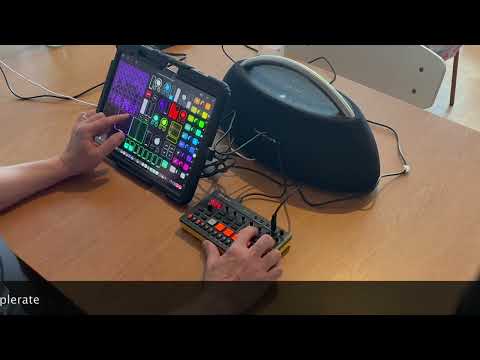
I admit that this is too long and unprofessional video. Did it yesterday afternoon and this is 1/3 of the full session. So it's all about Liveset in combination with P6 Creative Sampler by Roland.
Hopefully there some useful info. My templates are getting so huge with functionality that would need someone more professional to film my videos..
At the end part explaining my other template for song creation also..
Need to probably stick in making clumsy but quick to do shorts ;-)
Always love checkin in on and seeing how others are using Loopy Pro. I haven’t taken the plunge into the app yet (currently immersed in drambo) but these vids will def help me out down the road. So thanks 🤙
(Also your lil theme song gets stuck in my head and I find myself singing it throughout the day haha)
Thanks @Squishy I quess 😊 Now the iPhone first and very draft tryout is in patchstorage.com
Hi All. Some more info on iPhone version.
Had to skip Koala page, because cannot hide Koala auv3 instrument from the bottom, it would take too much screen space.
Some improvements coming to iPhone version:
Additional page to record loops and oneshots from any hardware like MPC, SP or P6. (I will have a dedicated color with routing there - don't want to allow to record to all colors to keep it simple. You need to import sounds via Loopy Pro clip import)
Will probably add buttons for details and move to another page from the recording page.
Also I understand that some demos and tutorials are needed e.g. how to use e.g. with Roland P6 Creative Sampler ;-)
Made already changes that brings this iPhone version to a whole new level..
https://youtube.com/shorts/ftviOFngnJs
Will update soon iPhone version 0.1 to 0.2
Loopy Pro and Sample Crate - organising my samples for LiveSet
Hi All.
Just sharing my way to handle samples, organise them and how I export and import them to Loopy Pro, especially to my LiveSet template. Not using the internal document picker of Loopy Pro, because it doesn't support immediately auditing the samples.
Hi All. Sharing my iPhone version of the LiveSet template for Loopy Pro
(https://patchstorage.com/loopy-pro-liveset-iphone-ver-0-1/)
Here is my preview video:
https://youtu.be/zNFZ6npWJII
Some addon use case example with P6 Sampler
(https://youtube.com/shorts/f_Qgzbq-6S4)
Some issues with effect activations, which worked with iPad.. need to check and improve. Now Koala fx, Shimmer doesn't seem to work properly.. maybe need to improve some bus handling.. and add one slider etc..
Hi All. Updated iPhone version of Loopy Pro LiveSet to version 0.3 with some fixes.
I'm getting some thumbs down and critics on this template..
So maybe I give up on it?
https://patchstorage.com/loopy-pro-liveset-iphone-ver-0-1/
Please let me know, if it's worth "developing" in iPhone. I know that it suite well with especially something like Roland Creative Sampler P6. Check my videos and experiments to know more..
https://youtube.com/shorts/Q3bqEoPFS8I
Hi All. I will soon publish for free this new version of HUGE template for LiveSet like Setup. Especially when using with two iPads and Ableton sync, you can multiply its capabilities.
Got some requests to demonstrate it's sound quality, so here you are!
Also sharing more information about the used effects in current version.
There is an additional Koala page for bringing your Koala Sampler content and sound to this template. You can record even first to midi and then record to audio with Koala's internal effects.. But will have a separate video on that.
If you will like this, can also provide ones with unique content, but need to probably get some extra cup of coffee to energy boost to be able to do that.
Actuallly already sharing it in patchstorage.com Let me know is it useful 👍 Excluded the sound content, you need to bring your own. Also need to own those effect plugins or replace them with your own (requires some tailoring) to have it all..
Created a Koala only version of LiveSet Template, with Koala auv3 and Koala fx, no other requirements.. will come back after sleep 👍
Here is my newest LiveSet template only with Koala and Koalafx. Check the description of the video, link is there.