Loopy Pro: Create music, your way.
What is Loopy Pro? — Loopy Pro is a powerful, flexible, and intuitive live looper, sampler, clip launcher and DAW for iPhone and iPad. At its core, it allows you to record and layer sounds in real-time to create complex musical arrangements. But it doesn’t stop there—Loopy Pro offers advanced tools to customize your workflow, build dynamic performance setups, and create a seamless connection between instruments, effects, and external gear.
Use it for live looping, sequencing, arranging, mixing, and much more. Whether you're a live performer, a producer, or just experimenting with sound, Loopy Pro helps you take control of your creative process.
Download on the App StoreLoopy Pro is your all-in-one musical toolkit. Try it for free today.
Help needed with mapping transport controls in Cubasis

Hi everyone,
I’m using and old Novation Remote 49 LE keyboard with Cubasis and I can’t get the MIDI learn to work with the play/pause button. What does Cubasis expect to ‘see’? I can get the Remote to send MIDI CC, NPRNs, PRNs, etc.
When I go into MIDI learn in Cubasis and press the button, the play/pause button onscreen in Cubasis turns green but when I try to use it, it doesn’t work.
It’s one of those things that’s driving me nuts so any help would be appreciated
Comments
Hi. It may be a toggle or not toggle thing. Does the remote send CC value 127 on press, 0 on release? Maybe Cubasis only expects one CC message to toggle its control. If so, your press/release sequence may turn it on and off very quickly. See if you can change the Remote button to toggle. Or the situation might be entirely the reverse...
Thanks, I’m sure I can set it to momentary or toggle. There are loads of options, it feels like I just haven’t found the right thing to send.
I used MIDI Learn in Cubasis 3 to remap the transport controls on my Novation Impulse 61, when you set MIDI Learn in Cubasis and then press Play on your Novation Remote, it should turn Orange and display the new CC number, if not, tap the PRESET tab next to MIDI Learn in Setup (see screenshot) and select Create New Preset and then redo the MIDI Learn.
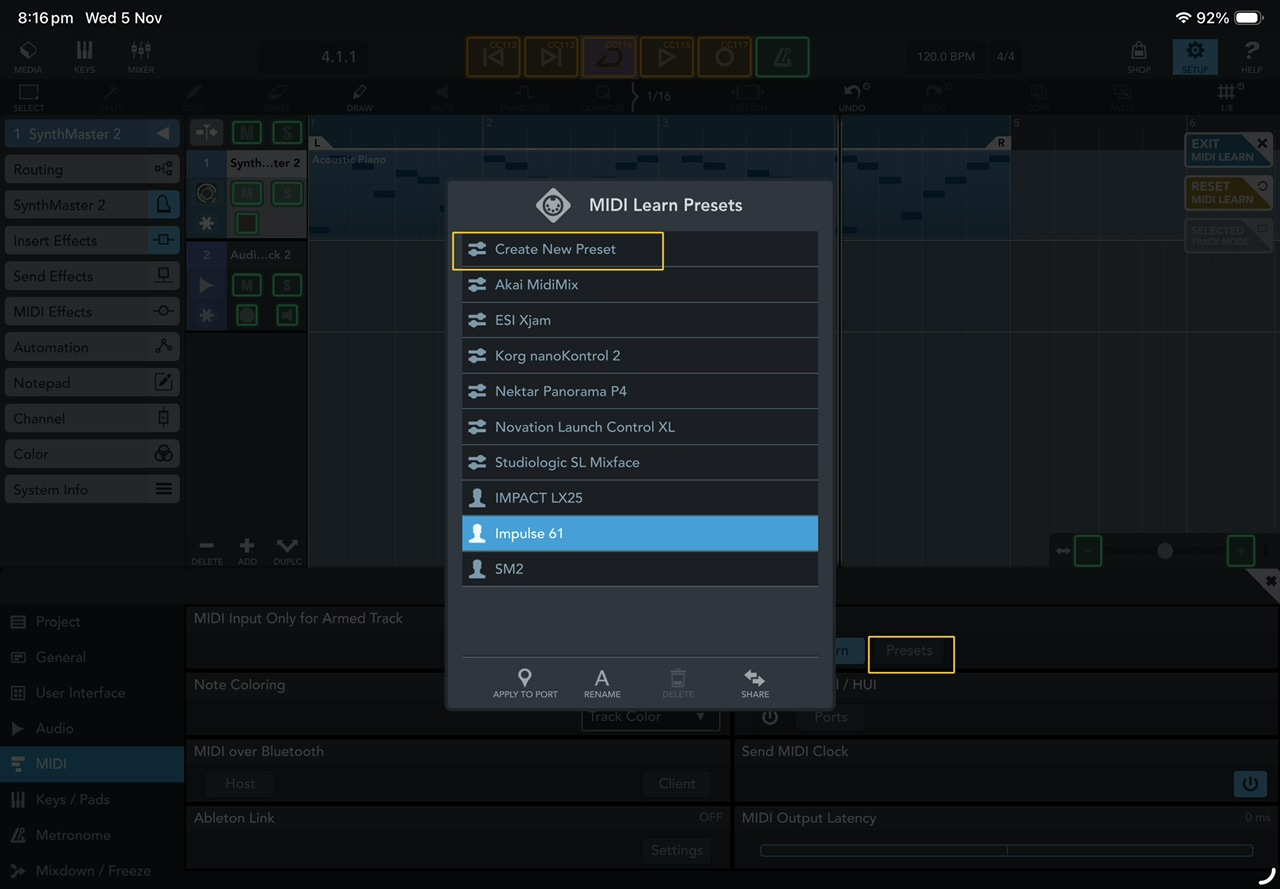
I also have my Nexus Impact 25 as a preset just in case I want to use it instead of my Impulse 61.