Loopy Pro: Create music, your way.
What is Loopy Pro? — Loopy Pro is a powerful, flexible, and intuitive live looper, sampler, clip launcher and DAW for iPhone and iPad. At its core, it allows you to record and layer sounds in real-time to create complex musical arrangements. But it doesn’t stop there—Loopy Pro offers advanced tools to customize your workflow, build dynamic performance setups, and create a seamless connection between instruments, effects, and external gear.
Use it for live looping, sequencing, arranging, mixing, and much more. Whether you're a live performer, a producer, or just experimenting with sound, Loopy Pro helps you take control of your creative process.
Download on the App StoreLoopy Pro is your all-in-one musical toolkit. Try it for free today.
Comments
Doug just made a really good overview of this brilliant app: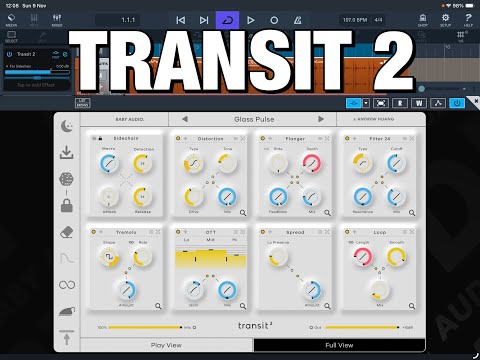
The only manual I’ve found online is for the desktop version, and none of the videos of watched so far have any definitive answers for this: anyone know what Tails, Always On, and Smooth on the sidebar menu actually do?
@Squishy I think the desktop manual applies to the iOS app, they seem the same. So the tails would be:
I suppose the smoothing option is:
Not sure about "always on" though, maybe the app has a "sleep" mode for when no audio is coming through to avoid wasting CPU power, hence battery?
So far I've been loving this app, so versatile and powerful, and you can do it all so fast! It seems really appropriate for the iPad, setting ranges and curves is super easy, the FX are great, super powerful now with all the modulation modes like LFO, Sidechain, Follow, etc. The FX combinations can completely transform the input audio and going through the presets puts an instant smile on your face.
It's perfect for live performances/jams! I haven't used Traktor in years but I feel this app would be perfect for DJs as well. But it's so versatile I can see myself using it for applying a reverb, a sidechain compressor, a delay, or going bananas and completely transforming samples...
Ya, the screenshots in the manual I found didn’t have that bar on the side so I assumed they were added for ios. Admittedly I should have kept reading. I’d say your explanations track, especially the parts about how awesome this app is! Appreciate you taking the time, thank ya kindly
'always on' is there in the manual, it's something like 'effects are still engaged even at zero'. Not sure what that helps avoid or prevent, maybe clicking or some other unwanted noise
Anyone else finding that turning Safety Limiter on causes a huge boost in gain, often leading AUM to boost to about +15dB or so in my case?
UPDATE: I see this has been addressed by @tristan already.
A tiny niggle … when operating the effect selection grid, you can only swipe up and down on the grid itself if your finger begins the swipe on an effect which is already included in the preset. If your swipe action begins on an effect which isn’t already present, it is added instantly to the preset i.e. the grid cannot distinguish between a tap and a swipe in this case.
Is there a way to force the Loop effect to refresh its buffer i.e. listen to new audio?
Would like to see a Gain/Input Boost for Follower/Sidechain, to make it possible to adjust the sensitivity of those modes to the dynamic range of incoming audio.
Yeah I noticed that, I guess that's what the scrollbar is for but more likely it's a touch-screen oversight.
Yes, a big aggravating to have to remember to use the scroll bar, as most users will expect to be able to swipe to scroll through lists like that.
+1 At least the scroll bar is a bit wider than it was in Transit 1 and this ‘issues’ was mentioned during the Transit 1 beta but must have somehow been ‘forgotten’ when Transit 2 was being made!?
I think they are well aware of it but priority was put on other things…
Id like to know about midi learn capabilities too….can’t see anything in the app though
I can record automations using Cubasis and I also can use the MIDI Learn feature on Loopy Pro (confirmed myself using my midi keyboard) to assign Midi Controls to FX. I can see the whole parameter list like: Bitcrush Rate Start, Bitcrush Rate End, Bitcrush Rate Static, Digital Chorus Depth Start, etc....
I cannot use MIDI Learn with Transit 2 through Cubasis though, the parameters don't appear as able to map.
EDIT: after educating myself a bit more on the topic, I don't think Transit 2 iOS has any MIDI learn functionality atm. Works on LP but not on Cubasis cause the way they implement Midi Learn, but the app itself, apparently no midi settings.
Is it possible to map the Macro button on Transit 2 through Loopy Pro? I really want to use an expression pedal for that.
@tubespace yes, worked fine through Loopy Pro (mapped a knob in my keyboard). It should work fine w/ a midi expression pedal.
EDIT: also works in Drambo.
Is it possible to get just a fully wet signal?
@Kashi I don't think so, I tried messing with the macro, mix and output values but I cannot solo only the wet signal.
EDIT: wrong info, see next post sorry
I really hope that’s not true. Wet only is essential when the effect will be used on a send.
I had done a quick test of the mix slider and thought I had complete dry signal, but I didn’t listen carefully to the fully wet position.
@wim, @Kashi scratch that sorry. I'm still learning all this and didn't really set stuff properly. I think it does output 100% wet signal:
I plugged an instrument to Transit 2 in LP, Transit 2 as a pre fader in BUS A and I turned the volume on the instrument track all the way down. I then used bitcrusher as the only FX in Transit 2 and placed Macro and Mix all the way up. All I can hear is the FX, so I believe this equals 100% wet signal correct? If we do remove all FX all we can hear is the "dry" signal, even with the mix & macro turned all the way up so that's a bit misleading.
I’m getting a fully wet signal with Mix turned to 100%. But it also depends on the mix settings of your individual effect modules, if they aren’t at 100% themselves then obviously the dry signal will come through.
Just had a little jam, automating Transit 2 with a MIDI clip in Loopy Pro. Using two instances here with the presets Pads Pumping Air and Faux Infinite Echo. It’s been spectacular fun so far @BabyAudio and @tristan
Sounds awesome @timfromtheborder!
One thing I noticed is there are no routing options so Transit 2 prioritizes some modules like Filters and Delays, which means all the FX are applied after those.
So let's say you want a piano w/ distortion and w/ a delay. You'll need two instances of Transit 2, one w/ the distortion and the other w/ the delay, cause if you have only one instance w/ both FX only the delay will be distorted, not the original piano source.
Not sure what you mean. The modules go left to right and top to bottom, don’t they? If the distortion comes first the delay will be the original signal with distortion, delayed. If the delay comes first, everything will be distorted.
@timfromtheborder yeah you're correct, again I wasn't thinking right -.-
You mean, you weren't thinking left (to right). 😉
Ok, cool. Thanks @jdss13 @wim @timfromtheborder - will try that
Hi everyone, we've taken note of everything here and will continue to do so.
Please let us know of any other optimizations that could be useful! True touch-native interfaces are less of a focus here as that's getting into a redesign of the entire plugin — that's a challenge we will overcome another day.
We are looking for QoL things that will make a difference in using the plugin as it currently exists.
Thank you all for the support thus far. Looking forward to updating T2 and prepping for the next iOS release...
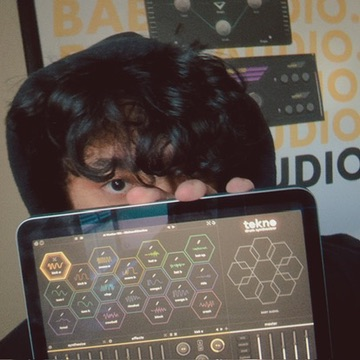
No solidified dates yet. Just showing signs of life!
@tristan there’s something off about the grab/move handle in the first fx slot. Unlike the other modules it is hard to get a hold of. Not impossible but it seems like the touch area is smaller there.