Loopy Pro: Create music, your way.

What is Loopy Pro?Loopy Pro is a powerful, flexible, and intuitive live looper, sampler, clip launcher and DAW for iPhone and iPad. At its core, it allows you to record and layer sounds in real-time to create complex musical arrangements. But it doesn’t stop there—Loopy Pro offers advanced tools to customize your workflow, build dynamic performance setups, and create a seamless connection between instruments, effects, and external gear.

Use it for live looping, sequencing, arranging, mixing, and much more. Whether you're a live performer, a producer, or just experimenting with sound, Loopy Pro helps you take control of your creative process.

Download on the App Store

Loopy Pro is your all-in-one musical toolkit. Try it for free today.

SpaceWalk by Higher Plane (Released)

245

Comments

  • @oldsynthguy said:
    Hi, ideally I'd like to use this on both platforms, so the new iOS version ticks that box, but does it lack any functionality/compatibility from the desktop version? My main DAW is Ableton, and I've seen a @thesoundtestroom vid hosting the app - but not sure if it's the VST or iOS version.

    Would the iOS version work in Ableton too? I realise Live doesn't support MIDI auV3's, but I've seen a workaround in your own getting started vid. If not, could I still host the iOS app in Logic - as that does support auV3 MIDI apps?

    Thanks!

    Hey! Thanks for the question, and great to hear you’re interested in using SpaceWalk across both platforms.

    Just to clarify things up front: the iOS AUv3 version is built specifically for iPad hosts, and I don’t support or guarantee running it on macOS. Some AUv3 apps can appear on macOS depending on how the OS interprets them, but SpaceWalk for iOS hasn’t been tested in that environment and isn’t intended for desktop use.

    For Ableton Live on macOS, you’ll want the desktop VST3/AU version, which is the one Doug used in his earlier video. If you’re waiting to see the iOS version in action then keep an eye on Doug's channel ;)

    In terms of differences:
    The chord engine is identical across desktop and iPad. The main change is workflow:

    •   Desktop has drag-and-drop MIDI
    •   iPad uses the Files app to save exported MIDI
    

    Everything else is adapted for touch — menus, interactions, UI behaviour, etc.

    If your goal is to use SpaceWalk both on iPad and inside Ableton on macOS, you’ll need the desktop version as well. The two versions are separate products with their own builds and update cycles.

    One more thing that might interest you: because a lot of Ableton users have asked, I recently picked up an Ableton Studio licence and I’m exploring a dedicated Max for Live version of SpaceWalk. It will be a separate paid upgrade (similar to how Stepic does it), but it’ll give Live users a native workflow in the long run. I don't have a timeline on this yet.

    Hope that clears things up — happy to help if you’ve got any more questions!

  • @higherplane said:

    @oldsynthguy said:
    Hi, ideally I'd like to use this on both platforms, so the new iOS version ticks that box, but does it lack any functionality/compatibility from the desktop version? My main DAW is Ableton, and I've seen a @thesoundtestroom vid hosting the app - but not sure if it's the VST or iOS version.

    Would the iOS version work in Ableton too? I realise Live doesn't support MIDI auV3's, but I've seen a workaround in your own getting started vid. If not, could I still host the iOS app in Logic - as that does support auV3 MIDI apps?

    Thanks!

    Hey! Thanks for the question, and great to hear you’re interested in using SpaceWalk across both platforms.

    Just to clarify things up front: the iOS AUv3 version is built specifically for iPad hosts, and I don’t support or guarantee running it on macOS. Some AUv3 apps can appear on macOS depending on how the OS interprets them, but SpaceWalk for iOS hasn’t been tested in that environment and isn’t intended for desktop use.

    For Ableton Live on macOS, you’ll want the desktop VST3/AU version, which is the one Doug used in his earlier video. If you’re waiting to see the iOS version in action then keep an eye on Doug's channel ;)

    In terms of differences:
    The chord engine is identical across desktop and iPad. The main change is workflow:

    • Desktop has drag-and-drop MIDI
    • iPad uses the Files app to save exported MIDI

    Everything else is adapted for touch — menus, interactions, UI behaviour, etc.

    If your goal is to use SpaceWalk both on iPad and inside Ableton on macOS, you’ll need the desktop version as well. The two versions are separate products with their own builds and update cycles.

    One more thing that might interest you: because a lot of Ableton users have asked, I recently picked up an Ableton Studio licence and I’m exploring a dedicated Max for Live version of SpaceWalk. It will be a separate paid upgrade (similar to how Stepic does it), but it’ll give Live users a native workflow in the long run. I don't have a timeline on this yet.

    Hope that clears things up — happy to help if you’ve got any more questions!

    Brilliant, thank you for the detailed reply!

    The Max for Live version would be really welcome, as that gets around the issue of Live not hosting AUv3 MIDI.

    Feel free to let me know if you need any beta testing done - I've got the full Ableton Suite plus a Push 3, so it might be nice to expose some macros for use on that one.

  • Will the special price be only for pre orders?

  • @oldsynthguy said:

    @higherplane said:

    @oldsynthguy said:
    Hi, ideally I'd like to use this on both platforms, so the new iOS version ticks that box, but does it lack any functionality/compatibility from the desktop version? My main DAW is Ableton, and I've seen a @thesoundtestroom vid hosting the app - but not sure if it's the VST or iOS version.

    Would the iOS version work in Ableton too? I realise Live doesn't support MIDI auV3's, but I've seen a workaround in your own getting started vid. If not, could I still host the iOS app in Logic - as that does support auV3 MIDI apps?

    Thanks!

    Hey! Thanks for the question, and great to hear you’re interested in using SpaceWalk across both platforms.

    Just to clarify things up front: the iOS AUv3 version is built specifically for iPad hosts, and I don’t support or guarantee running it on macOS. Some AUv3 apps can appear on macOS depending on how the OS interprets them, but SpaceWalk for iOS hasn’t been tested in that environment and isn’t intended for desktop use.

    For Ableton Live on macOS, you’ll want the desktop VST3/AU version, which is the one Doug used in his earlier video. If you’re waiting to see the iOS version in action then keep an eye on Doug's channel ;)

    In terms of differences:
    The chord engine is identical across desktop and iPad. The main change is workflow:

    •   Desktop has drag-and-drop MIDI
    •   iPad uses the Files app to save exported MIDI
    

    Everything else is adapted for touch — menus, interactions, UI behaviour, etc.

    If your goal is to use SpaceWalk both on iPad and inside Ableton on macOS, you’ll need the desktop version as well. The two versions are separate products with their own builds and update cycles.

    One more thing that might interest you: because a lot of Ableton users have asked, I recently picked up an Ableton Studio licence and I’m exploring a dedicated Max for Live version of SpaceWalk. It will be a separate paid upgrade (similar to how Stepic does it), but it’ll give Live users a native workflow in the long run. I don't have a timeline on this yet.

    Hope that clears things up — happy to help if you’ve got any more questions!

    Brilliant, thank you for the detailed reply!

    The Max for Live version would be really welcome, as that gets around the issue of Live not hosting AUv3 MIDI.

    Feel free to let me know if you need any beta testing done - I've got the full Ableton Suite plus a Push 3, so it might be nice to expose some macros for use on that one.

    No worries at all, and thanks very much for the offer - may well take you up on it. I'm a Logic user myself, but couldn't help treating myself to a Push 3 Standalone in the Ableton Black Friday sales. Might have been labeled as 'B Grade' but looks pretty good to my untrained eye... now all I need to do is figure out how to use it ;)

    Thanks again - and all the best

  • @higherplane said:

    @oldsynthguy said:

    @higherplane said:

    @oldsynthguy said:
    Hi, ideally I'd like to use this on both platforms, so the new iOS version ticks that box, but does it lack any functionality/compatibility from the desktop version? My main DAW is Ableton, and I've seen a @thesoundtestroom vid hosting the app - but not sure if it's the VST or iOS version.

    Would the iOS version work in Ableton too? I realise Live doesn't support MIDI auV3's, but I've seen a workaround in your own getting started vid. If not, could I still host the iOS app in Logic - as that does support auV3 MIDI apps?

    Thanks!

    Hey! Thanks for the question, and great to hear you’re interested in using SpaceWalk across both platforms.

    Just to clarify things up front: the iOS AUv3 version is built specifically for iPad hosts, and I don’t support or guarantee running it on macOS. Some AUv3 apps can appear on macOS depending on how the OS interprets them, but SpaceWalk for iOS hasn’t been tested in that environment and isn’t intended for desktop use.

    For Ableton Live on macOS, you’ll want the desktop VST3/AU version, which is the one Doug used in his earlier video. If you’re waiting to see the iOS version in action then keep an eye on Doug's channel ;)

    In terms of differences:
    The chord engine is identical across desktop and iPad. The main change is workflow:

    • Desktop has drag-and-drop MIDI
    • iPad uses the Files app to save exported MIDI

    Everything else is adapted for touch — menus, interactions, UI behaviour, etc.

    If your goal is to use SpaceWalk both on iPad and inside Ableton on macOS, you’ll need the desktop version as well. The two versions are separate products with their own builds and update cycles.

    One more thing that might interest you: because a lot of Ableton users have asked, I recently picked up an Ableton Studio licence and I’m exploring a dedicated Max for Live version of SpaceWalk. It will be a separate paid upgrade (similar to how Stepic does it), but it’ll give Live users a native workflow in the long run. I don't have a timeline on this yet.

    Hope that clears things up — happy to help if you’ve got any more questions!

    Brilliant, thank you for the detailed reply!

    The Max for Live version would be really welcome, as that gets around the issue of Live not hosting AUv3 MIDI.

    Feel free to let me know if you need any beta testing done - I've got the full Ableton Suite plus a Push 3, so it might be nice to expose some macros for use on that one.

    No worries at all, and thanks very much for the offer - may well take you up on it. I'm a Logic user myself, but couldn't help treating myself to a Push 3 Standalone in the Ableton Black Friday sales. Might have been labeled as 'B Grade' but looks pretty good to my untrained eye... now all I need to do is figure out how to use it ;)

    Thanks again - and all the best

    Same here, I’m on full Ableton Suite if you need a Max tester 🙏

  • @higherplane said:

    @timfromtheborder said:

    @anickt said:

    Then I don’t know what this is supposed to mean:

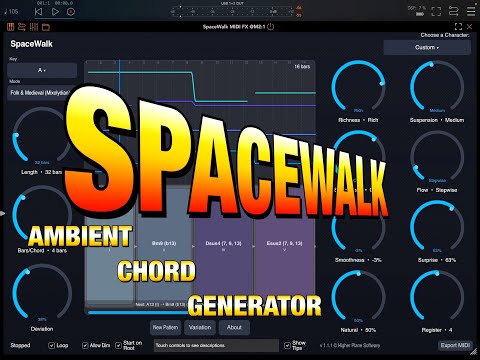
    Use SpaceWalk as an AUv3 Instrument to generate harmonic pads directly on your iPad, or insert the MIDI FX version before any synth or sampler to drive your favourite sounds with evolving progressions.

    And in the video it appears to be running in a standalone mode.

    Morning!

    Yes, Spacewalk is a Midi Generator - just like the desktop version. Doesn't create any audio whatsoever and you need to route it through to an actual instrument / synth to hear anything.

    There are two versions of the plugin included in the iOS version - one is an AUv3 Midi Effect... this one you just drop in a Midi Effect slot before your actual synth/instrument and it sends the midi directly to that instrument (works great in Logic Pro for iPad). However, that plugin doesn't show up in apps like Cubasis - which is why the bundle also includes SpaceWalk as an 'instrument'. Again, this doesn't produce any audio and needs to have its output routed to a track containing an actual instrument (this is why I say it's not compatible with Garageband, because Garageband has no way of routing midi output to other tracks that I could find)... this is what you're hearing in the demo video - it's a screen recording of it running real time in Cubasis, driving one of the built in Cubasis instruments.

    (It's exactly the same behaviour as the desktop version, for people who have used that)

    I think at some point I'll look to enhance it so that I do have some kind of basic synth instrument output... but you're probably still going to want to route it through to a sound of your choice anyway :)

    Appreciate all the support, everyone - thank you!

    So @higherplane, does that mean I can use say a Koala sample of a guitar and run it through the “Spacewalk”?

  • edited December 2025

    Hi @higherplane,
    Do you ever get reports that SpaceWalk is not sending MIDI in Ableton?

    1. I’ve loaded it on a channel and synth on another.
    2. Synth channel is set to record and receive MIDI from SpaceWalk.
    3. I press play, no triggering.

    I did trigger the synth separately to confirm audio was working. I’m running the latest macOS and Ableton. SpaceWalk works great in Logic, of course.

    I will try restarting Ableton and my MacBook to check those boxes.

    Any guidance?

  • @Stuntman_mike said:
    Hi @higherplane,
    Do you ever get reports that SpaceWalk is not sending MIDI in Ableton?

    1. I’ve loaded it on a channel and synth on another.
    2. Synth channel is set to record and receive MIDI from SpaceWalk.
    3. I press play, no triggering.

    I did trigger the synth separately to confirm audio was working. I’m running the latest macOS and Ableton. SpaceWalk works great in Logic, of course.

    I will try restarting Ableton and my MacBook to check those boxes.

    Any guidance?

    Actually I figured it out!
    I didn’t set Channels to SpaceWalk 🙏
    😂

  • edited December 2025

    This saucy creation started with a chord progression from SpaceWalk:

  • @higherplane I have a Pre-Release video at 8.00pm U.K. time, this evening.
  • @thesoundtestroom said:

    @higherplane I have a Pre-Release video at 8.00pm U.K. time, this evening.

    Thanks Doug! Saw that one pop up earlier - I’ll be coming along to join the chat - thanks for your support!

  • Little track I put together using Spacewalk as a foundation driving AD Continua on iPad plus a choir patch for some background material. Spacewalk is great to get ideas going.
    https://on.soundcloud.com/fFk5l2uIKux84JAyp2

  • edited December 2025

    @Jumpercollins said:
    Little track I put together using Spacewalk as a foundation driving AD Continua on iPad plus a choir patch for some background material. Spacewalk is great to get

    Oh wow, so beautifully done!

  • @Tones4Christ said:

    @Jumpercollins said:
    Little track I put together using Spacewalk as a foundation driving AD Continua on iPad plus a choir patch for some background material. Spacewalk is great to get

    Oh wow, so beautifully done!

    Cheers @Tones4Christ thanks for listening.Spacewalk going to be a great addition on iPad.

  • Creating chords hasn't usually been my primary struggle, or even verse progressions per se, but rather finding transitions from verses to chorus, or generating appropriate sounding chords for an existing melody. Since this app has come up, I've wondered if it would be good solution for those specific cases or there may be tools better suited to that.

    I haven't seen examples yet with Spacewalk having elements for treating patterns differently based on song sections or working from an existing melody.

  • @Poppadocrock said:
    It’s an instrument and a midi fx that’s cool

    I was basing that off the app description.

  • @EnergyCrush said:
    Creating chords hasn't usually been my primary struggle, or even verse progressions per se, but rather finding transitions from verses to chorus, or generating appropriate sounding chords for an existing melody. Since this app has come up, I've wondered if it would be good solution for those specific cases or there may be tools better suited to that.

    I haven't seen examples yet with Spacewalk having elements for treating patterns differently based on song sections or working from an existing melody.

    Scaler 2 is probably more suitable to your purposes.

  • Well that’s no fun, just went to look and it’s now not expected till the 12th

  • @BiancaNeve said:
    Well that’s no fun, just went to look and it’s now not expected till the 12th

    Yeah, I just came here to say that

  • I would definitely prefer to wait another week rather than have software with bugs.

  • I am peeved by how much this has peeved me.

  • The user and all related content has been deleted.
  • @offbrands said:
    ‘A launch with as little bugs as possible is better than a launch full of bugs’

    Confucius, probably.

    I think it was “lunch.” 😉

  • The user and all related content has been deleted.
  • edited December 2025


    Out now in UK.

  • The user and all related content has been deleted.
  • Just got the notification that it’s out here in the U.S.

  • Doesn't seem to have a save option (using host is always an option, I know).

    Also, the help text has limited characters which is a bit *!

    Other than that, it's a pretty cool tool.

  • edited December 2025

    Does this have a legato type option i.e. if the currently-playing chord and the next one share any notes, the shared notes would simply continue playing (allowing for smoother chord transitions), rather than stopping and retriggering that note, causing a gap?

    Tonality has this option and it’s ideal for creating shifting ambient soundscapes compared with always retriggering new notes.

Sign In or Register to comment.